Desktop 3D Printer
ProductOverview
The desktop 3D printer, based on fused deposition modeling (FDM), has revolutionized rapid prototyping and hobbyist manufacturing by making additive manufacturing accessible at the benchtop scale. The technology was invented in 1988 and patented by S. Scott Crump (now owned by Stratasys), but open-source designs like the RepRap project have driven down costs from tens of thousands of dollars to under $200–500. A typical desktop printer extrudes molten thermoplastic filament (usually PLA or ABS) through a heated nozzle, depositing a thin bead onto a moving platform. Layer by layer, the printer builds a three-dimensional object directly from a digital 3D model (typically in STL or OBJ format). The result is a functional or decorative part with minimal waste and zero tooling time.
The fundamental process is simple in principle but exacting in execution. Solid filament is fed into a heated chamber (the Hotend Heater Block), where it softens and flows through an orifice (the Extrusion Nozzle). The extruder head positions itself over the Heated Build Platform at a precise height (0.1–0.4 mm above the surface), and the bed platform moves beneath the nozzle while the nozzle traces out the first layer. Once a layer is complete, the Z-Axis Vertical Lift raises the bed by one layer height, and the process repeats. The Motion Controller Board coordinates all three axes and the heaters via G-code, a standard numerical control format listing each movement command and extrusion rate.
How it works
Filament feeding and hotend: The Filament Extrusion Drive consists of a stepper motor coupled to a Filament Drive Gear that grips the filament. An Idler Pressure Bearing under spring pressure presses the filament against the gear, ensuring positive grip. As the stepper motor rotates, the gear teeth push the filament forward into the PTFE Feed Tube, which guides it friction-minimizing into the hotend. The filament enters the Hotend Heater Block, an aluminum block heated to 200–250 °C by a Heating Element (a resistive cartridge heater). Inside the block, the plastic melts and flows to the Extrusion Nozzle, a brass tip with an orifice 0.4–1.0 mm in diameter. A Temperature Sensor positioned in the hotend measures temperature, and the Motion Controller Board adjusts heating power via a Heater Power MOSFET to maintain setpoint.
Nozzle positioning and motion control: The nozzle is mounted on the X-Axis Carriage, a carriage that slides left and right via a synchronous belt driven by an X-axis stepper motor. The entire X-axis assembly (carriage, nozzle, and hotend) is mounted on the Y-Axis Table, which moves forward and backward via a Ball Screw driven by a Y-axis stepper. The heated bed is bolted to the Y-axis carriage, so it moves in synchronization. Together, the X and Y axes allow the nozzle to address any point on the build platform. The Z-Axis Vertical Lift, a vertical leadscrew stage, raises or lowers the entire Y-axis assembly (including the bed) between layers.
The Motion Controller Board, typically running an open-source firmware such as Marlin, parses G-code instructions that specify:
- Move to (X, Y) at speed S
- Extrude E millimeters of filament while moving
- Raise Z by one layer height
Stepper drivers decode these commands into voltage pulses that energize the motor phases, causing each motor to step forward or backward by 1/200 of a full rotation (for standard NEMA 17 motors). The resolution is typically 0.1–0.2 mm in X and Y, and 0.05 mm in Z.
Heated bed and adhesion: The Heated Build Platform is an aluminum plate heated to 50–80 °C (depending on material) by a silicone heater mat on its underside. A Sheet Metal Panel (glass, perforated steel, or proprietary build surface like PEI) covers the top. Heat prevents the plastic from cooling and shrinking too rapidly, which would cause it to warp and curl away from the bed, a major failure mode. Fresh prints are difficult to remove if adhesion is too strong, but they detach when cooled. Many printers use a thin layer of adhesive (glue stick, diluted PVA glue, or proprietary bed coating) to promote adhesion when hot and release when cold.
Extrusion and bead formation: As the nozzle moves over the bed, plastic flows out at a rate controlled by the extruder motor speed. The flow rate must match the nozzle motion speed so that the deposited bead has consistent width and height. If the extruder is too fast, the bead is thick and tall (over-extrusion); if too slow, the line is thin and weak (under-extrusion). In practice, the user specifies extrusion width (typically 0.4–0.5 mm, matching the nozzle diameter) and layer height (0.2 mm typical), and the slicer software calculates the required extrusion rate. The Heater Power MOSFET controlling the extruder motor speed via PWM ensures smooth, responsive extrusion control.
Layer building and infill: Each layer is composed of:
- Perimeter: one or more outlines tracing the edge of the object (high strength, full material).
- Infill: a sparse lattice interior (10–50% density, reducing material and print time while maintaining strength).
- Top and bottom layers: fully filled layers at the top and bottom surfaces for structural integrity and appearance.
Slicing software (Cura, PrusaSlicer, etc.) converts the 3D model into a sequence of 2D layers and generates G-code that lays down each bead in the correct order.
Multi-material and multi-color printing: Some printers use two extruders to print different materials (e.g., rigid material plus flexible TPU for an articulated joint) or different colors. Each extruder has its own heater and drive motor; the controller switches between them during printing. This capability enables functional prototypes and artistic designs in a single print.
Design trade-offs
Speed vs. quality: Faster print speeds (100+ mm/s) reduce print time but introduce vibration, which degrades detail. Slower speeds (20–40 mm/s) produce higher quality but take longer. Typical compromise is 50–60 mm/s for general use.
Nozzle diameter: A 0.4 mm nozzle is the standard balance, finer nozzles (0.2 mm) produce higher detail but require slower printing; larger nozzles (0.8–1.0 mm) reduce print time but lose detail. Some users carry multiple nozzles for different purposes.
Layer height: Thinner layers (0.1 mm) yield smoother surfaces but multiply print time by 3–4×; thicker layers (0.4 mm) print fast but show visible stepping. The 0.2 mm standard is again a practical compromise.
Heated bed: Essential for printing ABS and nylon (which warp badly without bed heat) and PETG. Less critical for PLA, which has low shrinkage. Budget printers sometimes omit bed heating, limiting material choices.
Print volume vs. footprint: A larger build area (300×300 mm) lets you print bigger objects, but the printer occupies more desk space and requires longer belts and screws (more cost and complexity). Compact printers (150×150 mm) are appealing for space-limited labs.
Material selection
PLA: Most common hobbyist material. Plant-based, biodegradable, easy to print (low warp), poor heat resistance (< 60 °C). Ideal for mechanical prototypes, decorative items, and educational prints.
ABS: Engineering plastic, tough and heat-resistant (> 100 °C), but prone to warping and requires heated bed (80–110 °C). Harsh solvent (acetone) vapor smooths surface. Used for functional parts, enclosures, and automotive components.
PETG: Hybrid of ABS and PLA; stronger than PLA, less warpy than ABS, requires moderate bed heat (70–80 °C). Growing in popularity.
TPU, Flexible: Rubbery materials for flexible prints. Slow to print, require wide nozzle spacing.
Limitations and failure modes
Print adhesion failures: If the nozzle is too high on the first layer, plastic doesn't adhere and the print fails to stick. If too low, the nozzle scrapes the bed, blocking filament flow and causing under-extrusion.
Filament jams: Partially molten plastic can re-solidify in the hotend or PTFE tube, blocking flow. Causes include: hotend temperature too low, filament moisture content, nozzle hitting printed object. Prevention: dry filament storage, nozzle cleaning, and proper temperature selection.
Warping: Large prints or certain materials (ABS) shrink and warp as they cool. Mitigation: heated bed, draft-free environment, slow cooling, and brim/raft (extra perimeters for adhesion).
Ringing and vibration: Sudden direction changes cause the nozzle to vibrate, leaving visible wave patterns on the surface. Reduced by slower speeds and acceleration limits.
Applications in research and prototyping
Desktop 3D printers are invaluable for engineering education, iterative product design, replacement part manufacturing, and academic research. In materials science labs, they enable on-demand fabrication of test samples and fixtures. In robotics, rapid prototyping of chassis and sensor mounts cuts iteration cycles from weeks to hours.
Desktop 3D Printer parts and their functions
7 top-level parts · 56 parts in total · full bill of materials below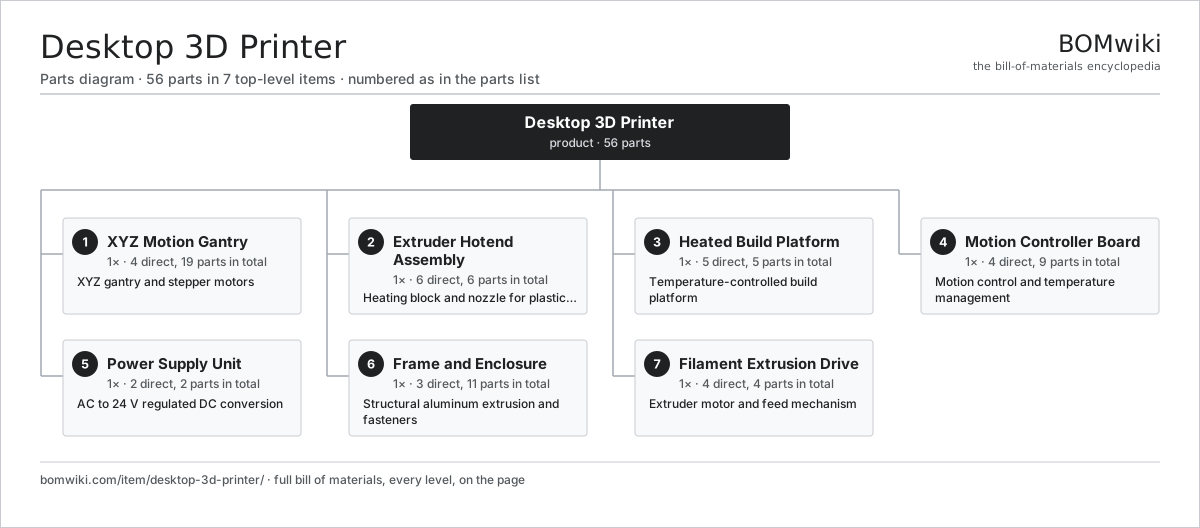
| # | Part | Qty | What it does |
|---|---|---|---|
| 1 | XYZ Motion Gantry 4 parts | 1× | XYZ gantry and stepper motors |
| 2 | Extruder Hotend Assembly 6 parts | 1× | Heating block and nozzle for plastic extrusion |
| 3 | Heated Build Platform 5 parts | 1× | Temperature-controlled build platform |
| 4 | Motion Controller Board 4 parts | 1× | Motion control and temperature management |
| 5 | Power Supply Unit 2 parts | 1× | AC to 24 V regulated DC conversion |
| 6 | Frame and Enclosure 3 parts | 1× | Structural aluminum extrusion and fasteners |
| 7 | Filament Extrusion Drive 4 parts | 1× | Extruder motor and feed mechanism |
3D model
No 3D model yet. Have a CAD file of this? Add a 3D model. STL renders right on this page; STEP, FreeCAD, and OpenSCAD sources are welcome too (openly licensed, like all 3D models on BOMwiki).
Build & assembly graph
expand / collapse · shared sub-assemblies converge · links to related products · est. labourTap an assembly to expand/collapse · tap a part to open it · use “Open page” for any node · drag to pan, scroll to zoom.
Bill of materials for Desktop 3D Printer
7 top-level lines · 48 rows shown · 56 parts total · indented to 3 levels| # | Item / sub-assembly | Part no. | Qty/assy | Ext. qty | Parts | Type |
|---|---|---|---|---|---|---|
| 1 | XYZ Motion Gantry 4 parts | desktop-3d-printer-motion-system | 1× | 1 | 19 | assembly |
| 1.1 | X-Axis Carriage 5 parts | desktop-3d-printer-x-axis | 1× | 1 | 6 | assembly |
| 1.1.1 | X-Axis Linear Rail | desktop-3d-printer-x-rail | 1× | 1 | · | part |
| 1.1.2 | X-Axis Carriage Block | desktop-3d-printer-x-carriage | 1× | 1 | · | part |
| 1.1.3 | X-Axis Stepper Motor | desktop-3d-printer-x-motor | 1× | 1 | · | part |
| 1.1.4 | Drive Belt | drive-belt | 1× | 1 | · | part |
| 1.1.5 | Drive Pulley | desktop-3d-printer-x-pulley | 2× | 2 | · | part |
| 1.2 | Y-Axis Table 4 parts | desktop-3d-printer-y-axis | 1× | 1 | 5 | assembly |
| 1.2.1 | Y-Axis Linear Rail | desktop-3d-printer-y-rail | 2× | 2 | · | part |
| 1.2.2 | Y-Axis Baseplate | desktop-3d-printer-y-carriage | 1× | 1 | · | part |
| 1.2.3 | Y-Axis Stepper Motor | desktop-3d-printer-y-motor | 1× | 1 | · | part |
| 1.2.4 | Ball Screw | ball-screw | 1× | 1 | · | part |
| 1.3 | Z-Axis Vertical Lift 4 parts | desktop-3d-printer-z-axis | 1× | 1 | 5 | assembly |
| 1.3.1 | Z-Axis Linear Rail | desktop-3d-printer-z-rail | 2× | 2 | · | part |
| 1.3.2 | Z-Axis Stepper Motor | desktop-3d-printer-z-motor | 1× | 1 | · | part |
| 1.3.3 | Ball Screw | ball-screw | 1× | 1 | · | part |
| 1.3.4 | Z-Axis Flexible Coupling | desktop-3d-printer-z-coupling | 1× | 1 | · | part |
| 1.4 | Motor Coupler | desktop-3d-printer-motor-coupler | 3× | 3 | · | part |
| 2 | Extruder Hotend Assembly 6 parts | desktop-3d-printer-extruder-hotend | 1× | 1 | 6 | assembly |
| 2.1 | Hotend Heater Block | desktop-3d-printer-hotend-block | 1× | 1 | · | part |
| 2.2 | Extrusion Nozzle | desktop-3d-printer-nozzle | 1× | 1 | · | part |
| 2.3 | Heating Element | desktop-3d-printer-heating-element | 1× | 1 | · | part |
| 2.4 | Temperature Sensor | desktop-3d-printer-thermistor | 1× | 1 | · | part |
| 2.5 | Hotend Heatsink | desktop-3d-printer-heatsink | 1× | 1 | · | part |
| 2.6 | PTFE Feed Tube | desktop-3d-printer-ptfe-tube | 1× | 1 | · | part |
| 3 | Heated Build Platform 5 parts | desktop-3d-printer-heated-bed | 1× | 1 | 5 | assembly |
| 3.1 | Bed Baseplate | desktop-3d-printer-bed-plate | 1× | 1 | · | part |
| 3.2 | Bed Heating Mat | desktop-3d-printer-bed-heating-element | 1× | 1 | · | part |
| 3.3 | Bed Temperature Sensor | desktop-3d-printer-bed-thermistor | 1× | 1 | · | part |
| 3.4 | Sheet Metal Panel | sheet-panel | 1× | 1 | · | part |
| 3.5 | Fastener Set | fastener-set | 1× | 1 | · | part |
| 4 | Motion Controller Board 4 parts | desktop-3d-printer-controller-board | 1× | 1 | 9 | assembly |
| 4.1 | Microcontroller | mcu | 1× | 1 | · | part |
| 4.2 | Stepper Motor Driver Module | desktop-3d-printer-stepper-driver | 3× | 3 | · | part |
| 4.3 | Heater Power MOSFET | desktop-3d-printer-mosfet | 2× | 2 | · | part |
| 4.4 | Connector | connector | 3× | 3 | · | part |
| 5 | Power Supply Unit 2 parts | desktop-3d-printer-power-supply | 1× | 1 | 2 | assembly |
| 5.1 | Power Supply | power-supply | 1× | 1 | · | part |
| 5.2 | Connector | connector | 1× | 1 | · | part |
| 6 | Frame and Enclosure 3 parts | desktop-3d-printer-frame | 1× | 1 | 11 | assembly |
| 6.1 | Aluminum Frame Extrusion | desktop-3d-printer-frame-extrusion | 8× | 8 | · | part |
| 6.2 | Fastener Set | fastener-set | 2× | 2 | · | part |
| 6.3 | Enclosure Side Panel | desktop-3d-printer-side-panel | 1× | 1 | · | part |
| 7 | Filament Extrusion Drive 4 parts | desktop-3d-printer-filament-drive | 1× | 1 | 4 | assembly |
| 7.1 | Extruder Motor | desktop-3d-printer-extruder-motor | 1× | 1 | · | part |
| 7.2 | Filament Drive Gear | desktop-3d-printer-filament-gear | 1× | 1 | · | part |
| 7.3 | Idler Pressure Bearing | desktop-3d-printer-idler-bearing | 1× | 1 | · | part |
| 7.4 | Idler Spring | desktop-3d-printer-extruder-spring | 1× | 1 | · | part |
Something wrong in this list? Report a problem with this BOM.
Related products
same domain, ranked by shared parts Thickness Planer
79 parts · shares 2 with this page
Demolition Hammer
51 parts · shares 1 with this page
Thickness Planer
79 parts · shares 2 with this page
Demolition Hammer
51 parts · shares 1 with this page
 MIG Welder
77 parts · shares 1 with this page
Desktop Laser Engraver
43 parts · shares 2 with this page
MIG Welder
77 parts · shares 1 with this page
Desktop Laser Engraver
43 parts · shares 2 with this page
 Desktop CNC Mill
52 parts · shares 1 with this page
Desktop Vacuum Former
37 parts · shares 1 with this page
Desktop CNC Mill
52 parts · shares 1 with this page
Desktop Vacuum Former
37 parts · shares 1 with this page
Sourcing: possible vendors
Browse the supplier directory → Prices, MOQ, and lead times are algorithmic estimates, not quotes, and not claims about these companies. Company mappings are curated by keyword; est. price band $30–$800. How estimates work| Vendor | HQ | Specialty | MOQ | Lead time |
|---|---|---|---|---|
| stanleyblackanddecker.com ↗ | New Britain, US | Tools (DeWalt, Craftsman) | 500 units | 6–12 wks |
| bosch-professional.com ↗ | Leinfelden, DE | Power tools | 500 units | 6–12 wks |
| ttigroup.com ↗ | Hong Kong, CN | Tools (Milwaukee, Ryobi) | 500 units | 6–12 wks |
|
🇯🇵Makita
makita.com ↗
|
Anjo, JP | Power tools | 500 units | 6–12 wks |
|
🇨🇭Hilti
hilti.com ↗
|
Schaan, CH | Construction tools | 500 units | 6–12 wks |
1,490-word article