Photo Print Kiosk
ProductOverview
A photo print kiosk is a self-service station that prints digital photos from cameras, phones, and storage devices. The customer inserts a memory card (SD, microSD, USB) into the card reader slots, browses their photos on the large touchscreen, edits the image (crop, rotate, color correction), selects a print size (4×6, 5×7, 8×10), pays via card or coin, and receives a finished color print in seconds. Originally popularized by Kodak, Fujifilm, and Shutterfly in the early 2000s, photo kiosks have declined with smartphone photography and cloud printing, but they remain profitable in high-traffic locations (airports, malls, tourist destinations) where impulse prints are still purchased.
The core appeal is instant gratification and tangibility. A tourist visiting a national park can print their favorite landscape photo on the spot and take it home. A parent can print a 4×6 snapshot of their child at the mall kiosk while the child waits in the stroller. The experience is fast (2–3 minutes from card insert to finished print) and the quality is superior to home inkjet printers.
How it works
A customer approaches the kiosk enclosure and sees the large HD touchscreen at eye level. Below the screen are multiple card reader slots, visibly labeled "Insert Camera Memory Card" or "Connect USB Drive". The customer removes their SD card (or inserts a USB stick) from their camera or phone.
The card is inserted into the SD card slot or USB port. The Central Control Microcontroller, an ARM microcontroller, detects the insertion (via mechanical switch confirmation) and immediately enumerates the storage device via USB protocol. The kiosk software reads the device's file system and searches for image files (JPEG, RAW, TIFF, PNG).
A photo gallery appears on the touchscreen, showing thumbnail previews of all detected images. The customer scrolls through and taps their favorite photo. The touchscreen now shows the full-resolution image with editing tools:
- Crop: Drag and pinch to frame the photo, with aspect ratio guides (4×6, 5×7)
- Rotate: Rotate 90° in either direction
- Color: Adjust brightness, contrast, saturation
- Mirror: Flip horizontally for selfies
- Zoom: Pan and zoom to inspect details
The editing tools are rendered on the GPU (via the image accelerator chip) for smooth, real-time response. All edits are non-destructive (the original file on the card is not modified).
Once the customer is satisfied with the edit, they tap "Print Size" and choose from available options:
- 4×6 inches (standard snapshot)
- 5×7 inches (classic greeting card)
- 8×10 inches (frame-ready print)
The kiosk calculates the price (typically USD 0.99–1.99 per 4×6, USD 2.99 per 5×7, USD 4.99 per 8×10). The customer can adjust quantity (e.g., "2 copies of this photo in 4×6").
The customer then proceeds to payment via the Payment & Print Triggering. They can swipe or tap a credit/debit card on the card reader, or insert coins/tokens into the coin slot. The payment gateway processes the transaction in real time.
Once payment is approved, the touchscreen displays "Printing..." and the printer module springs to life. The stepper motor advances a fresh sheet of thermal-coated photo paper into position under the print head. The head heats to 150–180°C and the CMYK dye-sublimation ribbon transfers dye onto the paper in a series of color passes (Cyan, Magenta, Yellow, then black/overlay if used). The entire print takes ~60 seconds.
Once the print exits the printer head, the motorized cutter trims the print from the roll to the exact requested size (4×6, 5×7, or 8×10 inches). The stepper motor positions the guillotine blade perpendicular to the paper, and the blade drops to cut. The print slides down a chute onto the heated output tray.
The tray heater (set to 60–80°C) dries the print rapidly (dye-sub inks set almost instantly, but the heat accelerates drying). After 20–30 seconds, the print is cool and ready to handle. The customer receives a notification ("Your print is ready!") on the touchscreen and retrieves the finished print from the output tray.
Total transaction time: ~2–3 minutes from card insertion to finished print in hand.
Dye-Sublimation Printing
The printer module uses dye-sublimation (sometimes called thermal transfer), a process that produces color-accurate, water-resistant photos. Dye-sublimation is superior to inkjet for this application because:
- Color accuracy: CMYK dyes are pre-mixed in precise ratios on the ribbon, guaranteeing consistent color
- Speed: Full-color print in one pass (thermal inkjet requires multiple passes and drying)
- Durability: Dye is chemically bound to the paper; photos resist fading for 50+ years
- Water resistance: Thermal paper is inherently water-resistant (unlike inkjet, which smudges if wet)
The heating element (500–800 W) maintains the platen at 150–180°C. The CMYK ribbon is drawn across the print head as the paper advances. Heat from the print head causes dyes on the ribbon to vaporize and bond to the paper. The process repeats for each color layer.
A single 500-print roll of dye ribbon costs ~USD 25–40, and a roll of thermal paper costs ~USD 15–25. Cost of goods per 4×6 print is thus ~USD 0.10–0.15, yielding a gross margin of 85–90% at USD 0.99 retail price.
Alternative: Inkjet Option
Some kiosks use color inkjet printers (especially if supporting 8×10 or larger prints). Inkjet advantages: cheaper printer, supports larger paper sizes. Disadvantages: slower (requires drying time), less durable (inks can fade or smudge), requires cartridge changes more frequently. Most high-end kiosks prefer dye-sublimation for photographic output.
Cloud Integration and Remote Management
The Ethernet or WiFi module enables cloud features:
- Cloud photos: A customer can log into the kiosk with their Dropbox, Google Photos, or Amazon Photos account and print photos directly from cloud storage (no card insertion needed)
- Mobile photo upload: Via a QR code on the touchscreen, a customer can email or upload photos to the kiosk before arriving
- Remote management: Operators monitor all kiosks via a web dashboard, seeing real-time transaction history, paper/ribbon levels, and mechanical issues
- Software updates: Firmware and editing tools can be pushed to kiosks remotely
Restocking and Maintenance
The paper and ribbon supplies are user-replaceable (operator or technician) via a access panel on the enclosure. Typical consumption:
- Dye ribbon: One 500-print roll lasts ~1–2 weeks at a busy location (100+ transactions/day)
- Thermal paper: One 500-sheet roll (in 4×6 format) lasts ~3–5 days
Operators check kiosk inventory dashboards daily and restock as needed. A regional operator managing 20–50 kiosks might perform restocking runs 2–3 times per week.
The display and print head are the longest-lived components (5–8 years typical life). The display will eventually develop dead pixels; the print head may clog if the kiosk sits unused for weeks (requiring cleaning with solvent). Maintenance is minimal otherwise.
Market and Revenue
Photo print kiosks are found in:
- Shopping malls (food courts, photo departments)
- Airport terminals (souvenir prints)
- Tourist attractions (national parks, theme parks)
- Pharmacies (CVS, Walgreens photo counters)
- Hotel lobbies and resorts
Revenue model: A typical kiosk in a mall food court or tourist area generates 50–100 transactions per day, or USD 50–150 daily revenue (at average USD 1.50 per transaction). Monthly gross revenue is ~USD 1,500–4,500. Cost of goods (paper + ribbon) is ~15%, so net profit is USD 1,275–3,825/month per kiosk. Payback period is 6–12 months; machines often operate for 5+ years.
High-volume locations (airports, major tourist attractions) can see 200+ transactions/day (USD 300+/day revenue), earning USD 9,000+/month per kiosk.
Some locations install 2–3 kiosks side-by-side to reduce wait times during peak hours (holidays, summer vacation).
Market Decline and Niche Survival
Photo print kiosks peaked in the early 2000s when digital cameras were new and cloud storage did not exist. Smartphone adoption (2007 onwards) shifted photo-taking from dedicated cameras to phones, and many consumers stopped printing photos entirely. Additionally, cloud printing (uploading photos to Shutterfly, Amazon Photos, or a drugstore app and picking up prints at checkout) became an alternative.
However, kiosks persist in high-traffic impulse-purchase locations where tourists or families want an instant tangible print souvenir. Theme parks, national parks, and cruise ships still operate kiosks and see healthy revenue. Niche applications also sustain the market: instant photo booths at events (weddings, parties) use kiosk-style hardware, and some kiosks have been repurposed as event photo vending (e.g., instant prints from a live photographer at a concert).
See also
- Dye-Sublimation Photo Printer Module for dye-sublimation printing specifics
- Photo Editing & Control Display for photo editing and user interface
- Central Control Microcontroller for image processing and cloud integration
Photo Print Kiosk parts and their functions
8 top-level parts · 46 parts in total · full bill of materials below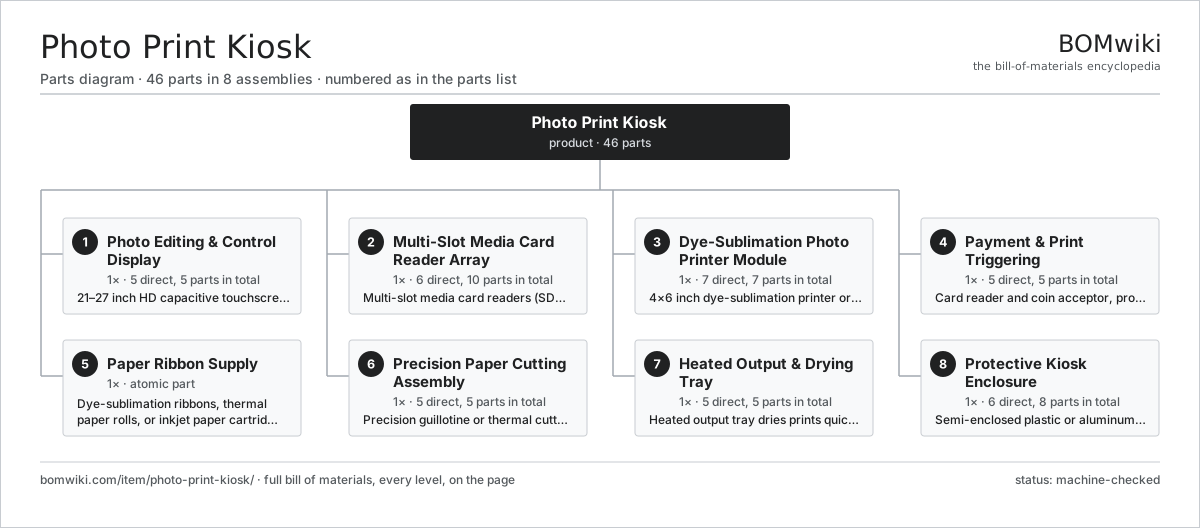
| # | Part | Qty | What it does |
|---|---|---|---|
| 1 | Photo Editing & Control Display 5 parts | 1× | 21–27 inch HD capacitive touchscreen with integrated printer control UI |
| 2 | Multi-Slot Media Card Reader Array 6 parts | 1× | Multi-slot media card readers (SD, SDHC, microSD, CompactFlash) accept photos from digital cameras |
| 3 | Dye-Sublimation Photo Printer Module 7 parts | 1× | 4×6 inch dye-sublimation printer or inkjet, 300 DPI resolution, 90 second print cycle |
| 4 | Payment & Print Triggering 5 parts | 1× | Card reader and coin acceptor, processes payment and triggers print job |
| 5 | Paper Ribbon Supply | 1× | Dye-sublimation ribbons, thermal paper rolls, or inkjet paper cartridges, user-replaceable |
| 6 | Precision Paper Cutting Assembly 5 parts | 1× | Precision guillotine or thermal cutter trims prints to standard sizes (4×6, 5×7, 8×10) |
| 7 | Heated Output & Drying Tray 5 parts | 1× | Heated output tray dries prints quickly, organizes multiple prints for pickup |
| 8 | Protective Kiosk Enclosure 6 parts | 1× | Semi-enclosed plastic or aluminum cabinet with ventilation for printer heat exhaust |
3D model
No 3D model yet. Have a CAD file of this? Add a 3D model — STL renders right on this page; STEP, FreeCAD, and OpenSCAD sources are welcome too (openly licensed, like all 3D models on BOMwiki).
Build & assembly graph
expand / collapse · shared sub-assemblies converge · links to related products · est. labourTap an assembly to expand/collapse · tap a part to open it · use “Open page” for any node · drag to pan, scroll to zoom.
Bill of materials for Photo Print Kiosk
8 top-level lines · 47 rows shown · 46 parts total · indented to 3 levels| # | Item / sub-assembly | Part no. | Qty/assy | Ext. qty | Parts | Type |
|---|---|---|---|---|---|---|
| 1 | Photo Editing & Control Display 5 parts | photo-print-kiosk-touchscreen-display | 1× | 1 | 5 | assembly |
| 1.1 | HD Touchscreen LCD Panel | photo-print-kiosk-lcd-panel | 1× | 1 | · | part |
| 1.2 | Lcd Controller | photo-print-kiosk-lcd-controller | 1× | 1 | · | part |
| 1.3 | Lcd Housing | photo-print-kiosk-lcd-housing | 1× | 1 | · | part |
| 1.4 | Display Speakers | photo-print-kiosk-display-speakers | 1× | 1 | · | part |
| 1.5 | Usb Hub | photo-print-kiosk-usb-hub | 1× | 1 | · | part |
| 2 | Multi-Slot Media Card Reader Array 6 parts | photo-print-kiosk-card-readers | 1× | 1 | 10 | assembly |
| 2.1 | SD/SDHC Card Reader Module | photo-print-kiosk-sd-card-reader | 1× | 1 | · | part |
| 2.2 | Micro Sd Reader | photo-print-kiosk-micro-sd-reader | 1× | 1 | · | part |
| 2.3 | USB 3.0 Data Port | photo-print-kiosk-usb-port | 1× | 1 | · | part |
| 2.4 | Card Reader Controller | photo-print-kiosk-card-reader-controller | 1× | 1 | · | part |
| 2.5 | Card Detection Sensor | photo-print-kiosk-card-detection-sensor | 4× | 4 | · | part |
| 2.6 | Connector | connector | 2× | 2 | · | part |
| 3 | Dye-Sublimation Photo Printer Module 7 parts | photo-print-kiosk-dye-sub-printer | 1× | 1 | 7 | assembly |
| 3.1 | Thermal Print Head | photo-print-kiosk-printer-head | 1× | 1 | · | part |
| 3.2 | CMYK Dye-Sublimation Ribbon | photo-print-kiosk-dye-ribbon | 1× | 1 | · | part |
| 3.3 | Thermal Coated Photo Paper | photo-print-kiosk-thermal-paper | 1× | 1 | · | part |
| 3.4 | Heat-Resistant Platen Roller | photo-print-kiosk-platen-roller | 1× | 1 | · | part |
| 3.5 | Dye-Sub Heater Element | photo-print-kiosk-heating-element | 1× | 1 | · | part |
| 3.6 | Paper Feed Stepper Motor | photo-print-kiosk-motor-feed | 1× | 1 | · | part |
| 3.7 | Printer Control Board | photo-print-kiosk-printer-controller | 1× | 1 | · | part |
| 4 | Payment & Print Triggering 5 parts | photo-print-kiosk-payment-module | 1× | 1 | 5 | assembly |
| 4.1 | EMV & Contactless Card Reader | photo-print-kiosk-card-reader-payment | 1× | 1 | · | part |
| 4.2 | Multi-Coin Validator | photo-print-kiosk-coin-acceptor | 1× | 1 | · | part |
| 4.3 | Payment Processor | photo-print-kiosk-payment-processor | 1× | 1 | · | part |
| 4.4 | Pin Pad | photo-print-kiosk-pin-pad | 1× | 1 | · | part |
| 4.5 | 58mm Thermal Receipt Printer | photo-print-kiosk-receipt-printer | 1× | 1 | · | part |
| 5 | Paper Ribbon Supply | photo-print-kiosk-paper-ribbon-supply | 1× | 1 | · | part |
| 6 | Precision Paper Cutting Assembly 5 parts | photo-print-kiosk-paper-cutter | 1× | 1 | 5 | assembly |
| 6.1 | Precision Guillotine Cutter Blade | photo-print-kiosk-cutter-blade | 1× | 1 | · | part |
| 6.2 | Cutter Drive Motor | photo-print-kiosk-cutter-motor | 1× | 1 | · | part |
| 6.3 | Cutter Guide | photo-print-kiosk-cutter-guide | 1× | 1 | · | part |
| 6.4 | Cutter Sensor | photo-print-kiosk-cutter-sensor | 1× | 1 | · | part |
| 6.5 | Debris Chute | photo-print-kiosk-debris-chute | 1× | 1 | · | part |
| 7 | Heated Output & Drying Tray 5 parts | photo-print-kiosk-output-tray | 1× | 1 | 5 | assembly |
| 7.1 | Output Tray Platform | photo-print-kiosk-output-tray-platform | 1× | 1 | · | part |
| 7.2 | Output Tray Heating Element | photo-print-kiosk-output-heater | 1× | 1 | · | part |
| 7.3 | Output Thermostat | photo-print-kiosk-output-thermostat | 1× | 1 | · | part |
| 7.4 | Output Dividers | photo-print-kiosk-output-dividers | 1× | 1 | · | part |
| 7.5 | Tray Sensor | photo-print-kiosk-tray-sensor | 1× | 1 | · | part |
| 8 | Protective Kiosk Enclosure 6 parts | photo-print-kiosk-enclosure | 1× | 1 | 8 | assembly |
| 8.1 | Enclosure Frame | photo-print-kiosk-enclosure-frame | 1× | 1 | · | part |
| 8.2 | Enclosure Panels | photo-print-kiosk-enclosure-panels | 3× | 3 | · | part |
| 8.3 | Enclosure Roof | photo-print-kiosk-enclosure-roof | 1× | 1 | · | part |
| 8.4 | Enclosure Front Fascia | photo-print-kiosk-enclosure-front-fascia | 1× | 1 | · | part |
| 8.5 | Enclosure Exhaust Fan | photo-print-kiosk-exhaust-fan | 1× | 1 | · | part |
| 8.6 | Fastener Set | fastener-set | 1× | 1 | · | part |
Sourcing: possible vendors
Prices, MOQ, and lead times are algorithmic estimates, not quotes, and not claims about these companies. Company mappings are curated by keyword; est. price band $1k–$30k. How estimates work| Vendor | HQ | Specialty | MOQ | Lead time |
|---|---|---|---|---|
| cranems.com ↗ | Williston, US | Vending machines | 50 units | 10–16 wks |
|
🇪🇸Azkoyen
azkoyen.com ↗
|
Peralta, ES | Vending & payment | 50 units | 10–16 wks |
| fujielectric.com ↗ | Tokyo, JP | Vending & power electronics | 50 units | 10–16 wks |
| sanden-rs.com ↗ | Isesaki, JP | Vending & retail systems | 50 units | 10–16 wks |
| tcnvend.com ↗ | Changsha, CN | Vending machines | 50 units | 10–16 wks |
1,652-word article