Comb Binding Machine Product
Overview
A comb-binding machine turns a loose stack of sheets into a bound document by punching a row of rectangular holes along one edge and threading the pages onto an opened plastic comb. The comb's curved tines spring closed once released, holding the pages while still letting the book lie flat and open a full 360 degrees. This desktop model is electric on the punch and manual on the bind: a motor drives the die so an operator can punch thick stacks without effort, while the comb is opened and loaded by hand.
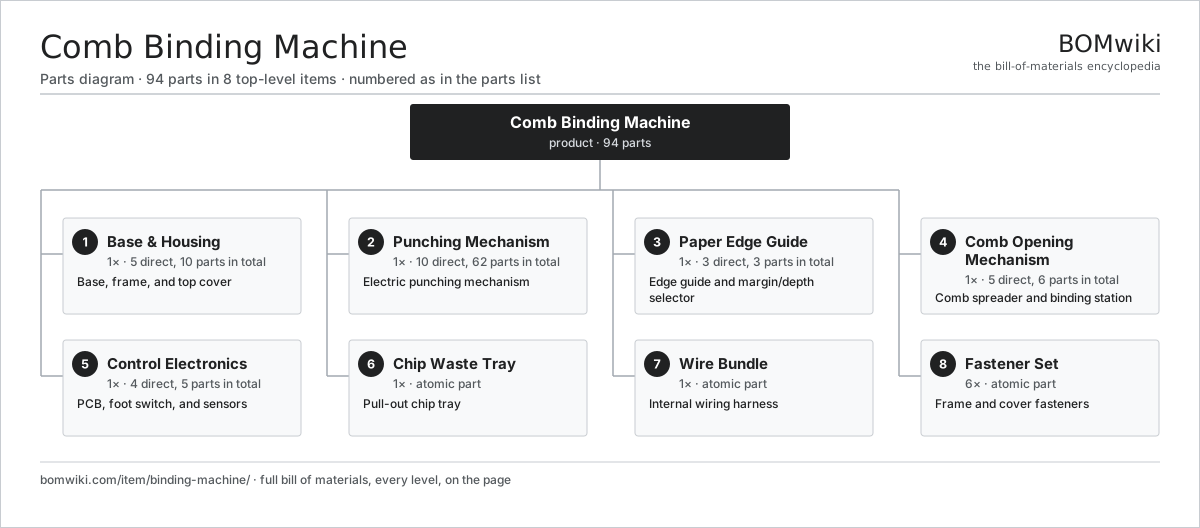
The machine is built around a rigid base that resists the high punching forces. The Base & Housing carries a stamped-steel frame and a moulded top cover with the punch slot and comb bay. The Punching Mechanism holds the die set, motor, and crank that drives the punch pins down through the paper. A Paper Edge Guide sets the edge alignment and margin depth so holes land consistently. The Comb Opening Mechanism is a toothed comb that fans the comb rings open for loading, and the Control Electronics board with its foot switch sequences each punch cycle and watches the safety interlocks. Punched chips drop into the Chip Waste Tray.
How it works
Pages are squared against the Paper Edge Guide and inserted into the throat until they bottom out. Pressing the foot switch signals the Control Electronics board, which runs the motor through a crank-and-link mechanism. The crank converts rotation into a single vertical stroke of the die bar in the Punching Mechanism, driving 21 hardened pins through the stack and into the die plate to cut clean rectangular holes. The slugs fall into the Chip Waste Tray below.
The comb is then hung on the metal teeth of the Comb Opening Mechanism and a lever rotates those teeth forward, spreading the comb's rings apart. The punched pages are slid onto the exposed rings; releasing the lever lets the comb relax closed through the holes. Disengageable end dies let the operator skip outer pins so the hole pattern centres correctly on shorter paper sizes.', },
'document-scanner': { specs: [ ['Type', 'Duplex sheet-fed ADF document scanner'], ['Sensor', 'Dual CIS (contact image sensor)'], ['Optical resolution', '600 × 600 dpi'], ['Output resolution', 'Up to 1,200 dpi (interpolated)'], ['Scan speed', '40 ppm / 80 ipm (200 dpi, A4 colour)'], ['Duplex', 'Single-pass two-side capture'], ['ADF capacity', '60 sheets (80 gsm)'], ['Daily duty cycle', '5,000 sheets'], ['Media size', 'A8 to A4 / Legal, long-page to 3 m'], ['Media weight', '27–413 gsm (incl. card / ID)'], ['Colour depth', '24-bit colour / 8-bit greyscale'], ['Interface', 'USB 3.2 Gen 1 + Gigabit Ethernet'], ['Ultrasonic detect', 'Double-feed detection sensor'], ['Power', 'External 24 V DC adapter'], ], body: '## Overview
A document scanner converts paper into digital images by drawing each sheet past an imaging sensor under controlled illumination. This is a sheet-fed automatic-document-feeder (ADF) design built for batch capture: a stack of pages is loaded once and the machine separates, feeds, images, and stacks them without intervention. A single-pass duplex layout puts a sensor on each side of the paper path so both faces are captured in one transit, roughly doubling throughput over a flip-and-rescan design.
The unit is organised around a short, straight paper path. The Housing & Trays provides the hinged top cover, base chassis, and the input and output trays. The Paper Feed & Transport holds the pickup and separation rollers, transport rollers, drive motor, and the sensors that time each sheet. The Imaging Module module carries the two CIS bars, their LED illumination, and the glass windows the paper slides across. Everything is coordinated by the Main Board, which runs the scanner SoC and the USB and LAN interfaces, with the operator working through the Control Panel.
How it works
When a batch is loaded into the ADF tray, the Paper Feed & Transport pickup roller drives the top sheet forward while a retard roller holds the rest back, separating one page at a time. An ultrasonic sensor listens for the change in sound through two overlapped sheets to flag double feeds before they jam.
As each sheet crosses the Imaging Module glass, the two contact image sensors illuminate it line by line with red, green, and blue LEDs. The CIS rod-lens array focuses each scan line one-to-one onto a row of photodiodes, building the image one row at a time as the paper moves at constant speed. The Main Board digitises both sensor streams, corrects for illumination and skew, deskews and crops the page, and streams compressed images out over USB or Ethernet. The Power Supply subsystem supplies the motor and electronics, and the Control Panel selects scan jobs and reports feed status.', },
'franking-machine': { specs: [ ['Type', 'Desktop digital franking (postage) machine'], ['Print technology', 'Thermal inkjet indicia'], ['Print resolution', '300 dpi'], ['Throughput', 'Up to 65 letters/min'], ['Feed', 'Semi-automatic envelope feed + transport'], ['Sealing', 'Integrated flap moistener and sealer'], ['Max envelope thickness', '8 mm (deck), 16 mm (slot feed)'], ['Integrated scale', '0–5 kg weigh platform, 1 g resolution'], ['Security module', 'PSD postal security device (cryptographic)'], ['Rate updates', 'Downloaded over LAN'], ['Connectivity', 'Ethernet 10/100 + USB'], ['Display', 'Colour touchscreen + keypad'], ['Ink', 'Dual fluorescent-red postal cartridge'], ['Power', '100–240 V universal supply'], ], body: '## Overview
A franking machine prints prepaid postage directly onto envelopes, replacing stamps with a printed indicia that encodes the value, date, and a cryptographic mark proving the postage was paid. It is a metered device: funds are loaded from a postal account into a secured module inside the machine, and each frank debits that balance. The combination of weighing, rating, sealing, and printing in one pass lets a mailroom process outgoing post far faster than hand-stamping.
The machine is a small transport deck topped by covers. The Housing & Chassis is the sheet-metal chassis and moulded top cover. The Feed & Transport Deck deck pulls envelopes in and drives them under the printhead, while the Moistener & Sealer wets and closes the flap on the way through. The Print Head Assembly lays down the indicia, and the Integrated Weigh Platform scale sets the correct rate. Everything is run by the secure Main Controller Board, operated through the Touchscreen UI Panel, and franked mail collects in the Output Stacker Tray.
How it works
An envelope placed on the feed deck is detected and pulled in by the rollers of the Feed & Transport Deck against a separator that admits one piece at a time. If sealing is enabled, the flap passes the Moistener & Sealer, where a wick or roller wets the gummed edge and a pressure roller closes it.
Meanwhile the operator weighs the piece on the Integrated Weigh Platform and the Main Controller Board looks up the postal rate from its downloaded rate tables. The board's postal security device authorises the value and decrements the stored funds; this tamper-resistant module is what postal authorities certify. As the envelope passes the Print Head Assembly, a thermal-inkjet array fires the fluorescent-red indicia — value, date, meter number, and a 2D barcode — at 300 dpi. The franked envelope drops into the Output Stacker Tray, and the Power Supply feeds the deck, heaters, and electronics throughout.', },
'label-maker': { specs: [ ['Type', 'Handheld thermal-transfer label printer'], ['Print technology', 'Direct thermal printhead'], ['Print resolution', '180 dpi'], ['Print speed', '20 mm/s'], ['Tape widths', '3.5, 6, 9, 12 mm'], ['Tape type', 'Laminated adhesive label cassette'], ['Max print height', '9 mm (12 mm tape)'], ['Cutter', 'Manual guillotine'], ['Display', 'Monochrome character LCD, backlit'], ['Keyboard', 'QWERTY rubber keypad, dome switches'], ['Memory', 'Stores ~30 labels'], ['Battery', 'Li-ion rechargeable, USB-C charge'], ['Connectivity', 'USB-C data (PC label software)'], ['Weight', '400 g with battery'], ], body: '## Overview
A handheld label maker prints short adhesive labels on demand from a self-contained, battery-powered unit. The operator types text on a built-in keyboard, sees it on a small screen, and the machine prints it onto a strip of laminated tape that is peeled and stuck down. It uses direct-thermal printing onto a cassette of heat-sensitive, pre-adhesive tape, which keeps the device simple: there is no separate ink, only a heated printhead and a roll of tape.
The body is a moulded clamshell that fits in one hand. The Housing & Covers forms the front and back shells and the battery door. The Print Mechanism holds the thermal printhead, the rubber platen roller, and the stepper that advances the tape. Tape lives in the Tape Cassette Bay, which locates the cartridge and guides the strip past the head. A Cutter Module guillotine trims each finished label, the Keypad Assembly and LCD Panel handle input and preview, and the Main Board ties it together, powered by the Battery Pack.
How it works
Keystrokes from the Keypad Assembly are read by the Main Board, which composes the label as a bitmap and shows it on the LCD Panel. On print, the board drives the stepper in the Print Mechanism to pull tape from the cassette while the platen presses the tape against the printhead.
The thermal printhead is a row of tiny resistive elements; the controller pulses individual elements hot as the tape moves under them, darkening the heat-sensitive layer dot by dot to form characters and graphics at 180 dpi. Because the print is built one vertical column at a time, label length is limited only by tape, not by any page size. Once printing finishes, the operator squeezes the Cutter Module lever to shear the tape, and the laminated label is peeled from its backing. The USB Port recharges the Battery Pack and lets PC software push longer or b-coded labels to the device.', },
'laminator': {
specs: [
['Type', 'Desktop pouch laminator (hot/cold)'],
['Rollers', '4-roller heated system'],
['Max pouch width', '330 mm (A3)'],
['Pouch thickness', '75–250 micron (per side)'],
['Warm-up time', '3–4 min'],
['Lamination speed', '500 mm/min'],
['Heating', 'Cartridge heaters in roller cores'],
['Temperature range', '100–150 °C'],
['Reverse / release', 'Jam-release lever, reverse drive'],
['Cold setting', 'Heaters off for self-adhesive pouches'],
['Carrier-free', 'No carrier needed'],
['Auto shut-off', 'Idle standby after 30 min'],
['Power', '230 V, ~400 W'],
['Weight', '3.6 kg'],
],
body: '## Overview
A pouch laminator seals a document between two sheets of plastic film to protect it and give it a rigid, wipe-clean finish. The document is placed inside a folded pouch coated on the inside with heat-activated adhesive; the machine pulls the pouch between heated rollers that melt the adhesive and press the layers permanently together. The result is a sealed, water-resistant card or sheet. A four-roller arrangement spreads the heat and pressure over a longer contact zone, which reduces wrinkling and trapped bubbles compared with two-roller machines.
The machine is a low, slot-fronted box. The Housing & Shell is the outer shell and inner sheet-metal frame holding everything in alignment. The two Heated Roller Assembly units carry the silicone rollers and their internal heaters. The Roller Drive train turns the rollers in unison, fed by the Feed Tray & Guide and caught by the Exit Tray. The Control Board regulates temperature and speed, and the Power Input brings in mains power.
How it works
At power-up the Control Board energises the cartridge heaters inside the Heated Roller Assembly rollers and waits for a thermistor to report that the silicone surfaces have reached the set temperature, signalling ready. A pouch holding the document is pushed sealed-edge-first into the Feed Tray & Guide so the rollers grip it squarely.
The Roller Drive motor and gears rotate the rollers, drawing the pouch through the nip. The first roller pair applies heat, melting the adhesive layer; the second pair applies cooling pressure that bonds the film and squeezes out air, leaving a flat, bubble-free seal. The laminated sheet emerges onto the Exit Tray, still warm, and flattens as it cools. A cold mode keeps the heaters off for pressure-sensitive pouches, and a jam-release lever lifts the roller pressure so a mis-fed pouch can be reversed out without damaging the rollers.', },
'money-counter': { specs: [ ['Type', 'Friction banknote counting machine'], ['Counting speed', '1,000–1,500 notes/min'], ['Hopper capacity', '500 notes'], ['Stacker capacity', '200 notes'], ['Counterfeit detection', 'UV + MG + IR + image (CIS)'], ['Modes', 'Count, batch, add, value (sorting)'], ['Batch presets', '1–200, user settable'], ['Note size range', '50 × 110 to 90 × 190 mm'], ['Denomination', 'Multi-currency value count'], ['Operator display', 'TFT LCD + keypad'], ['Customer display', 'External pole-mount count display'], ['Interface', 'USB / RS-232 for reporting'], ['Power', '100–240 V, ~60 W'], ['Weight', '6 kg'], ], body: '## Overview
A money-counting machine tallies a stack of banknotes quickly and accurately, and on better models also checks each note for authenticity and reads its denomination. Notes are fed from a hopper, separated one at a time, flung past a bank of sensors, and stacked in an output pocket while a counter ticks up. By replacing hand counting it removes both the labour and the miscounts of cash handling in banks, retail, and casinos.
The machine is a compact desktop unit with an angled input on top and a catch pocket on the front. The Housing holds the body, hopper, and stacker shells. The Feed System separates and launches notes, the Note Transport guides them through the sensor zone, and the Detection Array block carries the counterfeit and counting sensors. Counted notes land via the Stacker, with results shown on the operator Operator Display and a Customer Display facing the payer, all fed by the Power Supply.
How it works
A stack is dropped into the hopper and the Feed System roller, working against a friction pad, peels off the bottom note and accelerates it into the path. The Note Transport rollers carry it at constant speed through the Detection Array zone in a few milliseconds.
There, a contact image sensor reads each note's pattern while ultraviolet, magnetic, and infrared sensors check the security features: UV-fluorescent fibres, magnetic ink, and IR-transparent zones that genuine notes carry and most fakes lack. The Main Control Board compares these signals against stored templates to verify the note, identify its denomination, and increment the count. A double-note or chained-note error halts the run. Verified notes are thrown by the Stacker wheel into the front pocket in a neat fan. The running total and any suspect-note flag appear on the Operator Display, while the Customer Display shows the customer the same figure.', },
'paper-shredder': {
specs: [
['Type', 'Cross-cut deskside paper shredder'],
['Security level', 'P-4 (DIN 66399)'],
['Cut size', '4 × 40 mm cross-cut particles'],
['Sheet capacity', '18 sheets (80 gsm) per pass'],
['Throat width', '230 mm (A4)'],
['Shred speed', '2.5 m/min'],
['Run / cool cycle', '20 min on / 30 min off'],
['Also shreds', 'Staples, paper clips, credit cards, CDs'],
['Motor', 'Induction, 340 W'],
['Bin capacity', '30 L pull-out basket'],
['Safety', 'Touch-sensitive throat guard, head-lift cutoff'],
['Auto features', 'Auto start/stop, reverse, jam clear'],
['Noise', '62 dB(A)'],
['Weight', '11 kg'],
],
body: '## Overview
A paper shredder destroys documents by drawing them into a pair of intermeshing cutter shafts that slice the paper into narrow strips or small particles. Security is rated to the DIN 66399 scale; this cross-cut machine reaches P-4, cutting each sheet into roughly 4 by 40 mm confetti that cannot practically be reassembled, making it suitable for confidential office waste. A bin-mounted head design lets the shredded particles drop straight into a removable basket.
The unit is a shredder head seated on a waste bin. The Shredder Head houses the working parts: the Cutting Assembly of twin hardened-steel cutter shafts, the Drive Motor that drives them, and the Reduction Gearbox that reduces the motor's speed into the high torque the cut demands. Paper enters through the Feed Throat with its safety flap, controlled by the Control Board. Particles collect in the Waste Bin below.
How it works
When paper is inserted into the Feed Throat, an optical or capacitive sensor detects it and signals the Control Board to start the Drive Motor. The motor spins fast but with little torque, so the Reduction Gearbox gears it down, multiplying torque to overcome the resistance of cutting many sheets at once.
In the Cutting Assembly, two parallel shafts carry interleaved toothed cutting wheels that rotate toward each other. The teeth grip the sheet and pull it down between the shafts, slicing it into long strips; on this cross-cut design a second set of cutters or stripper fingers chops those strips transversely into short particles. When the paper clears, the sensor drops and the motor stops automatically. If the throat is overloaded the controller detects the motor stalling and reverses the shafts to clear the jam. A guard around the throat and a switch that cuts power when the head is lifted off the bin keep fingers away from the cutters.', },
'photocopier': { specs: [ ['Type', 'A3 colour laser multifunction printer (MFP)'], ['Functions', 'Copy / print / scan / fax'], ['Print technology', 'Electrophotographic (laser xerography)'], ['Print speed', '45 ppm (A4, colour and mono)'], ['First copy out', '~5.5 s (mono)'], ['Resolution', '1,200 × 1,200 dpi'], ['Max media size', 'A3 / SRA3 (320 × 450 mm)'], ['Paper capacity', '2,300 sheets (multi-tray + bypass)'], ['Duplex', 'Automatic two-sided print and scan'], ['ADF', '100-sheet single-pass duplexing feeder'], ['Fuser', 'IH (induction-heated) belt fuser'], ['Finisher', 'Staple / sort / offset stacker'], ['Panel', '10-inch colour touchscreen'], ['Monthly duty', 'Up to 150,000 pages'], ], body: '## Overview
A photocopier — today almost always a colour laser multifunction printer — reproduces documents by scanning an original to a digital image and then printing that image onto paper using electrophotography. The same engine serves as a network printer, a scanner, and a fax, so one floor-standing machine handles a whole office's document work. It works by xerography: a laser writes a charge pattern onto a photosensitive drum, toner sticks to that pattern, and heat fuses the toner permanently into the paper.
The machine is a tall stack of modules on a steel frame. The Chassis & Covers is that frame and its covers. On top, the Scanner Unit and the Auto Document Feeder capture originals. Inside, the Laser Scanner Unit writes the image onto the Imaging Unit's drum, the Fuser Unit bonds the toner, and the Paper Path moves sheets from the trays through the engine. Output is sorted by the Finisher, all coordinated by the Main Controller Board and driven from the Operation Panel.
How it works
To copy, the Auto Document Feeder feeds an original past the Scanner Unit sensor, producing a digital image. The Main Controller Board processes that image and sends it to the print engine. The Laser Scanner Unit modulates a laser across a spinning mirror to sweep lines of light onto the charged drum in the Imaging Unit, discharging the spots that should carry toner.
Toner — charged coloured powder — is attracted to that latent image on the drum, then transferred onto a sheet pulled from the Paper Path. The loose toner is still only resting on the paper until it passes through the Fuser Unit, where heat and pressure melt it into the fibres to form a permanent print. Colour pages repeat the develop-and-transfer step for cyan, magenta, yellow, and black. Finished sheets travel to the Finisher, which stacks, offsets, and staples sets, while the operator manages jobs at the Operation Panel.
Build & assembly graph
expand / collapse · shared sub-assemblies converge · links to related products · est. labourTap an assembly to expand/collapse · tap a part to open it · use “Open page” for any node · drag to pan, scroll to zoom.
Bill of materials
8 top-level lines · 39 rows shown · 94 parts total · indented to 3 levels| # | Item / sub-assembly | Part no. | Qty/assy | Ext. qty | Parts | Type |
|---|---|---|---|---|---|---|
| 1 | Base & Housing 5 parts | binding-machine-housing | 1× | 1 | 10 | assembly |
| 1.1 | Base Frame | binding-machine-base-frame | 1× | 1 | — | part |
| 1.2 | Top Cover | binding-machine-top-cover | 1× | 1 | — | part |
| 1.3 | Carry Grip | binding-machine-handle-grip | 2× | 2 | — | part |
| 1.4 | Anti-Slip Foot | binding-machine-foot | 4× | 4 | — | part |
| 1.5 | Fastener Set | fastener-set | 2× | 2 | — | part |
| 2 | Punching Mechanism 10 parts | binding-machine-punch-assembly | 1× | 1 | 62 | assembly |
| 2.1 | Die Block | binding-machine-die-block | 1× | 1 | — | part |
| 2.2 | Punch Pin | binding-machine-punch-pin | 21× | 21 | — | part |
| 2.3 | Disengageable Pin | binding-machine-pin-disengage | 4× | 4 | — | part |
| 2.4 | Punch Cam | binding-machine-punch-cam | 1× | 1 | — | part |
| 2.5 | Punch Motor 4 parts | binding-machine-punch-motor | 1× | 1 | 25 | assembly |
| 2.5.1 | Stator Assembly 3 parts + deeper › | stator-assembly | 1× | 1 | 3 | assembly |
| 2.5.2 | Rotor Assembly 4 parts + deeper › | rotor-assembly | 1× | 1 | 19 | assembly |
| 2.5.3 | Ball Bearing | ball-bearing | 2× | 2 | — | part |
| 2.5.4 | Reduction Gearbox | binding-machine-gearbox | 1× | 1 | — | part |
| 2.6 | Punch Lever | binding-machine-punch-lever | 1× | 1 | — | part |
| 2.7 | Punch Linkage | binding-machine-punch-linkage | 1× | 1 | — | part |
| 2.8 | Coil Spring | coil-spring | 4× | 4 | — | part |
| 2.9 | Ball Bearing | ball-bearing | 2× | 2 | — | part |
| 2.10 | Fastener Set | fastener-set | 2× | 2 | — | part |
| 3 | Paper Edge Guide 3 parts | binding-machine-paper-guide | 1× | 1 | 3 | assembly |
| 3.1 | Edge Guide | binding-machine-edge-guide | 1× | 1 | — | part |
| 3.2 | Margin Selector | binding-machine-margin-selector | 1× | 1 | — | part |
| 3.3 | Fastener Set | fastener-set | 1× | 1 | — | part |
| 4 | Comb Opening Mechanism 5 parts | binding-machine-comb-opener | 1× | 1 | 6 | assembly |
| 4.1 | Comb Rack | binding-machine-comb-rack | 1× | 1 | — | part |
| 4.2 | Spreader Bar | binding-machine-spreader-bar | 1× | 1 | — | part |
| 4.3 | Opening Lever | binding-machine-opening-lever | 1× | 1 | — | part |
| 4.4 | Coil Spring | coil-spring | 2× | 2 | — | part |
| 4.5 | Fastener Set | fastener-set | 1× | 1 | — | part |
| 5 | Control Electronics 4 parts | binding-machine-control | 1× | 1 | 5 | assembly |
| 5.1 | Bare PCB | pcb-bare | 1× | 1 | — | part |
| 5.2 | Foot Switch | binding-machine-foot-switch | 1× | 1 | — | part |
| 5.3 | Position Sensor | binding-machine-sensor | 2× | 2 | — | part |
| 5.4 | Wire Bundle | wire-bundle | 1× | 1 | — | part |
| 6 | Chip Waste Tray | binding-machine-waste-tray | 1× | 1 | — | part |
| 7 | Wire Bundle | wire-bundle | 1× | 1 | — | part |
| 8 | Fastener Set | fastener-set | 6× | 6 | — | part |
Sourcing — likely vendors
Companies that make this · indicative price $50–$15k · MOQ & lead are typical| Vendor | HQ | Specialty | MOQ | Lead time |
|---|---|---|---|---|
| 🇯🇵Canon canon.com ↗ | Tokyo, JP | Imaging & optics | 500 units | 8–12 wks |
| 🇯🇵Ricoh ricoh.com ↗ | Tokyo, JP | Office imaging | 500 units | 8–12 wks |
| 🇺🇸Xerox xerox.com ↗ | Norwalk, US | Printers & copiers | 500 units | 8–12 wks |
| 🇯🇵Epson epson.com ↗ | Suwa, JP | Printers & projectors | 500 units | 8–12 wks |
| 🇯🇵Brother brother.com ↗ | Nagoya, JP | Printers & sewing | 500 units | 8–12 wks |
3,356-word article