Overhead Book Scanner
ProductOverview
The overhead book scanner is a specialized document capture system designed to digitize bound books, journals, manuscripts, and large-format documents without damaging the spine or requiring disassembly. Unlike traditional flatbed scanners (which lie pages face-down under a platen) or sheet-feed scanners (which require pages to be separated), the overhead scanner allows an open book to rest in a gentle V-shaped cradle while a camera mounted above captures images of both visible pages simultaneously.
Overhead book scanners are used extensively in libraries, archives, academic institutions, and cultural heritage organizations to create digital collections of rare books, historical documents, and technical manuals. The hands-free operation via a foot pedal allows the operator to focus on page turning and positioning rather than manual button pressing, reducing fatigue during high-volume digitization projects.
How it works
Book Positioning: The operator places an open book in the V-shaped cradle, which supports the pages at a gentle angle (typically 150–170 degrees). The angle is shallow enough that the paper does not experience stress at the spine, unlike a flatbed scanner platen. Edge guides on the left and right help align pages and ensure consistent framing across captures.
Even Illumination: Two LED light arrays (left and right) positioned symmetrically above the book provide shadow-free, uniform illumination across both pages. The diffusion panels soften harsh LED shadows and ensure even brightness. The LED driver adjusts brightness to accommodate white pages, aged yellowed pages, and colored inks.
Image Capture: The operator presses the foot pedal (or uses a hand button on some models). This triggers the control module, which fires the camera shutter. The camera, positioned overhead at a fixed distance, captures a high-resolution (8–16 MP) image of both visible pages in a single shot. The wide-angle lens and careful optics alignment minimize distortion at the edges.
Height and Focus: The height adjustment mechanism (manual crank or motorized) allows the operator to move the camera closer or farther from the cradle to accommodate books of different thicknesses and sizes. Most models include autofocus or offer quick-focus presets.
Digital Output: The captured image is transmitted via USB to a host computer, where specialized software (provided by the scanner manufacturer) crops, rotates, and processes the image for optimal OCR (optical character recognition) or archival quality. Some scanners support direct cloud uploads or SD card storage.
Workflow Efficiency: In a typical digitization workflow, an operator can capture 100–300 books per day (depending on book size and complexity). The hands-free pedal trigger and fast capture speed (0.5–2 seconds per page pair) minimize per-book overhead. Two-page captures reduce total capture count by half compared to sheet-feed scanners that require separate feeding.
Optical Design and Image Quality
The camera system is carefully engineered to minimize geometric and chromatic distortion:
- Wide-Angle Lens: A lens with 24–35 mm equivalent focal length provides a large field of view, capturing a full letter-size or legal-size page pair in a single frame.
- Low Distortion: Multi-element lens designs (often 5–8 glass elements) correct barrel and pincushion distortion so text remains straight near edges.
- Consistent Focus: Autofocus or fixed focus (with sufficient depth-of-field) ensures that both left and right pages remain sharp despite the V-cradle angle.
The CMOS or CCD sensor typically ranges from 8 to 16 megapixels, providing DPI equivalent to 300 DPI or higher for standard book pages. This is sufficient for OCR and archival, though some high-end models support 20+ MP for fine art or high-resolution manuscript work.
LED Lighting and Color Accuracy
The dual LED arrays are color-corrected to approximately 5500–6500 K (daylight temperature), which closely matches natural daylight and provides good color fidelity for printed text and color illustrations. Unlike incandescent tungsten lamps, LEDs:
- Produce minimal heat, preventing page damage or fading during long digitization sessions
- Offer long operational life (50,000–100,000 hours)
- Allow precise brightness control via PWM or constant-current regulation
- Support dimming to accommodate sensitive historical documents
Height Adjustment and Book Compatibility
The overhead gantry typically offers 6–18 inches of vertical height adjustment. This accommodates:
- Small paperback books (0.5 inch spine)
- Standard hardcover books (1–2 inch spines)
- Oversized art books or atlases (2–4 inch spines)
- Thick technical manuals or bound journal volumes (4+ inch spines)
Manual adjustment via hand crank takes 10–30 seconds per book change. Motorized height drives reduce this to 2–5 seconds, improving workflow efficiency in large-scale projects.
Foot Pedal and Hands-Free Operation
The foot pedal trigger is a key usability feature. The operator's hands remain free to:
- Turn pages carefully
- Adjust page alignment
- Hold down loose or curling pages during capture
- Monitor the book for damage or handling issues
This is particularly important in archives and libraries where operators digitize delicate materials requiring constant tactile attention.
Comparison to Alternative Scanning Methods
| Method | Speed | Damage Risk | Cost | Image Quality |
|---|---|---|---|---|
| Flatbed Scanner | Slow (1–2 pages/min) | Moderate (platen pressure) | Low | Good (2-D capture) |
| Sheet-Feed Scanner | Fast (3–5 pages/min) | High (paper feed friction) | Moderate | Good if pages separate |
| Book Scanner (Overhead) | Fast (2–4 pages/min) | Very Low (non-contact) | High | Excellent (distortion-free) |
| Hand-Held Camera | Very Fast | Very Low | Very Low | Varies (operator-dependent) |
Maintenance and Longevity
Overhead book scanners are mechanically simple and durable:
- LED Arrays: Replace every 5–10 years or 50,000+ hours of use (rarely needed in practice).
- Camera Sensor: Solid-state, no moving parts (lifetime: 10+ years).
- V-Cradle: Check for scratches or wear on the groove; light sanding or replacement annually if heavily used.
- Foot Pedal: Replace spring or switch contacts if pedal becomes unresponsive (typically after 10+ years, millions of presses).
No calibration is typically required. Software updates for driver compatibility or new OCR features may be provided by the manufacturer.
Workflow Integration and Archive Standards
Modern book scanners integrate with archival digitization workflows that meet standards such as:
- FADGI (Federal Agencies Digitization Guidelines): Specifies resolution, color accuracy, and metadata requirements.
- OCLC (Online Computer Library Center): Encourages use of high-quality overhead scanning for rare book digitization.
- Dublin Core Metadata: Scanners support embedding of EXIF and XMP metadata (book title, ISBN, date, operator, etc.) into captured images.
Many libraries pair overhead scanners with software platforms like Goobi or Luna Imaging to manage large-scale digitization projects, track progress, and ensure QA.
Overhead Book Scanner parts and their functions
6 top-level parts · 35 parts in total · full bill of materials below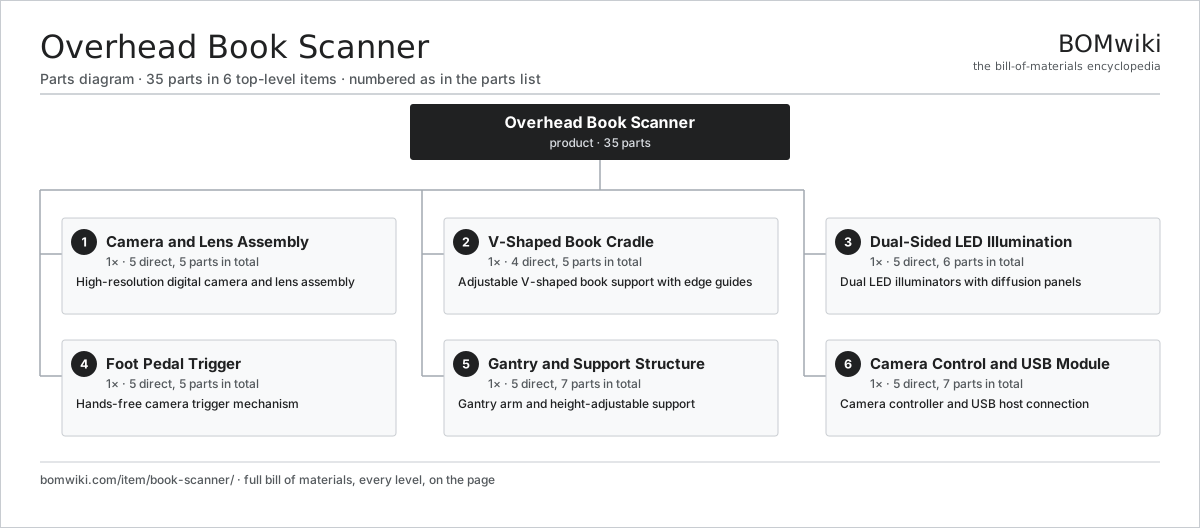
| # | Part | Qty | What it does |
|---|---|---|---|
| 1 | Camera and Lens Assembly 5 parts | 1× | High-resolution digital camera and lens assembly |
| 2 | V-Shaped Book Cradle 4 parts | 1× | Adjustable V-shaped book support with edge guides |
| 3 | Dual-Sided LED Illumination 5 parts | 1× | Dual LED illuminators with diffusion panels |
| 4 | Foot Pedal Trigger 5 parts | 1× | Hands-free camera trigger mechanism |
| 5 | Gantry and Support Structure 5 parts | 1× | Gantry arm and height-adjustable support |
| 6 | Camera Control and USB Module 5 parts | 1× | Camera controller and USB host connection |
3D model
No 3D model yet. Have a CAD file of this? Add a 3D model. STL renders right on this page; STEP, FreeCAD, and OpenSCAD sources are welcome too (openly licensed, like all 3D models on BOMwiki).
Build & assembly graph
expand / collapse · shared sub-assemblies converge · links to related products · est. labourTap an assembly to expand/collapse · tap a part to open it · use “Open page” for any node · drag to pan, scroll to zoom.
Bill of materials for Overhead Book Scanner
6 top-level lines · 35 rows shown · 35 parts total · indented to 3 levels| # | Item / sub-assembly | Part no. | Qty/assy | Ext. qty | Parts | Type |
|---|---|---|---|---|---|---|
| 1 | Camera and Lens Assembly 5 parts | book-scanner-camera-head | 1× | 1 | 5 | assembly |
| 1.1 | CMOS Image Sensor | image-sensor | 1× | 1 | · | part |
| 1.2 | Lens Assembly | camera-lens | 1× | 1 | · | part |
| 1.3 | Lens Mounting Bracket | book-scanner-lens-mount | 1× | 1 | · | part |
| 1.4 | Shutter Control Assembly | book-scanner-shutter-mechanism | 1× | 1 | · | part |
| 1.5 | Fastener Set | fastener-set | 1× | 1 | · | part |
| 2 | V-Shaped Book Cradle 4 parts | book-scanner-v-cradle | 1× | 1 | 5 | assembly |
| 2.1 | V-Groove Support Base | book-scanner-cradle-base | 1× | 1 | · | part |
| 2.2 | Page Edge Guide | book-scanner-edge-guide | 2× | 2 | · | part |
| 2.3 | Cradle Angle Adjuster | book-scanner-tilt-adjustment | 1× | 1 | · | part |
| 2.4 | Fastener Set | fastener-set | 1× | 1 | · | part |
| 3 | Dual-Sided LED Illumination 5 parts | book-scanner-lighting-system | 1× | 1 | 6 | assembly |
| 3.1 | Left LED Light Panel | book-scanner-led-array-l | 1× | 1 | · | part |
| 3.2 | Right LED Light Panel | book-scanner-led-array-r | 1× | 1 | · | part |
| 3.3 | Light Diffusion Panel | book-scanner-diffusion-panel | 2× | 2 | · | part |
| 3.4 | LED Power Controller | book-scanner-led-driver | 1× | 1 | · | part |
| 3.5 | Fastener Set | fastener-set | 1× | 1 | · | part |
| 4 | Foot Pedal Trigger 5 parts | book-scanner-foot-pedal | 1× | 1 | 5 | assembly |
| 4.1 | Pedal Push-Button Switch | book-scanner-pedal-switch | 1× | 1 | · | part |
| 4.2 | Pedal Lever Arm | book-scanner-pedal-arm | 1× | 1 | · | part |
| 4.3 | Pedal Return Spring | book-scanner-pedal-return-spring | 1× | 1 | · | part |
| 4.4 | Connector | connector | 1× | 1 | · | part |
| 4.5 | Fastener Set | fastener-set | 1× | 1 | · | part |
| 5 | Gantry and Support Structure 5 parts | book-scanner-base-stand | 1× | 1 | 7 | assembly |
| 5.1 | Support Frame and Arm | book-scanner-gantry-arm | 1× | 1 | · | part |
| 5.2 | Vertical Height Drive | book-scanner-height-adjuster | 1× | 1 | · | part |
| 5.3 | Weighted Base Platform | book-scanner-base-platform | 1× | 1 | · | part |
| 5.4 | Ball Bearing | ball-bearing | 2× | 2 | · | part |
| 5.5 | Fastener Set | fastener-set | 2× | 2 | · | part |
| 6 | Camera Control and USB Module 5 parts | book-scanner-interface-board | 1× | 1 | 7 | assembly |
| 6.1 | Microcontroller | mcu | 1× | 1 | · | part |
| 6.2 | Bare PCB | pcb-bare | 1× | 1 | · | part |
| 6.3 | Connector | connector | 3× | 3 | · | part |
| 6.4 | USB Host Controller | book-scanner-usb-host-chip | 1× | 1 | · | part |
| 6.5 | Fastener Set | fastener-set | 1× | 1 | · | part |
Something wrong in this list? Report a problem with this BOM.
Related products
same domain, ranked by shared parts Barcode Scanner
58 parts · shares 3 with this page
Barcode Scanner
58 parts · shares 3 with this page
 Safe Deposit Box System
5,374 parts · shares 3 with this page
Visitor Management Kiosk
44 parts · shares 1 with this page
Safe Deposit Box System
5,374 parts · shares 3 with this page
Visitor Management Kiosk
44 parts · shares 1 with this page
 Cash Deposit Machine
64 parts · shares 2 with this page
Check Scanner
83 parts · shares 2 with this page
Cash Deposit Machine
64 parts · shares 2 with this page
Check Scanner
83 parts · shares 2 with this page
 Document Scanner
79 parts · shares 2 with this page
Document Scanner
79 parts · shares 2 with this page
Sourcing: possible vendors
Browse the supplier directory → Prices, MOQ, and lead times are algorithmic estimates, not quotes, and not claims about these companies. Company mappings are curated by keyword; est. price band $50–$15k. How estimates work| Vendor | HQ | Specialty | MOQ | Lead time |
|---|---|---|---|---|
|
🇯🇵Canon
canon.com ↗
|
Tokyo, JP | Imaging & optics | 500 units | 8–12 wks |
|
🇯🇵Ricoh
ricoh.com ↗
|
Tokyo, JP | Office imaging | 500 units | 8–12 wks |
|
🇺🇸Xerox
xerox.com ↗
|
Norwalk, US | Printers & copiers | 500 units | 8–12 wks |
|
🇯🇵Epson
epson.com ↗
|
Suwa, JP | Printers & projectors | 500 units | 8–12 wks |
|
🇯🇵Brother
brother.com ↗
|
Nagoya, JP | Printers & sewing | 500 units | 8–12 wks |
1,154-word article