Electronic Copyboard
ProductOverview
The electronic copyboard (also called digital whiteboard, interactive copyboard, or electronic whiteboard with storage) is a presentation and documentation device that bridges traditional whiteboard writing and digital document management. Unlike a standard whiteboard, which captures only what remains on the physical surface, or an electronic smart board, which requires special pens or touch interaction, a copyboard uses an ingenious mechanical and optical system: a continuously-scrolling polyester writing surface that accepts standard dry-erase markers, combined with a motorized linear optical scanner that automatically captures images of written content.
When an instructor or presenter fills the board with notes and diagrams, they press a CAPTURE button. The scanner traverses the full height of the board, captures a high-resolution image, and stores it digitally. Content can then be printed, emailed, or uploaded to a cloud service within seconds. This allows classrooms, meeting rooms, and training centers to maintain a permanent record of whiteboard discussions while preserving the tactile, low-tech experience of writing and erasing with markers.
Copyboards were popular in the 1990s–2000s in education and corporate training, before digital whiteboards (like Smartboards and Promethean boards) became dominant. They remain in use where simplicity and mechanical reliability are valued over interactive features.
How it works
Writing and Manual Content Creation: The operator writes on the polyester sheet using standard dry-erase markers (blue, black, red, green). The micro-textured surface of the polyester accepts marker ink and allows clean erasure with a felt eraser or dry cloth. The sheet is mechanically bonded to the roller system via edge adhesive tape, ensuring the sheet stays flat and aligned during scrolling.
Scrolling for Continuous Writing: Once the visible portion of the board is filled, the operator can scroll the sheet upward by pressing a SCROLL or CLEAR button, or the system automatically scrolls. The motor rotates the upper roller, advancing the polyester sheet downward to expose a fresh writing area. Written content moves off-screen and is stored in the take-up roller. This allows unlimited writing without losing previous content to erasing.
Content Capture via Optical Scanning: When the operator presses the CAPTURE button, the linear scanner begins traversing vertically from top to bottom of the visible board area. The scanner contains:
- A linear CCD or CMOS image sensor (2048–4096 pixels wide) that captures one horizontal line of image data.
- Optics and lighting that illuminate the writing surface and focus the image onto the sensor.
- A stepper or servo motor that moves the scanner carriage downward at constant speed.
As the scanner moves, it captures the full image in horizontal strips. The image processor receives these linear scans and assembles them into a complete 2D image (typically 1200–3000 pixels wide × 800–2400 pixels tall, depending on board dimensions and resolution).
Image Processing and Compression: The processor applies optional:
- Rotation Correction: Ensures written lines are horizontal, compensating for board tilt.
- Contrast Enhancement: Boosts black marker text and reduces background speckles.
- JPEG or TIFF Compression: Reduces file size from megabytes (raw) to kilobytes (compressed) for storage and transmission.
Storage and Distribution: Captured images are stored in the internal storage (flash drive, SD card, or small hard drive). The operator can then:
- Print Immediately: Press PRINT to send the image to a connected printer or copier.
- Save Locally: Store images on the copyboard's internal drive for later retrieval.
- Email or Cloud Upload: Press a networked transfer button to send the image via Ethernet or WiFi to email, Dropbox, OneDrive, or a learning management system (Blackboard, Canvas, Moodle).
Advantages Over Alternatives
| Feature | Copyboard | Smart Board | Regular Whiteboard |
|---|---|---|---|
| Writing Experience | Natural, tactile, dry-erase markers | Touch-screen, stylus, less natural | Natural, requires manual transcription |
| Recording Content | Automatic image capture | Digital capture, requires software | Requires manual photography or transcription |
| Cost | $3,000–6,000 | $2,000–8,000 (initial), plus software | $200–500 |
| Learning Curve | Minimal (familiar whiteboard) | Moderate (requires stylus/touch skills) | Minimal (traditional) |
| Maintenance | Low (replace markers, occasional cleaning) | Moderate (software updates, projector lamps) | Minimal (markers, eraser) |
| Portability | Moderate (wall-mounted or on stand) | Similar | Excellent (small whiteboards) |
Mechanical Reliability and Durability
The copyboard's strength lies in its mechanical simplicity:
- No Electronics in the Writing Path: Markers write on plain polyester; no sensors or touch-screen electronics to malfunction.
- Mechanical Scrolling: The roller system is purely mechanical; it can advance the sheet 1000+ times per day indefinitely with minimal wear.
- Optical Scanning: The scanner uses a linear image sensor (solid-state, no moving parts) and a motorized carriage. The motor and bearings are the only wear items, typically lasting 10+ years.
- Simple Software: The image processor runs straightforward image assembly and JPEG encoding; no complex operating system means fewer crashes or software bugs.
As a result, copyboards are highly reliable and often outlast computer-based smart boards in high-use environments.
Operator Workflow
A typical classroom or training session using a copyboard proceeds as follows:
- Setup: Instructor positions the board, ensures dry-erase markers are available, and checks that the printer is online.
- Writing Phase: Write lecture notes, diagrams, and equations on the visible writing surface. Can scroll to a fresh area when needed.
- Capture: When a section of content is complete, press the CAPTURE button. The scanner automatically scans and stores the image.
- Erase or Scroll: Erase the board with a cloth, or scroll to a fresh area to continue writing.
- Repeat: Continue writing, capturing, and erasing as needed throughout the session.
- Output: At session end, press PRINT to output all captured pages to a printer, or upload to an email or cloud service.
- Distribution: Printed handouts or cloud-stored PDFs are distributed to students, providing a complete record of the lecture without manual note-taking.
Image Quality and OCR Compatibility
Copyboard scans are typically:
- Resolution: 150–300 dpi (dots per inch), sufficient for legible printed handouts (8.5 × 11 or A4).
- Contrast: Good (black marker on light polyester) but not always suitable for direct OCR (optical character recognition) without preprocessing.
- Size: Typical full-board scan is 5–10 MB uncompressed; JPEG compression reduces this to 200–500 KB.
For long-term archival, institutions often store scans in TIFF format (lossless compression), while distributing printed or PDF copies to students.
Network and Cloud Integration
Modern copyboards support:
- Ethernet Network: Direct connection to campus network for email and cloud service uploads.
- Email Gateway: Captured pages can be automatically emailed to a distribution list (e.g., class roster) or to a course management system.
- Cloud Storage: Integration with Dropbox, Google Drive, OneDrive, or institutional file shares for automatic archival.
- Learning Management System (LMS): Direct upload to Blackboard, Canvas, or Moodle for distribution to enrolled students.
Some institutions use copyboards as lecture capture endpoints in a larger ecosystem: copyboard captures → → email gateway → → LMS → → students download PDFs alongside video recordings and transcripts.
Maintenance and Parts
The polyester sheet is the primary consumable:
- Replacement Frequency: Every 2–5 years depending on usage and care (marker staining and wear).
- Cost: $500–1,500 per replacement sheet.
- DIY Cleaning: Regular gentle cleaning with dry cloth and occasional isopropyl alcohol removes marker stains and restores whiteness.
Other field-replaceable components:
- Scanner Motor: Rarely fails; replacement ~$200–400, 30 minutes labor.
- Roller Assemblies: Last 10+ years; replacement ~$300–500 each.
- Storage Media: If internal drive fails, data can often be recovered or replaced (~$100–300).
Legacy and Modern Context
Copyboards peaked in the 2000s in educational institutions. Gradual displacement by:
- Smart Boards and Interactive Whiteboards: Offer real-time digital content integration (web, videos, simulations) and interactive applications.
- Tablets and Stylus Input: iPad + Apple Pencil or Surface tablets offer portable, digital note-taking with instant cloud sync.
- Video Recording and Streaming: Lecture capture systems (Panopto, Kaltura, Blackboard Ally) record video of instructors and slides, reducing reliance on whiteboard transcription.
However, copyboards remain in use in:
- Design and Architecture Schools: Preference for tactile, marker-based sketching and discussion.
- Mathematics and Physics Departments: Complex equations and diagrams are faster and more legible when written by hand.
- Budget-Constrained Institutions: Lower total cost of ownership compared to smart boards over 5–10 years.
- Developing Nations: Simpler technology, no software licensing, lower infrastructure burden.
Used copyboards can be found for $500–1,500 on the secondary market. Manufacturers (e.g., Hitachi, Panasonic Toughpad) have largely exited the copyboard business but continue to support existing installations with replacement parts.
Electronic Copyboard parts and their functions
8 top-level parts · 50 parts in total · full bill of materials below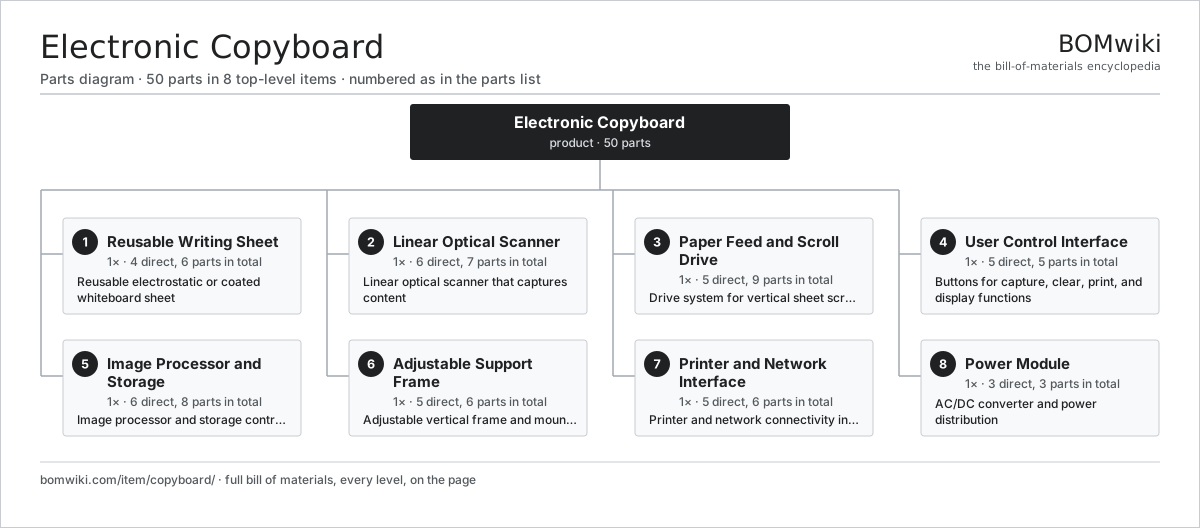
| # | Part | Qty | What it does |
|---|---|---|---|
| 1 | Reusable Writing Sheet 4 parts | 1× | Reusable electrostatic or coated whiteboard sheet |
| 2 | Linear Optical Scanner 6 parts | 1× | Linear optical scanner that captures content |
| 3 | Paper Feed and Scroll Drive 5 parts | 1× | Drive system for vertical sheet scrolling and repositioning |
| 4 | User Control Interface 5 parts | 1× | Buttons for capture, clear, print, and display functions |
| 5 | Image Processor and Storage 6 parts | 1× | Image processor and storage controller |
| 6 | Adjustable Support Frame 5 parts | 1× | Adjustable vertical frame and mounting system |
| 7 | Printer and Network Interface 5 parts | 1× | Printer and network connectivity interface |
| 8 | Power Module 3 parts | 1× | AC/DC converter and power distribution |
3D model
No 3D model yet. Have a CAD file of this? Add a 3D model. STL renders right on this page; STEP, FreeCAD, and OpenSCAD sources are welcome too (openly licensed, like all 3D models on BOMwiki).
Build & assembly graph
expand / collapse · shared sub-assemblies converge · links to related products · est. labourTap an assembly to expand/collapse · tap a part to open it · use “Open page” for any node · drag to pan, scroll to zoom.
Bill of materials for Electronic Copyboard
8 top-level lines · 47 rows shown · 50 parts total · indented to 3 levels| # | Item / sub-assembly | Part no. | Qty/assy | Ext. qty | Parts | Type |
|---|---|---|---|---|---|---|
| 1 | Reusable Writing Sheet 4 parts | copyboard-writing-surface | 1× | 1 | 6 | assembly |
| 1.1 | Polyester Writing Sheet | copyboard-surface-film | 1× | 1 | · | part |
| 1.2 | Edge Adhesive Tape | copyboard-adhesive-strip | 2× | 2 | · | part |
| 1.3 | Edge Guide Roller | copyboard-edge-guide | 2× | 2 | · | part |
| 1.4 | Fastener Set | fastener-set | 1× | 1 | · | part |
| 2 | Linear Optical Scanner 6 parts | copyboard-scanning-bar | 1× | 1 | 7 | assembly |
| 2.1 | Linear Image Sensor | copyboard-line-sensor | 1× | 1 | · | part |
| 2.2 | Scanner Motor | copyboard-scanning-motor | 1× | 1 | · | part |
| 2.3 | Scanner Lens and Light Assembly | copyboard-scanner-optics | 1× | 1 | · | part |
| 2.4 | Precision Linear Rail | copyboard-scanner-rail | 1× | 1 | · | part |
| 2.5 | Ball Bearing | ball-bearing | 2× | 2 | · | part |
| 2.6 | Fastener Set | fastener-set | 1× | 1 | · | part |
| 3 | Paper Feed and Scroll Drive 5 parts | copyboard-roller-assembly | 1× | 1 | 9 | assembly |
| 3.1 | Scroll Drive Motor | copyboard-motor | 1× | 1 | · | part |
| 3.2 | Supply Roller | copyboard-upper-roller | 1× | 1 | · | part |
| 3.3 | Take-Up Roller | copyboard-lower-roller | 1× | 1 | · | part |
| 3.4 | Ball Bearing | ball-bearing | 4× | 4 | · | part |
| 3.5 | Fastener Set | fastener-set | 2× | 2 | · | part |
| 4 | User Control Interface 5 parts | copyboard-control-panel | 1× | 1 | 5 | assembly |
| 4.1 | Control Button Set | copyboard-button-set | 1× | 1 | · | part |
| 4.2 | Touchscreen Display | copyboard-optional-touchscreen | 1× | 1 | · | part |
| 4.3 | Bare PCB | pcb-bare | 1× | 1 | · | part |
| 4.4 | Connector | connector | 1× | 1 | · | part |
| 4.5 | Fastener Set | fastener-set | 1× | 1 | · | part |
| 5 | Image Processor and Storage 6 parts | copyboard-processor-board | 1× | 1 | 8 | assembly |
| 5.1 | Main Processor IC | copyboard-processor-mcu | 1× | 1 | · | part |
| 5.2 | JPEG Compression IC | copyboard-image-processor | 1× | 1 | · | part |
| 5.3 | Image Storage Drive | copyboard-storage-media | 1× | 1 | · | part |
| 5.4 | Bare PCB | pcb-bare | 1× | 1 | · | part |
| 5.5 | Connector | connector | 3× | 3 | · | part |
| 5.6 | Fastener Set | fastener-set | 1× | 1 | · | part |
| 6 | Adjustable Support Frame 5 parts | copyboard-stand | 1× | 1 | 6 | assembly |
| 6.1 | Support Frame Beams | copyboard-frame-uprights | 1× | 1 | · | part |
| 6.2 | Height Adjustment Mechanism | copyboard-height-adjuster | 1× | 1 | · | part |
| 6.3 | Tilt Angle Control | copyboard-angle-adjuster | 1× | 1 | · | part |
| 6.4 | Base Platform | copyboard-base-platform | 1× | 1 | · | part |
| 6.5 | Fastener Set | fastener-set | 2× | 2 | · | part |
| 7 | Printer and Network Interface 5 parts | copyboard-interface-module | 1× | 1 | 6 | assembly |
| 7.1 | Network Interface Card | copyboard-network-adapter | 1× | 1 | · | part |
| 7.2 | Printer Interface | copyboard-printer-port | 1× | 1 | · | part |
| 7.3 | Bare PCB | pcb-bare | 1× | 1 | · | part |
| 7.4 | Connector | connector | 2× | 2 | · | part |
| 7.5 | Fastener Set | fastener-set | 1× | 1 | · | part |
| 8 | Power Module 3 parts | copyboard-power-supply | 1× | 1 | 3 | assembly |
| 8.1 | Power Supply | power-supply | 1× | 1 | · | part |
| 8.2 | Connector | connector | 1× | 1 | · | part |
| 8.3 | Fastener Set | fastener-set | 1× | 1 | · | part |
Something wrong in this list? Report a problem with this BOM.
Related products
same domain, ranked by shared parts Cash Deposit Machine
64 parts · shares 1 with this page
Check Scanner
83 parts · shares 1 with this page
Cash Deposit Machine
64 parts · shares 1 with this page
Check Scanner
83 parts · shares 1 with this page
 Checkout Lane Conveyor
63 parts · shares 1 with this page
Checkout Lane Conveyor
63 parts · shares 1 with this page
Sourcing: possible vendors
Browse the supplier directory → Prices, MOQ, and lead times are algorithmic estimates, not quotes, and not claims about these companies. Company mappings are curated by keyword; est. price band $50–$15k. How estimates work| Vendor | HQ | Specialty | MOQ | Lead time |
|---|---|---|---|---|
|
🇯🇵Canon
canon.com ↗
|
Tokyo, JP | Imaging & optics | 500 units | 8–12 wks |
|
🇯🇵Ricoh
ricoh.com ↗
|
Tokyo, JP | Office imaging | 500 units | 8–12 wks |
|
🇺🇸Xerox
xerox.com ↗
|
Norwalk, US | Printers & copiers | 500 units | 8–12 wks |
|
🇯🇵Epson
epson.com ↗
|
Suwa, JP | Printers & projectors | 500 units | 8–12 wks |
|
🇯🇵Brother
brother.com ↗
|
Nagoya, JP | Printers & sewing | 500 units | 8–12 wks |
1,461-word article