Electric Stapler
ProductOverview
An electric stapler does what a hand stapler does, but it fires the staple for you the instant you slide paper in. Push a stack against the throat, a sensor sees it, and a motor drives a single staple through and clinches it, useful at a busy desk or copier where someone staples sets all day. The consumable is a glued Staple Strip loaded into the Staple Magazine.
The mechanism replaces hand pressure with a motor and a cam. The Driver Mechanism has the motor turn a Drive Cam that snaps the Driver Blade down in a fast stroke; the blade shears one staple off the front of the strip and pushes its legs through the paper. Underneath, the Clincher Anvil has curved grooves that catch the legs and bend them inward so they lie flat, the clinch that holds the sheets together. A reused Coil Spring returns the blade for the next cycle, and another keeps the Staple Pusher feeding the strip forward as staples are used.
A small Control Board runs the cycle, and the unit takes wall power through the Power Supply with a backup Backup Battery for cordless use.
How it works
When a stack enters the throat, the Paper Sensor signals the Control Board, whose Microcontroller starts one cycle of the Drive Motor, a small motor built on a reused Stator Assembly and Rotor Assembly. Through a reused Helical Gear Pair the motor turns the Drive Cam, which drives the Driver Blade down.
The blade shears the front staple from the Staple Strip and forces its legs through all the sheets. As the legs emerge below, they strike the grooves of the Clincher Anvil and curl inward, clinching the stack tight. The cam continues round and a Coil Spring lifts the blade clear, while the spring-loaded Staple Pusher in the Staple Magazine advances the strip so a fresh staple sits ready. The whole stroke takes a fraction of a second. Running off the Backup Battery, a single reused Li-ion Cell, 18650 with its protection board, the stapler works the same when unplugged, and the controller manages charging whenever the adapter is connected.
Electric Stapler parts and their functions
9 top-level parts · 45 parts in total · full bill of materials below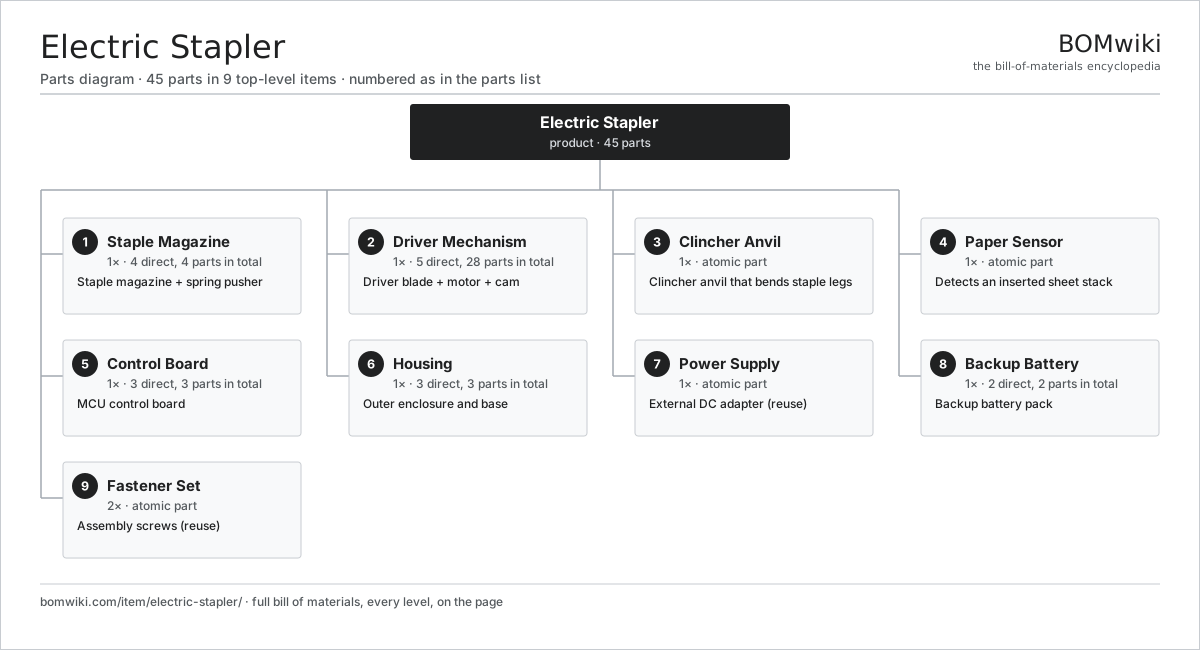
| # | Part | Qty | What it does |
|---|---|---|---|
| 1 | Staple Magazine 4 parts | 1× | Staple magazine + spring pusher |
| 2 | Driver Mechanism 5 parts | 1× | Driver blade + motor + cam |
| 3 | Clincher Anvil | 1× | Clincher anvil that bends staple legs |
| 4 | Paper Sensor | 1× | Detects an inserted sheet stack |
| 5 | Control Board 3 parts | 1× | MCU control board |
| 6 | Housing 3 parts | 1× | Outer enclosure and base |
| 7 | Power Supply | 1× | External DC adapter (reuse) |
| 8 | Backup Battery 2 parts | 1× | Backup battery pack |
| 9 | Fastener Set | 2× | Assembly screws (reuse) |
3D model
No 3D model yet. Have a CAD file of this? Add a 3D model. STL renders right on this page; STEP, FreeCAD, and OpenSCAD sources are welcome too (openly licensed, like all 3D models on BOMwiki).
Build & assembly graph
expand / collapse · shared sub-assemblies converge · links to related products · est. labourTap an assembly to expand/collapse · tap a part to open it · use “Open page” for any node · drag to pan, scroll to zoom.
Bill of materials for Electric Stapler
9 top-level lines · 29 rows shown · 45 parts total · indented to 3 levels| # | Item / sub-assembly | Part no. | Qty/assy | Ext. qty | Parts | Type |
|---|---|---|---|---|---|---|
| 1 | Staple Magazine 4 parts | es-magazine | 1× | 1 | 4 | assembly |
| 1.1 | Magazine Rail | es-magazine-rail | 1× | 1 | · | part |
| 1.2 | Staple Pusher | es-pusher | 1× | 1 | · | part |
| 1.3 | Coil Spring | coil-spring | 1× | 1 | · | part |
| 1.4 | Staple Strip | es-staple-strip | 1× | 1 | · | part |
| 2 | Driver Mechanism 5 parts | es-driver-mechanism | 1× | 1 | 28 | assembly |
| 2.1 | Driver Blade | es-driver-blade | 1× | 1 | · | part |
| 2.2 | Drive Motor 3 parts | es-motor | 1× | 1 | 24 | assembly |
| 2.2.1 | Stator Assembly 3 parts + deeper › | stator-assembly | 1× | 1 | 3 | assembly |
| 2.2.2 | Rotor Assembly 4 parts + deeper › | rotor-assembly | 1× | 1 | 19 | assembly |
| 2.2.3 | Ball Bearing | ball-bearing | 2× | 2 | · | part |
| 2.3 | Helical Gear Pair | gear-pair | 1× | 1 | · | part |
| 2.4 | Drive Cam | es-cam | 1× | 1 | · | part |
| 2.5 | Coil Spring | coil-spring | 1× | 1 | · | part |
| 3 | Clincher Anvil | es-anvil | 1× | 1 | · | part |
| 4 | Paper Sensor | es-paper-sensor | 1× | 1 | · | part |
| 5 | Control Board 3 parts | es-control-board | 1× | 1 | 3 | assembly |
| 5.1 | Bare PCB | pcb-bare | 1× | 1 | · | part |
| 5.2 | Microcontroller | mcu | 1× | 1 | · | part |
| 5.3 | SMD Passive (R/C/L) | smd-passives | 1× | 1 | · | part |
| 6 | Housing 3 parts | es-housing | 1× | 1 | 3 | assembly |
| 6.1 | Body Shell | es-body-shell | 1× | 1 | · | part |
| 6.2 | Base | es-base | 1× | 1 | · | part |
| 6.3 | Fastener Set | fastener-set | 1× | 1 | · | part |
| 7 | Power Supply | power-supply | 1× | 1 | · | part |
| 8 | Backup Battery 2 parts | es-battery | 1× | 1 | 2 | assembly |
| 8.1 | Li-ion Cell, 18650 | li-cell-18650 | 1× | 1 | · | part |
| 8.2 | Battery Protection Board | es-bms | 1× | 1 | · | part |
| 9 | Fastener Set | fastener-set | 2× | 2 | · | part |
Something wrong in this list? Report a problem with this BOM.
Related products
same domain, ranked by shared parts Handheld Label Maker
54 parts · shares 13 with this page
Paper Folding Machine
177 parts · shares 12 with this page
Automatic Letter Opener
58 parts · shares 12 with this page
Check Scanner
83 parts · shares 12 with this page
Coin Sorter / Counter
95 parts · shares 12 with this page
Handheld Label Maker
54 parts · shares 13 with this page
Paper Folding Machine
177 parts · shares 12 with this page
Automatic Letter Opener
58 parts · shares 12 with this page
Check Scanner
83 parts · shares 12 with this page
Coin Sorter / Counter
95 parts · shares 12 with this page
Sourcing: possible vendors
Browse the supplier directory → Prices, MOQ, and lead times are algorithmic estimates, not quotes, and not claims about these companies. Company mappings are curated by keyword; est. price band $50–$15k. How estimates work| Vendor | HQ | Specialty | MOQ | Lead time |
|---|---|---|---|---|
|
🇯🇵Canon
canon.com ↗
|
Tokyo, JP | Imaging & optics | 500 units | 8–12 wks |
|
🇯🇵Ricoh
ricoh.com ↗
|
Tokyo, JP | Office imaging | 500 units | 8–12 wks |
|
🇺🇸Xerox
xerox.com ↗
|
Norwalk, US | Printers & copiers | 500 units | 8–12 wks |
|
🇯🇵Epson
epson.com ↗
|
Suwa, JP | Printers & projectors | 500 units | 8–12 wks |
|
🇯🇵Brother
brother.com ↗
|
Nagoya, JP | Printers & sewing | 500 units | 8–12 wks |
366-word article