Electronic Key Cabinet
ProductOverview
An electronic key cabinet is a secure storage system that controls who can access which physical keys, when, and for how long. Keys are stored in individual slots within a locked cabinet. Each slot has its own motorized latch controlled by a central microcontroller. When an authorized user approaches the cabinet and provides valid credentials (fingerprint, badge scan, PIN), the controller unlocks only the slots associated with the user's role, and the user can retrieve the required keys.
Electronic key cabinets are used in facilities where key security and accountability are critical: hospitals (for medication, hazardous materials, and restricted room access), data centers (server room, security office), government buildings, hotels, and large enterprises with complex access hierarchies. They eliminate the security problems associated with traditional key racks (anyone can see which keys are available, take multiple keys without authorization, or duplicate keys); provide an immutable audit trail of all key access; and enforce role-based key access (a maintenance technician can only retrieve keys for authorized areas).
How it works
The controller module is the logical hub. It contains the MCU firmware that implements the core access logic:
User authentication: The MCU interfaces with the biometric reader (fingerprint or facial camera) to capture a sample. The biometric processor compares the sample against stored templates and returns a match/no-match result, along with the user ID.
Access profile lookup: The MCU queries the user's role and key access permissions. For example, the "Maintenance" role might have access to keys for stairwell locks, HVAC rooms, and mechanical closets. The "Night Security" role might have access only to perimeter keys and alarm override keys.
Slot unlock sequence: The MCU energizes the solenoid latches corresponding to the authorized key slots. Each slot lock is individually controlled, so only the correct slots unlock.
User takes key: The user opens the cabinet drawer or swings the door, removes the required key from the unlocked slot, and the key tag is visible.
Event logging: The MCU records the event: timestamp, user ID, key ID (or slot number), action (TAKEN or RETURNED), and result (SUCCESS or DENIED). This is immediately synced to a cloud audit server via the network module.
Auto-relock: After a timeout (e.g., 30 seconds), the solenoid latches re-engage. If a key has not been returned to its slot, the cabinet remains unlocked until it is manually closed and the next user authentication cycle begins.
Biometric and credential verification
Modern key cabinets use multi-factor authentication:
Fingerprint recognition: The biometric reader includes a capacitive or optical fingerprint sensor that captures a ridge-pattern image of the user's finger. The on-board biometric processor extracts minutiae points (ridge endpoints and bifurcations) and compares them against enrolled templates. A match is typically required to have 70–80% overlap with stored template. This prevents spoofing attacks (fake fingerprints, photographs) because the sensor detects liveness (blood flow, skin conductivity).
Facial recognition: Alternative biometric readers use RGB or infrared cameras to capture a face image. The processor performs liveness detection (detecting blink, head movement, or IR reflection patterns) and compares facial landmarks against enrolled templates. Facial recognition is faster and requires no physical contact, but is more susceptible to spoofing (high-quality photographs).
RFID backup: If the biometric reader fails, users can present an RFID badge to the proximity reader. The badge contains a unique ID; the MCU looks up the badge ID and authorizes the associated user.
PIN fallback: As a final fallback, a user can enter a 4–6 digit PIN on the numeric keypad. The PIN is hashed and compared against stored credentials. PINs are less secure than biometric and should only be allowed for authorized personnel in emergency situations.
Role-based access and key assignment
Each enrolled user is assigned one or more roles. Common roles include:
- Full Administrator: Access to all keys, 24/7.
- Maintenance Day Shift: Access to facility keys (HVAC, mechanical, cleaning closets) during business hours only.
- Security Officer: Access to perimeter keys, emergency override keys, 24/7.
- Facilities Manager: Access to maintenance and utility keys, 8 AM–8 PM Monday–Friday.
- Contractor: Temporary role with access to specific areas for a fixed duration (e.g., 1 week).
The role-to-key mapping is stored in the MCU firmware or downloaded from a central management system. When a user authenticates, the MCU looks up their assigned role(s) and enables only the corresponding key slots.
Time-based access restrictions are enforced in the firmware: the MCU includes a real-time clock (RTC) that checks the current day of week and time before granting access. A maintenance role might only grant access Monday–Friday, 6 AM–6 PM. Attempting to retrieve keys outside these hours results in a "Access Denied" response logged in the audit trail.
Audit logging and compliance
The audit module records every interaction with the cabinet. The event record includes:
- Timestamp (date and time to 1-second precision)
- User ID and biometric match confidence (if applicable)
- Key slot accessed and key ID
- Access result (SUCCESS, DENIED, or ERROR)
- Duration key was removed (seconds)
- User name and role (looked up from enrollment database)
These events are stored locally in the MCU's Flash memory (typically 100,000–500,000 event capacity) and are continuously synced to a cloud server via the network module (Ethernet or Wi-Fi). The cloud archive serves as the authoritative audit trail; local storage is a backup.
Compliance frameworks (HIPAA for healthcare, PCI-DSS for finance, SOC 2 for general IT) require immutable audit logs of key access. The key cabinet provides this: events cannot be deleted or modified locally, and the cloud archive is cryptographically signed to prevent tampering. Auditors can download 2+ years of audit logs showing exactly who accessed which keys, when, and for how long.
Emergency access and battery backup
If power is lost, the battery backup module maintains 24 VDC for the solenoid latches and MCU. The battery is sized to provide 30–60 minutes of runtime (enough to retrieve necessary keys during an emergency and call for backup power).
In a true emergency (power loss + biometric system failure), a backup mechanical lock may be present: a hardened steel padlock on the cabinet door. Authorized personnel (security director, building manager) carry the key and can unlock the cabinet manually.
The firmware also includes an "Emergency Override" function: a hidden sequence of buttons on the keypad (e.g., holding a specific button for 10 seconds) forces all solenoid latches to unlock. This action is logged as a special event with details of who overrode the system and when. The override is only used in genuine life-safety emergencies (fire, security breach, medical emergency).
Maintenance and troubleshooting
Solenoid latches wear with repeated cycling; a heavily used cabinet (100+ access events per day) might require latch replacement after 5–10 years. The solenoid coils can be tested by toggling them individually and listening for a distinctive click. A solenoid that does not click is likely burned out and must be replaced.
Fingerprint or facial recognition sensors accumulate dust and dirt over time, degrading match accuracy. Periodic cleaning of the sensor window with a soft cloth and isopropyl alcohol restores performance. The MCU firmware includes a "sensor health" diagnostic that reports the current false rejection rate (FRR); if FRR exceeds 10%, the sensor should be serviced.
The battery must be replaced every 3–5 years regardless of use, as lead-acid batteries degrade over time. The MCU firmware includes a battery self-test function that measures terminal voltage and estimates remaining capacity; when capacity drops below 50%, a maintenance alert is triggered.
The audit log must be reviewed periodically (monthly or quarterly) to detect anomalies: multiple failed access attempts, keys removed outside normal hours, or unusual access patterns. The cloud server can be configured to send alerts (e.g., email to security manager) when anomalies are detected, allowing rapid investigation.
Security considerations
The key cabinet's security is only as strong as the weakest link:
- Biometric spoofing: High-quality silicone fingerprint replicas or printed photographs can fool some sensors. Modern liveness detection mitigates this but is not perfect.
- Unauthorized enrollment: If an attacker can gain physical access to the cabinet's admin interface, they can enroll their own fingerprints. The cabinet should be mounted in a secure location and protected with a physical padlock.
- Credential theft: An attacker can steal a valid badge or memorize a PIN, gaining access under another user's identity. Multi-factor authentication (biometric + badge) reduces this risk.
- Brute-force attack: An attacker can attempt many PIN combinations in rapid succession. The MCU firmware includes a lockout mechanism: after 5–10 failed attempts, the cabinet locks down for 15 minutes and sends an alert to security.
- Cabinet forced entry: The cabinet enclosure is not rated for forced-entry resistance (unlike a vault door). An attacker with power tools could cut through the steel walls. The key cabinet is a deterrent and audit system, not a physical barrier.
For highest security, the cabinet should be mounted in a secure room (server room, office), not in a public area. Access to the cabinet itself (not just the keys) should be logged by a separate video surveillance system.
Integration with building security systems
Electronic key cabinets can integrate with central access control systems:
- RFID synchronization: The cabinet's RFID reader is the same technology used in building badges. A cardholder who can access the building can automatically authenticate at the key cabinet using the same badge.
- Video trigger: When a key access event occurs, the cabinet can send a signal to a nearby video camera to start recording, creating a video record synchronized with the audit log.
- Central enrollment: A central directory server can push user enrollment updates (new employees, role changes, terminations) to multiple key cabinets in a facility, keeping them in sync.
- Alarm integration: If the cabinet detects tamper (door forced, solenoid failure), it can send an alert to the building security system to trigger a visual or audible alarm.
Large enterprises deploy multiple key cabinets across a facility, each serving a specific area or function (HVAC keys, electrical keys, cleaning supplies keys). A central management console displays real-time status of all cabinets and allows remote lock/unlock in emergencies.
Electronic Key Cabinet parts and their functions
8 top-level parts · 92 parts in total · full bill of materials below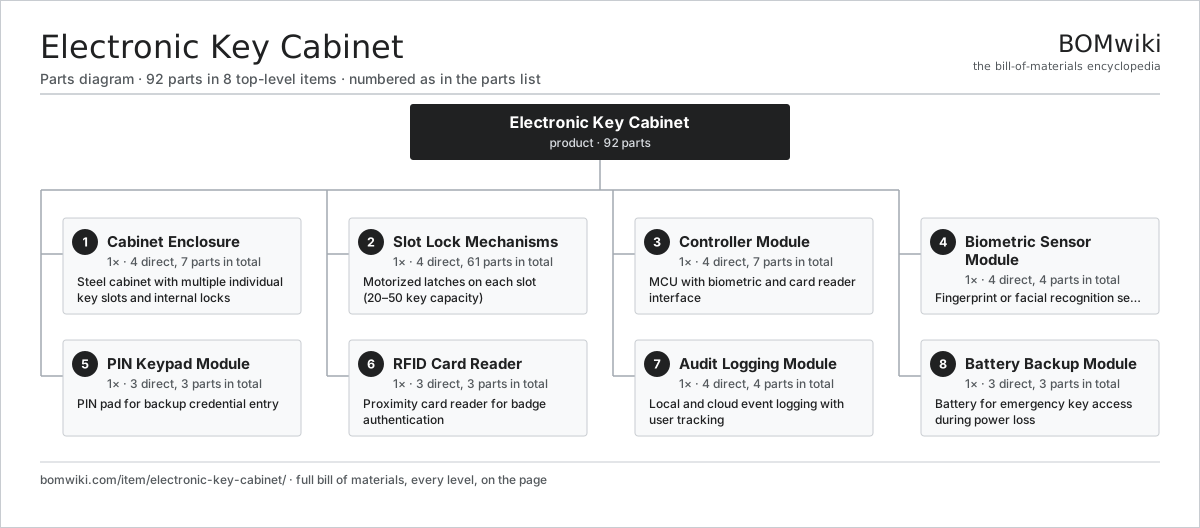
| # | Part | Qty | What it does |
|---|---|---|---|
| 1 | Cabinet Enclosure 4 parts | 1× | Steel cabinet with multiple individual key slots and internal locks |
| 2 | Slot Lock Mechanisms 4 parts | 1× | Motorized latches on each slot (20–50 key capacity) |
| 3 | Controller Module 4 parts | 1× | MCU with biometric and card reader interface |
| 4 | Biometric Sensor Module 4 parts | 1× | Fingerprint or facial recognition sensor for identity verification |
| 5 | PIN Keypad Module 3 parts | 1× | PIN pad for backup credential entry |
| 6 | RFID Card Reader 3 parts | 1× | Proximity card reader for badge authentication |
| 7 | Audit Logging Module 4 parts | 1× | Local and cloud event logging with user tracking |
| 8 | Battery Backup Module 3 parts | 1× | Battery for emergency key access during power loss |
3D model
No 3D model yet. Have a CAD file of this? Add a 3D model. STL renders right on this page; STEP, FreeCAD, and OpenSCAD sources are welcome too (openly licensed, like all 3D models on BOMwiki).
Build & assembly graph
expand / collapse · shared sub-assemblies converge · links to related products · est. labourTap an assembly to expand/collapse · tap a part to open it · use “Open page” for any node · drag to pan, scroll to zoom.
Bill of materials for Electronic Key Cabinet
8 top-level lines · 37 rows shown · 92 parts total · indented to 3 levels| # | Item / sub-assembly | Part no. | Qty/assy | Ext. qty | Parts | Type |
|---|---|---|---|---|---|---|
| 1 | Cabinet Enclosure 4 parts | electronic-key-cabinet-enclosure | 1× | 1 | 7 | assembly |
| 1.1 | Sheet Metal Panel | sheet-panel | 4× | 4 | · | part |
| 1.2 | Fastener Set | fastener-set | 1× | 1 | · | part |
| 1.3 | Connector | connector | 1× | 1 | · | part |
| 1.4 | O-Ring Set | oring-set | 1× | 1 | · | part |
| 2 | Slot Lock Mechanisms 4 parts | electronic-key-cabinet-slot-locks | 1× | 1 | 61 | assembly |
| 2.1 | Relay | relay | 20× | 20 | · | part |
| 2.2 | Bare PCB | pcb-bare | 1× | 1 | · | part |
| 2.3 | Power MOSFET | mosfet | 20× | 20 | · | part |
| 2.4 | Coil Spring | coil-spring | 20× | 20 | · | part |
| 3 | Controller Module 4 parts | electronic-key-cabinet-controller | 1× | 1 | 7 | assembly |
| 3.1 | Microcontroller | mcu | 1× | 1 | · | part |
| 3.2 | Bare PCB | pcb-bare | 1× | 1 | · | part |
| 3.3 | SMD Passive (R/C/L) | smd-passives | 1× | 1 | · | part |
| 3.4 | Connector | connector | 4× | 4 | · | part |
| 4 | Biometric Sensor Module 4 parts | electronic-key-cabinet-biometric-reader | 1× | 1 | 4 | assembly |
| 4.1 | CMOS Image Sensor | image-sensor | 1× | 1 | · | part |
| 4.2 | Microcontroller | mcu | 1× | 1 | · | part |
| 4.3 | Connector | connector | 1× | 1 | · | part |
| 4.4 | SMD Passive (R/C/L) | smd-passives | 1× | 1 | · | part |
| 5 | PIN Keypad Module 3 parts | electronic-key-cabinet-keypad | 1× | 1 | 3 | assembly |
| 5.1 | Bare PCB | pcb-bare | 1× | 1 | · | part |
| 5.2 | Touch Digitizer | touch-digitizer | 1× | 1 | · | part |
| 5.3 | Connector | connector | 1× | 1 | · | part |
| 6 | RFID Card Reader 3 parts | electronic-key-cabinet-rfid-reader | 1× | 1 | 3 | assembly |
| 6.1 | Compute SoC Module | soc-module | 1× | 1 | · | part |
| 6.2 | Connector | connector | 1× | 1 | · | part |
| 6.3 | Bare PCB | pcb-bare | 1× | 1 | · | part |
| 7 | Audit Logging Module 4 parts | electronic-key-cabinet-audit-log | 1× | 1 | 4 | assembly |
| 7.1 | Compute SoC Module | soc-module | 1× | 1 | · | part |
| 7.2 | Connector | connector | 1× | 1 | · | part |
| 7.3 | Bare PCB | pcb-bare | 1× | 1 | · | part |
| 7.4 | SMD Passive (R/C/L) | smd-passives | 1× | 1 | · | part |
| 8 | Battery Backup Module 3 parts | electronic-key-cabinet-battery-backup | 1× | 1 | 3 | assembly |
| 8.1 | 12 V Battery | lv-battery | 1× | 1 | · | part |
| 8.2 | Connector | connector | 1× | 1 | · | part |
| 8.3 | Coil Spring | coil-spring | 1× | 1 | · | part |
Something wrong in this list? Report a problem with this BOM.
Related products
same domain, ranked by shared parts Access Control Panel
52 parts · shares 8 with this page
Access Control Panel
52 parts · shares 8 with this page
 Intrusion Alarm Panel
40 parts · shares 8 with this page
Intrusion Alarm Panel
40 parts · shares 8 with this page
 Automatic Swing Door Operator
43 parts · shares 6 with this page
Automatic Swing Door Operator
43 parts · shares 6 with this page
 Smart Parcel Locker
278 parts · shares 6 with this page
Smart Parcel Locker
278 parts · shares 6 with this page
 Video Intercom System
110 parts · shares 5 with this page
Video Intercom System
110 parts · shares 5 with this page
 Mantrap Interlock Portal
82 parts · shares 6 with this page
Mantrap Interlock Portal
82 parts · shares 6 with this page
Sourcing: possible vendors
Browse the supplier directory → Prices, MOQ, and lead times are algorithmic estimates, not quotes, and not claims about these companies. Company mappings are curated by keyword; est. price band $50–$10k. How estimates work| Vendor | HQ | Specialty | MOQ | Lead time |
|---|---|---|---|---|
| assaabloy.com ↗ | Stockholm, SE | Locks & access | 1,000 units | 8–12 wks |
|
🇺🇸Allegion
allegion.com ↗
|
Dublin, US | Security products (Schlage) | 1,000 units | 8–12 wks |
| dormakaba.com ↗ | Rümlang, CH | Access & door systems | 1,000 units | 8–12 wks |
| honeywell.com ↗ | Charlotte, US | Building & safety tech | 1,000 units | 8–12 wks |
| hikvision.com ↗ | Hangzhou, CN | Surveillance & security | 1,000 units | 8–12 wks |
1,775-word article