Network Tap
ProductOverview
A network tap is a purpose-built device for seeing traffic on a live Ethernet link without being part of the network. It is inserted inline, the cable that ran from a switch to a router now runs through the tap's two Network Ports, and every frame passing in either direction is copied out the Monitor Ports to an analyzer, intrusion-detection sensor, or packet recorder. Unlike a switch SPAN port, a tap has no MAC address, no IP address, and no way to transmit into the monitored link, which is why security and troubleshooting practice prefers taps at critical boundaries: the evidence they produce is complete and the monitoring system cannot be addressed or attacked from the wire.
This is an active tap for 1000BASE-T. Gigabit copper cannot be tapped passively the way 10/100 or optical fiber can, because all four pairs carry signal in both directions simultaneously using echo cancellation; the only way to extract the two directions is to terminate the link in a real Network PHY and regenerate it. That makes the tap a powered device sitting in the middle of a production link, which is why the Fail-Safe Relay Section section and the dual supplies in Power Section dominate the design: the tap must never be the reason the link goes down.
How it works
In normal operation, port A's PHY terminates the signal from one endpoint and the Tap FPGA forwards every frame to port B's PHY, and vice versa, adding well under a microsecond of latency. The same logic copies the A-to-B stream to monitor port 1 and the B-to-A stream to monitor port 2. Splitting directions onto separate outputs is deliberate: a full-duplex gigabit link can carry 1 Gbit/s each way at once, 2 Gbit/s total, which would overrun any single gigabit monitor port during bursts. A SPAN port suffers exactly this oversubscription and silently drops frames; the dual-output tap structurally cannot.
The tap also copies what a switch would discard. Runts, frames with bad checksums, and corrupted symbols are forwarded to the monitor ports as received, because for troubleshooting, the damaged frames are often the entire point, a failing NIC or duplex mismatch announces itself in errored frames that a SPAN port hides.
Fail-to-wire is the defining safety feature. The Relay set sits directly in the signal path between the A and B jacks. While the tap is powered and the Watchdog Controller sees the logic running, the relays route the pairs through the PHYs. If power fails, firmware hangs, or the watchdog itself stops being petted, the Charge Reservoir discharges into the relay coils and the contacts fall to a direct metallic connection between A and B. The link endpoints see a brief interruption, a few milliseconds, after which their PHYs renegotiate as if a cable had been reseated, and the production link runs unmonitored but alive. The OR-ing Stage combine two independent Power Supply adapters so that a single supply failure never even triggers the bypass.
Variants
The same role is filled by several constructions. A passive fiber tap is the simplest: a fused optical splitter diverts a fixed fraction of the light, typically a 70/30 split, to the monitor outputs, with no electronics and nothing to fail, the trade-off is the split's insertion loss, which must fit within the link's optical budget. Passive copper taps exist only for 10/100BASE-TX, where resistive bridging onto the two active pairs works. Regeneration taps duplicate the copied traffic to several monitor outputs so multiple tools see the same link; aggregation taps merge both directions into one output stream for tools that accept occasional oversubscription; and bypass taps extend the fail-to-wire idea to inline security appliances, watching a heartbeat from an IPS and routing around it within milliseconds if it stalls.
Deployment
Taps are installed during scheduled windows, since inserting one breaks the link momentarily, and are then left permanently in place, the monitor ports sit dark until someone attaches a tool. Typical positions are the inside and outside of a firewall, the uplink of a server distribution switch, and demarcation points where a provider's responsibility ends, where having unimpeachable capture predates any dispute. Because the monitor PHYs transmit only, with the receive pairs unconnected at the Monitor RJ45, nothing plugged into a monitor port can inject traffic into the production link; capture appliances connected there often also run with unbound, address-less interfaces, making the whole monitoring chain unreachable from the monitored network. The Enclosure is fanless sheet steel drawing about 5 W, sized so several taps fit a 1U rack shelf at the network edge they observe.
Network Tap parts and their functions
6 top-level parts · 262 parts in total · full bill of materials below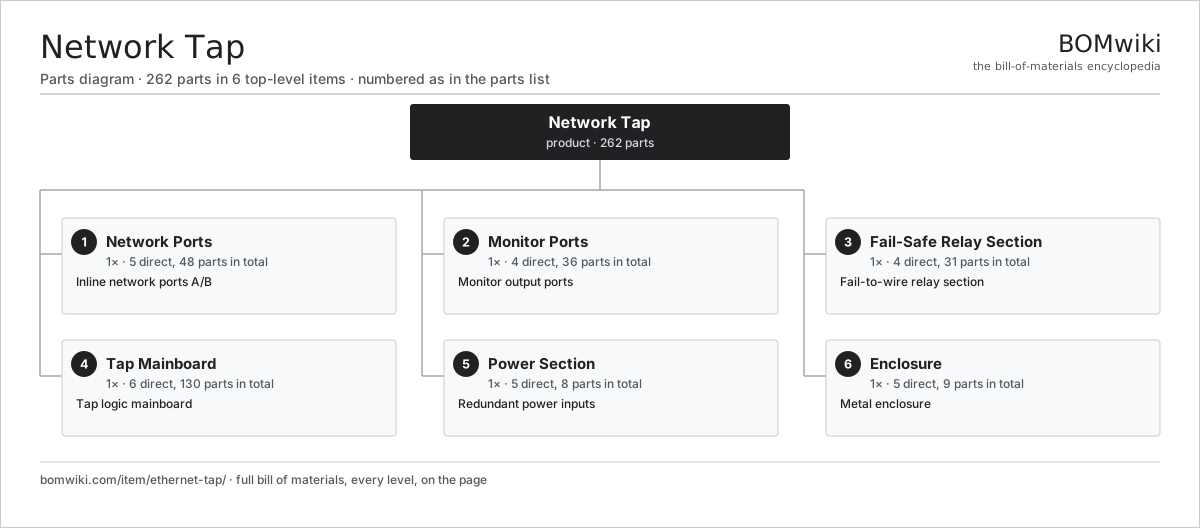
| # | Part | Qty | What it does |
|---|---|---|---|
| 1 | Network Ports 5 parts | 1× | Inline network ports A/B |
| 2 | Monitor Ports 4 parts | 1× | Monitor output ports |
| 3 | Fail-Safe Relay Section 4 parts | 1× | Fail-to-wire relay section |
| 4 | Tap Mainboard 6 parts | 1× | Tap logic mainboard |
| 5 | Power Section 5 parts | 1× | Redundant power inputs |
| 6 | Enclosure 5 parts | 1× | Metal enclosure |
3D model
No 3D model yet. Have a CAD file of this? Add a 3D model. STL renders right on this page; STEP, FreeCAD, and OpenSCAD sources are welcome too (openly licensed, like all 3D models on BOMwiki).
Build & assembly graph
expand / collapse · shared sub-assemblies converge · links to related products · est. labourTap an assembly to expand/collapse · tap a part to open it · use “Open page” for any node · drag to pan, scroll to zoom.
Bill of materials for Network Tap
6 top-level lines · 35 rows shown · 262 parts total · indented to 3 levels| # | Item / sub-assembly | Part no. | Qty/assy | Ext. qty | Parts | Type |
|---|---|---|---|---|---|---|
| 1 | Network Ports 5 parts | ethernet-tap-network-ports | 1× | 1 | 48 | assembly |
| 1.1 | Network RJ45 | ethernet-tap-net-rj45 | 2× | 2 | · | part |
| 1.2 | Network PHY | ethernet-tap-net-phy | 2× | 2 | · | part |
| 1.3 | Network Magnetics | ethernet-tap-net-magnetics | 2× | 2 | · | part |
| 1.4 | ESD Array | ethernet-tap-esd-array | 2× | 2 | · | part |
| 1.5 | SMD Passive (R/C/L) | smd-passives | 40× | 40 | · | part |
| 2 | Monitor Ports 4 parts | ethernet-tap-monitor-ports | 1× | 1 | 36 | assembly |
| 2.1 | Monitor RJ45 | ethernet-tap-mon-rj45 | 2× | 2 | · | part |
| 2.2 | Monitor PHY | ethernet-tap-mon-phy | 2× | 2 | · | part |
| 2.3 | Monitor Magnetics | ethernet-tap-mon-magnetics | 2× | 2 | · | part |
| 2.4 | SMD Passive (R/C/L) | smd-passives | 30× | 30 | · | part |
| 3 | Fail-Safe Relay Section 4 parts | ethernet-tap-failsafe | 1× | 1 | 31 | assembly |
| 3.1 | Relay | relay | 4× | 4 | · | part |
| 3.2 | Watchdog Controller | ethernet-tap-watchdog | 1× | 1 | · | part |
| 3.3 | Charge Reservoir | ethernet-tap-cap-bank | 1× | 1 | · | part |
| 3.4 | SMD Passive (R/C/L) | smd-passives | 25× | 25 | · | part |
| 4 | Tap Mainboard 6 parts | ethernet-tap-mainboard | 1× | 1 | 130 | assembly |
| 4.1 | Bare PCB | pcb-bare | 1× | 1 | · | part |
| 4.2 | Tap FPGA | ethernet-tap-fpga | 1× | 1 | · | part |
| 4.3 | Microcontroller | mcu | 1× | 1 | · | part |
| 4.4 | Reference Oscillator | ethernet-tap-osc | 1× | 1 | · | part |
| 4.5 | Status LED | ethernet-tap-led-bank | 6× | 6 | · | part |
| 4.6 | SMD Passive (R/C/L) | smd-passives | 120× | 120 | · | part |
| 5 | Power Section 5 parts | ethernet-tap-power | 1× | 1 | 8 | assembly |
| 5.1 | Power Supply | power-supply | 2× | 2 | · | part |
| 5.2 | DC Input Jack | ethernet-tap-dc-jack | 2× | 2 | · | part |
| 5.3 | OR-ing Stage | ethernet-tap-oring-diodes | 1× | 1 | · | part |
| 5.4 | Buck Regulators | ethernet-tap-regulators | 2× | 2 | · | part |
| 5.5 | Thermal Fuse | thermal-fuse | 1× | 1 | · | part |
| 6 | Enclosure 5 parts | ethernet-tap-enclosure | 1× | 1 | 9 | assembly |
| 6.1 | Case Body | ethernet-tap-case-body | 1× | 1 | · | part |
| 6.2 | Front Panel | ethernet-tap-front-panel | 1× | 1 | · | part |
| 6.3 | Mounting Ear | ethernet-tap-mounting-ears | 2× | 2 | · | part |
| 6.4 | Rubber Foot | ethernet-tap-feet | 4× | 4 | · | part |
| 6.5 | Fastener Set | fastener-set | 1× | 1 | · | part |
Something wrong in this list? Report a problem with this BOM.
Related products
same domain, ranked by shared parts 5G Base Station
436 parts · shares 2 with this page
5G Base Station
436 parts · shares 2 with this page
 DOCSIS Cable Modem
442 parts · shares 1 with this page
DOCSIS Cable Modem
442 parts · shares 1 with this page
 Fiber ONT (Optical Network Terminal)
327 parts · shares 1 with this page
Fiber ONT (Optical Network Terminal)
327 parts · shares 1 with this page
 Microwave Backhaul Radio
369 parts · shares 1 with this page
5G CPE Router
407 parts · shares 1 with this page
Data Center Switch (Spine)
3,264 parts · shares 1 with this page
Microwave Backhaul Radio
369 parts · shares 1 with this page
5G CPE Router
407 parts · shares 1 with this page
Data Center Switch (Spine)
3,264 parts · shares 1 with this page
Sourcing: possible vendors
Browse the supplier directory → Prices, MOQ, and lead times are algorithmic estimates, not quotes, and not claims about these companies. Company mappings are curated by keyword; est. price band $30–$50k. How estimates work| Vendor | HQ | Specialty | MOQ | Lead time |
|---|---|---|---|---|
|
🇺🇸Cisco
cisco.com ↗
|
San Jose, US | Networking | 500 units | 8–14 wks |
|
🇺🇸Juniper
juniper.net ↗
|
Sunnyvale, US | Networking | 500 units | 8–14 wks |
| arista.com ↗ | Santa Clara, US | Networking | 500 units | 8–14 wks |
|
🇫🇮Nokia
nokia.com ↗
|
Espoo, FI | Telecom equipment | 500 units | 8–14 wks |
|
🇨🇳Huawei
huawei.com ↗
|
Shenzhen, CN | Networking & telecom | 500 units | 8–14 wks |
808-word article