KVM Switch
ProductOverview
A KVM switch lets one keyboard, monitor, and mouse (the "K", "V", and "M") run several computers from a single console. Four computers plug into the back, the console monitor, keyboard, mouse, and speakers plug into the front, and at any moment the switch routes one host through to that console. This unit handles four HDMI/USB hosts and switches the active one three ways: a front Port Select Button, the IR Remote, or a keyboard hotkey sequence the firmware watches for.
Everything routes through the Main Board. Video, USB, and audio arrive on the Port Bank at the rear, the Front Panel Assembly carries the controls and status LEDs, and the whole stack sits in a grounded steel Enclosure Assembly. An external adapter feeds the DC Power Jack, so the switch can power its console peripherals without leaning on any single host.
How it works
Each computer sends video into one of the four HDMI Input Port ports. The HDMI MUX Switch IC is a crosspoint switch: it passes the TMDS lanes of just the selected source through to the HDMI Output Port that drives the shared monitor, at up to 4K. The trick that keeps the other three machines happy is the EDID Emulator on each input. Even when a computer is not the active port, its EDID emulator keeps replaying the monitor's capabilities back to it, so the host never sees its display "unplug" and never reshuffles windows when you switch away.
Keyboard, mouse, and peripherals are handled the same way on the USB side. Each host links to a USB-B Host Port port, and the USB Hub Controller IC re-attaches the console devices on the USB-A Console Port ports to whichever host is selected. Audio follows through the Audio Jack pair. The Microcontroller is the conductor: it reads button presses, decodes commands from the IR Receiver Module, scans the keyboard stream for the hotkey, then commands the video MUX and USB hub to move to the new port and lights the matching Status LED.
KVM Switch parts and their functions
9 top-level parts · 179 parts in total · full bill of materials below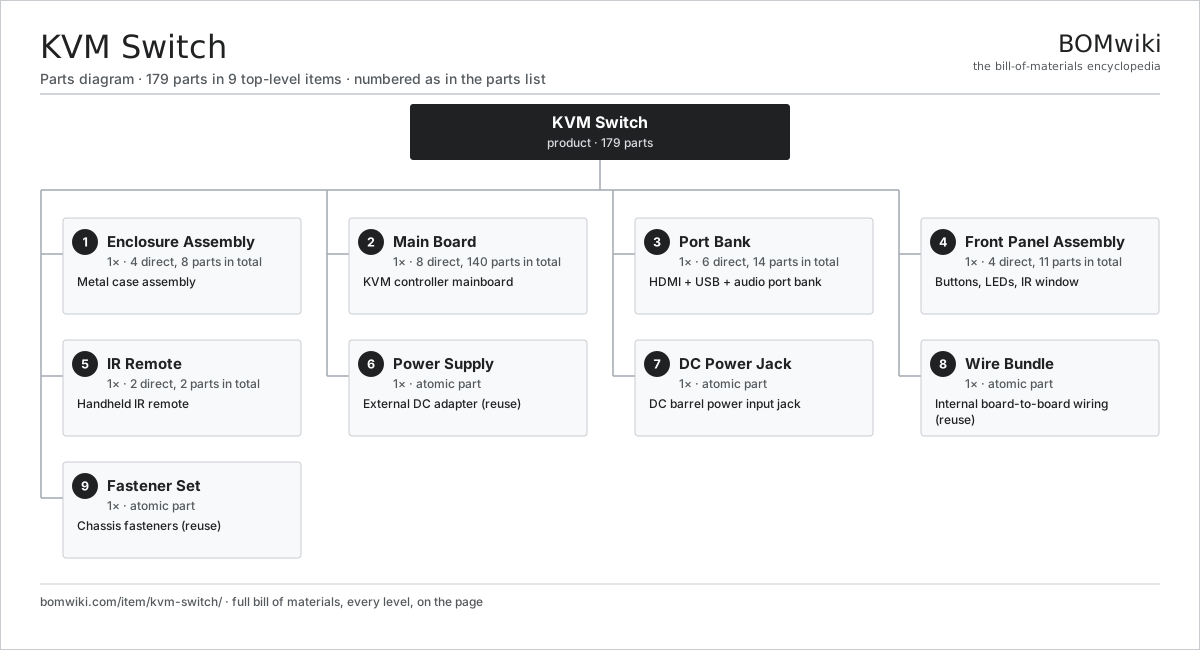
| # | Part | Qty | What it does |
|---|---|---|---|
| 1 | Enclosure Assembly 4 parts | 1× | Metal case assembly |
| 2 | Main Board 8 parts | 1× | KVM controller mainboard |
| 3 | Port Bank 6 parts | 1× | HDMI + USB + audio port bank |
| 4 | Front Panel Assembly 4 parts | 1× | Buttons, LEDs, IR window |
| 5 | IR Remote 2 parts | 1× | Handheld IR remote |
| 6 | Power Supply | 1× | External DC adapter (reuse) |
| 7 | DC Power Jack | 1× | DC barrel power input jack |
| 8 | Wire Bundle | 1× | Internal board-to-board wiring (reuse) |
| 9 | Fastener Set | 1× | Chassis fasteners (reuse) |
3D model
No 3D model yet. Have a CAD file of this? Add a 3D model. STL renders right on this page; STEP, FreeCAD, and OpenSCAD sources are welcome too (openly licensed, like all 3D models on BOMwiki).
Build & assembly graph
expand / collapse · shared sub-assemblies converge · links to related products · est. labourTap an assembly to expand/collapse · tap a part to open it · use “Open page” for any node · drag to pan, scroll to zoom.
Bill of materials for KVM Switch
9 top-level lines · 33 rows shown · 179 parts total · indented to 3 levels| # | Item / sub-assembly | Part no. | Qty/assy | Ext. qty | Parts | Type |
|---|---|---|---|---|---|---|
| 1 | Enclosure Assembly 4 parts | kvm-switch-enclosure | 1× | 1 | 8 | assembly |
| 1.1 | Sheet Metal Panel | sheet-panel | 2× | 2 | · | part |
| 1.2 | Base Tray | kvm-switch-base-tray | 1× | 1 | · | part |
| 1.3 | Rubber Foot | kvm-switch-feet | 4× | 4 | · | part |
| 1.4 | Fastener Set | fastener-set | 1× | 1 | · | part |
| 2 | Main Board 8 parts | kvm-switch-mainboard | 1× | 1 | 140 | assembly |
| 2.1 | Bare PCB | pcb-bare | 1× | 1 | · | part |
| 2.2 | Microcontroller | mcu | 1× | 1 | · | part |
| 2.3 | HDMI MUX Switch IC | kvm-switch-hdmi-mux | 1× | 1 | · | part |
| 2.4 | USB Hub Controller IC | kvm-switch-usb-hub-ic | 1× | 1 | · | part |
| 2.5 | EDID Emulator | kvm-switch-edid-emulator | 4× | 4 | · | part |
| 2.6 | ESD Protection Array | kvm-switch-esd-array | 8× | 8 | · | part |
| 2.7 | SMD Passive (R/C/L) | smd-passives | 120× | 120 | · | part |
| 2.8 | Connector | connector | 4× | 4 | · | part |
| 3 | Port Bank 6 parts | kvm-switch-port-bank | 1× | 1 | 14 | assembly |
| 3.1 | HDMI Input Port | kvm-switch-hdmi-in | 4× | 4 | · | part |
| 3.2 | HDMI Output Port | kvm-switch-hdmi-out | 1× | 1 | · | part |
| 3.3 | USB-B Host Port | kvm-switch-usb-b-host | 4× | 4 | · | part |
| 3.4 | USB-A Console Port | kvm-switch-usb-a-console | 2× | 2 | · | part |
| 3.5 | Audio Jack | kvm-switch-audio-jack | 2× | 2 | · | part |
| 3.6 | Connector | connector | 1× | 1 | · | part |
| 4 | Front Panel Assembly 4 parts | kvm-switch-front-panel | 1× | 1 | 11 | assembly |
| 4.1 | Port Select Button | kvm-switch-select-button | 4× | 4 | · | part |
| 4.2 | Status LED | kvm-switch-led | 5× | 5 | · | part |
| 4.3 | IR Receiver Module | kvm-switch-ir-receiver | 1× | 1 | · | part |
| 4.4 | Wire Bundle | wire-bundle | 1× | 1 | · | part |
| 5 | IR Remote 2 parts | kvm-switch-ir-remote | 1× | 1 | 2 | assembly |
| 5.1 | Remote PCB | kvm-switch-remote-pcb | 1× | 1 | · | part |
| 5.2 | Remote Shell | kvm-switch-remote-shell | 1× | 1 | · | part |
| 6 | Power Supply | power-supply | 1× | 1 | · | part |
| 7 | DC Power Jack | kvm-switch-power-jack | 1× | 1 | · | part |
| 8 | Wire Bundle | wire-bundle | 1× | 1 | · | part |
| 9 | Fastener Set | fastener-set | 1× | 1 | · | part |
Something wrong in this list? Report a problem with this BOM.
Related products
same domain, ranked by shared parts 5G Base Station
436 parts · shares 4 with this page
5G Base Station
436 parts · shares 4 with this page
 Firewall Appliance
82 parts · shares 4 with this page
Firewall Appliance
82 parts · shares 4 with this page
 Network Switch
1,367 parts · shares 4 with this page
Server Rack
304 parts · shares 4 with this page
Network Switch
1,367 parts · shares 4 with this page
Server Rack
304 parts · shares 4 with this page
 DECT Base Station
192 parts · shares 3 with this page
DECT Base Station
192 parts · shares 3 with this page
 Fiber Media Converter
304 parts · shares 3 with this page
Fiber Media Converter
304 parts · shares 3 with this page
Sourcing: possible vendors
Browse the supplier directory → Prices, MOQ, and lead times are algorithmic estimates, not quotes, and not claims about these companies. Company mappings are curated by keyword; est. price band $30–$50k. How estimates work| Vendor | HQ | Specialty | MOQ | Lead time |
|---|---|---|---|---|
|
🇺🇸Cisco
cisco.com ↗
|
San Jose, US | Networking | 500 units | 8–14 wks |
|
🇺🇸Juniper
juniper.net ↗
|
Sunnyvale, US | Networking | 500 units | 8–14 wks |
| arista.com ↗ | Santa Clara, US | Networking | 500 units | 8–14 wks |
|
🇫🇮Nokia
nokia.com ↗
|
Espoo, FI | Telecom equipment | 500 units | 8–14 wks |
|
🇨🇳Huawei
huawei.com ↗
|
Shenzhen, CN | Networking & telecom | 500 units | 8–14 wks |
363-word article