Manual Typewriter
ProductOverview
The manual typewriter is a mechanical writing machine that produces printed text by striking inked characters against paper via keyboard input. Invented in stages from the 1870s onward (with Remington producing the first commercial model in 1873), the typewriter revolutionized written communication, replacing handwriting for business, journalism, and literature. Unlike fountain pens (prone to smudges, variable legibility) or printing presses (slow, intended for mass production), the typewriter enabled rapid production of legible, uniform text by any literate person, with no special training beyond finger dexterity.
The machine operates on a straightforward mechanism: pressing a key activates a lever system that propels a typebar (bearing a raised character) forward, striking paper through an inked ribbon against a hard roller (platen). After impact, a spring returns the typebar. Simultaneously, the paper carriage advances one position, preparing for the next character.
Keyboard and Key Mechanism
The Keyboard contains 40–80 key buttons, each labeled with a character. The QWERTY layout (invented by Christopher Sholes in 1873) is standard in English-language machines; other layouts (AZERTY, DVORAK, Cyrillic, etc.) exist for other languages.
When the operator presses a key, the key stem (a vertical rod beneath each button) pushes downward. The stem connects via linkage rods to a key lever, an intermediate rocker lever that pivots. As the key lever rocks, it pulls upward on a corresponding typebar rod.
Springs beneath each key provide tactile feedback and return the key to the resting (up) position when the operator releases the key. The springs are calibrated for a consistent feel: too stiff, and typing fatigues the hand; too soft, and keys may not return cleanly.
Key travel (keystroke depth) is typically 5–8 mm. This travel distance allows the key to fully activate the downstream mechanism without bottoming out and creating a harsh impact sound. Experienced typists develop a rapid, rhythmic keystroke pattern, maintaining a cadence of 30–60 words per minute (60 words ≈ 300 characters, or 5 keystrokes per second).
Typebar Action and Motion
The Typebar Action is the ingenious mechanical system that converts downward key motion into an upward arc motion of the typeban. It consists of:
Typebar pivot: All typeban pivot on a single rotating point (like a seesaw). This pivot is typically located at the rear center of the machine. The pivot allows typeban to swing upward (striking position) and downward (rest position).
Key lever geometry: Each key lever (per key) connects to a typebar. The leverage ratio is typically 3–5:1, meaning the operator''s finger effort is amplified by 3–5 times at the typebar strike point. This amplification reduces typing effort and allows lighter, faster keystrokes to generate sufficient impact force (500–1500 grams-force) to make a clear mark on paper.
Drawband return spring: Rather than having individual return springs for 40+ typeban, a single drawband (spring or elastic tape) serves all typeban. The drawband is connected to each typebar at its front end and anchored to a fixed point at the rear. When the operator releases a key, the drawband pulls all typeban simultaneously back to the resting position.
Segment guide: A curved rail guides the typeban path, constraining motion to a smooth arc. Without this guide, typeban would move erratically and might collide with one another.
Typebars and Type Slugs
Each typebar is a steel rod (2–3 mm diameter, 50–80 mm long) bearing a raised character at its striking end. The character is a metal (typically type-metal: an alloy of lead, tin, and antimony) or steel casting with the inverted character shape. When the typebar strikes, the character face hits the paper, leaving an imprint.
Type-metal was historically preferred: it''s softer than steel, easier to cast with precise character details, but also wears gradually. Type slugs are replaceable; worn types can be unscrewed and replaced with fresh ones, extending the typewriter''s life.
Characters are inverted on the slug so that the mirror-image mark transfers to paper correctly. The striking end is hardened (heat-treated) to resist wear; after printing millions of characters, type faces develop small flat spots and the characters appear slightly worn.
Paper Feed and Carriage
The carriage assembly holds paper and advances it character-by-character. It consists of:
Carriage frame: A U-shaped rigid frame sliding horizontally on two rails embedded in the machine base. Rollers underneath the carriage engage the rails, allowing smooth side-to-side movement.
Paper support: A flat table on the carriage holds the paper sheet. A bail (spring-loaded bar) presses down on the paper''s top edge, keeping it flat and aligned. Paper is inserted by lifting the bail, sliding the sheet in, and lowering the bail.
Advance mechanism: After each keystroke, the carriage automatically advances (moves one space to the left, from the typist''s perspective). This advance is typically mechanical: a pawl (ratchet mechanism) engages with a toothed rack, preventing backward slip and ensuring discrete, uniform spacing.
Line space: At the end of a line (typically 80 characters on letter-width paper), the operator moves the paper upward by one line using a line-spacing lever. Rotating this lever manually advances the paper vertically to the next baseline. Line spacing is adjustable: single-spacing (6 lines per inch), 1.5×, or double-spacing (3 lines per inch).
Tabulator: Some machines include a tabulator that allows rapid carriage movement to preset column stops. This feature is valuable for forms, tables, and structured layouts. The operator engages the tabulator, and the carriage slides rapidly to the next stop point.
Platen (Impression Roller)
The Platen is a hard rubber or composition roller (approximately 25 mm diameter and 300–400 mm wide) positioned directly behind the paper. When a typebar strikes, the character hits the paper, which presses against the platen, transferring the inked mark.
The platen material must be hard enough to resist denting (soft platens develop divots where typeban strike repeatedly) but not so brittle that it cracks. Hard rubber (vulcanized rubber with high sulfur content) was the historical standard; modern typewriters use synthetic composition materials.
Platen knobs (hand grips on each end) allow the operator to rotate the platen manually, advancing paper without using the automatic mechanism. Skilled operators use this for rapid paper advance or to insert a sheet at a specific vertical position.
The platen gradually hardens and glazes with age, reducing grip and making impressions lighter. The solution is platen replacement, a straightforward operation: unbolt the platen from its bearings, slide out the old one, and install a new one. Replacement platens have been manufactured for decades and are still available.
Ribbon System
The Ribbon System delivers ink to the typebars. It consists of:
Ribbon spools: Two reels (one for supply, one for takeup) hold the ribbon. As typing proceeds, the supply spool gradually empties, and the takeup spool fills. The operator manually rewind the ribbon when the supply spool is exhausted, reversing the direction so that fresh, inked ribbon passes through the strike zone.
Ribbon material: The Ribbon is a cloth or nylon tape (13 mm wide, typically) saturated with oil-based black ink. The ribbon has a distinctive weave that holds ink without over-saturation. Ribbon lifespan is typically 500–1000 pages per spool (depending on ribbon length and ink saturation).
Ribbon advancement: After each keystroke, the ribbon vibrator, a mechanical mechanism linked to the carriage advance, shifts the ribbon slightly so that a fresh inked section presents to the typebar for the next strike. Without advancement, repeated strikes on the same ribbon area would cause the ink to transfer poorly.
Ribbon guide: A guide positions the ribbon precisely between the type and the platen, ensuring accurate ink transfer.
Some typewriters include a bi-directional ribbon (two colors, e.g., red and black, in alternating bands), allowing the operator to toggle between colors for emphasis. Correction ribbon (white, erasable ink) was invented later for electric machines, allowing typists to erase errors, though manual typewriters do not support this feature.
Impact and Impression Quality
The force of a keystroke is sufficient to create a clear mark on standard typing paper (20 lb bond, ~75 gsm) and even light carbon paper. Early typewritten documents are often sharper and cleaner than handwritten text, which contributed to the typewriter''s adoption for business and legal documents.
However, typing on manual machines is physically demanding: a single keystroke requires 500–1500 grams-force, and sustained typing (8 hours at 50 wpm) involves millions of micro-impacts, leading to fatigue. The shift key (raising typeban to access uppercase characters) requires extra force, making typing of all-caps text particularly strenuous. This consideration drove adoption of electric typewriters (introduced 1961) that provided powered keystroke assistance.
Mechanical Advantages and Durability
Manual typewriters are remarkably durable. With no electrical components, there are no circuits to fail, no motors to burn out. The mechanics are simple levers, springs, and ratchets, well-understood mechanical principles used for centuries. A well-maintained manual typewriter can function for decades, and machines from the 1920s–1950s often type as well as new machines.
Maintenance is straightforward: occasional cleaning of accumulated paper dust and ribbon fibers; lubrication of pivot points with light machine oil; adjustment of key lever heights (to equalize keystroke force across the keyboard); and ribbon and platen replacement. Parts are standardized, key springs, drawband, ribbon spools, and can be sourced from specialized vendors even today.
Typewriter Culture and Legacy
The typewriter became deeply embedded in 20th-century culture. Writers, Hemingway, Steinbeck, Cormac McCarthy, used manual typewriters for their novels. Journalists filed stories from typewriters in newsrooms. Court reporters used stenotype machines (specialized typewriters with a unique character set and key layout enabling shorthand typing at 100+ wpm).
The QWERTY layout, originally designed to prevent mechanical jams (by spacing frequently used character typeban farther apart), persisted even after electric machines made jamming irrelevant. This historical accident shaped how billions of people learn to type.
The typewriter declined after the 1980s with the rise of personal computers and word processors. However, a small but passionate community of enthusiasts maintains manual typewriters, valuing their mechanical purity, freedom from digital distractions, and distinctive tactile and auditory experience. Manual typewriter sales have experienced a modest revival since the 2010s among writers and students seeking distraction-free writing environments.
The influence of the typewriter keyboard layout, typing methodology, and the very concept of "word processing" permeates modern computing, a legacy of 150 years of mechanical evolution.
Manual Typewriter parts and their functions
7 top-level parts · 35 parts in total · full bill of materials below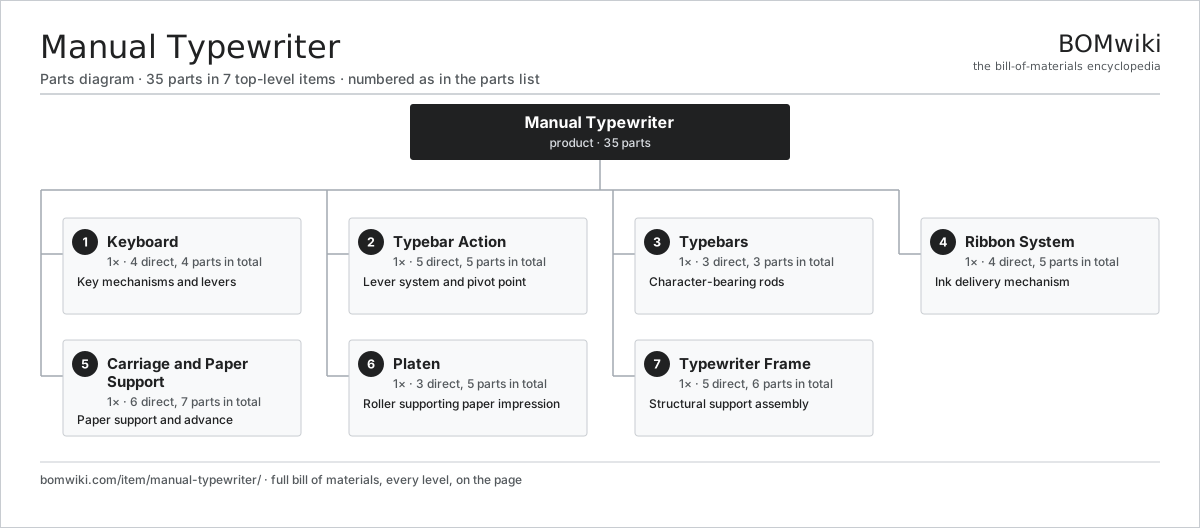
| # | Part | Qty | What it does |
|---|---|---|---|
| 1 | Keyboard 4 parts | 1× | Key mechanisms and levers |
| 2 | Typebar Action 5 parts | 1× | Lever system and pivot point |
| 3 | Typebars 3 parts | 1× | Character-bearing rods |
| 4 | Ribbon System 4 parts | 1× | Ink delivery mechanism |
| 5 | Carriage and Paper Support 6 parts | 1× | Paper support and advance |
| 6 | Platen 3 parts | 1× | Roller supporting paper impression |
| 7 | Typewriter Frame 5 parts | 1× | Structural support assembly |
3D model
No 3D model yet. Have a CAD file of this? Add a 3D model. STL renders right on this page; STEP, FreeCAD, and OpenSCAD sources are welcome too (openly licensed, like all 3D models on BOMwiki).
Build & assembly graph
expand / collapse · shared sub-assemblies converge · links to related products · est. labourTap an assembly to expand/collapse · tap a part to open it · use “Open page” for any node · drag to pan, scroll to zoom.
Bill of materials for Manual Typewriter
7 top-level lines · 37 rows shown · 35 parts total · indented to 3 levels| # | Item / sub-assembly | Part no. | Qty/assy | Ext. qty | Parts | Type |
|---|---|---|---|---|---|---|
| 1 | Keyboard 4 parts | manual-typewriter-keyboard | 1× | 1 | 4 | assembly |
| 1.1 | Key Caps | manual-typewriter-key-buttons | 1× | 1 | · | part |
| 1.2 | Key Stems | manual-typewriter-key-stems | 1× | 1 | · | part |
| 1.3 | Key Springs | manual-typewriter-key-springs | 1× | 1 | · | part |
| 1.4 | Key Linkage | manual-typewriter-key-linkage | 1× | 1 | · | part |
| 2 | Typebar Action 5 parts | manual-typewriter-typebar-action | 1× | 1 | 5 | assembly |
| 2.1 | Key Lever | manual-typewriter-key-lever | 1× | 1 | · | part |
| 2.2 | Typebar Pivot | manual-typewriter-typebar-pivot | 1× | 1 | · | part |
| 2.3 | Drawband | manual-typewriter-drawband | 1× | 1 | · | part |
| 2.4 | Segment Guide | manual-typewriter-segment-guide | 1× | 1 | · | part |
| 2.5 | Type Slugs | manual-typewriter-type-slugs | 1× | 1 | · | part |
| 3 | Typebars 3 parts | manual-typewriter-typebars | 1× | 1 | 3 | assembly |
| 3.1 | Typebar Rod | manual-typewriter-typebar-rod | 1× | 1 | · | part |
| 3.2 | Type Slug | manual-typewriter-type-slug | 1× | 1 | · | part |
| 3.3 | Type Hammer | manual-typewriter-type-hammer | 1× | 1 | · | part |
| 4 | Ribbon System 4 parts | manual-typewriter-ribbon-system | 1× | 1 | 5 | assembly |
| 4.1 | Ribbon Spools | manual-typewriter-ribbon-spools | 2× | 2 | · | part |
| 4.2 | Ribbon | manual-typewriter-ribbon | 1× | 1 | · | part |
| 4.3 | Ribbon Vibrator | manual-typewriter-ribbon-vibrator | 1× | 1 | · | part |
| 4.4 | Ribbon Guide | manual-typewriter-ribbon-guide | 1× | 1 | · | part |
| 5 | Carriage and Paper Support 6 parts | manual-typewriter-carriage | 1× | 1 | 7 | assembly |
| 5.1 | Carriage Frame | manual-typewriter-carriage-frame | 1× | 1 | · | part |
| 5.2 | Carriage Rollers | manual-typewriter-carriage-rollers | 2× | 2 | · | part |
| 5.3 | Paper Table | manual-typewriter-paper-support-table | 1× | 1 | · | part |
| 5.4 | Paper Bail | manual-typewriter-paper-bail | 1× | 1 | · | part |
| 5.5 | Line Space Lever | manual-typewriter-line-space-mechanism | 1× | 1 | · | part |
| 5.6 | Tabulator | manual-typewriter-tabulator-mechanism | 1× | 1 | · | part |
| 6 | Platen 3 parts | manual-typewriter-platen | 1× | 1 | 5 | assembly |
| 6.1 | Platen Roller | manual-typewriter-platen-roller | 1× | 1 | · | part |
| 6.2 | Platen Knobs | manual-typewriter-platen-knobs | 2× | 2 | · | part |
| 6.3 | Platen Bearings | manual-typewriter-platen-bearings | 2× | 2 | · | part |
| 7 | Typewriter Frame 5 parts | manual-typewriter-frame | 1× | 1 | 6 | assembly |
| 7.1 | Frame Base | manual-typewriter-frame-base | 1× | 1 | · | part |
| 7.2 | Frame Uprights | manual-typewriter-frame-uprights | 2× | 2 | · | part |
| 7.3 | Frame Top Bar | manual-typewriter-frame-top-bar | 1× | 1 | · | part |
| 7.4 | Mounting Feet | manual-typewriter-mounting-feet | 1× | 1 | · | part |
| 7.5 | Fastener Set | fastener-set | 1× | 1 | · | part |
Something wrong in this list? Report a problem with this BOM.
Sourcing: possible vendors
Browse the supplier directory → Prices, MOQ, and lead times are algorithmic estimates, not quotes, and not claims about these companies. Company mappings are curated by keyword; est. price band $5k–$2M. How estimates work| Vendor | HQ | Specialty | MOQ | Lead time |
|---|---|---|---|---|
| atlascopco.com ↗ | Stockholm, SE | Compressors & industrial | 10 units | 12–20 wks |
|
🇦🇹Andritz
andritz.com ↗
|
Graz, AT | Process plants & machinery | 10 units | 12–20 wks |
| buhlergroup.com ↗ | Uzwil, CH | Food & materials processing | 10 units | 12–20 wks |
| gea.com ↗ | Düsseldorf, DE | Process technology | 10 units | 12–20 wks |
| mhi.com ↗ | Tokyo, JP | Heavy machinery | 10 units | 12–20 wks |
1,836-word article