Mesh Wi-Fi Node
ProductOverview
The Mesh Wi-Fi Node is one element of a whole-home mesh: drop several of them around a building and they cooperate as a single network with one SSID, handing clients off as they move. Each node is a tri-band Wi-Fi 6E (802.11ax) radio rated around AXE5400, roughly 5.4 Gbps aggregate across the 2.4 GHz, 5 GHz and 6 GHz bands, and covers about 250 m² on its own.
Everything lives on one Mainboard. The board carries the Compute SoC Module networking processor, DDR4 RAM, NAND flash, three Radio Front-End Module front-ends (one per band), the RF power amplifiers and filters, and a 2.5GbE Switch IC driving the wired ports. The radios feed six PCB Antenna elements wrapped around the inside of the vented Housing Assembly, which exhausts heat through a top grille and carries the status light pipe and the reset/sync buttons.
Wired connectivity comes from the Ethernet Port Bank bank, one 2.5GbE port plus two Gigabit ports, each with its own magnetics, alongside a USB 3.0 socket. A barrel jack and external 12 V adapter (Power Supply) supply power.
How it works
Mesh coverage depends on backhaul: the link that carries traffic between nodes back to the one wired to the modem. This node defaults to a dedicated 6 GHz backhaul, the third radio is reserved so node-to-node traffic never steals airtime from clients on 2.4 and 5 GHz. The 6 GHz band is wide and uncongested, so two nodes a room apart can sustain multi-gigabit backhaul. Where a wall is in the way, the same job runs over a wired 2.5GbE hop through the 2.5GbE Switch IC instead, which is faster and immune to interference.
The Compute SoC Module runs the mesh protocol: nodes discover each other, measure link quality, and elect routes so each client reaches the gateway over the strongest path. As you walk through the house, 802.11k/v/r steering moves your phone to the nearest node mid-session. Each band's Radio Front-End Module uses 2x2 MU-MIMO and OFDMA to serve several devices in the same transmit slot, and the RF Power Amplifier amplifiers push each chain to its regulatory power limit for reach. Running three radios hot makes thermals matter, so the SoC sits under a heatsink with thermal pads and an EMI shield over the front-ends.
Mesh Wi-Fi Node parts and their functions
8 top-level parts · 70 parts in total · full bill of materials below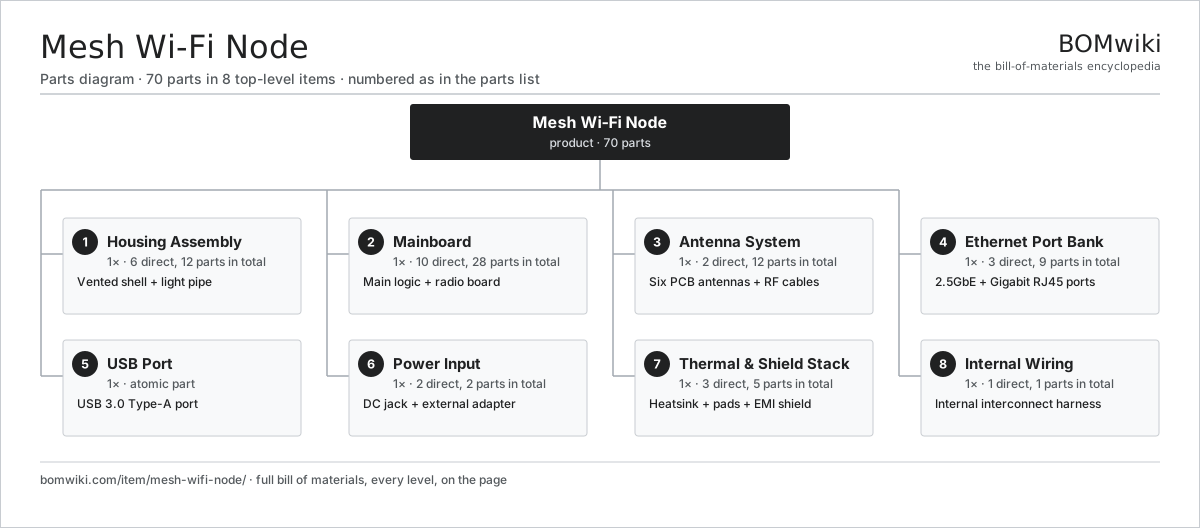
| # | Part | Qty | What it does |
|---|---|---|---|
| 1 | Housing Assembly 6 parts | 1× | Vented shell + light pipe |
| 2 | Mainboard 10 parts | 1× | Main logic + radio board |
| 3 | Antenna System 2 parts | 1× | Six PCB antennas + RF cables |
| 4 | Ethernet Port Bank 3 parts | 1× | 2.5GbE + Gigabit RJ45 ports |
| 5 | USB Port | 1× | USB 3.0 Type-A port |
| 6 | Power Input 2 parts | 1× | DC jack + external adapter |
| 7 | Thermal & Shield Stack 3 parts | 1× | Heatsink + pads + EMI shield |
| 8 | Internal Wiring 1 parts | 1× | Internal interconnect harness |
3D model
No 3D model yet. Have a CAD file of this? Add a 3D model. STL renders right on this page; STEP, FreeCAD, and OpenSCAD sources are welcome too (openly licensed, like all 3D models on BOMwiki).
Build & assembly graph
expand / collapse · shared sub-assemblies converge · links to related products · est. labourTap an assembly to expand/collapse · tap a part to open it · use “Open page” for any node · drag to pan, scroll to zoom.
Bill of materials for Mesh Wi-Fi Node
8 top-level lines · 40 rows shown · 70 parts total · indented to 3 levels| # | Item / sub-assembly | Part no. | Qty/assy | Ext. qty | Parts | Type |
|---|---|---|---|---|---|---|
| 1 | Housing Assembly 6 parts | mesh-wifi-node-housing | 1× | 1 | 12 | assembly |
| 1.1 | Vented Top Shell | mesh-wifi-node-top-shell | 1× | 1 | · | part |
| 1.2 | Base Shell | mesh-wifi-node-bottom-shell | 1× | 1 | · | part |
| 1.3 | Status LED Light Pipe | mesh-wifi-node-light-pipe | 1× | 1 | · | part |
| 1.4 | Reset / Sync Buttons 2 parts | mesh-wifi-node-buttons | 1× | 1 | 4 | assembly |
| 1.4.1 | Tactile Switch | mesh-wifi-node-tact-switch | 2× | 2 | · | part |
| 1.4.2 | Button Cap | mesh-wifi-node-button-cap | 2× | 2 | · | part |
| 1.5 | Rubber Foot | mesh-wifi-node-feet | 4× | 4 | · | part |
| 1.6 | Fastener Set | fastener-set | 1× | 1 | · | part |
| 2 | Mainboard 10 parts | mesh-wifi-node-mainboard | 1× | 1 | 28 | assembly |
| 2.1 | Bare PCB | pcb-bare | 1× | 1 | · | part |
| 2.2 | Compute SoC Module | soc-module | 1× | 1 | · | part |
| 2.3 | DDR4 SDRAM | mesh-wifi-node-ram | 1× | 1 | · | part |
| 2.4 | NAND Flash | mesh-wifi-node-nand | 1× | 1 | · | part |
| 2.5 | Radio Front-End Module 3 parts | mesh-wifi-node-radio-fem | 3× | 3 | 3 | assembly |
| 2.5.1 | Wi-Fi Transceiver | mesh-wifi-node-transceiver | 1× | 3 | · | part |
| 2.5.2 | T/R Switch | mesh-wifi-node-tr-switch | 1× | 3 | · | part |
| 2.5.3 | SMD Passive (R/C/L) | smd-passives | 1× | 3 | · | part |
| 2.6 | RF Power Amplifier | mesh-wifi-node-rf-pa | 6× | 6 | · | part |
| 2.7 | RF Band-Pass Filter | mesh-wifi-node-rf-filter | 6× | 6 | · | part |
| 2.8 | 2.5GbE Switch IC | mesh-wifi-node-switch-ic | 1× | 1 | · | part |
| 2.9 | SMD Passive (R/C/L) | smd-passives | 1× | 1 | · | part |
| 2.10 | Connector | connector | 1× | 1 | · | part |
| 3 | Antenna System 2 parts | mesh-wifi-node-antenna-system | 1× | 1 | 12 | assembly |
| 3.1 | PCB Antenna | mesh-wifi-node-pcb-antenna | 6× | 6 | · | part |
| 3.2 | RF Coaxial Cable | mesh-wifi-node-rf-cable | 6× | 6 | · | part |
| 4 | Ethernet Port Bank 3 parts | mesh-wifi-node-ethernet-ports | 1× | 1 | 9 | assembly |
| 4.1 | Connector | connector | 3× | 3 | · | part |
| 4.2 | Ethernet Magnetics | mesh-wifi-node-magnetics | 3× | 3 | · | part |
| 4.3 | Port LED | mesh-wifi-node-port-led | 3× | 3 | · | part |
| 5 | USB Port | mesh-wifi-node-usb-port | 1× | 1 | · | part |
| 6 | Power Input 2 parts | mesh-wifi-node-power-input | 1× | 1 | 2 | assembly |
| 6.1 | DC Barrel Jack | mesh-wifi-node-dc-jack | 1× | 1 | · | part |
| 6.2 | Power Supply | power-supply | 1× | 1 | · | part |
| 7 | Thermal & Shield Stack 3 parts | mesh-wifi-node-thermal-stack | 1× | 1 | 5 | assembly |
| 7.1 | Heatsink | mesh-wifi-node-heatsink | 1× | 1 | · | part |
| 7.2 | Thermal Pad | mesh-wifi-node-thermal-pad | 3× | 3 | · | part |
| 7.3 | EMI Shield | mesh-wifi-node-emi-shield | 1× | 1 | · | part |
| 8 | Internal Wiring 1 parts | mesh-wifi-node-wiring | 1× | 1 | 1 | assembly |
| 8.1 | Wire Bundle | wire-bundle | 1× | 1 | · | part |
Something wrong in this list? Report a problem with this BOM.
Related products
same domain, ranked by shared parts 5G Base Station
436 parts · shares 3 with this page
5G Base Station
436 parts · shares 3 with this page
 DECT Base Station
192 parts · shares 3 with this page
DECT Base Station
192 parts · shares 3 with this page
 Firewall Appliance
82 parts · shares 3 with this page
Firewall Appliance
82 parts · shares 3 with this page
 Microwave Backhaul Radio
369 parts · shares 3 with this page
Microwave Backhaul Radio
369 parts · shares 3 with this page
 Network Switch
1,367 parts · shares 3 with this page
Network Switch
1,367 parts · shares 3 with this page
 OTDR Fiber Tester
393 parts · shares 3 with this page
OTDR Fiber Tester
393 parts · shares 3 with this page
Sourcing: possible vendors
Browse the supplier directory → Prices, MOQ, and lead times are algorithmic estimates, not quotes, and not claims about these companies. Company mappings are curated by keyword; est. price band $30–$50k. How estimates work| Vendor | HQ | Specialty | MOQ | Lead time |
|---|---|---|---|---|
|
🇺🇸Cisco
cisco.com ↗
|
San Jose, US | Networking | 500 units | 8–14 wks |
|
🇺🇸Juniper
juniper.net ↗
|
Sunnyvale, US | Networking | 500 units | 8–14 wks |
| arista.com ↗ | Santa Clara, US | Networking | 500 units | 8–14 wks |
|
🇫🇮Nokia
nokia.com ↗
|
Espoo, FI | Telecom equipment | 500 units | 8–14 wks |
|
🇨🇳Huawei
huawei.com ↗
|
Shenzhen, CN | Networking & telecom | 500 units | 8–14 wks |
422-word article