OB Broadcast Van
ProductOverview
An OB (Outside Broadcast) van is a mobile television production facility capable of capturing and transmitting live sporting events, concerts, news conferences, and other remote venues without fixed studio infrastructure. The vehicle houses a complete television production suite, video switcher, audio console, graphics system, camera control, monitoring, and transmission uplink, enabling a remote production crew to deliver broadcast-quality programming to air or streaming platforms.
The OB van is a specialized tool used by broadcast networks (ESPN, NBC, Fox Sports), production companies, and large sporting organizations. Capital cost is $300,000–500,000+ per vehicle; operations cost $1,000–2,000/day. A typical client (college athletics, regional sports network) rents OB services for 50–100 events annually, generating $100,000–300,000 revenue per deployment.
Production Suite and Video Switcher
The Production Control Suite is the operational heart. Rack-mounted equipment includes:
- Video switcher (12–16 input, 4K-capable): Selects between up to 16 camera feeds and tape playback sources, applies transitions (cuts, dissolves, fades), and generates the final program output. Modern switchers (Sony ELC, Grass Valley Ignite) can seamlessly handle 4K (4096×2160) or UHD (3840×2160) video and 60 fps frame rates.
- Multiviewer monitors (multiple 4K displays): Program monitor shows live output (what's on air). Production monitors show each camera feed, graphics preview, and tape playback.
- Character generator (graphics system): Real-time overlay of team names, scores, lower-thirds, and full-screen graphics. Modern systems (Ross OverDrive, Vizrt) are web-based and can pull live data from game statistics feeds.
- Video encoder/transcoder: Compresses video using H.264 or H.265 codec for transmission over satellite or bonded cellular uplink.
Technical workflow (during live game):
- Director calls shots ("Camera 1, wide shot of stadium").
- Switcher operator selects Camera 1 on the switcher button panel.
- Video output transitions to Camera 1; multiviewer shows the selection.
- Audio engineer balances commentary, crowd ambience, and replay sound effects.
- Graphics operator overlays score, game clock, and player information.
- Final composite (video + audio + graphics) is encoded and transmitted to broadcast center.
Video signal path: SDI (Serial Digital Interface) cables transmit uncompressed or lightly compressed video at 270 Mbps (HD) or 1.5+ Gbps (4K). Longer runs (> 100 meters) use fiber-optic converters to extend distance without signal degradation. Redundancy is critical; a single SDI cable failure causes loss of a camera feed (visible on-air artifact).
Camera System and Field Operations
The Camera and Lens System typically comprises 3 broadcast-quality cameras positioned strategically:
- Wide-angle camera (press-box or high position): 40–60 degree field of view, captures stadium panorama and crowd reaction.
- Medium shot camera (sideline): 20–30 degree FOV, follows players and key action.
- Tight/close-up camera (jib arm or fixed): 10–15 degree FOV, captures player emotions and hand details.
Lens specifications: Broadcast lenses (Fujinon, Canon) feature servo-controlled motors for smooth zooms and motorized focus. Typical range: 16:1 or 20:1 (from wide to tight). A 16:1 lens covers 40 degrees (wide) to 2.5 degrees (tight) in a single lens, reducing the need for lens changes during live broadcast.
Camera mounts:
- Pedestal (on studio wheels, fixed location): Fluid-head pan/tilt mechanism allows smooth horizontal/vertical movement. Hydraulic fluid inside the head dampens abrupt movements, preventing jerkiness on-air.
- Jib arm (robotic crane, 10–20 feet height, 30–40 feet reach): Enables dynamic camera movements (push-in on player, crane overhead). Requires specialized operator training.
- Handheld (lightweight ENG camera): Reporter walks with camera; less stable but very mobile.
Cable runs: SDI cables (75-ohm shielded coax) run from each field camera back to the van, distance limiting to 200–300 meters (standard). For longer distances, fiber-optic converters extend to 1+ km.
Audio Production System
The Audio Production System is equally complex. The audio mixing console (32+ channels) accepts inputs from:
- Talent/commentary: 2–4 microphones (play-by-play announcer, color commentator, sideline reporter).
- Crowd ambience: Stereo omnidirectional microphones capturing ambient stadium sound.
- Replay sound: Tape playback, highlight packages with pre-recorded audio.
- Guest interviews: Remote mic feeds from on-field interviews.
Audio engineer's role (during game):
- Monitor all incoming audio levels (prevent clipping/distortion).
- Mix crowd, talent, and effects in real-time (raise talent during crucial moments, pull down crowd noise during huddles).
- Ensure continuity between segments (smooth transitions between live and tape playback).
- Manage remote audio feeds (satellite phone audio from reporter in field).
Monitoring: Headphone monitors for talent allow them to hear a mix of their own microphone, crowd, and director cues. Imbalanced monitors (talent cannot hear director) cause on-air gaffes.
Transmission and Uplink System
The Transmission and Uplink System sends video/audio to the broadcast center or streaming platform using one of two technologies:
1. Satellite uplink (Ku-band):
- Equipment: Motorized satellite dish (1–2 meters), mounted on van roof. Satellite modem (uplink equipment) encodes video at 5–10 Mbps and transmits to a satellite transponder.
- Bandwidth: Fixed 10–20 Mbps uplink (vs. lower-latency terrestrial). Cost: $1,500–3,000 per event day (transponder lease).
- Reliability: Weather-dependent; rain and high winds can degrade signal quality or cause temporary outages.
- Latency: 0.5–1 second delay (satellite propagation); acceptable for sports, problematic for interactive shows.
2. Bonded cellular uplink (4G/5G):
- Equipment: Dual-SIM cellular router (Viasat, Streambox) combining 2–4 cellular carriers (Verizon, AT&T, T-Mobile) into a single logical connection.
- Bandwidth: 5–50 Mbps aggregate (varies by cell tower congestion). Cost: $500–1,500 per event (cellular overage or dedicated contract).
- Reliability: More redundant than satellite (cell towers are ubiquitous); dual carriers protect against single carrier outage.
- Latency: 50–150 ms (much lower than satellite); better for interactive programming.
Hybrid approach: Many OB trucks carry both satellite and bonded cellular as failsafe. If satellite fails, switch to cellular; if cellular becomes congested, fall back to satellite. Automatic detection and switching minimizes on-air disruption.
Video compression: Live video (4K at 60 fps = 100+ Gbps uncompressed) is encoded to H.265 (HEVC) at 8–12 Mbps (20:1 compression ratio) for transmission. This requires real-time encoding power (GPUs) and introduces ~2–3 second encoding latency.
Power Generation and Distribution
The Power Generation System is critical. An OB van production suite consumes:
- Video/audio/control equipment: 10–15 kW
- Lighting (if indoor venue and van provides fill): 5–10 kW
- Transmission equipment (satellite or cellular): 2–5 kW
- HVAC (keeping electronics cool during 6–8 hour broadcasts): 5 kW
- Total peak demand: 25–35 kW sustained, 40–50 kW with headroom.
A 50–75 kW diesel generator provides ample headroom. The generator runs continuously during broadcast (6–8 hours), consuming 20–40 gallons diesel ($60–120 fuel cost per event). Fuel tank (200+ gallons) provides 10–20 hour autonomy.
Power distribution: Main panel (400 A service) distributes to:
- Production suite circuits (120/240 V, 30–50 A total): Video switcher, audio console, encoders, graphics, monitoring.
- Transmission circuits (dedicated 30 A): Satellite modem or cellular router (high instantaneous peaks during transmission).
- Lighting/HVAC circuits: If the van provides on-site fill lights or climate control.
UPS backup: Critical systems (video switcher, audio console, encoder) are backed by UPS batteries (15–30 minute capacity), allowing graceful shutdown if generator fails mid-broadcast. A generator failure during live transmission is catastrophic (loss of air); UPS buys time to switch to backup transmission method or hand off to remote studio.
Expandable Sides and Workspace
Some OB trucks feature hydraulic expandable sides (Expandable Sides and Workspace) that extend the van width from 8 feet to 12+ feet when parked, creating additional staging area for crew. Benefits:
- Larger gear staging area (spare cameras, cables, lighting).
- Additional workspace for mobile graphics or replay operators.
- Safety (expanded footprint provides stable platform for crew working outside van).
Setup requires 30–60 seconds (hydraulic cylinders extend). Breakdown requires retraction time, increasing load/unload duration.
Operations and Logistics
Pre-event preparation (48 hours prior):
- Advance crew scouts the venue (camera positions, cable runs, power availability, transmission uplink angles).
- Coordinates with event organizer for on-field access, credential requirements, and weather contingencies.
Arrival and setup (day of event, 3–4 hours prior to go-live):
- Park OB truck in designated spot.
- Position generator (away from talent areas; exhaust discharge upwind or away from crowds).
- String SDI cables from van to field cameras (run through conduit, tape to ground to prevent tripping hazard).
- Position and level each field camera on pedestal or mount.
- Run audio cables (crowd mics, talent headsets, line-level feeds).
- Connect satellite or cellular uplink; test signal quality to broadcast center.
- Power up all equipment; run technical rehearsal (test all cameras, audio, graphics, transmission).
- Audio/video system performance check (levels, delay, color correction).
Live broadcast (2–4 hours typical):
- Director, switcher operator, audio engineer, graphics operator, 3 camera operators, transmission specialist, producer all coordinating.
- Real-time problem solving (camera failure, audio feedback, graphics corruption, transmission dropout).
Breakdown (1–2 hours post-event):
- Retract expandable sides, wind up cables, secure equipment.
- Power down systems gracefully (prevent data corruption, allow cooling).
- Remove on-site staging (tape, cables, marker flags).
Total crew: 8–12 people per OB truck deployment (highly skilled specialists).
Cost of Ownership
Capital: $300,000–500,000+ per OB truck (fully equipped).
Operating cost (per event, 6-hour broadcast):
- Fuel: $80–150 (generator diesel).
- Transmission (satellite or cellular): $1,500–3,000.
- Crew labor: $2,000–3,000 (8–10 people × 6 hours × $40–50/hour).
- Equipment maintenance (amortized): $300–500.
- Total event cost: $3,880–6,650.
Revenue model: OB trucks are rented by broadcasters or event organizers. Typical rates: $5,000–10,000 per event day (depending on market, venue prestige, technical complexity). A truck operating 50 events/year at $7,500 average generates $375,000 revenue. Against ~$200,000 annual operating costs (fuel, maintenance, crew benefits, insurance), the contribution margin is $175,000 per vehicle per year, supporting owner/operator profit and reinvestment in equipment upgrades.
OB Broadcast Van parts and their functions
8 top-level parts · 101 parts in total · full bill of materials below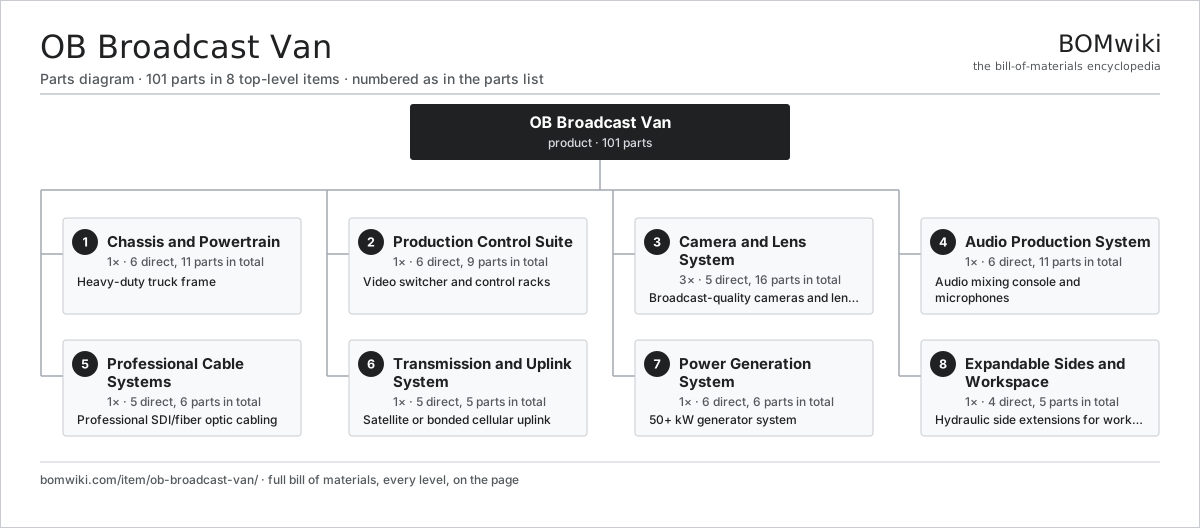
| # | Part | Qty | What it does |
|---|---|---|---|
| 1 | Chassis and Powertrain 6 parts | 1× | Heavy-duty truck frame |
| 2 | Production Control Suite 6 parts | 1× | Video switcher and control racks |
| 3 | Camera and Lens System 5 parts | 3× | Broadcast-quality cameras and lenses |
| 4 | Audio Production System 6 parts | 1× | Audio mixing console and microphones |
| 5 | Professional Cable Systems 5 parts | 1× | Professional SDI/fiber optic cabling |
| 6 | Transmission and Uplink System 5 parts | 1× | Satellite or bonded cellular uplink |
| 7 | Power Generation System 6 parts | 1× | 50+ kW generator system |
| 8 | Expandable Sides and Workspace 4 parts | 1× | Hydraulic side extensions for workspace |
3D model
No 3D model yet. Have a CAD file of this? Add a 3D model. STL renders right on this page; STEP, FreeCAD, and OpenSCAD sources are welcome too (openly licensed, like all 3D models on BOMwiki).
Build & assembly graph
expand / collapse · shared sub-assemblies converge · links to related products · est. labourTap an assembly to expand/collapse · tap a part to open it · use “Open page” for any node · drag to pan, scroll to zoom.
Bill of materials for OB Broadcast Van
8 top-level lines · 51 rows shown · 101 parts total · indented to 3 levels| # | Item / sub-assembly | Part no. | Qty/assy | Ext. qty | Parts | Type |
|---|---|---|---|---|---|---|
| 1 | Chassis and Powertrain 6 parts | ob-broadcast-van-chassis | 1× | 1 | 11 | assembly |
| 1.1 | Frame | ob-broadcast-van-frame | 1× | 1 | · | part |
| 1.2 | Engine | ob-broadcast-van-engine | 1× | 1 | · | part |
| 1.3 | Transmission | ob-broadcast-van-transmission | 1× | 1 | · | part |
| 1.4 | Suspension | ob-broadcast-van-suspension | 1× | 1 | · | part |
| 1.5 | Wheels and Tires | ob-broadcast-van-wheels-tires | 6× | 6 | · | part |
| 1.6 | Brake System | ob-broadcast-van-brake-system | 1× | 1 | · | part |
| 2 | Production Control Suite 6 parts | ob-broadcast-van-production-suite | 1× | 1 | 9 | assembly |
| 2.1 | Video Switcher | ob-broadcast-van-video-switcher | 1× | 1 | · | part |
| 2.2 | Graphics System | ob-broadcast-van-character-generator | 1× | 1 | · | part |
| 2.3 | Monitoring Display | ob-broadcast-van-multiviewer-monitor | 2× | 2 | · | part |
| 2.4 | Equipment Rack | ob-broadcast-van-equipment-racks | 3× | 3 | · | part |
| 2.5 | UPS System | ob-broadcast-van-uninterruptible-power | 1× | 1 | · | part |
| 2.6 | Patch Panel | ob-broadcast-van-patch-panel | 1× | 1 | · | part |
| 3 | Camera and Lens System 5 parts | ob-broadcast-van-camera-system | 3× | 3 | 16 | assembly |
| 3.1 | Broadcast Camera | ob-broadcast-van-broadcast-camera | 3× | 9 | · | part |
| 3.2 | Camera Lens | ob-broadcast-van-camera-lens | 6× | 18 | · | part |
| 3.3 | Camera Mount | ob-broadcast-van-camera-mount | 3× | 9 | · | part |
| 3.4 | SDI Cable | ob-broadcast-van-sdi-cable-camera | 3× | 9 | · | part |
| 3.5 | Fiber Extension | ob-broadcast-van-fiber-optic-extend | 1× | 3 | · | part |
| 4 | Audio Production System 6 parts | ob-broadcast-van-audio-system | 1× | 1 | 11 | assembly |
| 4.1 | Audio Mixer | ob-broadcast-van-audio-mixer | 1× | 1 | · | part |
| 4.2 | Microphone Preamp | ob-broadcast-van-microphone-preamp | 1× | 1 | · | part |
| 4.3 | Microphone | ob-broadcast-van-microphone-set | 4× | 4 | · | part |
| 4.4 | Monitor Speaker | ob-broadcast-van-audio-monitor-speakers | 2× | 2 | · | part |
| 4.5 | XLR Cable | ob-broadcast-van-xlr-cables | 1× | 1 | · | part |
| 4.6 | Wireless Receiver | ob-broadcast-van-remote-mic-receivers | 2× | 2 | · | part |
| 5 | Professional Cable Systems 5 parts | ob-broadcast-van-cable-systems | 1× | 1 | 6 | assembly |
| 5.1 | Backbone Cable | ob-broadcast-van-sdi-fiber-backbone | 1× | 1 | · | part |
| 5.2 | Breakout Box | ob-broadcast-van-breakout-boxes | 2× | 2 | · | part |
| 5.3 | Cable Management | ob-broadcast-van-cable-management | 1× | 1 | · | part |
| 5.4 | Test Equipment | ob-broadcast-van-test-equipment | 1× | 1 | · | part |
| 5.5 | Spare Cables | ob-broadcast-van-cable-spares | 1× | 1 | · | part |
| 6 | Transmission and Uplink System 5 parts | ob-broadcast-van-transmission-system | 1× | 1 | 5 | assembly |
| 6.1 | Satellite Antenna | ob-broadcast-van-satellite-antenna | 1× | 1 | · | part |
| 6.2 | Satellite Modem | ob-broadcast-van-satellite-modem | 1× | 1 | · | part |
| 6.3 | Cellular Router | ob-broadcast-van-cellular-router | 1× | 1 | · | part |
| 6.4 | Encoder | ob-broadcast-van-encoder-transcoder | 1× | 1 | · | part |
| 6.5 | Backup Uplink | ob-broadcast-van-backup-uplink | 1× | 1 | · | part |
| 7 | Power Generation System 6 parts | ob-broadcast-van-power-generation | 1× | 1 | 6 | assembly |
| 7.1 | Diesel Generator | ob-broadcast-van-diesel-generator | 1× | 1 | · | part |
| 7.2 | Fuel Tank | ob-broadcast-van-fuel-tank | 1× | 1 | · | part |
| 7.3 | Main Panel | ob-broadcast-van-main-power-panel | 1× | 1 | · | part |
| 7.4 | Breaker | ob-broadcast-van-distribution-breakers | 1× | 1 | · | part |
| 7.5 | Fuel Monitor | ob-broadcast-van-fuel-management | 1× | 1 | · | part |
| 7.6 | Backup Power | ob-broadcast-van-backup-battery-inverter | 1× | 1 | · | part |
| 8 | Expandable Sides and Workspace 4 parts | ob-broadcast-van-expandable-sides | 1× | 1 | 5 | assembly |
| 8.1 | Left Expandable Wall | ob-broadcast-van-expandable-wall-left | 1× | 1 | · | part |
| 8.2 | Right Expandable Wall | ob-broadcast-van-expandable-wall-right | 1× | 1 | · | part |
| 8.3 | Floor Extension | ob-broadcast-van-floor-extension | 1× | 1 | · | part |
| 8.4 | Safety Railing | ob-broadcast-van-safety-railing | 2× | 2 | · | part |
Something wrong in this list? Report a problem with this BOM.
Sourcing: possible vendors
Browse the supplier directory → Prices, MOQ, and lead times are algorithmic estimates, not quotes, and not claims about these companies. Company mappings are curated by keyword; est. price band $8k–$90k. How estimates work| Vendor | HQ | Specialty | MOQ | Lead time |
|---|---|---|---|---|
|
🇯🇵Toyota
global.toyota ↗
|
Toyota City, JP | Automaker | made to order | 16–28 wks |
| volkswagen-group.com ↗ | Wolfsburg, DE | Automaker | made to order | 16–28 wks |
| gm.com ↗ | Detroit, US | Automaker | made to order | 16–28 wks |
| hyundai.com ↗ | Seoul, KR | Automaker | made to order | 16–28 wks |
|
🇨🇳BYD
byd.com ↗
|
Shenzhen, CN | EV & battery manufacturer | made to order | 16–28 wks |
1,682-word article