OBD-II Scan Tool
ProductOverview
An OBD-II (On-Board Diagnostic, second generation) scan tool is a handheld computer that communicates with a vehicle's engine control module (ECM) and other modules via the standardized diagnostic connector under the dashboard. The OBD-II Interface Chip chip translates the vehicle's communication protocols (CAN bus, K-line, or KWP2000) into data that the Main Processor & Controller can parse. The Display Unit shows fault codes (Diagnostic Trouble Codes, or DTCs), live sensor values (RPM, oxygen sensor voltage, coolant temperature, etc.), and allows the technician to clear codes after repair.
OBD-II scan tools are essential for modern vehicle repair. Anything that triggers the Check Engine light stores a fault code in the ECM that cannot be cleared without a scan tool. The standardized interface means a single scan tool works on all 1996+ vehicles sold in North America, Europe, and many other markets.
Processor and computing
The Main Processor & Controller is an ARM-based system-on-chip (SoC) running at 1–2 GHz, typically an ARMv7 or ARMv8 processor. The Main PCB is a multi-layer circuit board with analog sections (power, CAN transceiver) and digital sections (processor, memory). The System RAM (256 MB to 1 GB DDR) holds running application code and logged data. The Firmware Flash Storage contains the boot loader and OBD protocol drivers; it is flash memory, updatable via USB.
A Real-Time Clock keeps track of time even when the device is powered off, allowing accurate timestamping of trouble codes and live data captures.
Vehicle interface and protocol translation
The OBD-II Interface Chip is the critical component that bridges the handheld electronics to the vehicle's electrical system. It includes a CAN Bus Transceiver for CAN-bus vehicles (the dominant protocol in 2010+) and a K-Line Interface for K-line and KWP2000 protocols used in older vehicles.
The Isolation Optocouplers provide 2 kV galvanic isolation between the scan tool processor and the vehicle power system. This protects the sensitive processor from transients, jump-starts, and accidental reverse polarity. The ESD Suppressor varistors clamp transient overvoltages that could occur when connecting or disconnecting the OBD-II Connector Cable hot (during vehicle operation).
Connector cable and vehicle link
The OBD-II Connector Cable terminates in a SAE J1962 16-pin female connector that mates with the OBD-II port on every vehicle. The cable is typically shielded, 3–5 m long, and flexible to route around engine compartment obstacles. Pins 4 and 5 provide vehicle chassis ground and signal ground; pins 6 and 7 carry CAN high and low on CAN-bus vehicles; pins 2, 7, and 15 carry K-line on K-line vehicles.
The Shielded Cable prevents noise from ignition systems and alternators from corrupting data signals, which is critical because the CAN and K-line signals are low-voltage (< 5 V) and susceptible to interference.
Display and user interface
The Display Unit is a 3.5"–5" color LCD or OLED with Touch Controller for capacitive or resistive touch input. Resolution is typically 480×320 on budget models and up to 1280×720 on premium units. The Backlight LEDs allows operation in dim garages and night service calls.
Typical screen flow: (1) Vehicle identification, showing make/model/year and ECM part number. (2) Fault code list, showing DTC code and description (e.g., P0128 "Coolant Thermostat Opening Time Below Threshold"). (3) Live data graph, showing selected sensors in real time, updated several times per second. (4) Module identification, showing software versions of all modules (engine, transmission, airbag, ABS, etc.). (5) I/M readiness, showing which emissions tests have run since the last clear.
Data logging and storage
The Data Logging Storage allows the technician to record a snapshot of all sensors and a specific trouble code, which can later be played back and analyzed. The Internal Flash (4–32 GB) stores historical code logs, allowing the technician to track intermittent faults. Many higher-end tools also include a SD Card Slot for exporting data to a computer for detailed analysis.
Snapshot data is critical for diagnosing intermittent faults: the technician can drive the vehicle, wait for a fault to occur and trigger the Check Engine light, then capture that moment's sensor values, which may indicate what conditions led to the failure.
Battery and power management
The Power Supply & Battery is typically a Li-ion Li-Ion Battery Cell (3.7 V nominal, 2,000–4,000 mAh) that provides 8–15 hours of continuous operation. The Battery Charger supports USB charging (handheld wall power) and 12 V vehicle power input via the OBD-II connector (meaning the scan tool can charge while plugged into a parked vehicle).
Power Regulators derive clean 3.3 V and 1.8 V rails from the battery, isolated from vehicle electrical noise. A Vehicle Power Jack optionally allows direct 12 V vehicle power input, useful for extended troubleshooting sessions without draining the internal battery.
Wireless and USB connectivity
Many modern scan tools include Wireless/Wired Comms Module via Bluetooth or USB. Bluetooth allows the scan tool to act as a wireless OBD module paired with a smartphone or tablet running a companion diagnostic app. This offloads the processor burden to the phone and reduces power consumption. USB (via the USB Controller) allows firmware updates from the manufacturer and data export to a laptop for advanced analysis.
The Antenna is typically a chip antenna (smaller and cheaper) on mid-range tools or an external whip antenna on premium models for better range.
Enclosure and durability
The Enclosure & Rugged Design is designed for the harsh shop environment. The Outer Case is ABS or polycarbonate, drop-tested to 1.5 m. The Screen Protector is tempered glass or anti-glare plastic to protect against scratches and provide visibility in bright sunlight. The Grip Overmold is textured rubber or silicone for secure hold when working under a vehicle.
Control is via soft buttons (Control Buttons) or a capacitive touchscreen, depending on the model. Soft buttons are more durable and work with gloved hands; touchscreens offer better user experience but require bare fingers.
Typical diagnostic workflow
(1) Plug the OBD-II cable into the vehicle port under the dashboard. The scan tool powers up and communicates with the ECM. (2) Select "Read Codes" to display all stored DTCs (e.g., P0300 "Multiple Cylinder Misfire Detected"). (3) Select a specific DTC to see live data from the time the fault occurred (snapshot). (4) Based on the code description and sensor values, diagnose the likely cause (e.g., bad spark plug, vacuum leak, fuel pressure regulator). (5) After repair, select "Clear Codes" to reset the Check Engine light. (6) Drive the vehicle through various operating modes (idle, acceleration, highway speed) to verify the fault does not recur and the systems run normally.
The scan tool removes guesswork from diagnosis; without it, a technician would have to rely on symptoms alone, leading to unnecessary parts replacement and customer frustration.
OBD-II Scan Tool parts and their functions
8 top-level parts · 31 parts in total · full bill of materials below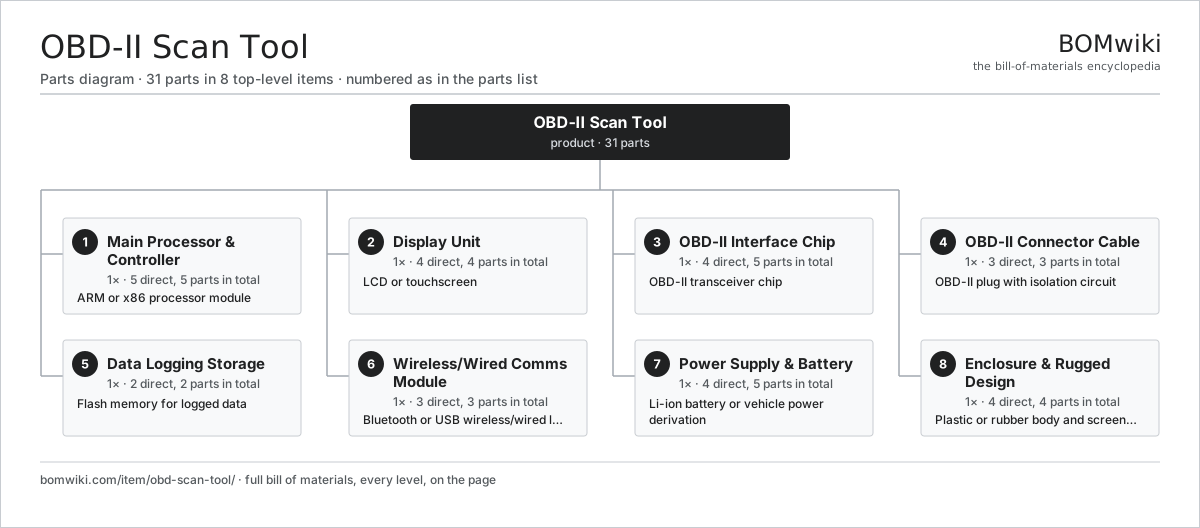
| # | Part | Qty | What it does |
|---|---|---|---|
| 1 | Main Processor & Controller 5 parts | 1× | ARM or x86 processor module |
| 2 | Display Unit 4 parts | 1× | LCD or touchscreen |
| 3 | OBD-II Interface Chip 4 parts | 1× | OBD-II transceiver chip |
| 4 | OBD-II Connector Cable 3 parts | 1× | OBD-II plug with isolation circuit |
| 5 | Data Logging Storage 2 parts | 1× | Flash memory for logged data |
| 6 | Wireless/Wired Comms Module 3 parts | 1× | Bluetooth or USB wireless/wired link |
| 7 | Power Supply & Battery 4 parts | 1× | Li-ion battery or vehicle power derivation |
| 8 | Enclosure & Rugged Design 4 parts | 1× | Plastic or rubber body and screen protector |
3D model
No 3D model yet. Have a CAD file of this? Add a 3D model. STL renders right on this page; STEP, FreeCAD, and OpenSCAD sources are welcome too (openly licensed, like all 3D models on BOMwiki).
Build & assembly graph
expand / collapse · shared sub-assemblies converge · links to related products · est. labourTap an assembly to expand/collapse · tap a part to open it · use “Open page” for any node · drag to pan, scroll to zoom.
Bill of materials for OBD-II Scan Tool
8 top-level lines · 37 rows shown · 31 parts total · indented to 3 levels| # | Item / sub-assembly | Part no. | Qty/assy | Ext. qty | Parts | Type |
|---|---|---|---|---|---|---|
| 1 | Main Processor & Controller 5 parts | obd-scan-tool-main-processor | 1× | 1 | 5 | assembly |
| 1.1 | System-on-Chip | obd-scan-tool-processor-soc | 1× | 1 | · | part |
| 1.2 | Main PCB | obd-scan-tool-main-pcb | 1× | 1 | · | part |
| 1.3 | System RAM | obd-scan-tool-ram | 1× | 1 | · | part |
| 1.4 | Firmware Flash Storage | obd-scan-tool-firmware-rom | 1× | 1 | · | part |
| 1.5 | Real-Time Clock | obd-scan-tool-real-time-clock | 1× | 1 | · | part |
| 2 | Display Unit 4 parts | obd-scan-tool-display | 1× | 1 | 4 | assembly |
| 2.1 | LCD Panel | obd-scan-tool-lcd-panel | 1× | 1 | · | part |
| 2.2 | Touch Controller | obd-scan-tool-touch-controller | 1× | 1 | · | part |
| 2.3 | Backlight LEDs | obd-scan-tool-backlight-led | 1× | 1 | · | part |
| 2.4 | Display Connector | obd-scan-tool-display-connector | 1× | 1 | · | part |
| 3 | OBD-II Interface Chip 4 parts | obd-scan-tool-vehicle-interface | 1× | 1 | 5 | assembly |
| 3.1 | CAN Bus Transceiver | obd-scan-tool-can-transceiver | 1× | 1 | · | part |
| 3.2 | K-Line Interface | obd-scan-tool-lin-transceiver | 1× | 1 | · | part |
| 3.3 | Isolation Optocoupler | obd-scan-tool-isolation-optocoupler | 2× | 2 | · | part |
| 3.4 | ESD Suppressor | obd-scan-tool-esd-protection | 1× | 1 | · | part |
| 4 | OBD-II Connector Cable 3 parts | obd-scan-tool-connector-cable | 1× | 1 | 3 | assembly |
| 4.1 | OBD-II Connector | obd-scan-tool-connector-plug | 1× | 1 | · | part |
| 4.2 | Shielded Cable | obd-scan-tool-cable-shielding | 1× | 1 | · | part |
| 4.3 | Cable Assembly | obd-scan-tool-cable-length | 1× | 1 | · | part |
| 5 | Data Logging Storage 2 parts | obd-scan-tool-data-storage | 1× | 1 | 2 | assembly |
| 5.1 | Internal Flash | obd-scan-tool-flash-chip | 1× | 1 | · | part |
| 5.2 | SD Card Slot | obd-scan-tool-sd-card-slot | 1× | 1 | · | part |
| 6 | Wireless/Wired Comms Module 3 parts | obd-scan-tool-communications | 1× | 1 | 3 | assembly |
| 6.1 | Bluetooth Module | obd-scan-tool-bluetooth-module | 1× | 1 | · | part |
| 6.2 | USB Controller | obd-scan-tool-usb-controller | 1× | 1 | · | part |
| 6.3 | Antenna | obd-scan-tool-antenna | 1× | 1 | · | part |
| 7 | Power Supply & Battery 4 parts | obd-scan-tool-power-supply | 1× | 1 | 5 | assembly |
| 7.1 | Li-Ion Battery Cell | obd-scan-tool-battery-cell | 1× | 1 | · | part |
| 7.2 | Battery Charger | obd-scan-tool-battery-charger | 1× | 1 | · | part |
| 7.3 | Power Regulator | obd-scan-tool-voltage-regulator | 2× | 2 | · | part |
| 7.4 | Vehicle Power Jack | obd-scan-tool-power-jack | 1× | 1 | · | part |
| 8 | Enclosure & Rugged Design 4 parts | obd-scan-tool-enclosure | 1× | 1 | 4 | assembly |
| 8.1 | Outer Case | obd-scan-tool-case-plastic | 1× | 1 | · | part |
| 8.2 | Screen Protector | obd-scan-tool-screen-protector | 1× | 1 | · | part |
| 8.3 | Control Buttons | obd-scan-tool-button-set | 1× | 1 | · | part |
| 8.4 | Grip Overmold | obd-scan-tool-grip-overmold | 1× | 1 | · | part |
Something wrong in this list? Report a problem with this BOM.
Sourcing: possible vendors
Browse the supplier directory → Prices, MOQ, and lead times are algorithmic estimates, not quotes, and not claims about these companies. Company mappings are curated by keyword; est. price band $0.50–$100. How estimates work| Vendor | HQ | Specialty | MOQ | Lead time |
|---|
1,240-word article