Printing Calculator
ProductOverview
The printing calculator is a desktop machine that combines electronic calculation with a built-in paper tape printer. When an accountant, auditor, or cashier performs a calculation (e.g., summing a column of receipts), the calculator not only displays the result on its digital screen but also prints each operation, operand, and result onto a continuous paper tape. This creates an indelible, auditable record of the calculation, essential in finance, taxation, auditing, and retail environments where calculations must be verified and documented.
Printing calculators became ubiquitous in offices during the 1970s–1990s, predating personal computers and spreadsheet software. They remain in use in specialized domains (accounting, banking, check verification, restaurant POS systems) where the combination of speed, simplicity, and paper-tape documentation is valued.
How it works
Numeric Input and Display: The operator enters numbers using the numeric keypad (0–9). Each keystroke is processed by the calculator logic circuit, which updates the LED or LCD display with the entered value in real-time.
Operation Execution: When an operation key (+, −, ×, ÷) is pressed:
- The calculator stores the current displayed value in a working register.
- The display is cleared and ready for the next operand.
- The processor records the operation symbol (+ or −, etc.) for later printing.
- The operator enters the second number.
- When the equals (=) key is pressed, the processor executes the arithmetic operation using its calculator CPU, stores the result, and updates the display.
Simultaneous Printing: As each number is entered, the print head immediately records the digit to the paper tape. When an operation key is pressed, the operation symbol (+, −, etc.) is printed. When equals is pressed, the result is printed, followed by a new line. This creates a running record on the paper tape that mirrors the calculation.
Print Mechanism Details:
- Impact Printer (older models): A pin matrix print head (e.g., 9×7 or 24×8 dots) uses solenoids to strike wires forward against an inked ribbon, leaving dot impressions on bond paper.
- Thermal Printer (newer models): A thermal print head with resistor elements heats the thermal-sensitive paper, causing a chemical reaction that darkens the paper where heat is applied.
Thermal printers are quieter, require no ribbon, and produce readable output for 10+ years if properly stored. Impact printers are louder but work with any plain paper and produce permanent marks.
Paper Advance: After each print, the paper motor advances the roll by a small increment (typically 1/6 inch, enough for one line of text). This ensures that each operation occupies its own line on the tape.
Accumulation and Memory: Some printing calculators support:
- Running Total (Accumulator): Pressing + repeatedly (without equals) adds each new number to a running sum, useful for summing columns of figures.
- Memory Register: Special M+, M−, MR (Memory Recall), and MC (Memory Clear) buttons store a value in a dedicated register and retrieve it later, useful for multi-step calculations.
The RAM stores these intermediate values, and the processor coordinates their retrieval and use.
Calculation Accuracy and Speed
Early printing calculators (1970s) performed arithmetic at ~10 operations/second. Modern designs (1990s+) achieve 100+ operations/second. The processor is typically a dedicated 4-bit, 8-bit, or modern 16-bit calculator IC:
- 4-bit CPUs (e.g., Intel 4004, 1970s): Handle 1–2 digit operations slowly, suitable for basic addition.
- 8-bit CPUs (e.g., Motorola 6800, 1980s–1990s): Fast enough for 12–16 digit operations at human typing speed.
- Modern 16-bit or 32-bit: Standard in 2000s+ calculators, offering millisecond response times.
Rounding and Precision: Calculations are performed with full internal precision (e.g., 20 digits), with rounding applied only at the display and print step. This prevents accumulated rounding errors when chaining operations.
Impact vs. Thermal Printing
| Aspect | Impact (Pin Matrix) | Thermal |
|---|---|---|
| Print Speed | 1–2 lines/sec | 1–3 lines/sec |
| Noise | 65–75 dB (loud) | 50–60 dB (quiet) |
| Paper | Plain bond, any color | Thermal-sensitive, white |
| Ribbon | Inked fabric cartridge (cost: $10–20) | None (direct heating) |
| Print Life | Permanent (indefinite) | 10+ years at room temp |
| Maintenance | Ribbon replacement, occasional head cleaning | Minimal (paper roll only) |
| Cost | Lower per copy (plain paper) | Slightly higher (thermal paper) |
Accounting and Audit Applications
In accounting and auditing workflows, the paper tape serves as:
- Verification Record: An auditor can inspect the tape to verify that all numbers were entered correctly and in the right order.
- Proof of Calculation: The tape documents the exact sequence of operations, preventing later disputes about how a total was derived.
- Regulatory Compliance: Financial regulations (e.g., Sarbanes-Oxley) often require documented evidence of calculations. The printed tape fulfills this requirement.
- Error Detection: If a final total is questioned, the tape can be inspected to identify the erroneous entry.
Printed tapes are typically retained for 7–10 years in business archives and are discoverable in litigation.
Integration with POS Systems
In retail and hospitality, printing calculators are sometimes paired with or integrated into point-of-sale (POS) systems:
- An operator scans items or manually enters prices into the calculator.
- The tape prints a running subtotal, taxes, and totals.
- The paper tape can be torn off and given to the customer as a receipt, or inserted into the POS system for transaction recording.
This workflow was common before integrated electronic POS systems became standard (1990s–2000s). Some establishments still prefer dedicated calculators for their mechanical simplicity and reliability.
Memory and Storage Functions
Most printing calculators include:
- Accumulator (Running Total): Repeated presses of the + key add to a running sum. Useful for summing expense reports, inventory counts, or invoice totals.
- Single Memory Register: Some models have one extra storage location (M+ adds to memory, M− subtracts, MR recalls, MC clears).
- Percent Function: Directly calculates percentages (useful for tips, taxes, discounts).
The RAM is minimal (typically a few bytes to a kilobyte), storing only the current running total, memory value, and pending operation symbol.
Print Formatting and Legibility
The printed output typically includes:
- Operands: Each number entered, printed as entered (e.g., "123.45").
- Operations: The + or − symbol printed after the first operand.
- Results: The calculated result printed after pressing =.
- Timestamps or Running Sequence: Some models print a sequence number (e.g., "001", "002") for tape ordering if portions are torn off.
The font is monospaced and left-aligned, with characters formed by dots in the case of impact printing, or as continuous dark marks in thermal printing. Readability is typically excellent for 5–10 years with proper storage.
Maintenance and Longevity
The print head is the most wear-intensive component:
- Impact Head: Wire contacts gradually wear; typical life 10+ million strikes. After that, the head may be cleaned or replaced ($50–200 parts + labor).
- Thermal Head: Resistor elements have a rated lifetime of ~1 million or more operations; failure is rare in normal office use.
The paper feed roller may harden or develop flat spots over decades, requiring replacement ($20–50).
Regular maintenance includes:
- Cleaning the print head of dust or dried ink with a soft brush.
- Checking the paper roll for creases or moisture.
- Verifying that the power supply output is stable.
With care, a printing calculator from the 1980s–1990s can operate reliably for 30+ years and tens of millions of calculations.
Transition to Digital and Modern Use
Spreadsheet software (Excel, Lotus 1-2-3, etc.) displaced printing calculators from corporate accounting in the 1990s–2000s. However, they remain in specialized niches:
- Auditing: Auditors often bring portable printing calculators to client sites for independent verification of client calculations.
- Banks and Credit Unions: Some tellers use printing calculators alongside electronic POS systems for secondary verification.
- Restaurants and Bars: Small establishments without robust POS systems may use printing calculators to compute bills.
- Developing Nations: Where computer infrastructure is limited, printing calculators are more reliable than cloud-based spreadsheet tools.
Used printing calculators remain available for $20–100 on secondary markets (eBay, local classifieds), and replacement parts (thermal paper, ribbon cartridges) are still manufactured and readily available at office supply stores.
Printing Calculator parts and their functions
8 top-level parts · 36 parts in total · full bill of materials below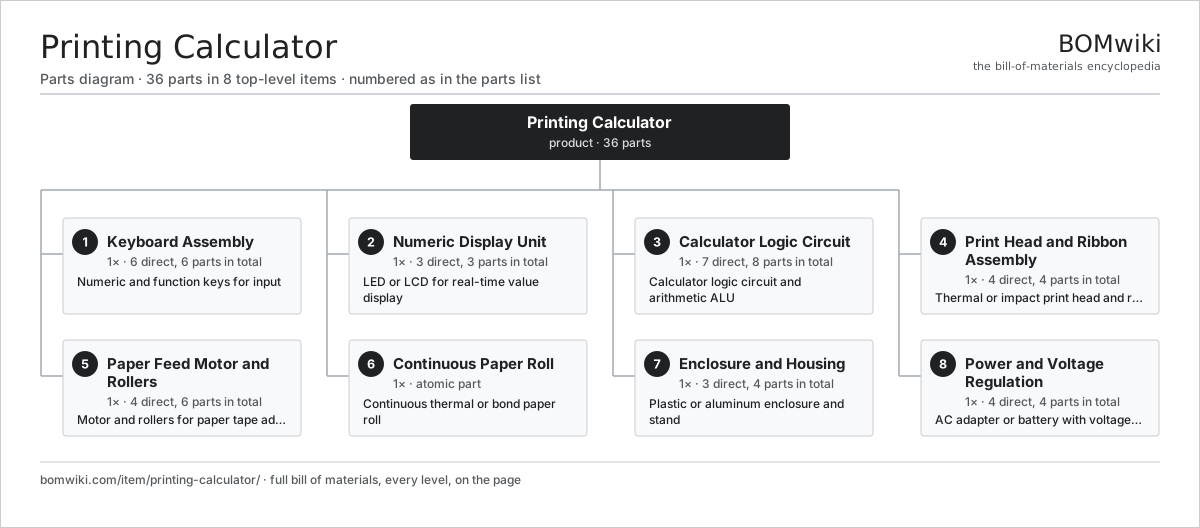
| # | Part | Qty | What it does |
|---|---|---|---|
| 1 | Keyboard Assembly 6 parts | 1× | Numeric and function keys for input |
| 2 | Numeric Display Unit 3 parts | 1× | LED or LCD for real-time value display |
| 3 | Calculator Logic Circuit 7 parts | 1× | Calculator logic circuit and arithmetic ALU |
| 4 | Print Head and Ribbon Assembly 4 parts | 1× | Thermal or impact print head and ribbon |
| 5 | Paper Feed Motor and Rollers 4 parts | 1× | Motor and rollers for paper tape advancement |
| 6 | Continuous Paper Roll | 1× | Continuous thermal or bond paper roll |
| 7 | Enclosure and Housing 3 parts | 1× | Plastic or aluminum enclosure and stand |
| 8 | Power and Voltage Regulation 4 parts | 1× | AC adapter or battery with voltage regulation |
3D model
No 3D model yet. Have a CAD file of this? Add a 3D model. STL renders right on this page; STEP, FreeCAD, and OpenSCAD sources are welcome too (openly licensed, like all 3D models on BOMwiki).
Build & assembly graph
expand / collapse · shared sub-assemblies converge · links to related products · est. labourTap an assembly to expand/collapse · tap a part to open it · use “Open page” for any node · drag to pan, scroll to zoom.
Bill of materials for Printing Calculator
8 top-level lines · 39 rows shown · 36 parts total · indented to 3 levels| # | Item / sub-assembly | Part no. | Qty/assy | Ext. qty | Parts | Type |
|---|---|---|---|---|---|---|
| 1 | Keyboard Assembly 6 parts | printing-calculator-keypad | 1× | 1 | 6 | assembly |
| 1.1 | Number Pad | printing-calculator-numeric-keys | 1× | 1 | · | part |
| 1.2 | Math Operation Keys | printing-calculator-operation-keys | 1× | 1 | · | part |
| 1.3 | Function Button Set | printing-calculator-function-keys | 1× | 1 | · | part |
| 1.4 | Bare PCB | pcb-bare | 1× | 1 | · | part |
| 1.5 | Connector | connector | 1× | 1 | · | part |
| 1.6 | Fastener Set | fastener-set | 1× | 1 | · | part |
| 2 | Numeric Display Unit 3 parts | printing-calculator-display | 1× | 1 | 3 | assembly |
| 2.1 | LED/LCD Panel | printing-calculator-display-panel | 1× | 1 | · | part |
| 2.2 | Status Indicator Lights | printing-calculator-status-lights | 1× | 1 | · | part |
| 2.3 | Fastener Set | fastener-set | 1× | 1 | · | part |
| 3 | Calculator Logic Circuit 7 parts | printing-calculator-processor | 1× | 1 | 8 | assembly |
| 3.1 | Calculator Processor IC | printing-calculator-cpu | 1× | 1 | · | part |
| 3.2 | Bare PCB | pcb-bare | 1× | 1 | · | part |
| 3.3 | Working Memory | printing-calculator-memory-ram | 1× | 1 | · | part |
| 3.4 | Firmware ROM | printing-calculator-rom | 1× | 1 | · | part |
| 3.5 | SMD Passive (R/C/L) | smd-passives | 1× | 1 | · | part |
| 3.6 | Connector | connector | 2× | 2 | · | part |
| 3.7 | Fastener Set | fastener-set | 1× | 1 | · | part |
| 4 | Print Head and Ribbon Assembly 4 parts | printing-calculator-print-mechanism | 1× | 1 | 4 | assembly |
| 4.1 | Print Head Module | printing-calculator-print-head | 1× | 1 | · | part |
| 4.2 | Ribbon or Thermal Element | printing-calculator-ribbon-cartridge | 1× | 1 | · | part |
| 4.3 | Print Driver Circuit | printing-calculator-head-driver | 1× | 1 | · | part |
| 4.4 | Fastener Set | fastener-set | 1× | 1 | · | part |
| 5 | Paper Feed Motor and Rollers 4 parts | printing-calculator-paper-feed | 1× | 1 | 6 | assembly |
| 5.1 | Paper Motor | printing-calculator-feed-motor | 1× | 1 | · | part |
| 5.2 | Paper Feed Roller | printing-calculator-feed-roller | 2× | 2 | · | part |
| 5.3 | Ball Bearing | ball-bearing | 2× | 2 | · | part |
| 5.4 | Fastener Set | fastener-set | 1× | 1 | · | part |
| 6 | Continuous Paper Roll | printing-calculator-paper-roll | 1× | 1 | · | part |
| 7 | Enclosure and Housing 3 parts | printing-calculator-frame | 1× | 1 | 4 | assembly |
| 7.1 | Main Case Shell | printing-calculator-case-body | 1× | 1 | · | part |
| 7.2 | Paper Exit Port | printing-calculator-paper-outlet | 1× | 1 | · | part |
| 7.3 | Fastener Set | fastener-set | 2× | 2 | · | part |
| 8 | Power and Voltage Regulation 4 parts | printing-calculator-power-supply | 1× | 1 | 4 | assembly |
| 8.1 | Power Supply | power-supply | 1× | 1 | · | part |
| 8.2 | Voltage Regulator Module | printing-calculator-voltage-regulator | 1× | 1 | · | part |
| 8.3 | Connector | connector | 1× | 1 | · | part |
| 8.4 | Fastener Set | fastener-set | 1× | 1 | · | part |
Something wrong in this list? Report a problem with this BOM.
Related products
same domain, ranked by shared parts Cash Deposit Machine
64 parts · shares 2 with this page
Check Scanner
83 parts · shares 2 with this page
Coin Counting Kiosk
63 parts · shares 2 with this page
Cash Deposit Machine
64 parts · shares 2 with this page
Check Scanner
83 parts · shares 2 with this page
Coin Counting Kiosk
63 parts · shares 2 with this page
Sourcing: possible vendors
Browse the supplier directory → Prices, MOQ, and lead times are algorithmic estimates, not quotes, and not claims about these companies. Company mappings are curated by keyword; est. price band $50–$15k. How estimates work| Vendor | HQ | Specialty | MOQ | Lead time |
|---|---|---|---|---|
|
🇯🇵Canon
canon.com ↗
|
Tokyo, JP | Imaging & optics | 500 units | 8–12 wks |
|
🇯🇵Ricoh
ricoh.com ↗
|
Tokyo, JP | Office imaging | 500 units | 8–12 wks |
|
🇺🇸Xerox
xerox.com ↗
|
Norwalk, US | Printers & copiers | 500 units | 8–12 wks |
|
🇯🇵Epson
epson.com ↗
|
Suwa, JP | Printers & projectors | 500 units | 8–12 wks |
|
🇯🇵Brother
brother.com ↗
|
Nagoya, JP | Printers & sewing | 500 units | 8–12 wks |
1,399-word article