Rack Console Drawer
ProductOverview
A rack console drawer is a space-saving input/output device mounted in standard 19" server racks or cabinets, providing consolidated keyboard, mouse, and display access to multiple servers without occupying dedicated bench space. The unit slides out horizontally on ball bearing rails, exposing a fold-up LCD monitor and compact keyboard with integrated touchpad. When not in use, the drawer slides flush into the cabinet, minimizing visual clutter and improving airflow.
Data center and telecommunications professionals depend on console drawers for direct server access during installation, troubleshooting, and recovery scenarios where network connectivity is unavailable or compromised. Many facilities require out-of-band (non-networked) access to critical systems; a console drawer provides this directly via DVI or HDMI video, with keyboard-video-mouse (KVM) multiplexing enabling one drawer to serve multiple servers.
How it Works
The mechanical frame consists of two vertical rail assemblies mounted to the cabinet's DIN rail using M5 cage nuts. Heavy-duty ball bearing slides extend the drawer smoothly under the full weight of the keyboard, touchpad, and display assembly (8–12 kg).
When the user pulls the drawer out, a dual-axis pivot hinge allows the LCD monitor to fold up and rotate. An articulated support arm with friction damping holds the display at a comfortable viewing angle (typically 15–20 degrees from horizontal).
The Keyboard Unit is a 84-key mechanical or membrane switch unit with a full numeric pad, designed for data center accessibility. Key travel is shallow (2 mm) for speed. The Touchpad Module sits to the right of the spacebar, providing mouse control. Both devices are connected via PS/2 or USB to a KVM aggregator microcontroller.
The KVM aggregator multiplexes video input from multiple servers and routes keyboard-video-mouse events to the selected server. Most units support 4–16 servers simultaneously, with a hardware button or on-screen menu selecting which server receives keyboard input and whose video appears on the LCD. Hot-swap capability allows the operator to switch between servers without powering the drawer or the target servers.
Display and Video Switching
The LCD display is typically 17" or 21.5", with 1280x1024 or 1920x1080 resolution. Modern units use LED backlighting with PWM brightness control, allowing the operator to adjust screen intensity for different ambient lighting in data centers (which often use low illumination to reduce cooling load).
Video input is DVI-D or HDMI, with the KVM controller multiplexing 4–16 server outputs onto the single display. Early designs included a VGA scaler for backward compatibility with older server BMC (Baseboard Management Controller) cards, but modern deployments assume HDMI or DVI support.
Keyboard and Input Device Design
The keyboard is sealed against dust ingress and moderate liquid spill. Membrane switches use a capacitive dome under each key, registering a keypress when the dome collapses and a conductive film connects two PCB traces. Mechanical switches (less common due to cost) use individual spring-return mechanisms under each keycap, providing superior tactile feedback and faster keypress registration.
The Touchpad Module is a capacitive sensor array detecting finger position at 10-point multi-touch resolution. A small mechanical encoder to the right of the touchpad provides scroll wheel functionality. Three mechanical switches below the touchpad serve as left-click, center-click, and right-click buttons.
This input arrangement is optimized for system administration tasks: password entry (via keyboard), command-line navigation (keyboard), and GUI window management (touchpad for pointing and dragging). The combination eliminates the need for a separate external mouse or keyboard, critical for installations where cable management is tight or where a separate keyboard/mouse drawer is not practical.
Cable Management and Power
All cabling is routed through the drawer's interior using spiral wrap, velcro ties, and routing clips. This keeps the drawer interior clean and prevents cables from catching on drawer rails during extension/retraction.
Power enters via a single heavy-duty cable connected to the cabinet's PDU (power distribution unit). The drawer includes an integral surge protection strip with master switch, protecting all downstream electronics from mains transients. The master switch allows rapid shutdown of the entire drawer without reaching behind the cabinet.
KVM Multiplexing and Hot-Swap
The KVM aggregator typically implements a master-slave model: one server is designated "active," receiving all keyboard input and displaying its video. A hardware button (often a rocker switch or numeric keypad entry) selects which server is active. The transition is seamless, the operator switches focus, and the display immediately shows the new server's video without clearing or blank-screen intervals.
Hot-swap capability is critical for production environments where servers cannot be rebooted for console access. The KVM allows instant switching between multiple servers without any reset or initialization sequence.
Rack Integration and Thermal Considerations
The console drawer occupies 1U (44 mm) or 2U (88 mm) of vertical rack space, depending on whether the keyboard and display are integrated into a single unit or split across two units. Some deployments install the drawer at the bottom of a rack for cable management ergonomics, while others place it at eye level (around 1.5 meters from floor) for comfortable viewing during extended troubleshooting sessions.
The drawer does not require active cooling beyond the airflow provided by the cabinet's existing fan system. LED backlighting generates minimal heat compared to older CCFL (cold cathode fluorescent lamp) designs, and the keyboard produces negligible thermal load.
Advanced Features
High-end units support:
- Dual-video display: Some drawers include a small secondary LCD showing system health metrics or alarm status without requiring server connection.
- Integrated KVM-over-IP: Rare but valuable for data centers with multiple cabinets. The drawer can be configured to accept keyboard/mouse and display video over Ethernet, enabling remote KVM access from workstations across the facility.
- Automatic server selection: Certain models detect which server is powered on and automatically switch video to the active system, reducing operator intervention.
- Encrypted keyboard input: For security-sensitive deployments, encrypted HID protocols protect against man-in-the-middle attacks on USB or PS/2 links.
Maintenance and Serviceability
Keyboard switches are user-replaceable, a technician can quickly swap a worn or damaged switch by desoldering it from the matrix PCB. The display panel is also replaceable, allowing the drawer to be refurbished with a newer display if the backlight dims after several years of use.
Rack Console Drawer parts and their functions
7 top-level parts · 323 parts in total · full bill of materials below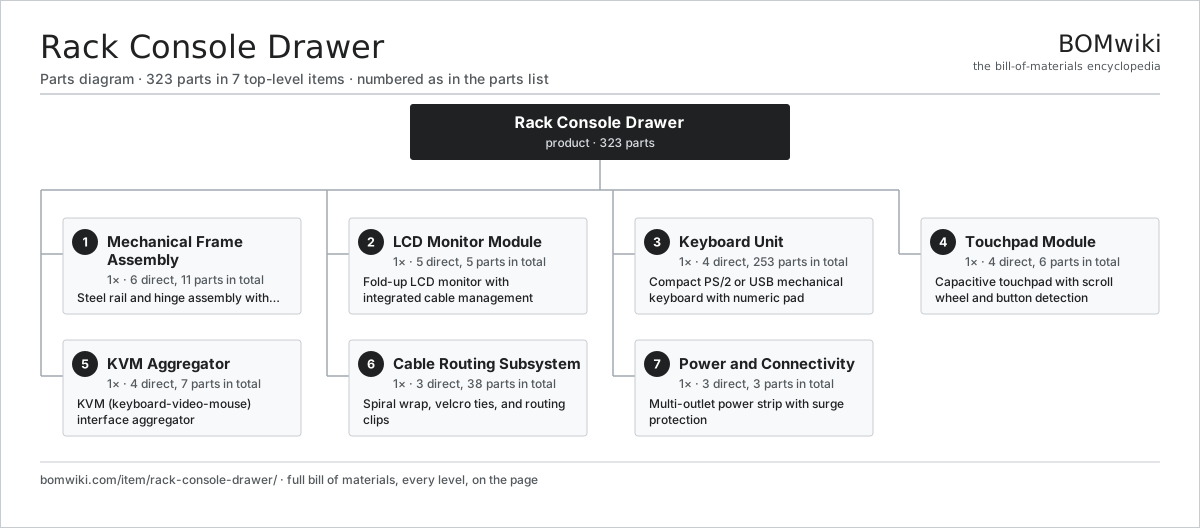
| # | Part | Qty | What it does |
|---|---|---|---|
| 1 | Mechanical Frame Assembly 6 parts | 1× | Steel rail and hinge assembly with standard DIN rail mounting |
| 2 | LCD Monitor Module 5 parts | 1× | Fold-up LCD monitor with integrated cable management |
| 3 | Keyboard Unit 4 parts | 1× | Compact PS/2 or USB mechanical keyboard with numeric pad |
| 4 | Touchpad Module 4 parts | 1× | Capacitive touchpad with scroll wheel and button detection |
| 5 | KVM Aggregator 4 parts | 1× | KVM (keyboard-video-mouse) interface aggregator |
| 6 | Cable Routing Subsystem 3 parts | 1× | Spiral wrap, velcro ties, and routing clips |
| 7 | Power and Connectivity 3 parts | 1× | Multi-outlet power strip with surge protection |
3D model
No 3D model yet. Have a CAD file of this? Add a 3D model. STL renders right on this page; STEP, FreeCAD, and OpenSCAD sources are welcome too (openly licensed, like all 3D models on BOMwiki).
Build & assembly graph
expand / collapse · shared sub-assemblies converge · links to related products · est. labourTap an assembly to expand/collapse · tap a part to open it · use “Open page” for any node · drag to pan, scroll to zoom.
Bill of materials for Rack Console Drawer
7 top-level lines · 36 rows shown · 323 parts total · indented to 3 levels| # | Item / sub-assembly | Part no. | Qty/assy | Ext. qty | Parts | Type |
|---|---|---|---|---|---|---|
| 1 | Mechanical Frame Assembly 6 parts | rack-console-drawer-frame | 1× | 1 | 11 | assembly |
| 1.1 | Vertical Rail Bracket | rack-console-drawer-vertical-rails | 2× | 2 | · | part |
| 1.2 | Ball Bearing Drawer Slide | rack-console-drawer-drawer-slides | 4× | 4 | · | part |
| 1.3 | Dual-Axis Pivot Hinge | rack-console-drawer-pivot-hinge | 2× | 2 | · | part |
| 1.4 | Articulated Support Arm | rack-console-drawer-support-arm | 1× | 1 | · | part |
| 1.5 | Base Pan Assembly | rack-console-drawer-base-pan | 1× | 1 | · | part |
| 1.6 | Fastener Set | fastener-set | 1× | 1 | · | part |
| 2 | LCD Monitor Module 5 parts | rack-console-drawer-lcd-assembly | 1× | 1 | 5 | assembly |
| 2.1 | LCD Display Panel | rack-console-drawer-lcd-panel | 1× | 1 | · | part |
| 2.2 | LED Backlight Module | rack-console-drawer-led-backlight | 1× | 1 | · | part |
| 2.3 | Timing Controller IC | rack-console-drawer-tcon | 1× | 1 | · | part |
| 2.4 | Power Supply Board | rack-console-drawer-power-board | 1× | 1 | · | part |
| 2.5 | LCD Panel | lcd-panel | 1× | 1 | · | part |
| 3 | Keyboard Unit 4 parts | rack-console-drawer-keyboard | 1× | 1 | 253 | assembly |
| 3.1 | Key Switch | rack-console-drawer-key-switches | 84× | 84 | · | part |
| 3.2 | Keyboard Controller PCB | rack-console-drawer-key-matrix-pcb | 1× | 1 | · | part |
| 3.3 | Key Cap | rack-console-drawer-key-caps | 84× | 84 | · | part |
| 3.4 | Key Spring | rack-console-drawer-key-return-spring | 84× | 84 | · | part |
| 4 | Touchpad Module 4 parts | rack-console-drawer-touchpad | 1× | 1 | 6 | assembly |
| 4.1 | Capacitive Sensor Array | rack-console-drawer-touchpad-sensor | 1× | 1 | · | part |
| 4.2 | Touchpad MCU | rack-console-drawer-touchpad-controller | 1× | 1 | · | part |
| 4.3 | Scroll Encoder | rack-console-drawer-scroll-wheel | 1× | 1 | · | part |
| 4.4 | Mouse Button | rack-console-drawer-button-switches | 3× | 3 | · | part |
| 5 | KVM Aggregator 4 parts | rack-console-drawer-kvm-bridge | 1× | 1 | 7 | assembly |
| 5.1 | KVM Controller IC | rack-console-drawer-kvm-ic | 1× | 1 | · | part |
| 5.2 | DVI/HDMI Input Port | rack-console-drawer-dvi-input | 4× | 4 | · | part |
| 5.3 | USB Hub Controller | rack-console-drawer-usb-hub | 1× | 1 | · | part |
| 5.4 | Video Scaler IC | rack-console-drawer-vga-scaler | 1× | 1 | · | part |
| 6 | Cable Routing Subsystem 3 parts | rack-console-drawer-cable-management | 1× | 1 | 38 | assembly |
| 6.1 | Spiral Cable Wrap | rack-console-drawer-spiral-wrap | 10× | 10 | · | part |
| 6.2 | Velcro Cable Tie | rack-console-drawer-velcro-ties | 20× | 20 | · | part |
| 6.3 | Cable Clip | rack-console-drawer-cable-clips | 8× | 8 | · | part |
| 7 | Power and Connectivity 3 parts | rack-console-drawer-power-distribution | 1× | 1 | 3 | assembly |
| 7.1 | Power Strip | rack-console-drawer-power-strip | 1× | 1 | · | part |
| 7.2 | Surge Suppression | rack-console-drawer-surge-protection | 1× | 1 | · | part |
| 7.3 | Power Cable | rack-console-drawer-power-cord | 1× | 1 | · | part |
Something wrong in this list? Report a problem with this BOM.
Related products
same domain, ranked by shared parts All-in-One PC
68 parts · shares 1 with this page
All-in-One PC
68 parts · shares 1 with this page
 Computer Monitor
461 parts · shares 1 with this page
Computer Monitor
461 parts · shares 1 with this page
 Graphics Drawing Tablet
357 parts · shares 1 with this page
Graphics Drawing Tablet
357 parts · shares 1 with this page
 Hardware Crypto Wallet
161 parts · shares 1 with this page
Hardware Crypto Wallet
161 parts · shares 1 with this page
 Laptop
157 parts · shares 1 with this page
Laptop
157 parts · shares 1 with this page
 Large-Format Inkjet Plotter
473 parts · shares 1 with this page
Large-Format Inkjet Plotter
473 parts · shares 1 with this page
Sourcing: possible vendors
Browse the supplier directory → Prices, MOQ, and lead times are algorithmic estimates, not quotes, and not claims about these companies. Company mappings are curated by keyword; est. price band $20–$3k. How estimates work| Vendor | HQ | Specialty | MOQ | Lead time |
|---|---|---|---|---|
| dell.com ↗ | Round Rock, US | Computers & infrastructure | 1,000 units | 8–14 wks |
|
🇺🇸HP
hp.com ↗
|
Palo Alto, US | Computers & printers | 1,000 units | 8–14 wks |
|
🇨🇳Lenovo
lenovo.com ↗
|
Beijing, CN | Computers | 1,000 units | 8–14 wks |
|
🇹🇼ASUS
asus.com ↗
|
Taipei, TW | Computers & components | 1,000 units | 8–14 wks |
|
🇨🇳Foxconn
foxconn.com ↗
|
Shenzhen, CN | Electronics contract mfg | 1,000 units | 8–14 wks |
1,165-word article