Robot Building Kit
ProductOverview
A robot building kit (such as LEGO Mindstorms, VEX Robotics, or Tetrix) is an educational platform combining modular mechanical parts, electrical motors and sensors, and a programmable controller to teach robotics, engineering, and software design. Students assemble a chassis and mechanisms from the Structural Beams and Fastening System, then mount the Motor Module and Sensor Set onto the frame. The Controller Brick brick acts as the robot's brain: it reads sensor inputs, executes user-written logic, and commands the motors to execute tasks such as following a line, avoiding obstacles, or manipulating objects.
The core of the system is the Controller Brick brick, a hand-sized device containing an ARM-based MCU Module (microcontroller), a small LCD Display for feedback, Button for manual control, and several motor and sensor ports. The MCU typically runs 100–1000 MHz with 256 MB SRAM and several gigabytes of flash storage, sufficient to store multiple robot programs. The controller interfaces with a host computer via USB or Bluetooth for programming; students write code in a graphical block-based language or a traditional language like Python or Java, compile it, and download it to the controller. When powered on, the controller executes the program autonomously.
Motors and drive systems
The Motor Module are the robot's actuators. Typical kits include two to four motors: typically one or two drive motors for locomotion and one or more for manipulators (arms, lifts, shooters). Each Motor Module assembly combines a brushed DC electric motor with a Gearbox (typically 50:1 to 100:1 reduction) to reduce speed and increase torque. The output shaft is capped with a Mount Lug for attaching wheels or linkages.
Raw motor speed is typically 4000–6000 RPM; after gear reduction, the output shaft turns at 40–120 RPM, providing 10–20 N·m of torque, sufficient to move a 2–5 kg robot or lift a light load. The Encoder, an optical or magnetic position sensor, counts shaft rotations, allowing the controller to measure distance traveled (if geared to a wheel) or arm angle. This feedback enables closed-loop control: the controller can command a motor to rotate exactly 360 degrees or move the robot forward 1 meter and stop precisely.
Sensors and perception
The Sensor Set give the robot awareness of its environment. A Touch Sensor is a simple contact switch, useful for detecting collisions or triggering actions when the robot hits an object. A Light Sensor measures ambient light intensity, allowing the robot to follow a line on the ground (crossing from white to black triggers a turn). A Distance Sensor uses ultrasonic or infrared ranging to detect obstacles: an Emitter sends a pulse of sound or light, and a Receiver listens for the echo or reflection, measuring the round-trip time to calculate distance (typically 5–300 cm range).
The controller reads sensor inputs at high frequency (10–100 Hz) and uses the data to make decisions. A typical line-following algorithm is:
- Read the light sensor value.
- If the value indicates white (reflecting), steer right.
- If the value indicates black (absorbing), steer left.
- Repeat.
With tuning, a robot can follow a curving line at high speed.
Mechanical assembly
The Structural Beams and Fastening System form the chassis. Beams are plastic or aluminum bars (50–400 mm length) with regularly spaced holes or snap-fit tabs. Connectors are L-shaped, T-shaped, or cross blocks that join beams at right angles, and Axle pins (3–6 mm diameter) slide through beam holes and motor shafts to align wheels and gears. The modular design allows rapid prototyping: students can snap together a chassis in minutes, test it, and rebuild it with a different geometry if needed.
Wheels are typically plastic or rubber tires mounted on the motor output shafts via the Axle. A two-wheel or four-wheel drive layout is common. The robot-building-kit-battery-pack (six to eight AA cells or a single large rechargeable) is mounted on the frame and wired to the Controller Brick and motors via the Cable Assembly.
Electrical integration
All electrical connections use standardized Cable Assembly, typically RJ25 telephone-style connectors, which simplify hot-swapping components and reduce soldering errors. Power cables deliver 6–9V DC from the battery to the controller and motors. Sensor cables (often shielded twisted-pair to reduce noise) carry low-level signals from sensors to the controller's analog or digital input ports. Motor cables are heavier gauge to handle the several amperes of current the motors draw.
The Controller Brick contains motor driver electronics internally, typically H-bridge circuits (FETs or BJTs) that switch current in both directions through each motor, enabling forward, reverse, and speed control via pulse-width modulation (PWM). Most kits support PWM control of three to four motors simultaneously.
Programming and control
The programming environment is typically a visual block-based language (similar to Scratch or MIT App Inventor) for beginners, with options to transition to text-based languages like Python or Java for advanced students. A student writes a program that reads sensors, evaluates conditions, and commands motors. For example:
- If distance < 20 cm, turn 90 degrees right.
- Otherwise, drive forward.
- If touch sensor pressed, stop and reverse.
The program is compiled and downloaded to the Controller Brick via USB or Bluetooth. The controller's MCU Module then executes the program at high priority in a real-time kernel, with interrupts from sensor inputs and motor encoders providing precise timing.
Power and runtime
The robot-building-kit-battery-pack typically contains six to eight alkaline AA cells (1.5V each, providing 9V total) or a single 7.2V or 11.1V rechargeable lithium-ion cell for advanced kits. Motor current draw depends on load: a robot idling consumes 50–200 mA; actively driving or lifting can draw 1–3 A. Battery runtime is typically 2–6 hours for alkaline batteries and 4–8 hours for high-capacity rechargeables. Rechargeable options (NiMH or LiPo) are preferred for frequent users because they offer better cost-per-hour and reduce disposable battery waste.
Educational value and competition
Robotics kits are used in STEM education worldwide. Competition formats (FIRST Robotics, VEX Robotics, RoboCup) provide challenges such as moving objects, navigating mazes, or defeating opponents in soccer-like matches. Students learn mechanical design, electrical integration, control theory, and software development, often in project-based teams that mirror real engineering practice.
Maintenance is minimal: keep the Structural Beams and connectors clean, replace AA batteries when voltage drops below 7V, and recalibrate sensor thresholds if performance drifts. Motors can overheat if stalled continuously; good design and testing prevent this.
Robot Building Kit parts and their functions
8 top-level parts · 71 parts in total · full bill of materials below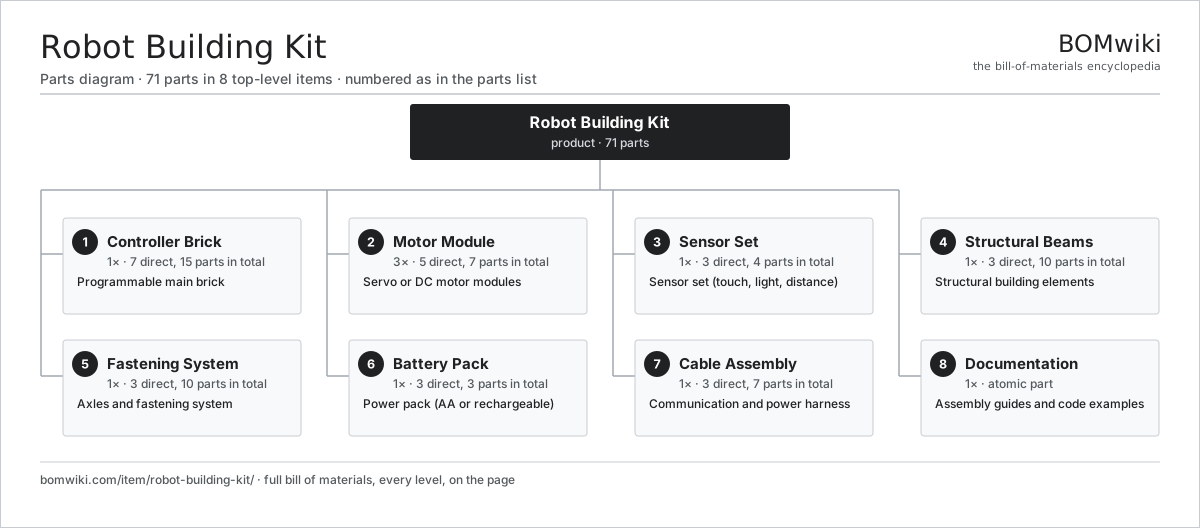
| # | Part | Qty | What it does |
|---|---|---|---|
| 1 | Controller Brick 7 parts | 1× | Programmable main brick |
| 2 | Motor Module 5 parts | 3× | Servo or DC motor modules |
| 3 | Sensor Set 3 parts | 1× | Sensor set (touch, light, distance) |
| 4 | Structural Beams 3 parts | 1× | Structural building elements |
| 5 | Fastening System 3 parts | 1× | Axles and fastening system |
| 6 | Battery Pack 3 parts | 1× | Power pack (AA or rechargeable) |
| 7 | Cable Assembly 3 parts | 1× | Communication and power harness |
| 8 | Documentation | 1× | Assembly guides and code examples |
3D model
No 3D model yet. Have a CAD file of this? Add a 3D model. STL renders right on this page; STEP, FreeCAD, and OpenSCAD sources are welcome too (openly licensed, like all 3D models on BOMwiki).
Build & assembly graph
expand / collapse · shared sub-assemblies converge · links to related products · est. labourTap an assembly to expand/collapse · tap a part to open it · use “Open page” for any node · drag to pan, scroll to zoom.
Bill of materials for Robot Building Kit
8 top-level lines · 39 rows shown · 71 parts total · indented to 3 levels| # | Item / sub-assembly | Part no. | Qty/assy | Ext. qty | Parts | Type |
|---|---|---|---|---|---|---|
| 1 | Controller Brick 7 parts | robot-building-kit-controller | 1× | 1 | 15 | assembly |
| 1.1 | Brick Housing | robot-building-kit-brick-body | 1× | 1 | · | part |
| 1.2 | MCU Module | robot-building-kit-mcu | 1× | 1 | · | part |
| 1.3 | LCD Display | robot-building-kit-display | 1× | 1 | · | part |
| 1.4 | Button | robot-building-kit-buttons | 4× | 4 | · | part |
| 1.5 | Port Assembly | robot-building-kit-ports | 1× | 1 | · | part |
| 1.6 | Bare PCB | pcb-bare | 1× | 1 | · | part |
| 1.7 | Connector | connector | 6× | 6 | · | part |
| 2 | Motor Module 5 parts | robot-building-kit-motors | 3× | 3 | 7 | assembly |
| 2.1 | Motor Case | robot-building-kit-motor-can | 1× | 3 | · | part |
| 2.2 | Gearbox 2 parts | robot-building-kit-gearbox | 1× | 3 | 3 | assembly |
| 2.2.1 | Helical Gear Pair | gear-pair | 2× | 6 | · | part |
| 2.2.2 | Gear Shaft | robot-building-kit-gear-shaft | 1× | 3 | · | part |
| 2.3 | Encoder | robot-building-kit-encoder | 1× | 3 | · | part |
| 2.4 | Mount Lug | robot-building-kit-mount-lug | 1× | 3 | · | part |
| 2.5 | Fastener Set | fastener-set | 1× | 3 | · | part |
| 3 | Sensor Set 3 parts | robot-building-kit-sensors | 1× | 1 | 4 | assembly |
| 3.1 | Touch Sensor | robot-building-kit-touch-sensor | 1× | 1 | · | part |
| 3.2 | Light Sensor | robot-building-kit-light-sensor | 1× | 1 | · | part |
| 3.3 | Distance Sensor 2 parts | robot-building-kit-distance-sensor | 1× | 1 | 2 | assembly |
| 3.3.1 | Emitter | robot-building-kit-distance-emitter | 1× | 1 | · | part |
| 3.3.2 | Receiver | robot-building-kit-distance-receiver | 1× | 1 | · | part |
| 4 | Structural Beams 3 parts | robot-building-kit-beams | 1× | 1 | 10 | assembly |
| 4.1 | Long Beam | robot-building-kit-long-beam | 4× | 4 | · | part |
| 4.2 | Short Beam | robot-building-kit-short-beam | 4× | 4 | · | part |
| 4.3 | Mounting Plate | robot-building-kit-plates | 2× | 2 | · | part |
| 5 | Fastening System 3 parts | robot-building-kit-connectors | 1× | 1 | 10 | assembly |
| 5.1 | Axle | robot-building-kit-axle | 8× | 8 | · | part |
| 5.2 | Screw | robot-building-kit-screws | 1× | 1 | · | part |
| 5.3 | Connector Block | robot-building-kit-connectors-blocks | 1× | 1 | · | part |
| 6 | Battery Pack 3 parts | robot-building-kit-battery | 1× | 1 | 3 | assembly |
| 6.1 | Battery Holder | robot-building-kit-battery-holder | 1× | 1 | · | part |
| 6.2 | Battery Cells | robot-building-kit-battery-cells | 1× | 1 | · | part |
| 6.3 | Fastener Set | fastener-set | 1× | 1 | · | part |
| 7 | Cable Assembly 3 parts | robot-building-kit-cables | 1× | 1 | 7 | assembly |
| 7.1 | Motor Cable | robot-building-kit-motor-cable | 3× | 3 | · | part |
| 7.2 | Sensor Cable | robot-building-kit-sensor-cable | 3× | 3 | · | part |
| 7.3 | Connector Pins | robot-building-kit-connector-pins | 1× | 1 | · | part |
| 8 | Documentation | robot-building-kit-instructions | 1× | 1 | · | part |
Something wrong in this list? Report a problem with this BOM.
Related products
same domain, ranked by shared parts Animatronic Toy
202 parts · shares 1 with this page
Animatronic Toy
202 parts · shares 1 with this page
 Bowling Pinsetter
130 parts · shares 1 with this page
Bubble Machine
53 parts · shares 1 with this page
Bowling Pinsetter
130 parts · shares 1 with this page
Bubble Machine
53 parts · shares 1 with this page
 Bumper Car
69 parts · shares 1 with this page
Bumper Car
69 parts · shares 1 with this page
 Carousel (Merry-Go-Round)
755 parts · shares 1 with this page
Carousel (Merry-Go-Round)
755 parts · shares 1 with this page
 Claw Machine
129 parts · shares 1 with this page
Claw Machine
129 parts · shares 1 with this page
Sourcing: possible vendors
Browse the supplier directory → Prices, MOQ, and lead times are algorithmic estimates, not quotes, and not claims about these companies. Company mappings are curated by keyword; est. price band $20–$3k. How estimates work| Vendor | HQ | Specialty | MOQ | Lead time |
|---|---|---|---|---|
|
🇩🇰LEGO
lego.com ↗
|
Billund, DK | Construction toys | 2,000 units | 6–10 wks |
|
🇺🇸Mattel
mattel.com ↗
|
El Segundo, US | Toys | 2,000 units | 6–10 wks |
|
🇺🇸Hasbro
hasbro.com ↗
|
Pawtucket, US | Toys & games | 2,000 units | 6–10 wks |
| bandainamco.co.jp ↗ | Tokyo, JP | Toys & amusement | 2,000 units | 6–10 wks |
| spinmaster.com ↗ | Toronto, CA | Toys | 2,000 units | 6–10 wks |
1,181-word article