Wi-Fi Access Point
ProductOverview
A wireless access point is the radio that turns a wired network into Wi-Fi coverage. Unlike a home router it does not route or hand out addresses; it bridges the air to an Ethernet backbone and is deployed in numbers across a building, each unit a cell that clients roam between. This is a ceiling-mount enterprise model, sealed in an unobtrusive puck that takes a single cable for both data and power.
That cable lands on the PoE Uplink Port, which splits off the network traffic and taps the DC supply to run the whole unit. Inside, the Radio Mainboard holds the Wi-Fi SoC, memory, and firmware flash that form the access point's brain. The SoC's two radios drive a pair of RF Front-End Module modules, one per band, that amplify transmit and receive signals before they reach the Antenna Array. The radio-transparent Radome Enclosure lets those antennas radiate through it, while the Mount Bracket twist-locks the unit to a ceiling grid.
How it works
The SoC runs two independent radios, one on 2.4 GHz and one on 5 GHz, so a client picks whichever band serves it best. Each radio's baseband produces a low-level signal that is far too weak to fill a room, so it passes through a front-end module. On transmit a power amplifier raises it to the regulatory limit; on receive a low-noise amplifier lifts faint client signals before the SoC tries to decode them. A fast switch shares each antenna between the two directions, and a SAW filter keeps each chain inside its band.
Multiple antennas per band are what make the access point fast. With Wi-Fi 6 the radio runs MU-MIMO, sending several spatial streams at once and even serving several clients in the same airtime, steering energy toward each by adjusting the phase across antennas. The whole exchange is scheduled tightly so dozens of devices share the channel without colliding, and because the unit draws its power over the same Ethernet run, one cable to the ceiling is all an installer needs.
Wi-Fi Access Point parts and their functions
8 top-level parts · 320 parts in total · full bill of materials below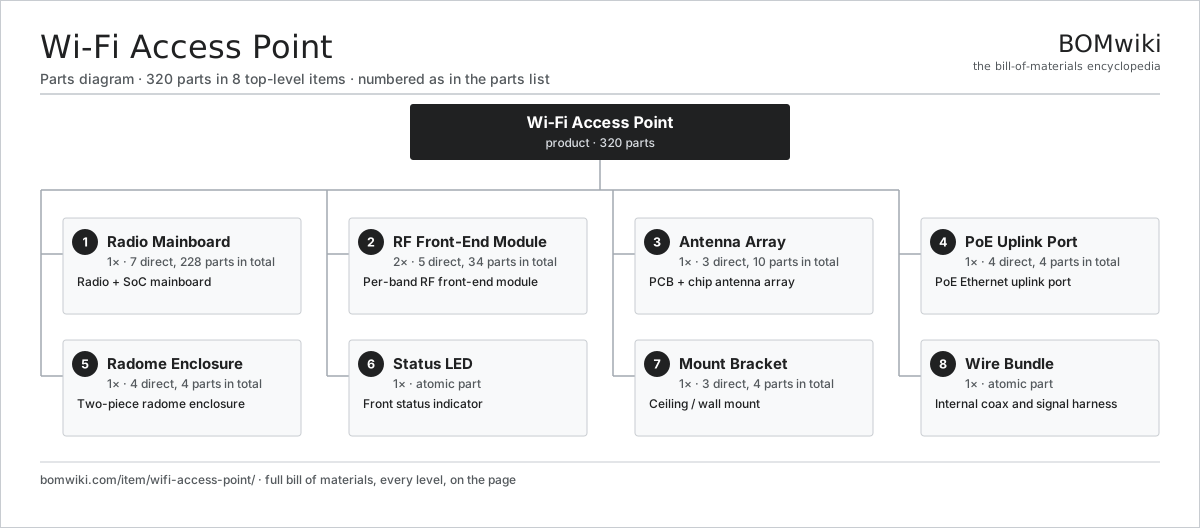
| # | Part | Qty | What it does |
|---|---|---|---|
| 1 | Radio Mainboard 7 parts | 1× | Radio + SoC mainboard |
| 2 | RF Front-End Module 5 parts | 2× | Per-band RF front-end module |
| 3 | Antenna Array 3 parts | 1× | PCB + chip antenna array |
| 4 | PoE Uplink Port 4 parts | 1× | PoE Ethernet uplink port |
| 5 | Radome Enclosure 4 parts | 1× | Two-piece radome enclosure |
| 6 | Status LED | 1× | Front status indicator |
| 7 | Mount Bracket 3 parts | 1× | Ceiling / wall mount |
| 8 | Wire Bundle | 1× | Internal coax and signal harness |
3D model
No 3D model yet. Have a CAD file of this? Add a 3D model. STL renders right on this page; STEP, FreeCAD, and OpenSCAD sources are welcome too (openly licensed, like all 3D models on BOMwiki).
Build & assembly graph
expand / collapse · shared sub-assemblies converge · links to related products · est. labourTap an assembly to expand/collapse · tap a part to open it · use “Open page” for any node · drag to pan, scroll to zoom.
Bill of materials for Wi-Fi Access Point
8 top-level lines · 34 rows shown · 320 parts total · indented to 3 levels| # | Item / sub-assembly | Part no. | Qty/assy | Ext. qty | Parts | Type |
|---|---|---|---|---|---|---|
| 1 | Radio Mainboard 7 parts | wifi-ap-mainboard | 1× | 1 | 228 | assembly |
| 1.1 | Bare PCB | pcb-bare | 1× | 1 | · | part |
| 1.2 | Wi-Fi SoC | wifi-ap-soc | 1× | 1 | · | part |
| 1.3 | DDR Memory | wifi-ap-dram | 1× | 1 | · | part |
| 1.4 | Firmware Flash | wifi-ap-flash | 1× | 1 | · | part |
| 1.5 | Microcontroller | mcu | 1× | 1 | · | part |
| 1.6 | RF Shield Can | wifi-ap-rf-shield | 3× | 3 | · | part |
| 1.7 | SMD Passive (R/C/L) | smd-passives | 220× | 220 | · | part |
| 2 | RF Front-End Module 5 parts | wifi-ap-front-end | 2× | 2 | 34 | assembly |
| 2.1 | Power Amplifier | wifi-ap-pa | 1× | 2 | · | part |
| 2.2 | Low-Noise Amplifier | wifi-ap-lna | 1× | 2 | · | part |
| 2.3 | RF Tx/Rx Switch | wifi-ap-rf-switch | 1× | 2 | · | part |
| 2.4 | SAW Bandpass Filter | wifi-ap-bandpass-filter | 1× | 2 | · | part |
| 2.5 | SMD Passive (R/C/L) | smd-passives | 30× | 60 | · | part |
| 3 | Antenna Array 3 parts | wifi-ap-antenna-array | 1× | 1 | 10 | assembly |
| 3.1 | PCB Antenna | wifi-ap-pcb-antenna | 4× | 4 | · | part |
| 3.2 | Chip Antenna | wifi-ap-chip-antenna | 2× | 2 | · | part |
| 3.3 | RF Coax Pigtail | wifi-ap-rf-cable | 4× | 4 | · | part |
| 4 | PoE Uplink Port 4 parts | wifi-ap-poe-port | 1× | 1 | 4 | assembly |
| 4.1 | RJ45 Jack | wifi-ap-rj45-jack | 1× | 1 | · | part |
| 4.2 | PoE Magnetics | wifi-ap-magnetics | 1× | 1 | · | part |
| 4.3 | PD Controller | wifi-ap-pd-controller | 1× | 1 | · | part |
| 4.4 | Connector | connector | 1× | 1 | · | part |
| 5 | Radome Enclosure 4 parts | wifi-ap-enclosure | 1× | 1 | 4 | assembly |
| 5.1 | Radome Cover | wifi-ap-radome | 1× | 1 | · | part |
| 5.2 | Base Plate | wifi-ap-base-plate | 1× | 1 | · | part |
| 5.3 | LED Light Pipe | wifi-ap-light-pipe | 1× | 1 | · | part |
| 5.4 | Fastener Set | fastener-set | 1× | 1 | · | part |
| 6 | Status LED | wifi-ap-status-led | 1× | 1 | · | part |
| 7 | Mount Bracket 3 parts | wifi-ap-mount-bracket | 1× | 1 | 4 | assembly |
| 7.1 | Bracket Plate | wifi-ap-bracket-plate | 1× | 1 | · | part |
| 7.2 | T-Bar Clip | wifi-ap-tbar-clip | 2× | 2 | · | part |
| 7.3 | Fastener Set | fastener-set | 1× | 1 | · | part |
| 8 | Wire Bundle | wire-bundle | 1× | 1 | · | part |
Something wrong in this list? Report a problem with this BOM.
Related products
same domain, ranked by shared parts 5G Base Station
436 parts · shares 3 with this page
5G Base Station
436 parts · shares 3 with this page
 DECT Base Station
192 parts · shares 3 with this page
DECT Base Station
192 parts · shares 3 with this page
 Fiber Media Converter
304 parts · shares 3 with this page
Fiber Media Converter
304 parts · shares 3 with this page
 Firewall Appliance
82 parts · shares 3 with this page
Firewall Appliance
82 parts · shares 3 with this page
 KVM Switch
179 parts · shares 3 with this page
KVM Switch
179 parts · shares 3 with this page
 Network Switch
1,367 parts · shares 3 with this page
Network Switch
1,367 parts · shares 3 with this page
Sourcing: possible vendors
Browse the supplier directory → Prices, MOQ, and lead times are algorithmic estimates, not quotes, and not claims about these companies. Company mappings are curated by keyword; est. price band $30–$50k. How estimates work| Vendor | HQ | Specialty | MOQ | Lead time |
|---|---|---|---|---|
|
🇺🇸Cisco
cisco.com ↗
|
San Jose, US | Networking | 500 units | 8–14 wks |
|
🇺🇸Juniper
juniper.net ↗
|
Sunnyvale, US | Networking | 500 units | 8–14 wks |
| arista.com ↗ | Santa Clara, US | Networking | 500 units | 8–14 wks |
|
🇫🇮Nokia
nokia.com ↗
|
Espoo, FI | Telecom equipment | 500 units | 8–14 wks |
|
🇨🇳Huawei
huawei.com ↗
|
Shenzhen, CN | Networking & telecom | 500 units | 8–14 wks |
362-word article