WLAN Controller
ProductOverview
A WLAN Controller is the central management and control plane for enterprise WiFi networks, coordinating hundreds of wireless access points to provide seamless roaming, consistent security, and optimized radio resource allocation. Individual APs running in "standalone" mode require manual configuration for each unit; a controller centralizes policy, enabling network-wide changes (password rotation, channel optimization) in seconds.
Deployed in corporate campuses, universities, hospitals, and large venues, controllers ensure thousands of users can move between APs without losing connection or re-authenticating. The controller maintains a real-time map of RF conditions (received signal strength, interference, noise floor) from each AP, and dynamically adjusts channel assignments and transmit power to minimize interference and maximize coverage.
How it works
The Control Plane Processor runs a management application that communicates with all managed APs via a discovery protocol (CAPWAP, Meraki Dashboard API, or proprietary). Each AP registers with the controller, reporting its IP address, MAC address, and current configuration. The controller then "claims" the AP and pushes down policies:
- SSID name and security type (Open, WPA2-Personal, WPA2-Enterprise)
- Band steering (prefer 5 GHz for capable clients, 2.4 GHz for older devices)
- TX power (high for open-air, low in dense environments)
- Channel assignment (e.g., AP 1 on channel 1, AP 2 on channel 6, AP 3 on channel 11 in 2.4 GHz)
When a client (smartphone, laptop) scans for networks, it finds all SSIDs broadcast by nearby APs. The client associates with one AP (often the strongest signal). The AP forwards DHCP and authentication frames to the controller, which assigns an IP address, applies QoS policies, and optionally performs 802.1X enterprise authentication if configured.
The Session Database maintains a live database of all clients: IP address, MAC address, VLAN, signal strength, data rate. This database is queried by the controller's roaming engine. When a client moves to a new AP (within 1 second), the controller detects the new AP's registration message and coordinates a "seamless roam" by:
- Reserving bandwidth on the new AP (if configured with per-client limits)
- Notifying the old AP to keep the client's session state (802.11k/v/w fast roaming)
- Updating the network switches to redirect traffic from old AP to new AP (Layer 2 learning)
This entire process happens in <100 ms, fast enough that real-time applications (VoIP calls) continue uninterrupted.
RF Optimization and Channel Planning
The controller continuously gathers RF metrics from all APs via periodic neighbor reports. Each AP measures RSSI (received signal strength) from its neighbors and reports to the controller. Using this map, the controller optimizes channel assignment: if two APs on the same channel are geographically close and causing interference, the controller moves one to a different channel, automatically pushing the change to that AP.
Power adjustment is similar: if an AP in a large venue is covering a huge area but only serving 2 clients, the controller can reduce transmit power to 5 dBm (instead of default 20 dBm), conserving energy and reducing interference to neighboring channels. In dense venues (stadiums, conferences), the controller may deliberately lower power to force clients to associate with nearby APs instead of distant ones, balancing load.
Legacy manual channel planning required drive tests (driving around with a scanner measuring signal levels) and expert network engineer intuition. Controller-based optimization is automated and adaptive: as seasonal foliage or furniture rearrangement affects RF propagation, the controller continuously re-optimizes.
Load Balancing and Client Density Management
The controller tracks how many clients are associated with each AP. If one AP is overloaded (100+ clients per AP is typical, but high-density venues may see 500+), the controller can implement band steering: "if the client is WiFi 6 capable and the 5 GHz band exists, prefer it; otherwise 2.4 GHz." Since fewer devices in 2.4 GHz means higher data rates and lower latency, steering offloads traffic.
The Session Database maintains client state across APs, enabling policy enforcement at the network level. For example, a rule might state: "client 08:00:27:XX:XX:XX is limited to 10 Mbps throughput." The controller ensures no AP violates this limit, adjusting the AP's local rate-limiting queue if necessary.
Guest Network Isolation
Enterprise controllers support multiple SSIDs on a single AP, each with different security and isolation levels. A typical deployment has:
- "Corporate-5G": WPA2-Enterprise with 802.1X authentication, corporate VLAN only
- "Corporate-24G": Same security, for older devices not supporting 5 GHz
- "Guest": Open, no authentication, captive portal, isolated VLAN (no access to corporate resources)
The controller ensures traffic between VLANs is firewalled at the network edge; the AP itself enforces VLAN isolation, preventing guest devices from even reaching corporate networks.
Clustering and High Availability
Critical deployments use two or more controllers in a cluster. The Redundant Management Network provides two independent Gigabit links for cluster synchronization. When a client roams between APs that are managed by different controllers, the controllers communicate to ensure consistent policy application.
If the primary controller fails, APs can operate in "standalone" mode briefly (using last-known configuration), or failover to the backup controller if configured. The Dual Hot-Swappable Power Supplies with hot-swappable PSU modules ensures power supply failure does not down the entire system.
Data Collection and Analytics
The controller collects extensive telemetry: per-AP channel utilization, per-client throughput, per-SSID security events. This data is stored on the Local Storage and can be exported for analytics. Security teams use this to identify anomalies (client with unusually high data transfer rate = potential data exfiltration, or unusual geographic roaming pattern = compromised device).
Integration with Network Edge
Modern controllers integrate with SD-WAN appliances and network access control (NAC) platforms. When a new device connects to WiFi, the controller can query NAC: "is this device compliant (OS patched, antivirus running)?" If not, the NAC system isolates the device to a quarantine network. The controller enforces this isolation by assigning the device to a restricted VLAN.
Some controllers also support airtime fairness: older 802.11b/g devices that transmit slower are given lower scheduling priority, preventing them from monopolizing airtime and degrading 802.11ac/ax clients.
Enterprise Authentication
For corporate networks, the controller integrates with RADIUS servers (or on-site RADIUS via a network appliance). When a user authenticates via 802.1X, the AP challenges the user, forwards credentials to the controller, which then queries the corporate RADIUS server using the user's domain credentials. Upon successful authentication, the user is assigned to their corporate VLAN, and the controller logs the event for compliance audit.
Password changes and group membership changes on the corporate directory automatically take effect on the next user WiFi login, without any controller reconfiguration.
WLAN Controller parts and their functions
7 top-level parts · 38 parts in total · full bill of materials below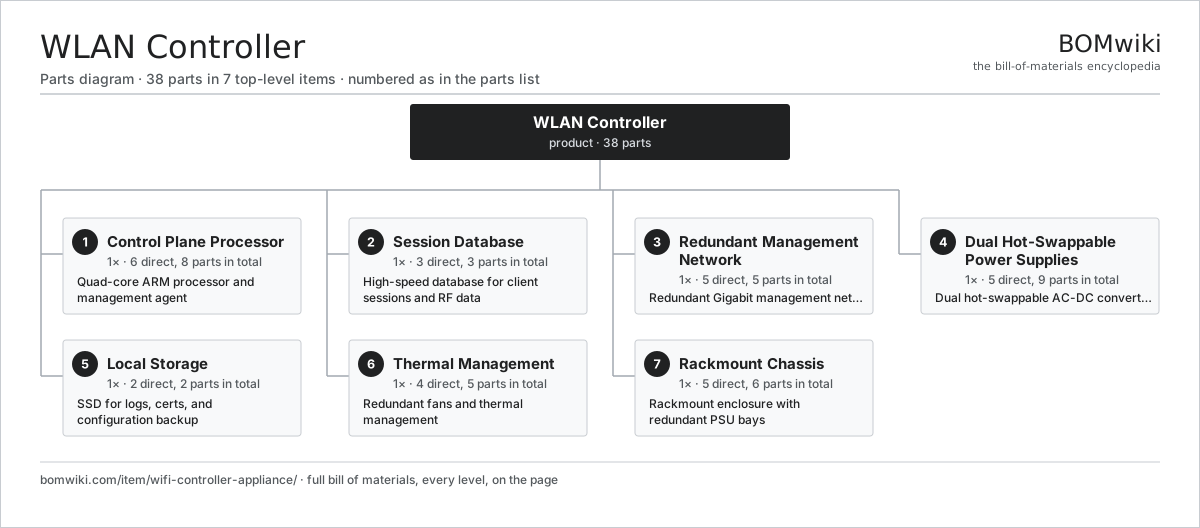
| # | Part | Qty | What it does |
|---|---|---|---|
| 1 | Control Plane Processor 6 parts | 1× | Quad-core ARM processor and management agent |
| 2 | Session Database 3 parts | 1× | High-speed database for client sessions and RF data |
| 3 | Redundant Management Network 5 parts | 1× | Redundant Gigabit management network |
| 4 | Dual Hot-Swappable Power Supplies 5 parts | 1× | Dual hot-swappable AC-DC converters |
| 5 | Local Storage 2 parts | 1× | SSD for logs, certs, and configuration backup |
| 6 | Thermal Management 4 parts | 1× | Redundant fans and thermal management |
| 7 | Rackmount Chassis 5 parts | 1× | Rackmount enclosure with redundant PSU bays |
3D model
No 3D model yet. Have a CAD file of this? Add a 3D model. STL renders right on this page; STEP, FreeCAD, and OpenSCAD sources are welcome too (openly licensed, like all 3D models on BOMwiki).
Build & assembly graph
expand / collapse · shared sub-assemblies converge · links to related products · est. labourTap an assembly to expand/collapse · tap a part to open it · use “Open page” for any node · drag to pan, scroll to zoom.
Bill of materials for WLAN Controller
7 top-level lines · 37 rows shown · 38 parts total · indented to 3 levels| # | Item / sub-assembly | Part no. | Qty/assy | Ext. qty | Parts | Type |
|---|---|---|---|---|---|---|
| 1 | Control Plane Processor 6 parts | wifi-controller-appliance-control-cpu-subsystem | 1× | 1 | 8 | assembly |
| 1.1 | ARM Cortex-A72 SoC | wifi-controller-appliance-soc | 1× | 1 | · | part |
| 1.2 | 12 GB DDR4 Memory | wifi-controller-appliance-ddr4-12gb | 1× | 1 | · | part |
| 1.3 | 500 GB NVMe SSD | wifi-controller-appliance-nvme-ssd | 1× | 1 | · | part |
| 1.4 | GPIO Expander IC | wifi-controller-appliance-gpio-expander | 1× | 1 | · | part |
| 1.5 | Bare PCB | pcb-bare | 1× | 1 | · | part |
| 1.6 | SMD Passive (R/C/L) | smd-passives | 3× | 3 | · | part |
| 2 | Session Database 3 parts | wifi-controller-appliance-database-subsystem | 1× | 1 | 3 | assembly |
| 2.1 | Db Cache | wifi-controller-appliance-db-cache | 1× | 1 | · | part |
| 2.2 | Persistent Store | wifi-controller-appliance-persistent-store | 1× | 1 | · | part |
| 2.3 | Cluster Sync | wifi-controller-appliance-cluster-sync | 1× | 1 | · | part |
| 3 | Redundant Management Network 5 parts | wifi-controller-appliance-networking-subsystem | 1× | 1 | 5 | assembly |
| 3.1 | Primary Gigabit PHY | wifi-controller-appliance-nic-primary | 1× | 1 | · | part |
| 3.2 | Backup Gigabit PHY | wifi-controller-appliance-nic-backup | 1× | 1 | · | part |
| 3.3 | Primary RJ45 Jack | wifi-controller-appliance-rj45-primary | 1× | 1 | · | part |
| 3.4 | Backup RJ45 Jack | wifi-controller-appliance-rj45-backup | 1× | 1 | · | part |
| 3.5 | Ethernet MAC Driver | wifi-controller-appliance-switch-driver | 1× | 1 | · | part |
| 4 | Dual Hot-Swappable Power Supplies 5 parts | wifi-controller-appliance-power-subsystem | 1× | 1 | 9 | assembly |
| 4.1 | Power Supply | power-supply | 2× | 2 | · | part |
| 4.2 | 12V to 5V Buck | wifi-controller-appliance-dcdc-12v-5v | 1× | 1 | · | part |
| 4.3 | 5V to 3.3V Buck | wifi-controller-appliance-dcdc-5v-3v3 | 1× | 1 | · | part |
| 4.4 | Power Supply Monitor IC | wifi-controller-appliance-psu-monitor | 1× | 1 | · | part |
| 4.5 | SMD Passive (R/C/L) | smd-passives | 4× | 4 | · | part |
| 5 | Local Storage 2 parts | wifi-controller-appliance-storage-subsystem | 1× | 1 | 2 | assembly |
| 5.1 | 500 GB NVMe SSD | wifi-controller-appliance-nvme-ssd | 1× | 1 | · | part |
| 5.2 | NVMe Protocol Converter | wifi-controller-appliance-ssd-controller | 1× | 1 | · | part |
| 6 | Thermal Management 4 parts | wifi-controller-appliance-cooling-subsystem | 1× | 1 | 5 | assembly |
| 6.1 | Dual-Fan Tray Module | wifi-controller-appliance-fan-tray-dual | 1× | 1 | · | part |
| 6.2 | Thermal Sensor | wifi-controller-appliance-temperature-sensor | 2× | 2 | · | part |
| 6.3 | PWM Fan Controller | wifi-controller-appliance-fan-controller | 1× | 1 | · | part |
| 6.4 | Passive Heatsink | wifi-controller-appliance-heatsink | 1× | 1 | · | part |
| 7 | Rackmount Chassis 5 parts | wifi-controller-appliance-chassis-subsystem | 1× | 1 | 6 | assembly |
| 7.1 | 2RU Rackmount Frame | wifi-controller-appliance-rack-frame | 1× | 1 | · | part |
| 7.2 | Front Panel Assembly | wifi-controller-appliance-front-panel | 1× | 1 | · | part |
| 7.3 | PSU Hot-Swap Bay (Left) | wifi-controller-appliance-psu-bay-left | 1× | 1 | · | part |
| 7.4 | PSU Hot-Swap Bay (Right) | wifi-controller-appliance-psu-bay-right | 1× | 1 | · | part |
| 7.5 | Fastener Set | fastener-set | 2× | 2 | · | part |
Something wrong in this list? Report a problem with this BOM.
Sourcing: possible vendors
Browse the supplier directory → Prices, MOQ, and lead times are algorithmic estimates, not quotes, and not claims about these companies. Company mappings are curated by keyword; est. price band $30–$50k. How estimates work| Vendor | HQ | Specialty | MOQ | Lead time |
|---|---|---|---|---|
|
🇺🇸Cisco
cisco.com ↗
|
San Jose, US | Networking | 500 units | 8–14 wks |
|
🇺🇸Juniper
juniper.net ↗
|
Sunnyvale, US | Networking | 500 units | 8–14 wks |
| arista.com ↗ | Santa Clara, US | Networking | 500 units | 8–14 wks |
|
🇫🇮Nokia
nokia.com ↗
|
Espoo, FI | Telecom equipment | 500 units | 8–14 wks |
|
🇨🇳Huawei
huawei.com ↗
|
Shenzhen, CN | Networking & telecom | 500 units | 8–14 wks |
1,135-word article