Refreshable Braille Display
ProductOverview
A refreshable braille display is an electronic device that renders characters in tactile braille format, allowing blind or low-vision users to read screen content in real-time. Unlike static paper braille, each cell refreshes dynamically in response to cursor movement or text scrolling, making it possible to navigate digital documents, emails, and web content at native reading speed.
The core technology uses piezoelectric ceramic stacks positioned beneath a grid of small pins. When powered with high voltage (typically 40 V), the piezo elements deform, mechanically raising pins to form the eight-dot braille pattern. Depowering the cell allows springs to return pins to the flat baseline. Modern units display 40 to 80 cells simultaneously, corresponding to 2–4 lines of text depending on the application's layout.
Refreshable braille displays bridge an accessibility gap in the computing ecosystem. Unlike keyboard navigation or screen readers, they allow rapid scanning of text and visual layouts that contain spatial information, tables, spreadsheets, code editors with column-aligned syntax, and graphical user interfaces. A skilled user reading a 40-cell display can achieve comprehension speeds approaching sighted reading for familiar document structures.
How it Works
The display receives character data via USB or Bluetooth from the host computer running a screen reader (JAWS, NVDA, VoiceOver). The Controller Board board decodes this stream and maps each character to its eight-bit braille pattern. Every 20 milliseconds, the controller updates all cell driver channels in parallel.
Each Piezo Ceramic Stack operates as a push-actuator. The Gate Driver IC circuits apply 40 V square-wave pulses to the ceramic element, causing it to expand and push the mechanical Pin Coupling Rod. The rod couples to a visible braille pin, which the user feels as a raised dot. When voltage is removed, a spring (or magnetic force from the Neodymium Magnet) returns the pin to the baseline.
Timing is critical. Cells must refresh in phase with human touch perception, too fast wastes power, too slow creates lag when the user's fingers are scanning. A 50 Hz refresh per cell balances responsiveness and power consumption. The power subsystem must supply clean 40 V without ripple, as any oscillation causes the pin to chatter or fail to fully raise.
The user navigates via mechanical keys: cursor routing buttons jump to specific character positions, the four-way rocker scrolls line-by-line or word-by-word, and the Navigation Encoder encoder allows continuous panning across long lines. All key presses route through the Keypad PCB Assembly matrix and back to the screen reader as standard HID keyboard events, so the host operating system treats the display as a peripheral keyboard rather than a specialized device.
Piezo Cell Design
Each braille cell contains eight piezo stacks (one per dot position) arranged in a 2×4 grid. A typical stack is 2 mm in diameter and 40 mm tall, assembled from alternating layers of lead-free PZT ceramic and metal electrodes. The ceramic material chosen (usually PZT-5H) exhibits high electromechanical coupling for maximum displacement-per-volt ratio, and high durability (>10^8 cycles) because piezo actuators refresh thousands of times per second during normal reading sessions.
The pin rod must be rigid (brass or hardened steel) and friction-free, because any drag increases actuation power and creates tactile noise. Ball bearings or polymer bushings isolate each pin's motion vertically, preventing cross-talk between adjacent cells. When all 80 cells refresh simultaneously, the device draws peak current in the 5–10 A range; the boost converter must respond instantly to maintain voltage regulation.
Wireless and Connectivity
Most modern units support Bluetooth LE to untether from desk computers and work with smartphones and tablets. The nRF52840 wireless module implements HID-over-Gatt, presenting itself as a standard Bluetooth keyboard and mouse to the host. This means screen readers on iOS, Android, Windows, and macOS require no proprietary driver installation, they see the display as a compatible input device out of the box.
USB remains the primary tether for stationary use and charging. The FT4232H bridge converts USB high-speed data into parallel GPIO channels controlling the cell drivers directly, eliminating the latency of a full USB protocol stack in the main controller.
Accessibility Impact
Refreshable braille displays are critical infrastructure for professional blind and low-vision users in engineering, programming, law, and research roles. They enable independent operation of complex software without constant reliance on spoken feedback. A developer reading code can see indentation structure, spot syntax errors visually, and understand spatial layouts in data visualizations, capabilities essential for production work. They also serve as an educational tool, helping sighted users learn braille by offering parallel text feedback.
The primary barrier is cost: a commercial 40-cell display typically costs USD 3000–4000, and an 80-cell unit costs USD 8000–15000. This has driven open-source projects (like Project ARIA) and lower-cost consumer designs using cheaper actuator technologies (solenoids, shape-memory alloys) as alternatives, though those sacrifice refresh speed or dot sharpness.
Refreshable Braille Display parts and their functions
7 top-level parts · 292 parts in total · full bill of materials below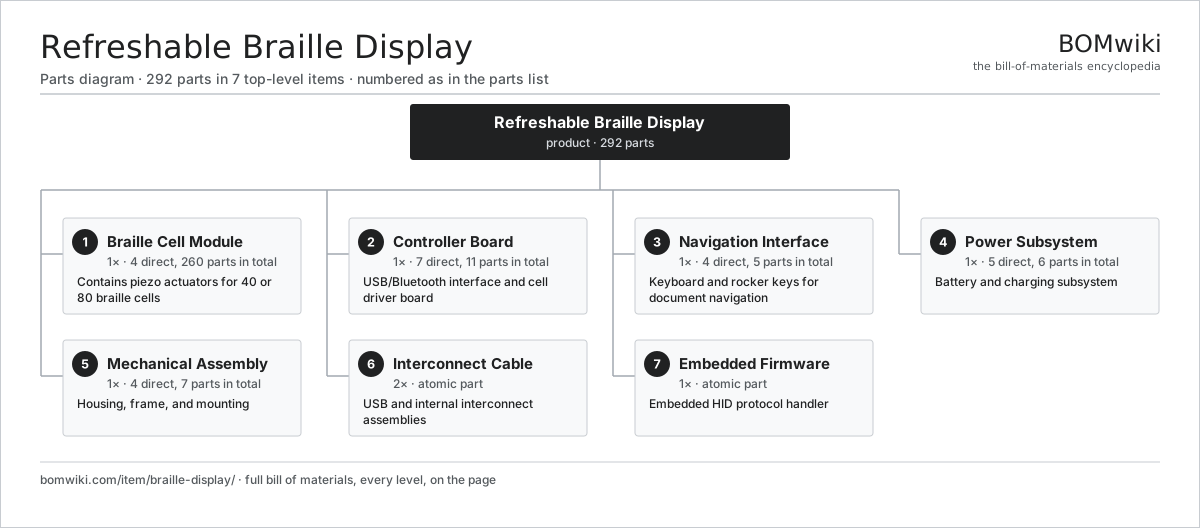
| # | Part | Qty | What it does |
|---|---|---|---|
| 1 | Braille Cell Module 4 parts | 1× | Contains piezo actuators for 40 or 80 braille cells |
| 2 | Controller Board 7 parts | 1× | USB/Bluetooth interface and cell driver board |
| 3 | Navigation Interface 4 parts | 1× | Keyboard and rocker keys for document navigation |
| 4 | Power Subsystem 5 parts | 1× | Battery and charging subsystem |
| 5 | Mechanical Assembly 4 parts | 1× | Housing, frame, and mounting |
| 6 | Interconnect Cable | 2× | USB and internal interconnect assemblies |
| 7 | Embedded Firmware | 1× | Embedded HID protocol handler |
3D model
No 3D model yet. Have a CAD file of this? Add a 3D model. STL renders right on this page; STEP, FreeCAD, and OpenSCAD sources are welcome too (openly licensed, like all 3D models on BOMwiki).
Build & assembly graph
expand / collapse · shared sub-assemblies converge · links to related products · est. labourTap an assembly to expand/collapse · tap a part to open it · use “Open page” for any node · drag to pan, scroll to zoom.
Bill of materials for Refreshable Braille Display
7 top-level lines · 34 rows shown · 292 parts total · indented to 3 levels| # | Item / sub-assembly | Part no. | Qty/assy | Ext. qty | Parts | Type |
|---|---|---|---|---|---|---|
| 1 | Braille Cell Module 4 parts | braille-display-cell-module | 1× | 1 | 260 | assembly |
| 1.1 | Cell Array Assembly 3 parts | braille-display-cell-array | 1× | 1 | 256 | assembly |
| 1.1.1 | Piezo Ceramic Stack | braille-display-piezo-stack | 64× | 64 | · | part |
| 1.1.2 | Pin Coupling Rod | braille-display-pin-rod | 64× | 64 | · | part |
| 1.1.3 | Ball Bearing | ball-bearing | 128× | 128 | · | part |
| 1.2 | Cell Driver PCB | braille-display-cell-driver-pcb | 1× | 1 | · | part |
| 1.3 | Neodymium Magnet | neodymium-magnet | 2× | 2 | · | part |
| 1.4 | Cell Mounting Frame | braille-display-cell-housing | 1× | 1 | · | part |
| 2 | Controller Board 7 parts | braille-display-controller | 1× | 1 | 11 | assembly |
| 2.1 | USB Bridge IC | braille-display-usb-bridge | 1× | 1 | · | part |
| 2.2 | BLE Wireless Module | braille-display-ble-module | 1× | 1 | · | part |
| 2.3 | Microcontroller | mcu | 1× | 1 | · | part |
| 2.4 | Gate Driver IC | braille-display-level-shifter | 4× | 4 | · | part |
| 2.5 | Bare PCB | pcb-bare | 1× | 1 | · | part |
| 2.6 | SMD Passive (R/C/L) | smd-passives | 1× | 1 | · | part |
| 2.7 | Connector | connector | 2× | 2 | · | part |
| 3 | Navigation Interface 4 parts | braille-display-navigation | 1× | 1 | 5 | assembly |
| 3.1 | Keypad PCB Assembly | braille-display-keypad-pcb | 1× | 1 | · | part |
| 3.2 | Rocker Switch Module | braille-display-rocker-switches | 2× | 2 | · | part |
| 3.3 | Navigation Encoder | braille-display-thumb-wheel | 1× | 1 | · | part |
| 3.4 | Fastener Set | fastener-set | 1× | 1 | · | part |
| 4 | Power Subsystem 5 parts | braille-display-power | 1× | 1 | 6 | assembly |
| 4.1 | LiPo Cell | lipo-cell | 2× | 2 | · | part |
| 4.2 | Boost Converter | braille-display-dcdc-boost | 1× | 1 | · | part |
| 4.3 | Charge Controller IC | braille-display-charge-controller | 1× | 1 | · | part |
| 4.4 | Thermal Fuse | thermal-fuse | 1× | 1 | · | part |
| 4.5 | Power Supply | power-supply | 1× | 1 | · | part |
| 5 | Mechanical Assembly 4 parts | braille-display-mechanics | 1× | 1 | 7 | assembly |
| 5.1 | Base Shell | braille-display-base-shell | 1× | 1 | · | part |
| 5.2 | Top Cover Panel | braille-display-top-cover | 1× | 1 | · | part |
| 5.3 | Elastomeric Feet | braille-display-grip-feet | 4× | 4 | · | part |
| 5.4 | Protective Edge Rail | braille-display-rail-extrusion | 1× | 1 | · | part |
| 6 | Interconnect Cable | braille-display-cable | 2× | 2 | · | part |
| 7 | Embedded Firmware | braille-display-firmware | 1× | 1 | · | part |
Something wrong in this list? Report a problem with this BOM.
Related products
same domain, ranked by shared parts Large-Format Inkjet Plotter
473 parts · shares 3 with this page
Large-Format Inkjet Plotter
473 parts · shares 3 with this page
 Laser Printer
124 parts · shares 3 with this page
Laser Printer
124 parts · shares 3 with this page
 Tape Library
1,115 parts · shares 3 with this page
Tape Library
1,115 parts · shares 3 with this page
 Thermal Label Printer
64 parts · shares 3 with this page
Thermal Label Printer
64 parts · shares 3 with this page
 Serial Console Server
336 parts · shares 2 with this page
Serial Console Server
336 parts · shares 2 with this page
 Laptop
157 parts · shares 2 with this page
Laptop
157 parts · shares 2 with this page
Sourcing: possible vendors
Browse the supplier directory → Prices, MOQ, and lead times are algorithmic estimates, not quotes, and not claims about these companies. Company mappings are curated by keyword; est. price band $20–$3k. How estimates work| Vendor | HQ | Specialty | MOQ | Lead time |
|---|---|---|---|---|
| dell.com ↗ | Round Rock, US | Computers & infrastructure | 1,000 units | 8–14 wks |
|
🇺🇸HP
hp.com ↗
|
Palo Alto, US | Computers & printers | 1,000 units | 8–14 wks |
|
🇨🇳Lenovo
lenovo.com ↗
|
Beijing, CN | Computers | 1,000 units | 8–14 wks |
|
🇹🇼ASUS
asus.com ↗
|
Taipei, TW | Computers & components | 1,000 units | 8–14 wks |
|
🇨🇳Foxconn
foxconn.com ↗
|
Shenzhen, CN | Electronics contract mfg | 1,000 units | 8–14 wks |
869-word article