Broadcast Graphics Engine
ProductOverview
A broadcast graphics engine is the real-time renderer behind on-air graphics, lower thirds, scorecards, virtual sets, and animated transitions. Unlike post-production rendering (which can take hours), broadcast graphics must render and output a new frame every 33 ms (at 30 fps) or 16.7 ms (at 60 fps), synchronized perfectly to the transmission timeline. A high-end GPU driven by custom software makes this possible, generating broadcast-quality images live as operators manipulate objects, trigger animations, or swap templates.
Dual output architecture
The output stage provides two independent video streams:
- Fill (RGB): The final composited image, text, graphics, backgrounds, effects, ready for transmission.
- Key (Alpha): A monochrome matte showing which pixels are opaque (white) and which are transparent (black).
This dual-output design allows downstream vision mixers to composite the graphics over a camera shot: the mixer's keyer uses the key signal as a mask, placing the opaque parts of the graphics over the camera and leaving the transparent parts for the camera to show through. This is how lower thirds appear over talent without covering their feet, or how a virtual set replaces the real background while keeping the talent in front.
GPU rendering pipeline
The GPU runs a graphics pipeline optimized for real-time broadcast. Incoming asset data (fonts, images, video clips) live in high-bandwidth GPU memory. Each frame, the rendering engine:
- Clears the frame buffer (fill and key)
- Draws background layers (gradients, fills, video)
- Renders text and vector graphics (lower thirds, tickers, scoreboards)
- Applies effects and transitions (keyframe animation, blur, color grading)
- Outputs the result to fill and key outputs
The timing sync input ensures output frames align with the master blackburst clock, so the graphics remain synchronized with cameras and other sources.
Software and control
The graphics composition suite runs on the CPU. It provides:
- Project editor: Designers build templates with text boxes, image placeholders, and animation curves.
- Rundown control: During live production, operators see a list of graphics due to air ("Lower third," "Score update," "End card") and trigger each with a button press.
- Real-time data binding: Dynamic content (scores, stock tickers, weather data) plugs into template placeholders.
- Multi-camera support: Different graphics or text overlays for different camera angles.
A typical workflow: the graphics operator receives a rundown from the director (e.g., "Lower third for Smith at 10:30, Update score at 10:45"). They pre-stage each template, and at the cue time, they press a button. The engine instantly swaps in the new graphics. If a name or number changes, they can edit on the fly, the new text renders in the next frame.
Genlock and frame timing
The timing sync input accepts blackburst or tri-level sync from the facility master clock. The GPU frame rate is locked to this reference, so every output frame aligns exactly with camera frames and transmission line timing. A graphics frame that slips even a few milliseconds will appear to stutter or tear when mixed with camera video; genlock prevents this.
Liquid cooling and thermal management
Modern GPUs dissipate significant heat, especially under sustained render loads. Many broadcast graphics engines use liquid cooling loops, a pump circulates coolant through a water block on the GPU die, then through a radiator where a fan cools the liquid. This keeps the GPU at <50°C, maintaining stable clock speeds and long lifespan. A temperature sensor feeds back to the control software, which throttles rendering if temperature rises, ensuring safe operation.
Practical workflow
In a live broadcast: the graphics operator sits at a control workstation with a graphics editor open. The director's assistant feeds them rundown updates: "Graphics 1 at 11:05, Graphics 2 at 11:15." The operator pre-stages each by loading the template and filling in names/numbers. At the cue, a single click or foot pedal press triggers the graphics to air. In mission-critical broadcasts (sports, news), backup graphics systems run in parallel, if the primary engine fails, an operator can instantly switch to the backup engine without stopping transmission.
The SSD storage holds hundreds of graphics projects and media assets. For high-bandwidth content delivery (multiple graphics planes, full-frame animation), the 10 Gigabit Ethernet allows rapid asset ingest from production servers or cloud storage, ensuring the operator always has fresh content ready to render.
Broadcast Graphics Engine parts and their functions
11 top-level parts · 114 parts in total · full bill of materials below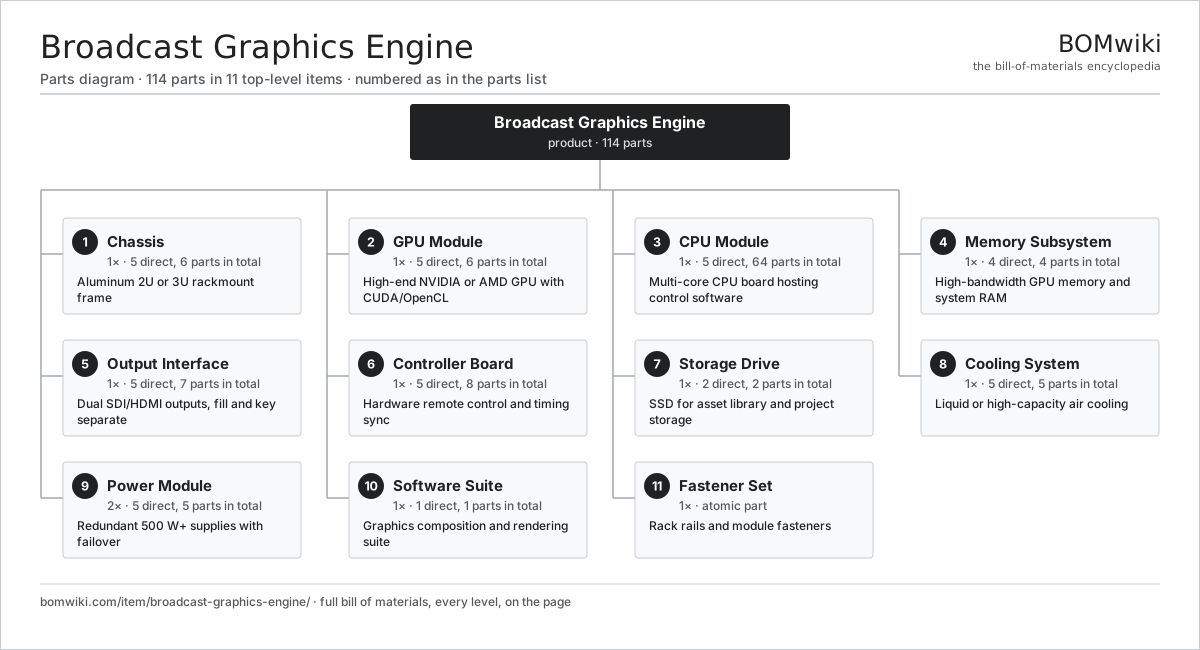
| # | Part | Qty | What it does |
|---|---|---|---|
| 1 | Chassis 5 parts | 1× | Aluminum 2U or 3U rackmount frame |
| 2 | GPU Module 5 parts | 1× | High-end NVIDIA or AMD GPU with CUDA/OpenCL |
| 3 | CPU Module 5 parts | 1× | Multi-core CPU board hosting control software |
| 4 | Memory Subsystem 4 parts | 1× | High-bandwidth GPU memory and system RAM |
| 5 | Output Interface 5 parts | 1× | Dual SDI/HDMI outputs, fill and key separate |
| 6 | Controller Board 5 parts | 1× | Hardware remote control and timing sync |
| 7 | Storage Drive 2 parts | 1× | SSD for asset library and project storage |
| 8 | Cooling System 5 parts | 1× | Liquid or high-capacity air cooling |
| 9 | Power Module 5 parts | 2× | Redundant 500 W+ supplies with failover |
| 10 | Software Suite 1 parts | 1× | Graphics composition and rendering suite |
| 11 | Fastener Set | 1× | Rack rails and module fasteners |
3D model
No 3D model yet. Have a CAD file of this? Add a 3D model. STL renders right on this page; STEP, FreeCAD, and OpenSCAD sources are welcome too (openly licensed, like all 3D models on BOMwiki).
Build & assembly graph
expand / collapse · shared sub-assemblies converge · links to related products · est. labourTap an assembly to expand/collapse · tap a part to open it · use “Open page” for any node · drag to pan, scroll to zoom.
Bill of materials for Broadcast Graphics Engine
11 top-level lines · 53 rows shown · 114 parts total · indented to 3 levels| # | Item / sub-assembly | Part no. | Qty/assy | Ext. qty | Parts | Type |
|---|---|---|---|---|---|---|
| 1 | Chassis 5 parts | broadcast-graphics-engine-chassis | 1× | 1 | 6 | assembly |
| 1.1 | Frame Extrusion | broadcast-graphics-engine-frame-extrusion | 1× | 1 | · | part |
| 1.2 | Front Panel | broadcast-graphics-engine-front-panel | 1× | 1 | · | part |
| 1.3 | Rear Panel | broadcast-graphics-engine-rear-panel | 1× | 1 | · | part |
| 1.4 | Side Ventilation | broadcast-graphics-engine-side-vents | 2× | 2 | · | part |
| 1.5 | Fastener Set | fastener-set | 1× | 1 | · | part |
| 2 | GPU Module 5 parts | broadcast-graphics-engine-gpu-module | 1× | 1 | 6 | assembly |
| 2.1 | GPU Card | broadcast-graphics-engine-gpu-card | 1× | 1 | · | part |
| 2.2 | GPU Heatsink | broadcast-graphics-engine-gpu-heatsink | 1× | 1 | · | part |
| 2.3 | Thermal Interface | broadcast-graphics-engine-gpu-thermal-pad | 1× | 1 | · | part |
| 2.4 | Power Connector | broadcast-graphics-engine-gpu-power-connector | 2× | 2 | · | part |
| 2.5 | Fastener Set | fastener-set | 1× | 1 | · | part |
| 3 | CPU Module 5 parts | broadcast-graphics-engine-cpu-module | 1× | 1 | 64 | assembly |
| 3.1 | CPU Board | broadcast-graphics-engine-cpu-board | 1× | 1 | · | part |
| 3.2 | System ROM | broadcast-graphics-engine-system-rom | 1× | 1 | · | part |
| 3.3 | Network Card | broadcast-graphics-engine-network-card | 1× | 1 | · | part |
| 3.4 | SATA Controller | broadcast-graphics-engine-sata-controller | 1× | 1 | · | part |
| 3.5 | SMD Passive (R/C/L) | smd-passives | 60× | 60 | · | part |
| 4 | Memory Subsystem 4 parts | broadcast-graphics-engine-memory-subsystem | 1× | 1 | 4 | assembly |
| 4.1 | GPU Memory | broadcast-graphics-engine-gpu-memory | 1× | 1 | · | part |
| 4.2 | System RAM | broadcast-graphics-engine-system-memory | 1× | 1 | · | part |
| 4.3 | Memory Controller | broadcast-graphics-engine-memory-controller | 1× | 1 | · | part |
| 4.4 | Memory Heatspreader | broadcast-graphics-engine-memory-heatspreader | 1× | 1 | · | part |
| 5 | Output Interface 5 parts | broadcast-graphics-engine-output-interface | 1× | 1 | 7 | assembly |
| 5.1 | Fill Output Stage | broadcast-graphics-engine-fill-output | 1× | 1 | · | part |
| 5.2 | Key Output Stage | broadcast-graphics-engine-key-output | 1× | 1 | · | part |
| 5.3 | Output DAC | broadcast-graphics-engine-output-dac | 2× | 2 | · | part |
| 5.4 | Output Driver | broadcast-graphics-engine-output-driver | 2× | 2 | · | part |
| 5.5 | Bare PCB | pcb-bare | 1× | 1 | · | part |
| 6 | Controller Board 5 parts | broadcast-graphics-engine-controller-board | 1× | 1 | 8 | assembly |
| 6.1 | USB Hub | broadcast-graphics-engine-usb-hub | 1× | 1 | · | part |
| 6.2 | Timing Sync | broadcast-graphics-engine-timing-sync | 1× | 1 | · | part |
| 6.3 | Status LED | broadcast-graphics-engine-status-led | 4× | 4 | · | part |
| 6.4 | Controller PCB | broadcast-graphics-engine-controller-pcb | 1× | 1 | · | part |
| 6.5 | Microcontroller | mcu | 1× | 1 | · | part |
| 7 | Storage Drive 2 parts | broadcast-graphics-engine-storage-drive | 1× | 1 | 2 | assembly |
| 7.1 | SSD Module | broadcast-graphics-engine-ssd-module | 1× | 1 | · | part |
| 7.2 | SSD Enclosure | broadcast-graphics-engine-ssd-enclosure | 1× | 1 | · | part |
| 8 | Cooling System 5 parts | broadcast-graphics-engine-cooling-system | 1× | 1 | 5 | assembly |
| 8.1 | Radiator | broadcast-graphics-engine-radiator | 1× | 1 | · | part |
| 8.2 | Pump | broadcast-graphics-engine-pump | 1× | 1 | · | part |
| 8.3 | Water Block | broadcast-graphics-engine-water-block | 1× | 1 | · | part |
| 8.4 | Coolant | broadcast-graphics-engine-coolant | 1× | 1 | · | part |
| 8.5 | Thermal Sensor | broadcast-graphics-engine-thermal-sensor | 1× | 1 | · | part |
| 9 | Power Module 5 parts | broadcast-graphics-engine-power-supply | 2× | 2 | 5 | assembly |
| 9.1 | PFC Stage | broadcast-graphics-engine-pfc-stage | 1× | 2 | · | part |
| 9.2 | Main Converter | broadcast-graphics-engine-main-converter | 1× | 2 | · | part |
| 9.3 | Output Rails | broadcast-graphics-engine-output-rails | 1× | 2 | · | part |
| 9.4 | PSU Connector | broadcast-graphics-engine-psu-connector | 1× | 2 | · | part |
| 9.5 | PSU Fan | broadcast-graphics-engine-psu-fan | 1× | 2 | · | part |
| 10 | Software Suite 1 parts | broadcast-graphics-engine-software-license | 1× | 1 | 1 | assembly |
| 10.1 | License Dongle | broadcast-graphics-engine-license-dongle | 1× | 1 | · | part |
| 11 | Fastener Set | fastener-set | 1× | 1 | · | part |
Something wrong in this list? Report a problem with this BOM.
Sourcing: possible vendors
Browse the supplier directory → Prices, MOQ, and lead times are algorithmic estimates, not quotes, and not claims about these companies. Company mappings are curated by keyword; est. price band $50–$3k. How estimates work| Vendor | HQ | Specialty | MOQ | Lead time |
|---|---|---|---|---|
|
🇯🇵Sony
sony.com ↗
|
Tokyo, JP | Consumer electronics | 1,000 units | 8–12 wks |
| samsung.com ↗ | Suwon, KR | Electronics & displays | 1,000 units | 8–12 wks |
|
🇺🇸Harman
harman.com ↗
|
Stamford, US | Audio (JBL, AKG) | 1,000 units | 8–12 wks |
|
🇺🇸Bose
bose.com ↗
|
Framingham, US | Audio | 1,000 units | 8–12 wks |
| yamaha.com ↗ | Hamamatsu, JP | Audio & instruments | 1,000 units | 8–12 wks |
836-word article