Video Capture Card
ProductOverview
A video capture card turns a live HDMI signal, from a game console, a camera, or a second computer, into a video stream the host PC can record or stream. Despite the name, modern units are external boxes that plug into USB rather than slot into a motherboard, so they work with laptops too. They are the standard tool for game streaming, screen recording, and webinar production.
Everything happens on the Capture PCB, which receives the HDMI input, digitizes it, and ships it to the host. The source and a local monitor connect through the Port Cluster, which also carries the USB link. The board is wrapped in the Enclosure, its activity shown on the Status LED, its hottest chip cooled by the Heatsink, and it reaches the computer over the bundled USB-C Cable.
How it works
The incoming HDMI cable lands on the HDMI Receiver, which deserializes the three high-speed TMDS lanes into a parallel stream of pixels and the embedded audio. That stream feeds two paths. One path is the HDMI Retimer, which immediately re-drives a clean copy out the pass-through port so the player still sees the source on a local display with no added lag. The other path goes to the Capture SoC, where the Format FPGA converts colour space, scales if needed, and buffers frames.
From there the USB Controller packetizes the video and streams it over USB 3.x to the host, which sees the device as a standard webcam-class video source, so recording and streaming software picks it up with no special driver. Lighter SoCs hand over raw frames for the PC to encode, while higher-end ones compress to H.264 or H.265 on the card to save bus bandwidth and CPU. The card draws all its power from the USB bus, and the Thermal Interface Pad couples the SoC to the aluminium shell so the fanless enclosure can shed the heat.
Video Capture Card parts and their functions
7 top-level parts · 25 parts in total · full bill of materials below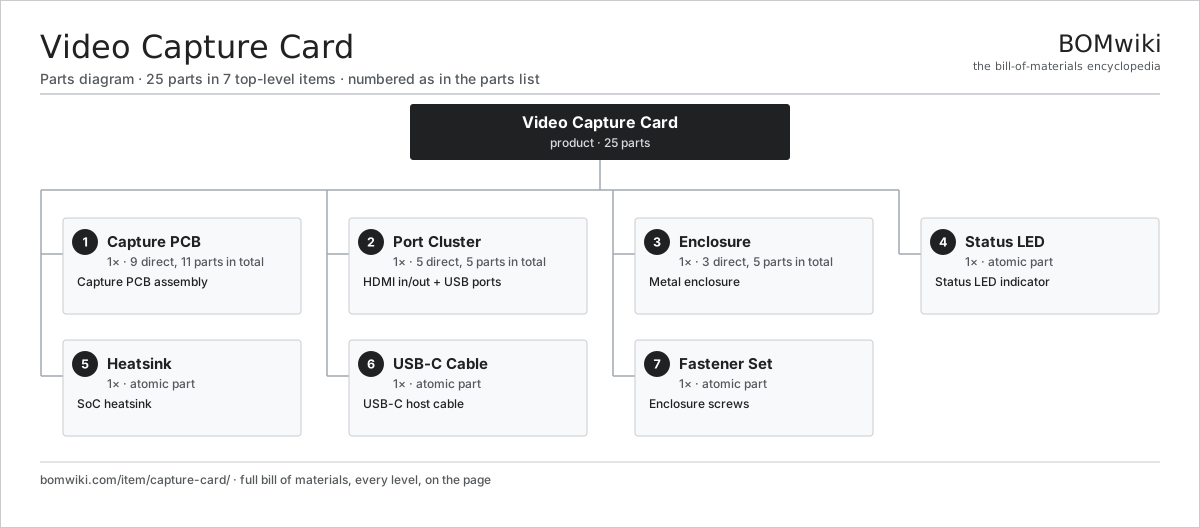
| # | Part | Qty | What it does |
|---|---|---|---|
| 1 | Capture PCB 9 parts | 1× | Capture PCB assembly |
| 2 | Port Cluster 5 parts | 1× | HDMI in/out + USB ports |
| 3 | Enclosure 3 parts | 1× | Metal enclosure |
| 4 | Status LED | 1× | Status LED indicator |
| 5 | Heatsink | 1× | SoC heatsink |
| 6 | USB-C Cable | 1× | USB-C host cable |
| 7 | Fastener Set | 1× | Enclosure screws |
3D model
No 3D model yet. Have a CAD file of this? Add a 3D model. STL renders right on this page; STEP, FreeCAD, and OpenSCAD sources are welcome too (openly licensed, like all 3D models on BOMwiki).
Build & assembly graph
expand / collapse · shared sub-assemblies converge · links to related products · est. labourTap an assembly to expand/collapse · tap a part to open it · use “Open page” for any node · drag to pan, scroll to zoom.
Bill of materials for Video Capture Card
7 top-level lines · 24 rows shown · 25 parts total · indented to 3 levels| # | Item / sub-assembly | Part no. | Qty/assy | Ext. qty | Parts | Type |
|---|---|---|---|---|---|---|
| 1 | Capture PCB 9 parts | cc-pcb | 1× | 1 | 11 | assembly |
| 1.1 | Bare PCB | pcb-bare | 1× | 1 | · | part |
| 1.2 | Capture SoC | cc-capture-soc | 1× | 1 | · | part |
| 1.3 | Format FPGA | cc-fpga | 1× | 1 | · | part |
| 1.4 | Microcontroller | mcu | 1× | 1 | · | part |
| 1.5 | HDMI Receiver | cc-hdmi-receiver | 1× | 1 | · | part |
| 1.6 | HDMI Retimer | cc-hdmi-retimer | 1× | 1 | · | part |
| 1.7 | USB Controller | cc-usb-controller | 1× | 1 | · | part |
| 1.8 | SMD Passive (R/C/L) | smd-passives | 1× | 1 | · | part |
| 1.9 | Connector | connector | 3× | 3 | · | part |
| 2 | Port Cluster 5 parts | cc-port-cluster | 1× | 1 | 5 | assembly |
| 2.1 | HDMI Input | cc-hdmi-in | 1× | 1 | · | part |
| 2.2 | HDMI Output | cc-hdmi-out | 1× | 1 | · | part |
| 2.3 | USB-C Port | cc-usb-port | 1× | 1 | · | part |
| 2.4 | Audio Jack | cc-audio-jack | 1× | 1 | · | part |
| 2.5 | Connector | connector | 1× | 1 | · | part |
| 3 | Enclosure 3 parts | cc-enclosure | 1× | 1 | 5 | assembly |
| 3.1 | Sheet Metal Panel | sheet-panel | 2× | 2 | · | part |
| 3.2 | End Cap | cc-end-cap | 2× | 2 | · | part |
| 3.3 | Thermal Interface Pad | cc-thermal-pad | 1× | 1 | · | part |
| 4 | Status LED | cc-status-led | 1× | 1 | · | part |
| 5 | Heatsink | cc-heatsink | 1× | 1 | · | part |
| 6 | USB-C Cable | cc-usb-cable | 1× | 1 | · | part |
| 7 | Fastener Set | fastener-set | 1× | 1 | · | part |
Something wrong in this list? Report a problem with this BOM.
Related products
same domain, ranked by shared parts


Sourcing: possible vendors
Browse the supplier directory → Prices, MOQ, and lead times are algorithmic estimates, not quotes, and not claims about these companies. Company mappings are curated by keyword; est. price band $20–$3k. How estimates work| Vendor | HQ | Specialty | MOQ | Lead time |
|---|---|---|---|---|
| dell.com ↗ | Round Rock, US | Computers & infrastructure | 1,000 units | 8–14 wks |
|
🇺🇸HP
hp.com ↗
|
Palo Alto, US | Computers & printers | 1,000 units | 8–14 wks |
|
🇨🇳Lenovo
lenovo.com ↗
|
Beijing, CN | Computers | 1,000 units | 8–14 wks |
|
🇹🇼ASUS
asus.com ↗
|
Taipei, TW | Computers & components | 1,000 units | 8–14 wks |
|
🇨🇳Foxconn
foxconn.com ↗
|
Shenzhen, CN | Electronics contract mfg | 1,000 units | 8–14 wks |
335-word article