Dot Matrix Printer
ProductOverview
A dot matrix printer forms text and graphics by hammering a vertical column of fine wire pins through an inked ribbon onto paper, building every character from a grid of physical dots. Introduced in volume in the 1970s and ubiquitous through the 1980s, the technology survives today in one stubborn niche: it is an impact process, so it is the only common printer that can produce carbonless multipart forms, invoices, delivery notes, customs documents, in a single pass, with the impact pressure copying through up to five plies. Banks, logistics depots, and point-of-sale back offices still run them for exactly this reason, along with their tolerance of dust, heat, and continuous fanfold stationery.
The print engine is the Print Head, shuttled across the page by the Carriage Drive while the Ribbon Cartridge feeds inked fabric between pins and paper. The Platen Assembly backs the impacts and the Tractor Feed pulls continuous forms through by their sprocket holes. The Controller Board interprets the data stream and times every pin firing.
How it works
Print data arrives through the Interface Port as a stream of characters and ESC/P escape codes. The Microcontroller looks each character up in the Firmware ROM font table, which defines it as a pattern of dot columns. As the carriage sweeps, the controller fires the appropriate pins at each column position: a Pin Driver Array dumps a roughly 35 V, high-current pulse into a Pin Solenoid, the magnetic field slams the 0.2 mm Print Pin forward about 0.4 mm, the tip drives the ribbon into the paper, and the Pin Return Spring retracts it, the whole cycle completing in under half a millisecond, allowing each pin to fire over a thousand times per second.
A 9-pin head prints a coarse draft matrix; a 24-pin head stacks two staggered columns of twelve pins, producing "letter quality" output at up to 360 dpi by overlapping dots on multiple passes. The pins converge through the jewel-bushed Pin Guide Nose, whose precise bore spacing sets dot placement. Sustained printing turns the solenoid stack into a heater, which is why the head wears the finned Head Heat Sink and the firmware throttles speed when an internal thermistor reads hot.
Carriage motion is open-loop: the Carriage Stepper Motor drives the timing belt, and counted steps from the Home Sensor reference give position. Printing is bidirectional, the controller prints left-to-right, then queues the next line reversed and prints right-to-left on the return stroke, nearly doubling throughput.
Ribbon and paper path
The ribbon is an endless loop of ink-saturated nylon stuffed, not spooled, inside the Ribbon Case, folded with a half-twist so both edges pass the print zone and wear evenly. The Ribbon Sprocket, geared off carriage motion, creeps the loop along so successive impacts always meet fresh ink; a fading printout means the loop has simply re-inked itself too many times. The Ribbon Mask keeps the inky fabric from brushing the page between strikes.
Two paper paths coexist. Cut sheets feed by friction around the Platen Roller, exactly as in a typewriter. Continuous fanfold paper instead rides the Tractor Unit pin belts, which engage the sprocket-hole margins and are locked to a common Tractor Drive Shaft so both edges advance identically, the only way to keep a thousand-page form run from skewing. The Line-Feed Motor indexes paper in 1/216-inch steps, fine enough for subscripts and bit-image graphics. For multipart forms the Head Gap Lever widens the head-to-platen gap to accommodate the extra plies while keeping impact force adequate for the bottom copy.
Endurance
The format's longevity comes down to mechanical margins. Pins rated for hundreds of millions of strokes, a platen that shrugs off impacts for decades, and a chassis of stamped steel mean service life is measured in tens of thousands of printing hours. Consumable cost is minimal, a ribbon prints around four million draft characters for a few dollars, and the Paper-Out Sensor plus park/tear-off logic on the Operator Panel let the same box of fanfold paper serve for months of duty.
Dot Matrix Printer parts and their functions
9 top-level parts · 312 parts in total · full bill of materials below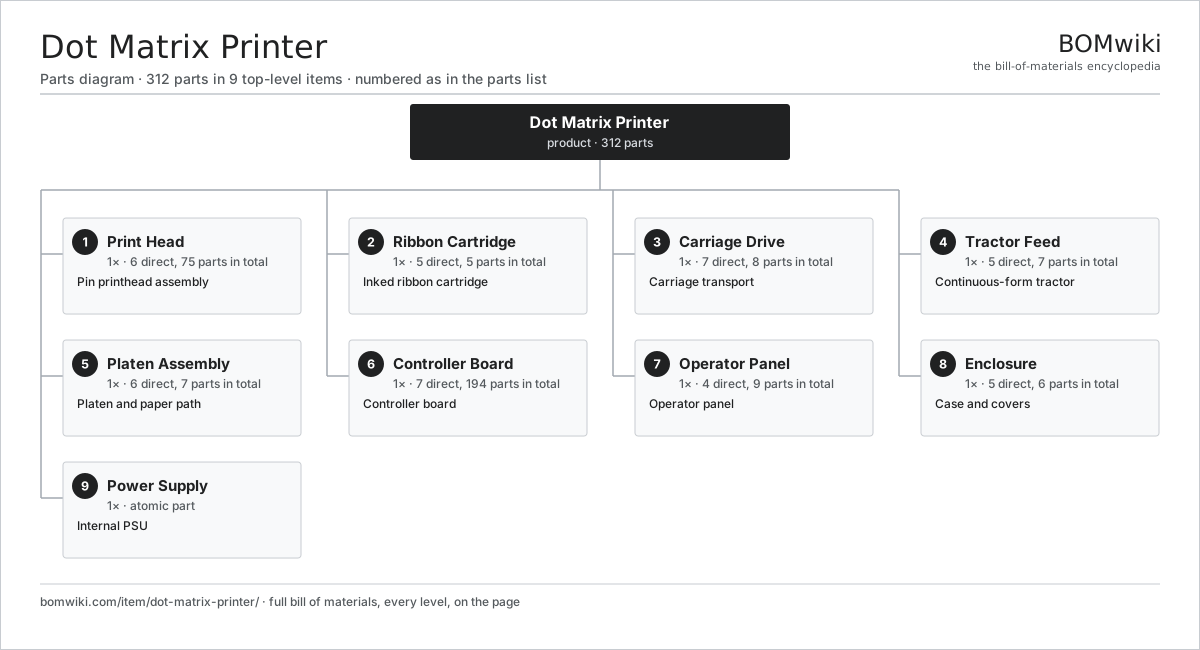
| # | Part | Qty | What it does |
|---|---|---|---|
| 1 | Print Head 6 parts | 1× | Pin printhead assembly |
| 2 | Ribbon Cartridge 5 parts | 1× | Inked ribbon cartridge |
| 3 | Carriage Drive 7 parts | 1× | Carriage transport |
| 4 | Tractor Feed 5 parts | 1× | Continuous-form tractor |
| 5 | Platen Assembly 6 parts | 1× | Platen and paper path |
| 6 | Controller Board 7 parts | 1× | Controller board |
| 7 | Operator Panel 4 parts | 1× | Operator panel |
| 8 | Enclosure 5 parts | 1× | Case and covers |
| 9 | Power Supply | 1× | Internal PSU |
3D model
No 3D model yet. Have a CAD file of this? Add a 3D model. STL renders right on this page; STEP, FreeCAD, and OpenSCAD sources are welcome too (openly licensed, like all 3D models on BOMwiki).
Build & assembly graph
expand / collapse · shared sub-assemblies converge · links to related products · est. labourTap an assembly to expand/collapse · tap a part to open it · use “Open page” for any node · drag to pan, scroll to zoom.
Bill of materials for Dot Matrix Printer
9 top-level lines · 54 rows shown · 312 parts total · indented to 3 levels| # | Item / sub-assembly | Part no. | Qty/assy | Ext. qty | Parts | Type |
|---|---|---|---|---|---|---|
| 1 | Print Head 6 parts | dot-matrix-printer-printhead | 1× | 1 | 75 | assembly |
| 1.1 | Print Pin | dot-matrix-printer-print-pin | 24× | 24 | · | part |
| 1.2 | Pin Solenoid | dot-matrix-printer-pin-solenoid | 24× | 24 | · | part |
| 1.3 | Pin Guide Nose | dot-matrix-printer-pin-guide | 1× | 1 | · | part |
| 1.4 | Pin Return Spring | dot-matrix-printer-return-spring | 24× | 24 | · | part |
| 1.5 | Head Heat Sink | dot-matrix-printer-head-heatsink | 1× | 1 | · | part |
| 1.6 | Head Flex Cable | dot-matrix-printer-head-cable | 1× | 1 | · | part |
| 2 | Ribbon Cartridge 5 parts | dot-matrix-printer-ribbon-cartridge | 1× | 1 | 5 | assembly |
| 2.1 | Ribbon Fabric | dot-matrix-printer-ribbon-fabric | 1× | 1 | · | part |
| 2.2 | Ribbon Case | dot-matrix-printer-ribbon-case | 1× | 1 | · | part |
| 2.3 | Ribbon Sprocket | dot-matrix-printer-ribbon-sprocket | 1× | 1 | · | part |
| 2.4 | Ribbon Mask | dot-matrix-printer-ribbon-mask | 1× | 1 | · | part |
| 2.5 | Tension Knob | dot-matrix-printer-ribbon-knob | 1× | 1 | · | part |
| 3 | Carriage Drive 7 parts | dot-matrix-printer-carriage-drive | 1× | 1 | 8 | assembly |
| 3.1 | Carriage Frame | dot-matrix-printer-carriage-frame | 1× | 1 | · | part |
| 3.2 | Carriage Rod | dot-matrix-printer-carriage-rod | 1× | 1 | · | part |
| 3.3 | Carriage Stepper Motor | dot-matrix-printer-stepper | 1× | 1 | · | part |
| 3.4 | Drive Belt | drive-belt | 1× | 1 | · | part |
| 3.5 | Home Sensor | dot-matrix-printer-home-sensor | 1× | 1 | · | part |
| 3.6 | Head Gap Lever | dot-matrix-printer-gap-lever | 1× | 1 | · | part |
| 3.7 | Ball Bearing | ball-bearing | 2× | 2 | · | part |
| 4 | Tractor Feed 5 parts | dot-matrix-printer-tractor-feed | 1× | 1 | 7 | assembly |
| 4.1 | Tractor Unit | dot-matrix-printer-tractor-unit | 2× | 2 | · | part |
| 4.2 | Tractor Drive Shaft | dot-matrix-printer-tractor-shaft | 1× | 1 | · | part |
| 4.3 | Paper-Out Sensor | dot-matrix-printer-paper-sensor | 1× | 1 | · | part |
| 4.4 | Helical Gear Pair | gear-pair | 1× | 1 | · | part |
| 4.5 | Hold-Down Flap | dot-matrix-printer-tension-flap | 2× | 2 | · | part |
| 5 | Platen Assembly 6 parts | dot-matrix-printer-platen-assembly | 1× | 1 | 7 | assembly |
| 5.1 | Platen Roller | dot-matrix-printer-platen-roller | 1× | 1 | · | part |
| 5.2 | Line-Feed Motor | dot-matrix-printer-linefeed-motor | 1× | 1 | · | part |
| 5.3 | Paper Bail | dot-matrix-printer-paper-bail | 1× | 1 | · | part |
| 5.4 | Helical Gear Pair | gear-pair | 1× | 1 | · | part |
| 5.5 | Ball Bearing | ball-bearing | 2× | 2 | · | part |
| 5.6 | Paper Guide | dot-matrix-printer-paper-guide | 1× | 1 | · | part |
| 6 | Controller Board 7 parts | dot-matrix-printer-mainboard | 1× | 1 | 194 | assembly |
| 6.1 | Bare PCB | pcb-bare | 1× | 1 | · | part |
| 6.2 | Microcontroller | mcu | 1× | 1 | · | part |
| 6.3 | Firmware ROM | dot-matrix-printer-firmware-rom | 1× | 1 | · | part |
| 6.4 | Pin Driver Array | dot-matrix-printer-pin-driver | 4× | 4 | · | part |
| 6.5 | Power MOSFET | mosfet | 6× | 6 | · | part |
| 6.6 | Interface Port | dot-matrix-printer-interface-port | 1× | 1 | · | part |
| 6.7 | SMD Passive (R/C/L) | smd-passives | 180× | 180 | · | part |
| 7 | Operator Panel 4 parts | dot-matrix-printer-panel | 1× | 1 | 9 | assembly |
| 7.1 | Membrane Keys | dot-matrix-printer-membrane-keys | 1× | 1 | · | part |
| 7.2 | Status LED | dot-matrix-printer-status-led | 6× | 6 | · | part |
| 7.3 | Bare PCB | pcb-bare | 1× | 1 | · | part |
| 7.4 | Wire Bundle | wire-bundle | 1× | 1 | · | part |
| 8 | Enclosure 5 parts | dot-matrix-printer-enclosure | 1× | 1 | 6 | assembly |
| 8.1 | Base Chassis | dot-matrix-printer-base-chassis | 1× | 1 | · | part |
| 8.2 | Top Case | dot-matrix-printer-top-case | 1× | 1 | · | part |
| 8.3 | Acoustic Cover | dot-matrix-printer-acoustic-cover | 1× | 1 | · | part |
| 8.4 | Sheet Metal Panel | sheet-panel | 2× | 2 | · | part |
| 8.5 | Fastener Set | fastener-set | 1× | 1 | · | part |
| 9 | Power Supply | power-supply | 1× | 1 | · | part |
Something wrong in this list? Report a problem with this BOM.
Related products
same domain, ranked by shared parts Large-Format Inkjet Plotter
473 parts · shares 6 with this page
Large-Format Inkjet Plotter
473 parts · shares 6 with this page
 Laser Printer
124 parts · shares 4 with this page
Laser Printer
124 parts · shares 4 with this page
 Thermal Label Printer
64 parts · shares 3 with this page
Thermal Label Printer
64 parts · shares 3 with this page
 Tape Library
1,115 parts · shares 4 with this page
Tape Library
1,115 parts · shares 4 with this page
 Desktop PC
146 parts · shares 3 with this page
Desktop PC
146 parts · shares 3 with this page
 External GPU Enclosure
125 parts · shares 2 with this page
External GPU Enclosure
125 parts · shares 2 with this page
Sourcing: possible vendors
Browse the supplier directory → Prices, MOQ, and lead times are algorithmic estimates, not quotes, and not claims about these companies. Company mappings are curated by keyword; est. price band $20–$3k. How estimates work| Vendor | HQ | Specialty | MOQ | Lead time |
|---|---|---|---|---|
| dell.com ↗ | Round Rock, US | Computers & infrastructure | 1,000 units | 8–14 wks |
|
🇺🇸HP
hp.com ↗
|
Palo Alto, US | Computers & printers | 1,000 units | 8–14 wks |
|
🇨🇳Lenovo
lenovo.com ↗
|
Beijing, CN | Computers | 1,000 units | 8–14 wks |
|
🇹🇼ASUS
asus.com ↗
|
Taipei, TW | Computers & components | 1,000 units | 8–14 wks |
|
🇨🇳Foxconn
foxconn.com ↗
|
Shenzhen, CN | Electronics contract mfg | 1,000 units | 8–14 wks |
764-word article