Show Media Server
ProductOverview
Media servers are the video processing backbone of modern theater, concert, and broadcast productions. They manage multiple video sources (pre-recorded content, live cameras, real-time graphics, slides) and route them to an arbitrary number of projection surfaces or display devices synchronized precisely with stage action and lighting cues. A media server must handle 4K video playback with sub-frame accuracy, support live video compositing, and integrate seamlessly with the lighting control system via DMX512 protocol.
The Show Media Server is a professional-grade solution designed for mid-to-large venues requiring 4–6 simultaneous video outputs. Its dual GPU Compute Card NVIDIA RTX 4090 GPUs deliver 32 teraflops of compute power, sufficient to decode and render 4K video in real time while also applying effects, color correction, and compositing. The Motherboard and CPU Intel Xeon processor runs a custom Linux-based show control OS that manages video scheduling, cue playback, and synchronization with the lighting console.
GPU Architecture and Video Processing
The GPU Compute Card cards are NVIDIA RTX 4090 GPUs, each featuring 16,384 CUDA cores and 24GB of GDDR6X VRAM. Each GPU can independently:
- Decode two 4K H.265 video streams simultaneously.
- Render real-time 3D graphics (title cards, animated overlays).
- Apply color correction, effects (blur, distortion), and keying.
- Encode and output four simultaneous video streams at 4K@60Hz.
By deploying two GPUs, the Show Media Server can manage:
- Eight simultaneous 4K video playback channels (four per GPU).
- Real-time effects processing on each channel independently.
- Live camera input decoding and compositing.
The dual-GPU architecture also provides redundancy: if one GPU fails, the show can continue at reduced output (four streams) while the failed card is replaced.
Video Output and Routing
The Multi-Output Card provides six simultaneous video outputs:
- Three HDMI 2.1 outputs: Each capable of 4K@60Hz, suitable for projection surfaces.
- Two 12G-SDI outputs: Professional broadcast-grade video, each supporting 4K@50/60 fps.
- One DisplayPort 2.0 output: Supporting 80 Gbps bandwidth for high-refresh-rate control monitors or ultra-high-resolution displays.
An internal routing matrix in the Multi-Output Card PCB allows any GPU-rendered video to be assigned to any output connector. This flexibility enables shows to scale from a single-projector setup (using one HDMI) to complex multi-screen rigs (using all six outputs).
Output timing is critical in theater: all outputs must be frame-synchronized to within ±1 frame (±16.67 ms at 60 Hz). The Multi-Output Card implements a common pixel clock distributed to all output drivers, ensuring pixel-perfect synchronization across all six outputs.
Video Input and Live Capture
The Input Capture Module ingests live video from two sources:
- HDMI inputs: Receiving video from external cameras, laptops, or playback devices.
- 12G-SDI inputs: Professional broadcast cameras or external video equipment.
An operator can:
- Pre-load recorded video content (concert footage, graphic sequences) onto the Media Storage Array.
- During the show, switch between pre-recorded playback and live camera input via the lighting console (via DMX protocol).
- Composite multiple sources (e.g., live camera over a graphic background) in real time using the GPU Compute Card rendering engine.
The Input Capture Module also provides HDMI receive capability for non-linear editing systems (DaVinci Resolve, Final Cut) to preview video on external monitors while editing cues on the show control system.
Storage and Video Cache
The Media Storage Array uses four 2TB NVMe SSDs in RAID 0 (striped) configuration, providing 8TB of usable storage at 28 GB/s aggregate bandwidth. This is sufficient to cache:
- 2 hours of 4K H.265 video (at 100 Mbps bitrate = 45 GB/hour).
- 50+ hours of 1080p HD video.
Video files are loaded onto the media server's storage either by:
- USB-C connection from an external editing workstation.
- Network transfer via 10GbE Ethernet (achievable transfer rate: 1 GB per second, allowing a 50 GB 4K file to load in <1 minute).
During playback, the RAID 0 stripe ensures sustained read performance; if any single SSD can deliver 7.1 GB/s, four SSDs in stripe deliver 28.4 GB/s, more than sufficient for simultaneous decode of multiple 4K streams.
CPU and System Control
The Motherboard and CPU houses an Intel Xeon W5690 (12-core 3.5 GHz) processor running a Linux-based show control OS. The OS manages:
- Video scheduling (which clip plays on which output at what time).
- Cue playback (scripted transitions between video compositions).
- Real-time encoding of effects (color correction, keying) defined in the show programming.
- Synchronization with the lighting console via DMX512 and 10GbE Ethernet.
The 64GB DDR5 system RAM buffers video frames, timecode state, and cue schedules. Typical latency from a DMX cue command to a visible change on the output is 2–4 frames (33–67 ms at 60 Hz).
Network and Synchronization
The Network and Sync Interface provides two critical interfaces:
- 10GbE Ethernet: Bidirectional communication with the lighting console, allowing the operator to send cue commands ("play scene 3 video") and the media server to return status ("video playback at 45 seconds").
- DMX512 Synchronization: Receives frame-synchronized DMX512 commands, with the media server's video frame output locked to the DMX frame boundaries. This ensures video cuts and effects sync with lighting changes to within ±1 frame.
Typical show flow:
- Operator programs a show on the lighting console, assigning video cues to specific timeline points.
- At 10:00 PM (show start), the console sends a "start show" command to both the lighting rig and the media server.
- All systems (lighting, video, audio) start from timecode 00:00:00, synchronized to within ±1 frame.
- As the show progresses, the operator triggers cues from the console, which are received by the media server with negligible latency (<1 ms).
Codec and Format Support
The GPU Compute Card GPUs support hardware acceleration for:
- H.264 (AVC): Common codec, up to 4K@60Hz decode (2-3 streams per GPU).
- H.265/HEVC: More efficient, enabling 8K@60Hz decode on a single GPU.
- ProRes and DNxHD: Broadcast and editing codec formats.
- RAW: Uncompressed or lightly compressed, for maximum color fidelity in color-critical applications (e.g., music videos).
Video can be ingested in any standard format (MOV, MP4, MXF) and automatically transcoded to ProRes or DNxHD (professional codecs optimized for playback performance) during show prep.
Thermal Design and Reliability
The Server Chassis houses three cooling fans:
- Intake: Front fan draws cool ambient air into the chassis.
- GPU coolers: Each GPU Processor has a dedicated vapor-chamber heatsink with fans, dissipating 300W per GPU.
- Exhaust: Rear fan expels hot air out of the chassis.
Under full load (two GPUs running 4K decode), the chassis consumes approximately 600W, generating significant heat. The cooling system maintains GPU junction temperatures below 80°C in ambient air up to 30°C (typical of air-conditioned theaters). The system is designed to operate continuously for 8+ hours (typical of a touring show load-in and multiple rehearsal/performance days).
Typical Deployment
A concert production uses a Show Media Server to manage video playback on three stage LED screens (left, center, right) plus a single front-of-house projection display. Video content includes:
- Pre-recorded band footage (4K ProRes, 30 minutes total).
- Live camera feed from three HD stage cameras (composited into a picture-in-picture graphic).
- Real-time animated titles and graphics synchronized to the music.
The media server's six outputs are assigned:
- Three outputs to stage LED screens (feeding projection-mapping software running on external computers).
- One output to the front-of-house projector (broadcast camera + graphics).
- Two outputs spare/backup.
During the show, the tour video operator watches the performer and the lighting console timeline, cueing video transitions via a tablet that communicates with the media server over 10GbE. The video output is frame-locked to the lighting console, ensuring that camera shots transition in sync with stage lighting changes.
Maintenance and Troubleshooting
Monthly tasks:
- Check GPU fan speeds and clean heatsink fins if necessary (dust buildup degrades cooling).
- Verify video playback quality on all six outputs (check for artifacts, color shifts).
Annual tasks:
- Replace intake fans if bearing noise increases.
- Backup show programming to external redundant storage.
- Validate codec support by test-playing sample clips in each format used in shows.
The Show Media Server is designed for 5+ years of reliable operation in a touring or permanent install theater environment, with GPU or SSD replacement intervals typical of other professional broadcast equipment.
Show Media Server parts and their functions
7 top-level parts · 40 parts in total · full bill of materials below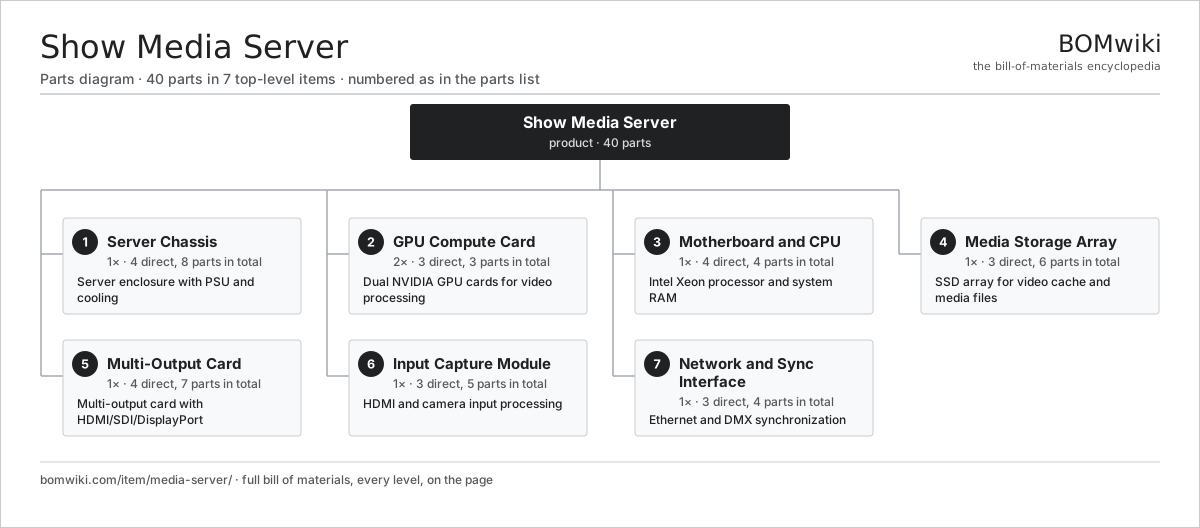
| # | Part | Qty | What it does |
|---|---|---|---|
| 1 | Server Chassis 4 parts | 1× | Server enclosure with PSU and cooling |
| 2 | GPU Compute Card 3 parts | 2× | Dual NVIDIA GPU cards for video processing |
| 3 | Motherboard and CPU 4 parts | 1× | Intel Xeon processor and system RAM |
| 4 | Media Storage Array 3 parts | 1× | SSD array for video cache and media files |
| 5 | Multi-Output Card 4 parts | 1× | Multi-output card with HDMI/SDI/DisplayPort |
| 6 | Input Capture Module 3 parts | 1× | HDMI and camera input processing |
| 7 | Network and Sync Interface 3 parts | 1× | Ethernet and DMX synchronization |
3D model
No 3D model yet. Have a CAD file of this? Add a 3D model. STL renders right on this page; STEP, FreeCAD, and OpenSCAD sources are welcome too (openly licensed, like all 3D models on BOMwiki).
Build & assembly graph
expand / collapse · shared sub-assemblies converge · links to related products · est. labourTap an assembly to expand/collapse · tap a part to open it · use “Open page” for any node · drag to pan, scroll to zoom.
Bill of materials for Show Media Server
7 top-level lines · 31 rows shown · 40 parts total · indented to 3 levels| # | Item / sub-assembly | Part no. | Qty/assy | Ext. qty | Parts | Type |
|---|---|---|---|---|---|---|
| 1 | Server Chassis 4 parts | media-server-compute-chassis | 1× | 1 | 8 | assembly |
| 1.1 | Sheet Metal Panel | sheet-panel | 3× | 3 | · | part |
| 1.2 | Power Supply | power-supply | 1× | 1 | · | part |
| 1.3 | Blower Motor | blower-motor | 3× | 3 | · | part |
| 1.4 | Fastener Set | fastener-set | 1× | 1 | · | part |
| 2 | GPU Compute Card 3 parts | media-server-gpu-module | 2× | 2 | 3 | assembly |
| 2.1 | GPU Processor | media-server-gpu-core | 1× | 2 | · | part |
| 2.2 | GPU Thermal Solution | media-server-heatsink | 1× | 2 | · | part |
| 2.3 | Connector | connector | 1× | 2 | · | part |
| 3 | Motherboard and CPU 4 parts | media-server-cpu-board | 1× | 1 | 4 | assembly |
| 3.1 | Workstation Motherboard | media-server-motherboard | 1× | 1 | · | part |
| 3.2 | Xeon Processor | media-server-cpu | 1× | 1 | · | part |
| 3.3 | System RAM | media-server-ram | 1× | 1 | · | part |
| 3.4 | System Drive | media-server-system-ssd | 1× | 1 | · | part |
| 4 | Media Storage Array 3 parts | media-server-storage-subsystem | 1× | 1 | 6 | assembly |
| 4.1 | NVMe SSD | media-server-nvme-ssd | 4× | 4 | · | part |
| 4.2 | NVMe Adapter | media-server-nvme-controller | 1× | 1 | · | part |
| 4.3 | Fastener Set | fastener-set | 1× | 1 | · | part |
| 5 | Multi-Output Card 4 parts | media-server-output-card | 1× | 1 | 7 | assembly |
| 5.1 | HDMI Output Driver | media-server-hdmi-driver | 3× | 3 | · | part |
| 5.2 | SDI Output Driver | media-server-sdi-driver | 2× | 2 | · | part |
| 5.3 | DisplayPort Driver | media-server-dp-driver | 1× | 1 | · | part |
| 5.4 | Bare PCB | pcb-bare | 1× | 1 | · | part |
| 6 | Input Capture Module 3 parts | media-server-capture-interface | 1× | 1 | 5 | assembly |
| 6.1 | HDMI Input Receiver | media-server-hdmi-receiver | 2× | 2 | · | part |
| 6.2 | Camera Input Preamp | media-server-camera-preamp | 2× | 2 | · | part |
| 6.3 | Bare PCB | pcb-bare | 1× | 1 | · | part |
| 7 | Network and Sync Interface 3 parts | media-server-network-card | 1× | 1 | 4 | assembly |
| 7.1 | 10GbE Network Card | media-server-ethernet-nic | 1× | 1 | · | part |
| 7.2 | DMX Sync Interface | media-server-dmx-interface | 1× | 1 | · | part |
| 7.3 | Connector | connector | 2× | 2 | · | part |
Something wrong in this list? Report a problem with this BOM.
Related products
same domain, ranked by shared parts AV Receiver
1,097 parts · shares 3 with this page
AV Receiver
1,097 parts · shares 3 with this page
 Stage Lighting Console
163 parts · shares 3 with this page
Stage Lighting Console
163 parts · shares 3 with this page
 DMX Dimmer Rack
71 parts · shares 2 with this page
DMX Dimmer Rack
71 parts · shares 2 with this page
 Loudspeaker Management Processor
42 parts · shares 2 with this page
Loudspeaker Management Processor
42 parts · shares 2 with this page
 Professional Power Amplifier
52 parts · shares 2 with this page
Cinema Sound Processor
839 parts · shares 2 with this page
Professional Power Amplifier
52 parts · shares 2 with this page
Cinema Sound Processor
839 parts · shares 2 with this page
Sourcing: possible vendors
Browse the supplier directory → Prices, MOQ, and lead times are algorithmic estimates, not quotes, and not claims about these companies. Company mappings are curated by keyword; est. price band $50–$3k. How estimates work| Vendor | HQ | Specialty | MOQ | Lead time |
|---|---|---|---|---|
|
🇯🇵Sony
sony.com ↗
|
Tokyo, JP | Consumer electronics | 1,000 units | 8–12 wks |
| samsung.com ↗ | Suwon, KR | Electronics & displays | 1,000 units | 8–12 wks |
|
🇺🇸Harman
harman.com ↗
|
Stamford, US | Audio (JBL, AKG) | 1,000 units | 8–12 wks |
|
🇺🇸Bose
bose.com ↗
|
Framingham, US | Audio | 1,000 units | 8–12 wks |
| yamaha.com ↗ | Hamamatsu, JP | Audio & instruments | 1,000 units | 8–12 wks |
1,426-word article