NVMe SSD Enclosure
ProductOverview
An NVMe enclosure is a portable external storage solution that turns a bare M.2 SSD into a plug-and-play device. The user inserts a standard M.2 NVMe drive into the M.2 Slot Assembly, closes the Aluminum Housing, and plugs the USB Cable Assembly into a laptop or desktop. The host operating system recognizes it as a USB mass storage device and mounts the filesystem immediately.
The USB Bridge Controller translates the drive's NVMe protocol (which uses PCIe) into USB 3.2 Gen 2 (or Thunderbolt 3/4) for the host connection. This allows the drive to run at nearly its native speed (~1000 MB/s for SATA-speed drives, or up to 3500+ MB/s for NVMe Gen 4 drives over Thunderbolt).
The Thermal Interface System system keeps the drive cool during sustained reads/writes. The Aluminum Heatspreader affixed to the drive's control chips absorbs heat; the Thermal Interface Pad interfaces it to the aluminum housing, which radiates heat into the surrounding air.
How it works
When the enclosure is connected to the host, the USB Cable Assembly carries power (USB VBUS, 5 V at 500 mA typical) and data (USB 3.2 Gen 2 differential pairs). The NVMe-to-USB Bridge IC receives power and initializes.
On the drive side, the M.2 Socket presents the M.2 slot's standard pinout: power rails, NVMe command/control (via PCIe protocol), and reset signals. The NVMe-to-USB Bridge IC internally routes the user's M.2 NVMe drive as if it were a USB device. The drive's firmware negotiates with the bridge controller, and they establish a PCIe tunnel inside the USB 3.2 protocol (or native USB4/TB3 in newer variants).
The Slot PCB provides a minimal PCB carrier with bypass capacitors and level shifters if needed. Most of the work is done by the NVMe-to-USB Bridge IC, which handles:
- NVMe command translation
- Error handling and retries
- Power management and L1 sleep states
- Hot-plug detection (the drive can be safely unplugged without unmounting, though data corruption risk applies)
Thermal feedback: as the drive's NAND and controller chips warm up during sustained I/O, the Aluminum Heatspreader pulls heat away. The Thermal Interface Pad conducts this heat to the Aluminum Housing aluminum body. Passive convection to the environment completes the heat path, no fans are required due to the low power consumption and small form factor.
NVMe SSD Enclosure parts and their functions
6 top-level parts · 91 parts in total · full bill of materials below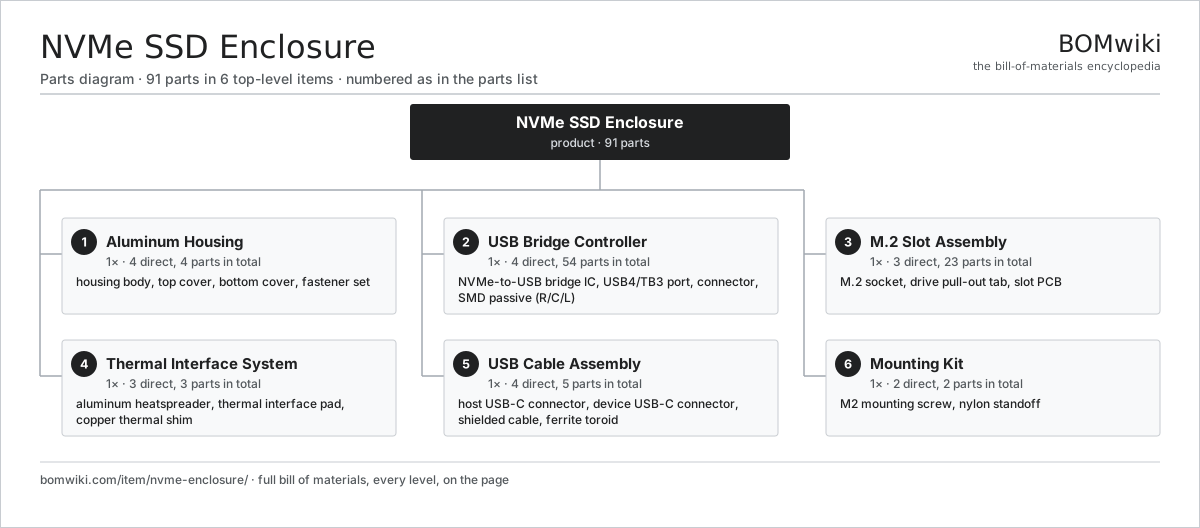
| # | Part | Qty | What it does |
|---|---|---|---|
| 1 | Aluminum Housing 4 parts | 1× | Machined aluminum shell for durability and heat dissipation. |
| 2 | USB Bridge Controller 4 parts | 1× | Converts NVMe protocol to USB/TB3 for host access. |
| 3 | M.2 Slot Assembly 3 parts | 1× | Connector and mounting for the NVMe drive. |
| 4 | Thermal Interface System 3 parts | 1× | Heatspreader and interface pads for SSD cooling. |
| 5 | USB Cable Assembly 4 parts | 1× | USB-C or TB3 cable with shielded conductors. |
| 6 | Mounting Kit 2 parts | 1× | Screws and standoffs for securing the SSD. |
3D model
No 3D model yet. Have a CAD file of this? Add a 3D model. STL renders right on this page; STEP, FreeCAD, and OpenSCAD sources are welcome too (openly licensed, like all 3D models on BOMwiki).
Build & assembly graph
expand / collapse · shared sub-assemblies converge · links to related products · est. labourTap an assembly to expand/collapse · tap a part to open it · use “Open page” for any node · drag to pan, scroll to zoom.
Bill of materials for NVMe SSD Enclosure
6 top-level lines · 28 rows shown · 91 parts total · indented to 3 levels| # | Item / sub-assembly | Part no. | Qty/assy | Ext. qty | Parts | Type |
|---|---|---|---|---|---|---|
| 1 | Aluminum Housing 4 parts | nvme-enclosure-housing | 1× | 1 | 4 | assembly |
| 1.1 | Housing Body | nvme-housing-body | 1× | 1 | · | part |
| 1.2 | Top Cover | nvme-housing-top | 1× | 1 | · | part |
| 1.3 | Bottom Cover | nvme-housing-bottom | 1× | 1 | · | part |
| 1.4 | Fastener Set | fastener-set | 1× | 1 | · | part |
| 2 | USB Bridge Controller 4 parts | nvme-bridge-controller | 1× | 1 | 54 | assembly |
| 2.1 | NVMe-to-USB Bridge IC | nvme-bridge-ic | 1× | 1 | · | part |
| 2.2 | USB4/TB3 Port | nvme-usb-port | 1× | 1 | · | part |
| 2.3 | Connector | connector | 2× | 2 | · | part |
| 2.4 | SMD Passive (R/C/L) | smd-passives | 50× | 50 | · | part |
| 3 | M.2 Slot Assembly 3 parts | nvme-slot-assembly | 1× | 1 | 23 | assembly |
| 3.1 | M.2 Socket | nvme-m2-socket | 1× | 1 | · | part |
| 3.2 | Drive Pull-Out Tab | nvme-m2-pull-tab | 1× | 1 | · | part |
| 3.3 | Slot PCB 2 parts | nvme-slot-pcb | 1× | 1 | 21 | assembly |
| 3.3.1 | Bare PCB | pcb-bare | 1× | 1 | · | part |
| 3.3.2 | SMD Passive (R/C/L) | smd-passives | 20× | 20 | · | part |
| 4 | Thermal Interface System 3 parts | nvme-thermal-management | 1× | 1 | 3 | assembly |
| 4.1 | Aluminum Heatspreader | nvme-aluminum-spreader | 1× | 1 | · | part |
| 4.2 | Thermal Interface Pad | nvme-thermal-pad | 1× | 1 | · | part |
| 4.3 | Copper Thermal Shim | nvme-copper-shim | 1× | 1 | · | part |
| 5 | USB Cable Assembly 4 parts | nvme-usb-cable | 1× | 1 | 5 | assembly |
| 5.1 | Host USB-C Connector | nvme-cable-connector-host | 1× | 1 | · | part |
| 5.2 | Device USB-C Connector | nvme-cable-connector-device | 1× | 1 | · | part |
| 5.3 | Shielded Cable | nvme-cable-shielded | 1× | 1 | · | part |
| 5.4 | Ferrite Toroid | ferrite-core | 2× | 2 | · | part |
| 6 | Mounting Kit 2 parts | nvme-mounting-hardware | 1× | 1 | 2 | assembly |
| 6.1 | M2 Mounting Screw | nvme-mounting-screw | 1× | 1 | · | part |
| 6.2 | Nylon Standoff | nvme-mounting-standoff | 1× | 1 | · | part |
Something wrong in this list? Report a problem with this BOM.
Sourcing: possible vendors
Browse the supplier directory → Prices, MOQ, and lead times are algorithmic estimates, not quotes, and not claims about these companies. Company mappings are curated by keyword; est. price band $20–$3k. How estimates work| Vendor | HQ | Specialty | MOQ | Lead time |
|---|---|---|---|---|
| dell.com ↗ | Round Rock, US | Computers & infrastructure | 1,000 units | 8–14 wks |
|
🇺🇸HP
hp.com ↗
|
Palo Alto, US | Computers & printers | 1,000 units | 8–14 wks |
|
🇨🇳Lenovo
lenovo.com ↗
|
Beijing, CN | Computers | 1,000 units | 8–14 wks |
|
🇹🇼ASUS
asus.com ↗
|
Taipei, TW | Computers & components | 1,000 units | 8–14 wks |
|
🇨🇳Foxconn
foxconn.com ↗
|
Shenzhen, CN | Electronics contract mfg | 1,000 units | 8–14 wks |
407-word article