Pen Display Tablet
ProductOverview
A pen display is a screen you draw on directly: the cursor appears under the nib instead of on a separate monitor, so it feels like marking paper. It is used by illustrators, retouchers, and CAD users who want to work hand-over-image. The tablet is a display first and a digitizer second, the host computer drives it like an external monitor while it sends pen strokes back as input.
The visible surface is the Display Module, an LCD laminated under an etched cover glass. Hidden behind the panel is the EMR Sensor Board, the grid that tracks the pen, and the Driver / Scaler Board that scales the host video and runs the panel. Drawing is done with the bundled EMR Stylus. The host connects through the I/O Port Cluster, the tablet is propped by the Folding Stand, and the Internal Wiring ties the boards together inside the Rear Cover.
How it works
Pen tracking uses electromagnetic resonance. The EMR Controller Board energizes the antenna grid in the sensor board, broadcasting a magnetic field through the panel. The pen contains an Resonant Coil, an LC circuit, that absorbs this energy and re-emits it. When the grid switches to listen, it picks up that returned signal; whichever coils hear it loudest pinpoint the pen, with no battery ever needed in the stylus. Nib force shifts the circuit's resonance through the Pressure Sensor, which the controller reads as 8,192 pressure levels, and the field's angle gives tilt.
Meanwhile the Driver / Scaler Board handles the picture: its Scaler IC times the incoming HDMI or USB-C video to the panel's native resolution and the Backlight Driver sets brightness. Because the Optical Laminate removes the air gap between glass and LCD, the rendered line sits directly beneath the physical nib, so what the pen reports and what the screen shows stay aligned across the surface.
Pen Display Tablet parts and their functions
9 top-level parts · 39 parts in total · full bill of materials below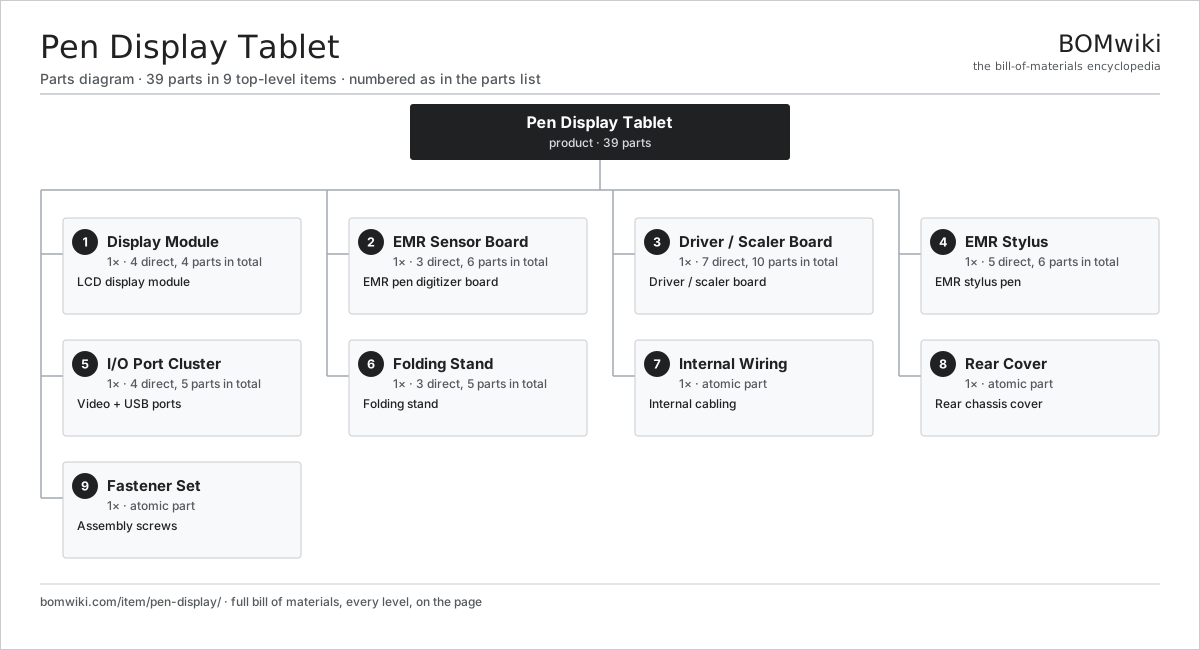
| # | Part | Qty | What it does |
|---|---|---|---|
| 1 | Display Module 4 parts | 1× | LCD display module |
| 2 | EMR Sensor Board 3 parts | 1× | EMR pen digitizer board |
| 3 | Driver / Scaler Board 7 parts | 1× | Driver / scaler board |
| 4 | EMR Stylus 5 parts | 1× | EMR stylus pen |
| 5 | I/O Port Cluster 4 parts | 1× | Video + USB ports |
| 6 | Folding Stand 3 parts | 1× | Folding stand |
| 7 | Internal Wiring | 1× | Internal cabling |
| 8 | Rear Cover | 1× | Rear chassis cover |
| 9 | Fastener Set | 1× | Assembly screws |
3D model
No 3D model yet. Have a CAD file of this? Add a 3D model. STL renders right on this page; STEP, FreeCAD, and OpenSCAD sources are welcome too (openly licensed, like all 3D models on BOMwiki).
Build & assembly graph
expand / collapse · shared sub-assemblies converge · links to related products · est. labourTap an assembly to expand/collapse · tap a part to open it · use “Open page” for any node · drag to pan, scroll to zoom.
Bill of materials for Pen Display Tablet
9 top-level lines · 39 rows shown · 39 parts total · indented to 3 levels| # | Item / sub-assembly | Part no. | Qty/assy | Ext. qty | Parts | Type |
|---|---|---|---|---|---|---|
| 1 | Display Module 4 parts | pd-display | 1× | 1 | 4 | assembly |
| 1.1 | LCD Panel | lcd-panel | 1× | 1 | · | part |
| 1.2 | LED Backlight | pd-backlight | 1× | 1 | · | part |
| 1.3 | Cover Glass | pd-cover-glass | 1× | 1 | · | part |
| 1.4 | Optical Laminate | pd-laminate | 1× | 1 | · | part |
| 2 | EMR Sensor Board 3 parts | pd-emr-sensor | 1× | 1 | 6 | assembly |
| 2.1 | Touch Digitizer | touch-digitizer | 1× | 1 | · | part |
| 2.2 | EMR Controller Board 4 parts | pd-emr-controller | 1× | 1 | 4 | assembly |
| 2.2.1 | Bare PCB | pcb-bare | 1× | 1 | · | part |
| 2.2.2 | EMR Digitizer ASIC | pd-emr-asic | 1× | 1 | · | part |
| 2.2.3 | SMD Passive (R/C/L) | smd-passives | 1× | 1 | · | part |
| 2.2.4 | Connector | connector | 1× | 1 | · | part |
| 2.3 | Magnetic Shield | pd-shield-layer | 1× | 1 | · | part |
| 3 | Driver / Scaler Board 7 parts | pd-driver-board | 1× | 1 | 10 | assembly |
| 3.1 | Bare PCB | pcb-bare | 1× | 1 | · | part |
| 3.2 | Compute SoC Module | soc-module | 1× | 1 | · | part |
| 3.3 | Microcontroller | mcu | 1× | 1 | · | part |
| 3.4 | Scaler IC | pd-scaler-ic | 1× | 1 | · | part |
| 3.5 | Backlight Driver | pd-backlight-driver | 1× | 1 | · | part |
| 3.6 | SMD Passive (R/C/L) | smd-passives | 1× | 1 | · | part |
| 3.7 | Connector | connector | 4× | 4 | · | part |
| 4 | EMR Stylus 5 parts | pd-stylus | 1× | 1 | 6 | assembly |
| 4.1 | Resonant Coil | pd-stylus-coil | 1× | 1 | · | part |
| 4.2 | Pressure Sensor | pd-pressure-sensor | 1× | 1 | · | part |
| 4.3 | Pen Nib | pd-pen-tip | 1× | 1 | · | part |
| 4.4 | Barrel Button | pd-pen-button | 2× | 2 | · | part |
| 4.5 | Pen Body | pd-pen-body | 1× | 1 | · | part |
| 5 | I/O Port Cluster 4 parts | pd-io-panel | 1× | 1 | 5 | assembly |
| 5.1 | Video Input Port | pd-video-port | 1× | 1 | · | part |
| 5.2 | USB-C Port | pd-usb-port | 1× | 1 | · | part |
| 5.3 | Express Keys | pd-express-keys | 1× | 1 | · | part |
| 5.4 | Connector | connector | 2× | 2 | · | part |
| 6 | Folding Stand 3 parts | pd-stand | 1× | 1 | 5 | assembly |
| 6.1 | Stand Leg | pd-stand-leg | 2× | 2 | · | part |
| 6.2 | Stand Hinge | pd-stand-hinge | 2× | 2 | · | part |
| 6.3 | Fastener Set | fastener-set | 1× | 1 | · | part |
| 7 | Internal Wiring | pd-wiring | 1× | 1 | · | part |
| 8 | Rear Cover | pd-rear-cover | 1× | 1 | · | part |
| 9 | Fastener Set | fastener-set | 1× | 1 | · | part |
Something wrong in this list? Report a problem with this BOM.
Related products
same domain, ranked by shared parts All-in-One PC
68 parts · shares 3 with this page
All-in-One PC
68 parts · shares 3 with this page
 Large-Format Inkjet Plotter
473 parts · shares 3 with this page
Large-Format Inkjet Plotter
473 parts · shares 3 with this page
 Laser Printer
124 parts · shares 3 with this page
Laser Printer
124 parts · shares 3 with this page
 Portable Monitor
218 parts · shares 3 with this page
Portable Monitor
218 parts · shares 3 with this page
 Tablet
61 parts · shares 3 with this page
Tablet
61 parts · shares 3 with this page
 Macro Keypad / Stream Controller
199 parts · shares 2 with this page
Macro Keypad / Stream Controller
199 parts · shares 2 with this page
Sourcing: possible vendors
Browse the supplier directory → Prices, MOQ, and lead times are algorithmic estimates, not quotes, and not claims about these companies. Company mappings are curated by keyword; est. price band $20–$3k. How estimates work| Vendor | HQ | Specialty | MOQ | Lead time |
|---|---|---|---|---|
| dell.com ↗ | Round Rock, US | Computers & infrastructure | 1,000 units | 8–14 wks |
|
🇺🇸HP
hp.com ↗
|
Palo Alto, US | Computers & printers | 1,000 units | 8–14 wks |
|
🇨🇳Lenovo
lenovo.com ↗
|
Beijing, CN | Computers | 1,000 units | 8–14 wks |
|
🇹🇼ASUS
asus.com ↗
|
Taipei, TW | Computers & components | 1,000 units | 8–14 wks |
|
🇨🇳Foxconn
foxconn.com ↗
|
Shenzhen, CN | Electronics contract mfg | 1,000 units | 8–14 wks |
323-word article