POS Customer Display
ProductOverview
A POS customer display is a secondary monitor installed at checkout counters in retail environments, positioned to face customers rather than the cashier. It shows the running transaction total, itemized purchases, any promotional messages or local advertising, and a reminder to insert payment cards. The display reduces transaction friction by allowing customers to see what was scanned and verify the total before payment, while simultaneously providing a high-visibility advertising medium for the retailer.
Customer displays are ubiquitous in grocery stores, quick-service restaurants, and retail outlets. They communicate with the main POS terminal via a serial cable (historically RS-232, increasingly USB), receiving updates in real-time as items are scanned or voids are entered. The display's simple protocol and low-bandwidth requirements mean it can coexist on the same network segment as card readers and receipt printers without degrading throughput.
Display Technology
Two display technologies dominate the customer display market: vacuum fluorescent (VFD) and liquid crystal (LCD).
VFD displays use a grid of filament wires heated to incandescence, with phosphor-coated electrodes creating the character patterns. When high voltage (~80 V) is applied to an electrode, the filament electrons strike the phosphor, producing light. VFD offers several advantages: bright, crisp green characters visible in high ambient light (supermarket checkout aisles are well-lit), fast response time (characters update with zero flicker), and long operating life (50,000+ hours). The downside is power consumption (30–40 W) and the need for high-voltage supply circuitry.
LCD displays use a backlit liquid crystal layer modulated by thin-film transistors. Modern LCDs are IPS (in-plane switching) technology, offering wide viewing angles and excellent brightness. LED backlighting consumes less power than VFD (~15 W) and allows dimming via PWM. LCD units can display colors and graphics, enabling rich promotional content. However, LCDs are more fragile and have narrower operating temperature ranges.
The VFD panel or LCD Panel contains the character matrix, addressing circuitry, and a timing controller IC managing refresh rate and segment selection. A supply voltage (either VFD filament voltage or LED backlight current) illuminates the display.
Mechanical Integration
The pole clamp is critical for POS integration. Rather than mounting the display to the counter with bolts (which would require custom drilling per installation), the clamp uses adjustable C-channel arms and knurled knobs to secure the display to the existing checkout counter pole without tools. The soft rubber pads prevent marring the pole finish.
The aluminum frame and bezel protect the display module from impact. A typical unit weighs 2.5–3.5 kg and measures 260 × 150 mm, allowing ergonomic tilting to improve customer viewing angles. Many designs include a swivel mount, allowing the cashier to adjust the display's angle without moving the entire unit.
Communication Protocol
The main controller microcontroller manages communication with the POS terminal. Historical interfaces used RS-232 serial at 9600 baud (slow by today's standards, but reliable over long cable runs). Modern units use USB, which provides both power and data, reducing the number of cables required at checkout.
The POS system sends ASCII or proprietary command sequences to the display:
- Clear screen: 'ESC [ 2 J' (or vendor-specific command)
- Position cursor: 'ESC [ 2 ; 1 H' (move to line 2, column 1)
- Write text: 'Subtotal: $47.50'
Line 1 typically shows the current item being scanned or message ("Thank you for shopping"); line 2 shows the running total or promotional message. Updates occur at checkout speed (every 1–3 seconds as items are scanned), requiring minimal latency. The UART or USB converter handles the host communication, while the display driver IC manages the matrix addressing.
Integration with Checkout Workflow
During a transaction, the POS terminal continuously updates the customer display:
- Item scanned: "Milk 3.99" → Display shows subtotal.
- Item voided: "VOID: Milk" → Display updates.
- Payment requested: "Insert card" or "Total: $52.47" → Display shows final amount.
- Transaction complete: "Thank you!" or advertising message.
The display cycles through promotional messages between transactions, giving retailers an advertising opportunity. Some advanced units support barcode or QR code display, enabling "print-to-display" workflows (e.g., loyalty program enrollment codes).
Power Management and Thermal Design
The AC/DC power converter is compact, often a small toroidal transformer with bridge rectifier and linear regulators. VFD units generate more heat and require larger transformers (24 VA) compared to LED-backlit LCDs (12 VA). The entire unit is passive-cooled; no fans are used in standard models.
Modern green designs employ LED backlighting with PWM dimming, reducing power consumption during low-traffic hours or nighttime operation. Some units include ambient light sensors that adjust backlight brightness automatically, further reducing energy use.
Standards and Compatibility
Most POS systems support OPOS (OLE for POS), a Windows COM interface abstracting display hardware. A driver installed on the POS terminal translates high-level OPOS commands ("display.printNormal 1, 'Hello'") to the low-level serial protocol specific to the attached display. This allows a retailer to change display vendors without rewriting POS software.
However, proprietary protocols remain common, particularly in international markets where specific display vendors dominate. Training staff on new POS systems includes familiarization with any display-specific features (color changes, special character sets).
Longevity and Maintenance
VFD displays degrade predictably over 50,000+ hours, roughly 5–7 years at 24/7 operation. Character brightness decreases gradually as the filament loses emission capability. LED LCD backlights last 30,000–50,000 hours, at which point the display can be replaced as a module without rewiring.
The display is a field-replaceable unit, disconnecting the serial cable and pole clamp takes less than 5 minutes. Retailers stock spare units for rapid restoration in case of failure, minimizing checkout downtime.
POS Customer Display parts and their functions
6 top-level parts · 27 parts in total · full bill of materials below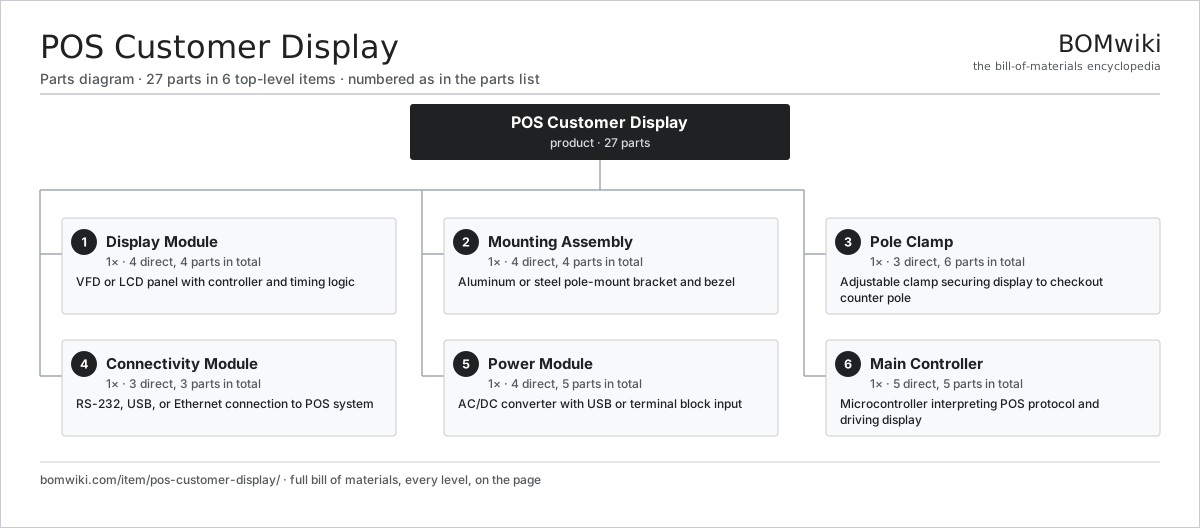
| # | Part | Qty | What it does |
|---|---|---|---|
| 1 | Display Module 4 parts | 1× | VFD or LCD panel with controller and timing logic |
| 2 | Mounting Assembly 4 parts | 1× | Aluminum or steel pole-mount bracket and bezel |
| 3 | Pole Clamp 3 parts | 1× | Adjustable clamp securing display to checkout counter pole |
| 4 | Connectivity Module 3 parts | 1× | RS-232, USB, or Ethernet connection to POS system |
| 5 | Power Module 4 parts | 1× | AC/DC converter with USB or terminal block input |
| 6 | Main Controller 5 parts | 1× | Microcontroller interpreting POS protocol and driving display |
3D model
No 3D model yet. Have a CAD file of this? Add a 3D model. STL renders right on this page; STEP, FreeCAD, and OpenSCAD sources are welcome too (openly licensed, like all 3D models on BOMwiki).
Build & assembly graph
expand / collapse · shared sub-assemblies converge · links to related products · est. labourTap an assembly to expand/collapse · tap a part to open it · use “Open page” for any node · drag to pan, scroll to zoom.
Bill of materials for POS Customer Display
6 top-level lines · 29 rows shown · 27 parts total · indented to 3 levels| # | Item / sub-assembly | Part no. | Qty/assy | Ext. qty | Parts | Type |
|---|---|---|---|---|---|---|
| 1 | Display Module 4 parts | pos-customer-display-lcd-module | 1× | 1 | 4 | assembly |
| 1.1 | VFD Display Panel | pos-customer-display-vfd-panel | 1× | 1 | · | part |
| 1.2 | Display Backlight | pos-customer-display-backlight | 1× | 1 | · | part |
| 1.3 | Display Controller IC | pos-customer-display-timing-controller | 1× | 1 | · | part |
| 1.4 | Display Interface Board | pos-customer-display-interface-pcb | 1× | 1 | · | part |
| 2 | Mounting Assembly 4 parts | pos-customer-display-housing | 1× | 1 | 4 | assembly |
| 2.1 | Aluminum Frame | pos-customer-display-aluminum-frame | 1× | 1 | · | part |
| 2.2 | Display Bezel | pos-customer-display-bezel-ring | 1× | 1 | · | part |
| 2.3 | Pole Mounting Plate | pos-customer-display-mounting-plate | 1× | 1 | · | part |
| 2.4 | Fastener Set | fastener-set | 1× | 1 | · | part |
| 3 | Pole Clamp 3 parts | pos-customer-display-pole-clamp | 1× | 1 | 6 | assembly |
| 3.1 | Clamp Arm | pos-customer-display-clamp-arm | 2× | 2 | · | part |
| 3.2 | Clamp Knob | pos-customer-display-clamp-knob | 2× | 2 | · | part |
| 3.3 | Clamp Pad | pos-customer-display-clamp-pads | 2× | 2 | · | part |
| 4 | Connectivity Module 3 parts | pos-customer-display-cable-assembly | 1× | 1 | 3 | assembly |
| 4.1 | Serial Connector | pos-customer-display-serial-connector | 1× | 1 | · | part |
| 4.2 | USB Connector | pos-customer-display-usb-connector | 1× | 1 | · | part |
| 4.3 | Shielded Cable | pos-customer-display-cable-shielded | 1× | 1 | · | part |
| 5 | Power Module 4 parts | pos-customer-display-power-supply | 1× | 1 | 5 | assembly |
| 5.1 | Power Transformer | pos-customer-display-transformer | 1× | 1 | · | part |
| 5.2 | Rectifier Module | pos-customer-display-bridge-rectifier | 1× | 1 | · | part |
| 5.3 | Linear Regulator | pos-customer-display-linear-reg | 2× | 2 | · | part |
| 5.4 | Power Supply | power-supply | 1× | 1 | · | part |
| 6 | Main Controller 5 parts | pos-customer-display-controller-board | 1× | 1 | 5 | assembly |
| 6.1 | Microcontroller | pos-customer-display-mcu | 1× | 1 | · | part |
| 6.2 | Serial Interface IC | pos-customer-display-usart | 1× | 1 | · | part |
| 6.3 | Character/Pixel Driver | pos-customer-display-display-driver | 1× | 1 | · | part |
| 6.4 | Bare PCB | pcb-bare | 1× | 1 | · | part |
| 6.5 | SMD Passive (R/C/L) | smd-passives | 1× | 1 | · | part |
Something wrong in this list? Report a problem with this BOM.
Related products
same domain, ranked by shared parts All-in-One PC
68 parts · shares 1 with this page
All-in-One PC
68 parts · shares 1 with this page
 Braille Embosser
58 parts · shares 1 with this page
Braille Embosser
58 parts · shares 1 with this page
 Docking Station
266 parts · shares 1 with this page
Docking Station
266 parts · shares 1 with this page
 Dot Matrix Printer
312 parts · shares 1 with this page
Fixed RFID Reader
150 parts · shares 1 with this page
Dot Matrix Printer
312 parts · shares 1 with this page
Fixed RFID Reader
150 parts · shares 1 with this page
 Laptop
157 parts · shares 1 with this page
Laptop
157 parts · shares 1 with this page
Sourcing: possible vendors
Browse the supplier directory → Prices, MOQ, and lead times are algorithmic estimates, not quotes, and not claims about these companies. Company mappings are curated by keyword; est. price band $20–$3k. How estimates work| Vendor | HQ | Specialty | MOQ | Lead time |
|---|---|---|---|---|
| dell.com ↗ | Round Rock, US | Computers & infrastructure | 1,000 units | 8–14 wks |
|
🇺🇸HP
hp.com ↗
|
Palo Alto, US | Computers & printers | 1,000 units | 8–14 wks |
|
🇨🇳Lenovo
lenovo.com ↗
|
Beijing, CN | Computers | 1,000 units | 8–14 wks |
|
🇹🇼ASUS
asus.com ↗
|
Taipei, TW | Computers & components | 1,000 units | 8–14 wks |
|
🇨🇳Foxconn
foxconn.com ↗
|
Shenzhen, CN | Electronics contract mfg | 1,000 units | 8–14 wks |
1,003-word article