Serial Console Server
ProductOverview
A serial console server is the unsung backbone of datacenter operations. It solves a problem that no amount of network connectivity can fully replace: when a network device (switch, firewall, router, server) fails catastrophically and is unreachable on the network, the last recourse is the serial console. A serial port on a network device gives low-level access, bypassing network stacks entirely, you can reset the device, reload firmware, or diagnose a failed boot, all without an IP address.
In modern datacenters with hundreds of devices across multiple racks, a serial console server (also called a terminal server or serial concentrator) consolidates the wiring. Instead of running individual null-modem cables from each device's serial port across the back of the rack and into a technician's laptop, all serial lines plug into the console server, which presents them over Ethernet. A technician in the NOC (network operations centre) can now SSH to the console server from any workstation, select the device port, and interact with the remote serial console as if they were sitting at a laptop with a serial cable.
Architecture
The Main CPU Module is the heart. Its CPU PCB hosts a dual-core ARM (NXP i.MX8) or Intel Atom processor running Linux. The DRAM Module holds the kernel and SSH daemon; the Boot Flash Storage stores the OS image and a 30–90 day rolling log of all serial sessions.
The Multi-UART Board is the sensory input. For a 48-port server, there are typically 4–6 UART Controller (e.g. Exar XR21V1410 ICs or equivalent), each providing 8–16 independent UART channels. Each channel has its own baud rate and flow-control settings, decoupled from the others. The RS-232 Driver are RS-232 level shifters (Maxim MAX3232), converting the 3.3 V logic of the UART chips into ±9 V serial, meeting the RS-232 electrical spec for long cable runs.
Serial Port Monitoring
Each port has activity detection. The Activity Detector stage is a comparator monitoring the RX line for signal activity; when a device transmits, the LED for that port goes amber (activity). Advanced units also detect ring signals (for modems) and report them to the management interface. This visual feedback is essential during troubleshooting: a technician can see that port 17 is active (device is responding) even before opening a terminal session.
Ethernet and Network Access
The Ethernet Interface is the lifeline to the rest of the datacenter. A gigabit Gigabit PHY transceiver converts the CPU's RGMII bus into 1000BASE-T twisted pair. The Transformer / Isolation are isolation transformers inside the RJ-45 jack, protecting against network transients that could otherwise couple into the serial lines. The console server sits on the management VLAN (a separate network from production traffic), isolated behind the datacenter's firewall.
Management and User Access
The Management Interface interface has three vectors:
Web console: HTTPS dashboard running on the CPU, showing all port status, allowing point-and-click "connect to device" sessions, and displaying activity history. Written in React or Vue, it communicates to a backend daemon via REST/WebSocket.
SSH: Native SSH access to the console server itself. A technician can 'ssh console-server-1.dc.example.com -l root', then issue CLI commands like 'connect port 17' to open a serial session, or 'show log port 17' to view recent activity.
SNMP: Standard Simple Network Management Protocol agent, allowing monitoring systems to poll port status, temperature sensors, PSU health, and disk space. SNMP traps alert on device disconnection or console server overheating.
User authentication is critical in a shared infrastructure. The Management Interface application supports RADIUS or LDAP backends, so user credentials integrate with the corporate directory; only engineers with "console access" LDAP group membership can connect. Session logs are maintained: who connected to which port, when, and for how long, all timestamped with the RTC.
Session Recording and Audit
The Storage and Session Logs partition stores session logs. In many security-sensitive environments (financial, healthcare, government), every keystroke on a production network device must be recorded. Console servers often optionally record terminal sessions (the SSH window contents) as compressed GZIP files, storing 30–90 days depending on activity volume and storage capacity. This enables forensic analysis: if a misconfiguration took down production, the engineer can replay the session and see exactly what was typed.
Baud rate flexibility is important. Different devices use different rates: a Cisco router might default to 9600 bps, while a Linux server could be set to 115,200. Each port on the Multi-UART Board can independently support 75 to 230,400 bps, hardware flow control (RTS/CTS), parity, and stop bits. The operator selects the matching baud rate when connecting to a device; the UART controller adjusts its internal divisors automatically.
Redundancy and High Availability
Console access is critical, if the console server fails, the last recourse for dead devices is gone. Mission-critical datacenters run redundant console servers, cross-connected in an N+1 or N+2 configuration: each device's serial port is wired to both console servers, and a failover daemon on the management network detects if the primary server is unreachable and switches operator sessions to the backup.
The Power Supply Unit uses dual hot-swappable PSU modules. Each module is individually fused and monitored; if one PSU fails, the other immediately powers the system, and an alert is sent to the NOC. A technician can swap the failed PSU without powering down the server.
Physical Installation
The console server is a 1U or 2U rack appliance, mounted on a standard 4-post 19-inch datacenter rack. The 1U / 2U Rack Chassis frame is typically perforated steel with passive cooling, no fans needed, as the CPU and UART ICs dissipate only 80–100 W. Front panel serial connectors (Serial Connector Panel) are DB-25 female jacks or DB-37, clearly labelled 1–48. The Ethernet uplink is a single gigabit port on the rear.
Cable management is important. In a large datacenter with 100+ devices, the serial cables from each device to the console server can become a rats nest. Many installations use labelled category 5 or custom shielded cables, racked parallel along the back of the cabinet. Some organisations colour-code by device type (red for routers, blue for switches, green for servers) or by department.
Field Operations
A technician's typical workflow:
- SSH to the console server from the NOC workstation.
- View port status: 'show port' lists all ports, which ones have active devices.
- Connect: 'connect port 17' opens a session to the device on port 17, assuming 9600 8N1 baud rate.
- Interact: The terminal is now connected to the remote device's serial console, just as if the technician were sitting at the device with a serial cable.
- Exit: Type '[Ctrl-A] [q]' (or server-specific escape sequence) to disconnect.
If the connection is lost (network hiccup, device reboot), the session cleanly closes and the technician can reconnect.
Evolution: Newer Alternatives
SSH access to network devices' serial consoles is increasingly common on modern equipment, reducing reliance on physical console servers. Cloud-native infrastructure (VMs, containers) have no serial console at all. However, legacy equipment (2010s-era switches, UPS systems, IPMI BMCs), network appliances, and critical infrastructure (power, water, telecom) continue to rely on serial consoles, ensuring the console server remains a datacenter staple. Hyperscalers like AWS and Google run enormous console server farms, dedicating one server to every few hundred devices, a ratio optimized by decades of operational experience.
Serial Console Server parts and their functions
9 top-level parts · 336 parts in total · full bill of materials below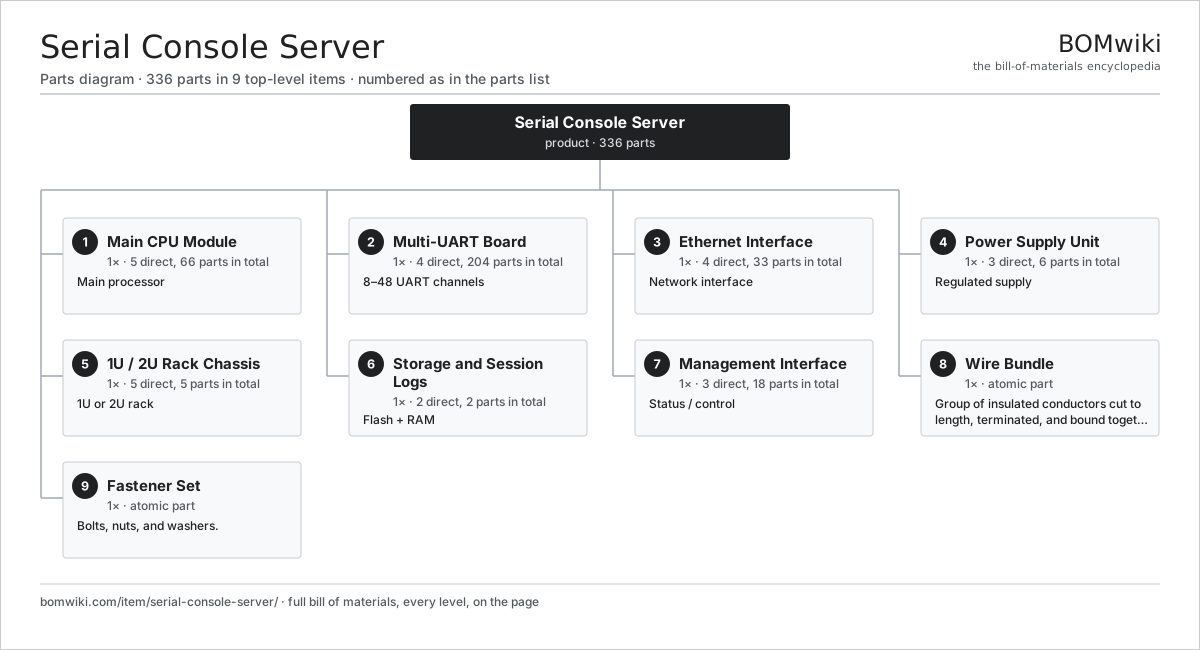
| # | Part | Qty | What it does |
|---|---|---|---|
| 1 | Main CPU Module 5 parts | 1× | Main processor |
| 2 | Multi-UART Board 4 parts | 1× | 8–48 UART channels |
| 3 | Ethernet Interface 4 parts | 1× | Network interface |
| 4 | Power Supply Unit 3 parts | 1× | Regulated supply |
| 5 | 1U / 2U Rack Chassis 5 parts | 1× | 1U or 2U rack |
| 6 | Storage and Session Logs 2 parts | 1× | Flash + RAM |
| 7 | Management Interface 3 parts | 1× | Status / control |
| 8 | Wire Bundle | 1× | Group of insulated conductors cut to length, terminated, and bound together to carry power and signals between the assemblies of a machine. |
| 9 | Fastener Set | 1× | Bolts, nuts, and washers. |
3D model
No 3D model yet. Have a CAD file of this? Add a 3D model. STL renders right on this page; STEP, FreeCAD, and OpenSCAD sources are welcome too (openly licensed, like all 3D models on BOMwiki).
Build & assembly graph
expand / collapse · shared sub-assemblies converge · links to related products · est. labourTap an assembly to expand/collapse · tap a part to open it · use “Open page” for any node · drag to pan, scroll to zoom.
Bill of materials for Serial Console Server
9 top-level lines · 42 rows shown · 336 parts total · indented to 3 levels| # | Item / sub-assembly | Part no. | Qty/assy | Ext. qty | Parts | Type |
|---|---|---|---|---|---|---|
| 1 | Main CPU Module 5 parts | serial-console-server-cpu | 1× | 1 | 66 | assembly |
| 1.1 | CPU PCB 3 parts | serial-console-server-cpu-board | 1× | 1 | 3 | assembly |
| 1.1.1 | Bare PCB | pcb-bare | 1× | 1 | · | part |
| 1.1.2 | Compute SoC Module | soc-module | 1× | 1 | · | part |
| 1.1.3 | System Oscillator | serial-console-server-oscillator | 1× | 1 | · | part |
| 1.2 | DRAM Module | serial-console-server-dram | 1× | 1 | · | part |
| 1.3 | Boot Flash Storage | serial-console-server-flash | 1× | 1 | · | part |
| 1.4 | Real-Time Clock | serial-console-server-rtc | 1× | 1 | · | part |
| 1.5 | SMD Passive (R/C/L) | smd-passives | 60× | 60 | · | part |
| 2 | Multi-UART Board 4 parts | serial-console-server-uart-board | 1× | 1 | 204 | assembly |
| 2.1 | UART Controller 2 parts | serial-console-server-uart-chips | 4× | 4 | 2 | assembly |
| 2.1.1 | Bare PCB | pcb-bare | 1× | 4 | · | part |
| 2.1.2 | Connector | connector | 1× | 4 | · | part |
| 2.2 | RS-232 Driver | serial-console-server-uart-drivers | 48× | 48 | · | part |
| 2.3 | Activity Detector | serial-console-server-channel-sense | 48× | 48 | · | part |
| 2.4 | SMD Passive (R/C/L) | smd-passives | 100× | 100 | · | part |
| 3 | Ethernet Interface 4 parts | serial-console-server-ethernet | 1× | 1 | 33 | assembly |
| 3.1 | Gigabit PHY | serial-console-server-eth-phy | 1× | 1 | · | part |
| 3.2 | Transformer / Isolation | serial-console-server-eth-magnetics | 1× | 1 | · | part |
| 3.3 | RJ-45 Connector | serial-console-server-eth-connector | 1× | 1 | · | part |
| 3.4 | SMD Passive (R/C/L) | smd-passives | 30× | 30 | · | part |
| 4 | Power Supply Unit 3 parts | serial-console-server-power | 1× | 1 | 6 | assembly |
| 4.1 | PSU Module 2 parts | serial-console-server-psu-unit | 2× | 2 | 2 | assembly |
| 4.1.1 | Power Supply | power-supply | 1× | 2 | · | part |
| 4.1.2 | Thermal Fuse | thermal-fuse | 1× | 2 | · | part |
| 4.2 | PSU Combining Backplane | serial-console-server-psu-backplane | 1× | 1 | · | part |
| 4.3 | Power Protection | serial-console-server-psu-protection | 1× | 1 | · | part |
| 5 | 1U / 2U Rack Chassis 5 parts | serial-console-server-chassis | 1× | 1 | 5 | assembly |
| 5.1 | Rack Frame | serial-console-server-chassis-frame | 1× | 1 | · | part |
| 5.2 | Perforated Cover | serial-console-server-chassis-cover | 1× | 1 | · | part |
| 5.3 | Internal Backplane | serial-console-server-chassis-backplane | 1× | 1 | · | part |
| 5.4 | Serial Connector Panel | serial-console-server-connector-panel | 1× | 1 | · | part |
| 5.5 | Fastener Set | fastener-set | 1× | 1 | · | part |
| 6 | Storage and Session Logs 2 parts | serial-console-server-memory | 1× | 1 | 2 | assembly |
| 6.1 | SSD Storage | serial-console-server-ssd | 1× | 1 | · | part |
| 6.2 | Log Partition | serial-console-server-log-partition | 1× | 1 | · | part |
| 7 | Management Interface 3 parts | serial-console-server-management | 1× | 1 | 18 | assembly |
| 7.1 | Web Console Application | serial-console-server-web-app | 1× | 1 | · | part |
| 7.2 | Status LED Indicator | serial-console-server-status-leds | 16× | 16 | · | part |
| 7.3 | Power Control | serial-console-server-power-button | 1× | 1 | · | part |
| 8 | Wire Bundle | wire-bundle | 1× | 1 | · | part |
| 9 | Fastener Set | fastener-set | 1× | 1 | · | part |
Something wrong in this list? Report a problem with this BOM.
Related products
same domain, ranked by shared parts Refreshable Braille Display
292 parts · shares 2 with this page
Refreshable Braille Display
292 parts · shares 2 with this page
 Edge AI Inference Box
558 parts · shares 2 with this page
Edge AI Inference Box
558 parts · shares 2 with this page
 KVM-over-IP Switch
222 parts · shares 2 with this page
KVM-over-IP Switch
222 parts · shares 2 with this page
 Microcontroller Dev Board
49 parts · shares 1 with this page
Microcontroller Dev Board
49 parts · shares 1 with this page
 Rugged Tablet
136 parts · shares 1 with this page
Rugged Tablet
136 parts · shares 1 with this page
 All-in-One PC
68 parts · shares 3 with this page
All-in-One PC
68 parts · shares 3 with this page
Sourcing: possible vendors
Browse the supplier directory → Prices, MOQ, and lead times are algorithmic estimates, not quotes, and not claims about these companies. Company mappings are curated by keyword; est. price band $20–$3k. How estimates work| Vendor | HQ | Specialty | MOQ | Lead time |
|---|---|---|---|---|
| dell.com ↗ | Round Rock, US | Computers & infrastructure | 1,000 units | 8–14 wks |
|
🇺🇸HP
hp.com ↗
|
Palo Alto, US | Computers & printers | 1,000 units | 8–14 wks |
|
🇨🇳Lenovo
lenovo.com ↗
|
Beijing, CN | Computers | 1,000 units | 8–14 wks |
|
🇹🇼ASUS
asus.com ↗
|
Taipei, TW | Computers & components | 1,000 units | 8–14 wks |
|
🇨🇳Foxconn
foxconn.com ↗
|
Shenzhen, CN | Electronics contract mfg | 1,000 units | 8–14 wks |
1,295-word article