Studio Floor Monitor
ProductOverview
A studio floor monitor is the talent's window to the show. Unlike a broadcast monitor at the vision control desk (which shows what the audience sees), a floor monitor displays the camera feed, graphics, or countdown that helps the talent deliver their performance. A news anchor reads from a teleprompter and glances at a floor monitor to see lower thirds and updates in real time. A weather presenter uses a monitor to see the chroma-key composite behind them. A talk show host sees a countdown to a guest entrance, or a monitor showing their own camera shot so they can frame themselves. The large LCD screen mounted on a rolling pedestal puts the broadcast signal directly in front of the talent, eliminating the need for them to look away or guess timing.
Display and electronics
The LCD panel (32–50 inches) is the main visual component. Modern panels offer high brightness (500+ nits) to cut through studio lights and excellent viewing angles (IPS wide-angle). The timing controller IC drives the pixel array with precise timing, and a video scaler converts any input format (480p, 720p, 1080i, 1080p, 4K) to the panel's native resolution.
The input stage accepts HDMI, SDI, or analog component video. The multiplexer lets the monitor select which input is displayed, either manually via a button or automatically via priority (e.g., if HDMI drops, fall back to SDI). Most professional monitors offer hot-swappable inputs, the talent or floor crew can switch to a different camera feed or graphics output without restarting.
Tally integration
The tally input is critical in multi-camera production. Via a low-voltage pair (typically a pair of wires from the vision mixer's button panel), the monitor receives a "red" signal (camera is live/on-air) or "green" signal (camera is standby). The bi-color LED on the monitor's bezel shows this status, red light means the talent's camera is currently broadcasting, green means another camera is on-air. This lets the talent know when to look at the lens and when they can relax, or when they're expected to deliver their line.
In some studios, the tally input also triggers the monitor to highlight the edges of the screen (red frame border), making the on-air status unmistakable even from across the studio.
Stand and mobility
The pedestal base is a steel four-legged frame providing stability despite the significant mass of a 40–50 inch monitor. The articulating neck can swivel (horizontal pan) and tilt (±30° vertical), allowing adjustment for talent height and sightline comfort. A VESA-compatible bracket on the neck secures the monitor safely.
Four pneumatic caster wheels allow the operator to roll the monitor into position during setup, and foot brakes lock it in place during recording to prevent accidental drift. The footprint is typically 1.0 m × 0.8 m, giving a stable base without crowding the studio floor.
Cable management
Video cables (HDMI or SDI), power cables, and tally wiring all need to route from the monitor stand base back to the control room or vision mixer. A wire tray running along the base frame organizes and protects these cables. P-clips spaced every 200 mm prevent the cables from becoming a tripping hazard. A spiral wrap bundles the cables together, and a flexible conduit protects the video coax from crushing if the monitor is moved or repositioned.
Audio output
Most floor monitors include a small built-in speaker (1–2 W mono or stereo). This allows the talent to hear program audio (what the audience hears), floor directions from the floor manager, or cue tones. The amplifier is fed from the monitor's HDMI or component input (some sources include embedded audio). A volume knob on the monitor bezel lets the talent or floor manager adjust monitoring level.
In high-end setups, the monitor is fed from a dedicated floor feed mixing console that blends program audio with intercom/cue signals, giving the talent a customized mix (e.g., program audio + their own voice for confidence feedback, or program audio + director cues only).
Power supply
The internal power supply converts AC mains (120 V or 230 V) to regulated DC for the LCD panel and audio amplifier. Most monitors use a power factor correction stage for efficiency and to minimize harmonics on the studio power grid. A thermal fuse or breaker protects against overload or internal short.
Practical use
In live broadcast, a floor monitor is often the talent's lifeline. A news anchor depends on it for timing cues and graphics confirmation. A sports commentator watches replays rolling on their monitor as they narrate. A talk show guest might see their own camera feed, building confidence they're framing well. The tally LED tells them when they're on-air, eliminating the anxiety of "am I live?"
Positioning is an art: the monitor must be close enough to read comfortably (typically 1–2 meters away) but not so close it's visible on camera. A skilled floor manager places the monitor at the talent's eye level and slightly off-axis, so they can glance at it without appearing to look away from the lens.
In productions with multiple studios or a large floor, a single monitor won't suffice. Large facilities have monitor walls with dozens of displays showing different outputs (camera 1, camera 2, graphics, replay, incoming satellite feed, etc.), allowing crew to see exactly what's going on everywhere in the production.
Studio Floor Monitor parts and their functions
11 top-level parts · 211 parts in total · full bill of materials below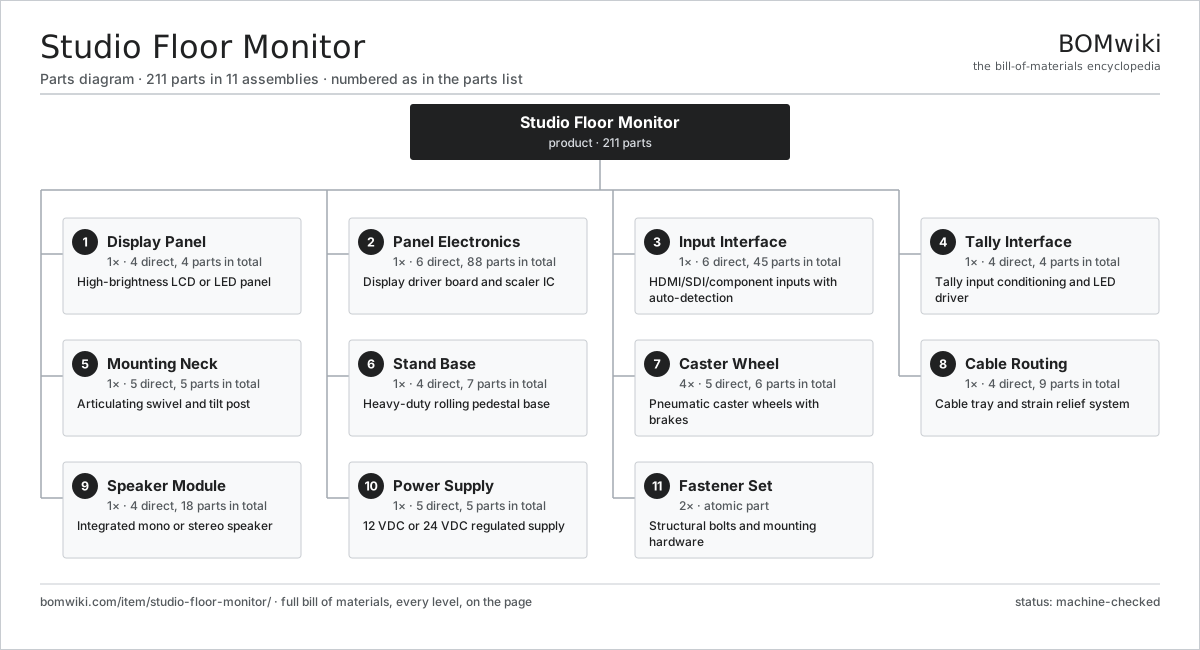
| # | Part | Qty | What it does |
|---|---|---|---|
| 1 | Display Panel 4 parts | 1× | High-brightness LCD or LED panel |
| 2 | Panel Electronics 6 parts | 1× | Display driver board and scaler IC |
| 3 | Input Interface 6 parts | 1× | HDMI/SDI/component inputs with auto-detection |
| 4 | Tally Interface 4 parts | 1× | Tally input conditioning and LED driver |
| 5 | Mounting Neck 5 parts | 1× | Articulating swivel and tilt post |
| 6 | Stand Base 4 parts | 1× | Heavy-duty rolling pedestal base |
| 7 | Caster Wheel 5 parts | 4× | Pneumatic caster wheels with brakes |
| 8 | Cable Routing 4 parts | 1× | Cable tray and strain relief system |
| 9 | Speaker Module 4 parts | 1× | Integrated mono or stereo speaker |
| 10 | Power Supply 5 parts | 1× | 12 VDC or 24 VDC regulated supply |
| 11 | Fastener Set | 2× | Structural bolts and mounting hardware |
3D model
No 3D model yet. Have a CAD file of this? Add a 3D model — STL renders right on this page; STEP, FreeCAD, and OpenSCAD sources are welcome too (openly licensed, like all 3D models on BOMwiki).
Build & assembly graph
expand / collapse · shared sub-assemblies converge · links to related products · est. labourTap an assembly to expand/collapse · tap a part to open it · use “Open page” for any node · drag to pan, scroll to zoom.
Bill of materials for Studio Floor Monitor
11 top-level lines · 58 rows shown · 211 parts total · indented to 3 levels| # | Item / sub-assembly | Part no. | Qty/assy | Ext. qty | Parts | Type |
|---|---|---|---|---|---|---|
| 1 | Display Panel 4 parts | studio-floor-monitor-display-panel | 1× | 1 | 4 | assembly |
| 1.1 | LCD Cell | studio-floor-monitor-lcd-cell | 1× | 1 | · | part |
| 1.2 | Backlight | studio-floor-monitor-backlight-module | 1× | 1 | · | part |
| 1.3 | Bezel | studio-floor-monitor-display-bezel | 1× | 1 | · | part |
| 1.4 | Anti-Glare Window | studio-floor-monitor-display-window | 1× | 1 | · | part |
| 2 | Panel Electronics 6 parts | studio-floor-monitor-panel-electronics | 1× | 1 | 88 | assembly |
| 2.1 | Bare PCB | pcb-bare | 1× | 1 | · | part |
| 2.2 | Timing Controller IC | studio-floor-monitor-timing-ic | 1× | 1 | · | part |
| 2.3 | Scaler IC | studio-floor-monitor-scaler-ic | 1× | 1 | · | part |
| 2.4 | Backlight Driver | studio-floor-monitor-backlight-driver | 1× | 1 | · | part |
| 2.5 | SMD Passive (R/C/L) | smd-passives | 80× | 80 | · | part |
| 2.6 | Connector | connector | 4× | 4 | · | part |
| 3 | Input Interface 6 parts | studio-floor-monitor-input-interface | 1× | 1 | 45 | assembly |
| 3.1 | HDMI Receiver | studio-floor-monitor-hdmi-rx | 1× | 1 | · | part |
| 3.2 | SDI Receiver IC | studio-floor-monitor-sdi-rx | 1× | 1 | · | part |
| 3.3 | Component Receiver | studio-floor-monitor-component-rx | 1× | 1 | · | part |
| 3.4 | Input Multiplexer | studio-floor-monitor-input-switch | 1× | 1 | · | part |
| 3.5 | Bare PCB | pcb-bare | 1× | 1 | · | part |
| 3.6 | SMD Passive (R/C/L) | smd-passives | 40× | 40 | · | part |
| 4 | Tally Interface 4 parts | studio-floor-monitor-tally-interface | 1× | 1 | 4 | assembly |
| 4.1 | Tally Optocoupler | studio-floor-monitor-tally-optocoupler | 1× | 1 | · | part |
| 4.2 | Tally LED Driver | studio-floor-monitor-tally-led-driver | 1× | 1 | · | part |
| 4.3 | Tally Indicator | studio-floor-monitor-tally-led-indicator | 1× | 1 | · | part |
| 4.4 | Tally PCB | studio-floor-monitor-tally-pcb | 1× | 1 | · | part |
| 5 | Mounting Neck 5 parts | studio-floor-monitor-mounting-neck | 1× | 1 | 5 | assembly |
| 5.1 | Neck Tube | studio-floor-monitor-neck-tube | 1× | 1 | · | part |
| 5.2 | Swivel Bearing | studio-floor-monitor-swivel-bearing | 1× | 1 | · | part |
| 5.3 | Tilt Mechanism | studio-floor-monitor-tilt-mechanism | 1× | 1 | · | part |
| 5.4 | Panel Clamp | studio-floor-monitor-panel-clamp | 1× | 1 | · | part |
| 5.5 | Fastener Set | fastener-set | 1× | 1 | · | part |
| 6 | Stand Base 4 parts | studio-floor-monitor-stand-base | 1× | 1 | 7 | assembly |
| 6.1 | Base Frame | studio-floor-monitor-base-frame | 1× | 1 | · | part |
| 6.2 | Corner Brace | studio-floor-monitor-corner-brace | 4× | 4 | · | part |
| 6.3 | Cable Tray | studio-floor-monitor-cable-tray | 1× | 1 | · | part |
| 6.4 | Fastener Set | fastener-set | 1× | 1 | · | part |
| 7 | Caster Wheel 5 parts | studio-floor-monitor-stand-wheels | 4× | 4 | 6 | assembly |
| 7.1 | Pneumatic Tire | studio-floor-monitor-wheel-tire | 1× | 4 | · | part |
| 7.2 | Ball Bearing | ball-bearing | 2× | 8 | · | part |
| 7.3 | Brake Lever | studio-floor-monitor-brake-lever | 1× | 4 | · | part |
| 7.4 | Brake Pad | studio-floor-monitor-brake-pad | 1× | 4 | · | part |
| 7.5 | Fastener Set | fastener-set | 1× | 4 | · | part |
| 8 | Cable Routing 4 parts | studio-floor-monitor-cable-routing | 1× | 1 | 9 | assembly |
| 8.1 | Spiral Cable Wrap | studio-floor-monitor-spiral-wrap | 1× | 1 | · | part |
| 8.2 | Flexible Conduit | studio-floor-monitor-flexible-conduit | 1× | 1 | · | part |
| 8.3 | Cable Clip | studio-floor-monitor-cable-clips | 6× | 6 | · | part |
| 8.4 | Wire Bundle | wire-bundle | 1× | 1 | · | part |
| 9 | Speaker Module 4 parts | studio-floor-monitor-speaker-module | 1× | 1 | 18 | assembly |
| 9.1 | Speaker Driver | studio-floor-monitor-speaker-driver | 1× | 1 | · | part |
| 9.2 | Audio Amplifier | studio-floor-monitor-audio-amp | 1× | 1 | · | part |
| 9.3 | Volume Control | studio-floor-monitor-volume-pot | 1× | 1 | · | part |
| 9.4 | SMD Passive (R/C/L) | smd-passives | 15× | 15 | · | part |
| 10 | Power Supply 5 parts | studio-floor-monitor-power-supply | 1× | 1 | 5 | assembly |
| 10.1 | PFC Stage | studio-floor-monitor-pfc-stage | 1× | 1 | · | part |
| 10.2 | Transformer | studio-floor-monitor-isolation-transformer | 1× | 1 | · | part |
| 10.3 | Secondary Rectifier | studio-floor-monitor-secondary-rectifier | 1× | 1 | · | part |
| 10.4 | Output Filter | studio-floor-monitor-output-filter | 1× | 1 | · | part |
| 10.5 | Power Connector | studio-floor-monitor-power-connector | 1× | 1 | · | part |
| 11 | Fastener Set | fastener-set | 2× | 2 | · | part |
Related products
same domain, ranked by shared parts Broadcast Pedestal
83 parts · shares 2 with this page
Broadcast Pedestal
83 parts · shares 2 with this page
 DJ Controller
179 parts · shares 2 with this page
DJ Controller
179 parts · shares 2 with this page
 PTZ Camera
499 parts · shares 2 with this page
PTZ Camera
499 parts · shares 2 with this page
 Record Player
215 parts · shares 2 with this page
Studio Jib Arm
106 parts · shares 2 with this page
Film Wind Machine
102 parts · shares 1 with this page
Record Player
215 parts · shares 2 with this page
Studio Jib Arm
106 parts · shares 2 with this page
Film Wind Machine
102 parts · shares 1 with this page
Sourcing: possible vendors
Prices, MOQ, and lead times are algorithmic estimates, not quotes, and not claims about these companies. Company mappings are curated by keyword; est. price band $50–$3k. How estimates work| Vendor | HQ | Specialty | MOQ | Lead time |
|---|---|---|---|---|
|
🇯🇵Sony
sony.com ↗
|
Tokyo, JP | Consumer electronics | 1,000 units | 8–12 wks |
| samsung.com ↗ | Suwon, KR | Electronics & displays | 1,000 units | 8–12 wks |
|
🇺🇸Harman
harman.com ↗
|
Stamford, US | Audio (JBL, AKG) | 1,000 units | 8–12 wks |
|
🇺🇸Bose
bose.com ↗
|
Framingham, US | Audio | 1,000 units | 8–12 wks |
| yamaha.com ↗ | Hamamatsu, JP | Audio & instruments | 1,000 units | 8–12 wks |
1,075-word article