3D Navigation Mouse
ProductOverview
A 3D navigation mouse (or spaceball puck) is a six-axis input device used by design engineers and CAD operators to manipulate objects in 3D space without releasing keyboard or primary input controls. Unlike a traditional mouse that moves in the X-Y plane, this optical navigation puck encodes six degrees of freedom: three rotations (pitch, roll, yaw) and three translations (x, y, z).
The device works by measuring its own position and orientation relative to a fixed Optical Tracking Sensor cluster mounted inside the Body Shell. The CMOS Image Sensor reads coded markers from the LED Array and computes the puck's 6-axis state many times per second. The Button & Click Module adds discrete navigation shortcuts, and the Weighted Base, a dense tungsten Tungsten Weight, anchors the device on a desk with a solid, weighted feel.
All sensing and processing happens locally; the USB Interface Board sends packets to the host computer via the USB Cable Assembly (USB-C), and native driver software in the CAD application interprets the motion commands to dolly, pan, rotate, and zoom the 3D viewport.
How it works
The CMOS Image Sensor inside the puck continuously captures frames of the internal LED markers. A cluster of at least three LED Arrays fixed to the housing projects reference points; by detecting the pixel positions of those LEDs in the sensor image, the firmware on the Microcontroller calculates the instantaneous position and orientation of the entire puck in free space using photogrammetric algorithms.
Motion is expressed as six axes of data: +/- X (side-to-side), +/- Y (up-down), +/- Z (forward-back), and rotation around each axis (roll, pitch, yaw). The firmware quantizes these into motion vectors and forwards them through the USB Controller IC on each USB poll.
The four Tactile Switches on the Button & Click Module are used for preset navigation functions, zoom fit, front view, isometric reset, etc., reducing the need to reach for the keyboard while manipulating the design.
The Rubber Foot on the Weighted Base prevent slipping, and the weighted base makes the device resist tipping when pressure is applied during navigation. The LED Status Ring glows to confirm connection status and active tracking.
3D Navigation Mouse parts and their functions
8 top-level parts · 106 parts in total · full bill of materials below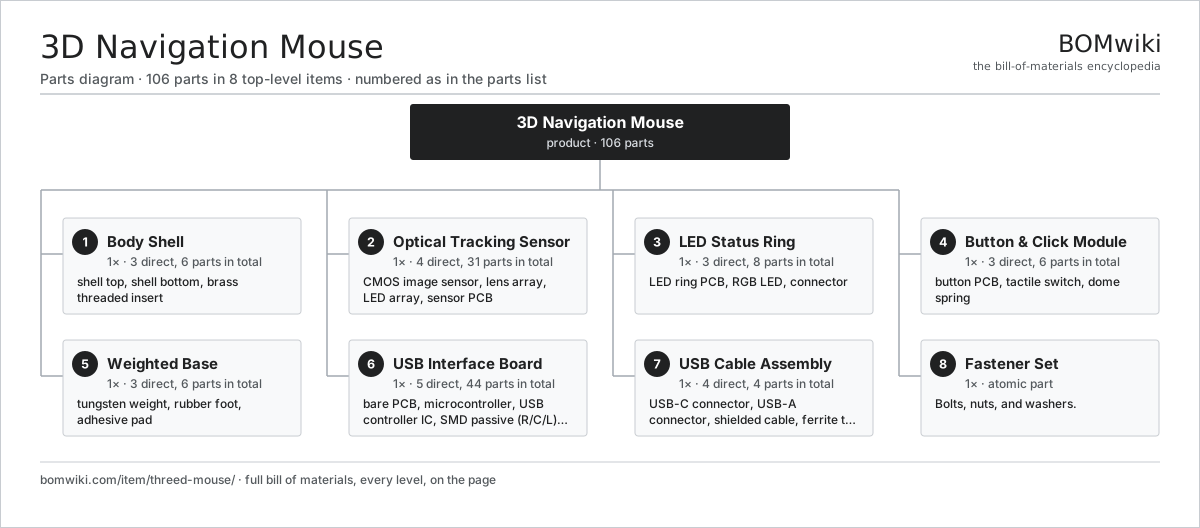
| # | Part | Qty | What it does |
|---|---|---|---|
| 1 | Body Shell 3 parts | 1× | Molded polymer housing with ergonomic contours. |
| 2 | Optical Tracking Sensor 4 parts | 1× | Multi-axis optical sensor that tracks device orientation. |
| 3 | LED Status Ring 3 parts | 1× | RGB LEDs indicating connection and tracking state. |
| 4 | Button & Click Module 3 parts | 1× | Mechanical buttons for navigation control. |
| 5 | Weighted Base 3 parts | 1× | Tungsten mass for stability and grip feel. |
| 6 | USB Interface Board 5 parts | 1× | USB-C controller and signal processing. |
| 7 | USB Cable Assembly 4 parts | 1× | USB-C to USB-A braided cable with ferrite. |
| 8 | Fastener Set | 1× | Bolts, nuts, and washers. |
3D model
No 3D model yet. Have a CAD file of this? Add a 3D model. STL renders right on this page; STEP, FreeCAD, and OpenSCAD sources are welcome too (openly licensed, like all 3D models on BOMwiki).
Build & assembly graph
expand / collapse · shared sub-assemblies converge · links to related products · est. labourTap an assembly to expand/collapse · tap a part to open it · use “Open page” for any node · drag to pan, scroll to zoom.
Bill of materials for 3D Navigation Mouse
8 top-level lines · 35 rows shown · 106 parts total · indented to 3 levels| # | Item / sub-assembly | Part no. | Qty/assy | Ext. qty | Parts | Type |
|---|---|---|---|---|---|---|
| 1 | Body Shell 3 parts | threed-mouse-body | 1× | 1 | 6 | assembly |
| 1.1 | Shell Top | threed-mouse-shell-top | 1× | 1 | · | part |
| 1.2 | Shell Bottom | threed-mouse-shell-bottom | 1× | 1 | · | part |
| 1.3 | Brass Threaded Insert | threed-mouse-insert-brass | 4× | 4 | · | part |
| 2 | Optical Tracking Sensor 4 parts | threed-mouse-optical-sensor | 1× | 1 | 31 | assembly |
| 2.1 | CMOS Image Sensor | image-sensor | 1× | 1 | · | part |
| 2.2 | Lens Array | threed-mouse-lens-array | 1× | 1 | · | part |
| 2.3 | LED Array | threed-mouse-led-array | 3× | 3 | · | part |
| 2.4 | Sensor PCB 2 parts | threed-mouse-sensor-pcb | 1× | 1 | 26 | assembly |
| 2.4.1 | Bare PCB | pcb-bare | 1× | 1 | · | part |
| 2.4.2 | SMD Passive (R/C/L) | smd-passives | 25× | 25 | · | part |
| 3 | LED Status Ring 3 parts | threed-mouse-led-ring | 1× | 1 | 8 | assembly |
| 3.1 | LED Ring PCB | threed-mouse-led-ring-pcb | 1× | 1 | · | part |
| 3.2 | RGB LED | threed-mouse-rgb-led | 6× | 6 | · | part |
| 3.3 | Connector | connector | 1× | 1 | · | part |
| 4 | Button & Click Module 3 parts | threed-mouse-button-assembly | 1× | 1 | 6 | assembly |
| 4.1 | Button PCB | threed-mouse-button-pcb | 1× | 1 | · | part |
| 4.2 | Tactile Switch | threed-mouse-tactile-switch | 4× | 4 | · | part |
| 4.3 | Dome Spring | threed-mouse-click-spring | 1× | 1 | · | part |
| 5 | Weighted Base 3 parts | threed-mouse-base-weight | 1× | 1 | 6 | assembly |
| 5.1 | Tungsten Weight | threed-mouse-tungsten-weight | 1× | 1 | · | part |
| 5.2 | Rubber Foot | threed-mouse-rubber-feet | 4× | 4 | · | part |
| 5.3 | Adhesive Pad | adhesive-pad | 1× | 1 | · | part |
| 6 | USB Interface Board 5 parts | threed-mouse-usb-interface | 1× | 1 | 44 | assembly |
| 6.1 | Bare PCB | pcb-bare | 1× | 1 | · | part |
| 6.2 | Microcontroller | mcu | 1× | 1 | · | part |
| 6.3 | USB Controller IC | usb-controller-ic | 1× | 1 | · | part |
| 6.4 | SMD Passive (R/C/L) | smd-passives | 40× | 40 | · | part |
| 6.5 | Connector | connector | 1× | 1 | · | part |
| 7 | USB Cable Assembly 4 parts | threed-mouse-cable | 1× | 1 | 4 | assembly |
| 7.1 | USB-C Connector | usb-c-connector | 1× | 1 | · | part |
| 7.2 | USB-A Connector | usb-a-connector | 1× | 1 | · | part |
| 7.3 | Shielded Cable | cable-shielded | 1× | 1 | · | part |
| 7.4 | Ferrite Toroid | ferrite-core | 1× | 1 | · | part |
| 8 | Fastener Set | fastener-set | 1× | 1 | · | part |
Something wrong in this list? Report a problem with this BOM.
Related products
same domain, ranked by shared parts Macro Keypad / Stream Controller
199 parts · shares 4 with this page
Macro Keypad / Stream Controller
199 parts · shares 4 with this page
 Hardware Crypto Wallet
161 parts · shares 2 with this page
Hardware Crypto Wallet
161 parts · shares 2 with this page
 NVMe SSD Enclosure
91 parts · shares 1 with this page
NVMe SSD Enclosure
91 parts · shares 1 with this page
 Laptop Cooling Pad
129 parts · shares 1 with this page
Laptop Cooling Pad
129 parts · shares 1 with this page
 All-in-One PC
68 parts · shares 1 with this page
Barcode Verifier
80 parts · shares 1 with this page
All-in-One PC
68 parts · shares 1 with this page
Barcode Verifier
80 parts · shares 1 with this page
Sourcing: possible vendors
Browse the supplier directory → Prices, MOQ, and lead times are algorithmic estimates, not quotes, and not claims about these companies. Company mappings are curated by keyword; est. price band $20–$3k. How estimates work| Vendor | HQ | Specialty | MOQ | Lead time |
|---|---|---|---|---|
| dell.com ↗ | Round Rock, US | Computers & infrastructure | 1,000 units | 8–14 wks |
|
🇺🇸HP
hp.com ↗
|
Palo Alto, US | Computers & printers | 1,000 units | 8–14 wks |
|
🇨🇳Lenovo
lenovo.com ↗
|
Beijing, CN | Computers | 1,000 units | 8–14 wks |
|
🇹🇼ASUS
asus.com ↗
|
Taipei, TW | Computers & components | 1,000 units | 8–14 wks |
|
🇨🇳Foxconn
foxconn.com ↗
|
Shenzhen, CN | Electronics contract mfg | 1,000 units | 8–14 wks |
384-word article