USB Hub
ProductOverview
A USB hub turns one USB port on a computer into several. The host sees a single device on its upstream link, and the hub presents a fresh set of downstream ports that peripherals plug into. This is a powered hub: instead of drawing everything from the host, it takes its own external supply through the DC Power Jack, so each of its four USB-A ports can deliver full charging current at the same time without starving the others.
The electronics live on the Main Board, built around a USB Hub Controller IC that does the actual fan-out. The host connects through the USB-C Upstream Port on the Port Cluster, and devices plug into the bank of USB-A Downstream Port receptacles beside it. A LED Indicator Board shows which ports are live, and the whole stack is held in the two-piece Enclosure Assembly.
How it works
The host link arrives on the USB-C Upstream Port and runs to the USB Hub Controller IC. That controller is the heart of the hub: it answers the host as one device, enumerates each peripheral plugged into a USB-A Downstream Port, and routes traffic between them. A USB 3.x hub carries two logical hubs in one package, a SuperSpeed hub for the 5 Gbps lanes and a high-speed hub for legacy USB 2.0 traffic, so a slow keyboard on one port never holds up a fast drive on another. The controller times all of this against a stable reference clock from the Crystal Oscillator.
Power is what makes this hub powered. The DC Power Jack feeds a Power Management IC stage that switches a regulated 5 V rail out to each port separately, with a current limit that trips if a device draws too much or shorts, protecting the rest of the hub. Because the rail comes from the wall and not the host, every port can supply its full output at once.
The exposed connectors are the most vulnerable points, so each data pair and power line passes through an ESD Protection Array that clamps electrostatic discharge before it reaches the silicon. As ports come up, the LED Indicator Board lights an indicator for each active link so the user can see at a glance which slots are in use, with the light carried out to the shell face through moulded light pipes.
USB Hub parts and their functions
9 top-level parts · 124 parts in total · full bill of materials below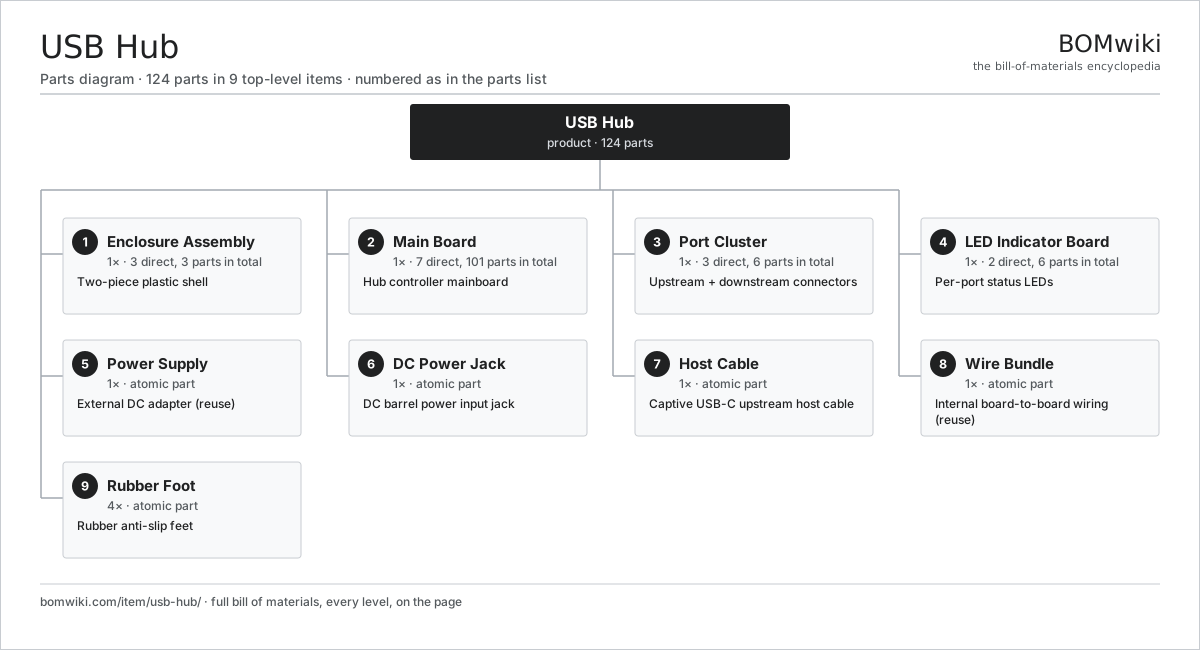
| # | Part | Qty | What it does |
|---|---|---|---|
| 1 | Enclosure Assembly 3 parts | 1× | Two-piece plastic shell |
| 2 | Main Board 7 parts | 1× | Hub controller mainboard |
| 3 | Port Cluster 3 parts | 1× | Upstream + downstream connectors |
| 4 | LED Indicator Board 2 parts | 1× | Per-port status LEDs |
| 5 | Power Supply | 1× | External DC adapter (reuse) |
| 6 | DC Power Jack | 1× | DC barrel power input jack |
| 7 | Host Cable | 1× | Captive USB-C upstream host cable |
| 8 | Wire Bundle | 1× | Internal board-to-board wiring (reuse) |
| 9 | Rubber Foot | 4× | Rubber anti-slip feet |
3D model
No 3D model yet. Have a CAD file of this? Add a 3D model. STL renders right on this page; STEP, FreeCAD, and OpenSCAD sources are welcome too (openly licensed, like all 3D models on BOMwiki).
Build & assembly graph
expand / collapse · shared sub-assemblies converge · links to related products · est. labourTap an assembly to expand/collapse · tap a part to open it · use “Open page” for any node · drag to pan, scroll to zoom.
Bill of materials for USB Hub
9 top-level lines · 24 rows shown · 124 parts total · indented to 3 levels| # | Item / sub-assembly | Part no. | Qty/assy | Ext. qty | Parts | Type |
|---|---|---|---|---|---|---|
| 1 | Enclosure Assembly 3 parts | usb-hub-enclosure | 1× | 1 | 3 | assembly |
| 1.1 | Top Shell | usb-hub-top-shell | 1× | 1 | · | part |
| 1.2 | Bottom Shell | usb-hub-bottom-shell | 1× | 1 | · | part |
| 1.3 | Fastener Set | fastener-set | 1× | 1 | · | part |
| 2 | Main Board 7 parts | usb-hub-mainboard | 1× | 1 | 101 | assembly |
| 2.1 | Bare PCB | pcb-bare | 1× | 1 | · | part |
| 2.2 | USB Hub Controller IC | usb-hub-controller-ic | 1× | 1 | · | part |
| 2.3 | Crystal Oscillator | usb-hub-crystal | 1× | 1 | · | part |
| 2.4 | ESD Protection Array | usb-hub-esd-array | 4× | 4 | · | part |
| 2.5 | Power Management IC | usb-hub-power-mgmt | 1× | 1 | · | part |
| 2.6 | SMD Passive (R/C/L) | smd-passives | 90× | 90 | · | part |
| 2.7 | Connector | connector | 3× | 3 | · | part |
| 3 | Port Cluster 3 parts | usb-hub-port-cluster | 1× | 1 | 6 | assembly |
| 3.1 | USB-C Upstream Port | usb-hub-upstream-port | 1× | 1 | · | part |
| 3.2 | USB-A Downstream Port | usb-hub-downstream-port | 4× | 4 | · | part |
| 3.3 | Connector | connector | 1× | 1 | · | part |
| 4 | LED Indicator Board 2 parts | usb-hub-led-board | 1× | 1 | 6 | assembly |
| 4.1 | Status LED | usb-hub-led | 5× | 5 | · | part |
| 4.2 | Wire Bundle | wire-bundle | 1× | 1 | · | part |
| 5 | Power Supply | power-supply | 1× | 1 | · | part |
| 6 | DC Power Jack | usb-hub-power-jack | 1× | 1 | · | part |
| 7 | Host Cable | usb-hub-host-cable | 1× | 1 | · | part |
| 8 | Wire Bundle | wire-bundle | 1× | 1 | · | part |
| 9 | Rubber Foot | usb-hub-feet | 4× | 4 | · | part |
Something wrong in this list? Report a problem with this BOM.
Related products
same domain, ranked by shared parts All-in-One PC
68 parts · shares 2 with this page
All-in-One PC
68 parts · shares 2 with this page
 Docking Station
266 parts · shares 2 with this page
Docking Station
266 parts · shares 2 with this page
 Dot Matrix Printer
312 parts · shares 2 with this page
Dot Matrix Printer
312 parts · shares 2 with this page
 Laptop
157 parts · shares 2 with this page
Laptop
157 parts · shares 2 with this page
 Large-Format Inkjet Plotter
473 parts · shares 2 with this page
Large-Format Inkjet Plotter
473 parts · shares 2 with this page
 Laser Printer
124 parts · shares 2 with this page
Laser Printer
124 parts · shares 2 with this page
Sourcing: possible vendors
Browse the supplier directory → Prices, MOQ, and lead times are algorithmic estimates, not quotes, and not claims about these companies. Company mappings are curated by keyword; est. price band $20–$3k. How estimates work| Vendor | HQ | Specialty | MOQ | Lead time |
|---|---|---|---|---|
| dell.com ↗ | Round Rock, US | Computers & infrastructure | 1,000 units | 8–14 wks |
|
🇺🇸HP
hp.com ↗
|
Palo Alto, US | Computers & printers | 1,000 units | 8–14 wks |
|
🇨🇳Lenovo
lenovo.com ↗
|
Beijing, CN | Computers | 1,000 units | 8–14 wks |
|
🇹🇼ASUS
asus.com ↗
|
Taipei, TW | Computers & components | 1,000 units | 8–14 wks |
|
🇨🇳Foxconn
foxconn.com ↗
|
Shenzhen, CN | Electronics contract mfg | 1,000 units | 8–14 wks |
412-word article