HMI Touch Panel
ProductOverview
An HMI (human–machine interface) panel is the operator's window into a factory machine or production line. It displays the process state in real time (tank level, motor speed, recipe step, alarm messages), accepts touch input for button presses and parameter changes, and sends commands back to the PLC or process controller. On a textile mill, a confectionery line, or a bottling plant, the HMI is the single point where an operator starts a recipe, monitors progress, acknowledges alarms, and adjusts setpoints.
Industrial HMI panels differ from consumer tablets in several ways: they are hardened for dust and moisture (IP65 minimum rating), support isolated fieldbus links to prevent ground loops, are powered from 24 V industrial supplies (surviving brownout and surge), and run real-time operating systems (Linux or QNX) with predictable latency for control feedback loops. Sizes range from 7 inches (handheld equivalents) to 22 inches (large format for complex multi-line plants).
Display and Touch Technology
The core of the HMI is its Touchscreen Assembly, a bonded assembly of a LCD or OLED Matrix and a Touch Digitizer sensor layer. Most industrial panels use LCD (liquid crystal display) because of cost, brightness, and low power; OLED offers superior contrast and colour but higher power draw and burn-in risk on static screens.
Touch input comes in two flavours. Resistive panels are the legacy standard: two conductive layers separated by a gap react to finger pressure at a single point, generating an X/Y coordinate. They work with gloved fingers (a must on a factory floor) and with any stylus, but offer no multi-touch and suffer from reduced optical clarity due to the dual-layer sandwich. Capacitive panels sense the change in capacitance when a finger approaches, offering better clarity and multi-touch support, but require bare skin to work.
The Panel Timing Controller bridge IC converts the CPU's LVDS or parallel RGB video stream into the specific timing signals (clocks, sync pulses, clock enables) that the LCD matrix needs. The Touch Digitizer overlay runs its own controller (Touch Controller IC) which scans the sensor grid at 100–200 Hz and outputs raw X/Y data; the CPU's kernel driver filters this data (median filter to remove noise, averaging to reduce jitter) and feeds calibrated screen coordinates to the application.
Processor and Operating System
The CPU / SoC Module is the computational engine. Most modern HMIs use an ARM Cortex-A SoC (i.MX6 from NXP, or Snapdragon/Exynos variants) which integrates the CPU cores (1–4), a GPU for graphics acceleration, and on-die memory controllers. The System-on-Chip runs Linux (typically Ubuntu 20.04 LTS with a vendor patch for real-time kernel) or QNX, a lightweight RTOS with hard real-time guarantees.
The DRAM Module is typically 2–4 GB of DDR3 or DDR4 soldered directly to the PCB. This holds the OS kernel, the HMI application (written in Qt, Java, or custom C++), and double-buffered frame buffers for the display. A 1920×1200 32-bit frame buffer alone is ~9 MB; two buffers plus OS overhead leave 1–3 GB for application data and caching.
The Storage and Flash subsystem has two parts: the eMMC Flash Module flash module (64 GB typical) holding the OS image and application code, and a microSD Card Slot microSD slot for technician access. OS updates, HMI screen backups, and historical logs can be swapped out on a microSD card without disassembling the panel.
Graphics and Real-Time Feedback
The SoC's GPU handles 2D rendering (buttons, bars, text) and 3D graphics if needed (process 3D models, animated transitions). The CPU draws to the off-screen frame buffer (a region of DRAM), then flips it to the display after a vertical sync pulse, eliminating flicker. On a 60 Hz display, frame-ready events occur at 16.7 ms intervals; a well-tuned HMI application achieves 60 FPS and responds to a touch within 50 ms (perceptual threshold for responsiveness).
Process data flows in via the HMI Network and Fieldbus Interface link. Most often this is Ethernet (industrial Ethernet/IP or Modbus TCP), which runs at 10–100 Mbps and carries data blocks every 50–200 ms. The HMI reads these blocks in a thread, updates internal data structures, signals the GUI thread, and the GUI re-paints relevant widgets. Latency from a sensor reading at the PLC to visual update on the HMI is typically 100–500 ms.
Backlight and Sunlight Readability
Factory floors are not dark rooms. Daylight and bright LED work lights wash out reflective displays. Industrial HMI panels use a Backlight LED Driver with high brightness: 300–500 cd/m² is typical (consumer tablets are 200–300). The LED Driver IC PWM-dims the LED array, both to extend battery life on portable HMIs and to reduce power consumption during night shift operation. Some advanced models add an ambient-light sensor that adjusts brightness automatically.
The Cover Glass cover glass (Gorilla Glass 3 or equivalent, ≥4 mm) is chemically strengthened to survive impacts and scratches, and carries an oleophobic coating to reduce fingerprints in oily factory environments. The Bezel Frame light baffle underneath reduces ambient-light glare; anti-glare coatings on the LCD are often applied, trading a small brightness penalty for readable viewing angles.
Power and Thermal Management
The panel receives 18–30 V DC from the plant's industrial supply. The Industrial Power Supply supply converts this to isolated 12 V (backlight), 5 V (peripherals), and 3.3 V (SoC core). Isolation is crucial: a PLC and HMI typically live on different ground planes in the cabinet; a common-mode transient on the fieldbus cable could otherwise couple destructively between supplies. The Power Isolation Stage stage (opto-isolated DC-DC or small transformer) prevents this.
Thermal dissipation is passive. The SoC and power stages run at 10–30 W continuously; the CPU Heatsink bonded to the CPU, with fins extending into the enclosure, radiates this to the cabinet. The Heat Dissipation strategy relies on natural convection: a 45 W system with free-standing heatsink reaches ~70 °C ambient in still air. Fanless design is preferred in food and dusty environments where contamination and noise are concerns.
Mechanical Integration
The Cabinet Mounting Hardware frame fastens the PCB assembly to the cabinet wall. Quick-release Quick-Release Clamp allow a technician to pull the entire module out without disconnecting any cables, sliding the assembly along guide rails until it clears the cabinet. This "slide-out" design is standard in industrial equipment, enabling quick HMI replacement in the field. The rear connector block (network, power, auxiliary IO) remains accessible once the panel is halfway extracted.
The Front Panel Bezel seals the front opening with gaskets; the Cover Glass sits flush in the Bezel Frame with no gap, presenting a clean, washable surface. If the machine is IP65 or higher rated, the HMI contributes to that rating via its front and rear gaskets.
Field Commissioning and Programming
HMI software is written in Qt (C++) or Java Swing, typically on an x86 development workstation, then cross-compiled to ARM and transferred via microSD card or network USB. The HMI application links to a data dictionary (tag list) that names the process variables (pressure_PSI, motor_speed_RPM, alarm_code), and the fieldbus driver maps each tag to a memory address in the PLC message block. When the PLC sends a 32-byte message, the HMI driver unpacks it, updates each tag, and the GUI thread wakes to re-render affected widgets.
Alarms are often latched and color-coded: a red flashing box for high-severity events (motor overcurrent), amber for warnings (temperature drifting high), green for OK. Multi-line recipes are programmed offline as JSON or XML files, uploaded via microSD, and executed by the HMI on operator command. Field technicians can adjust timing, alarm thresholds, and enable/disable features without rebuilding the HMI software.
HMI Touch Panel parts and their functions
9 top-level parts · 134 parts in total · full bill of materials below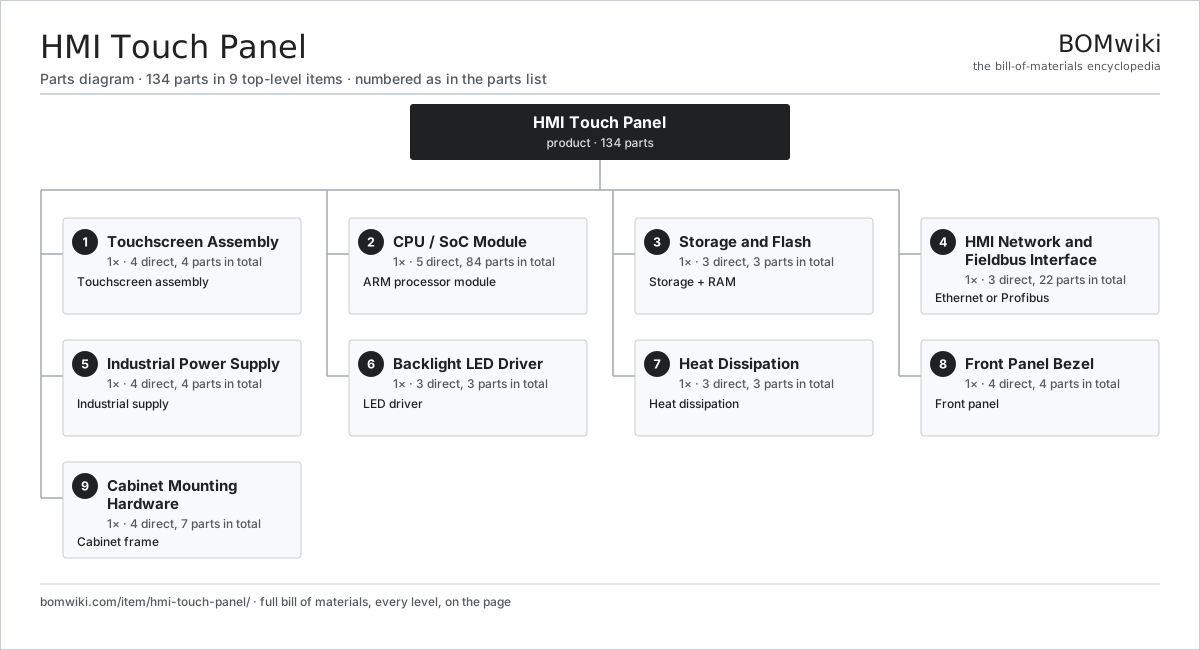
| # | Part | Qty | What it does |
|---|---|---|---|
| 1 | Touchscreen Assembly 4 parts | 1× | Touchscreen assembly |
| 2 | CPU / SoC Module 5 parts | 1× | ARM processor module |
| 3 | Storage and Flash 3 parts | 1× | Storage + RAM |
| 4 | HMI Network and Fieldbus Interface 3 parts | 1× | Ethernet or Profibus |
| 5 | Industrial Power Supply 4 parts | 1× | Industrial supply |
| 6 | Backlight LED Driver 3 parts | 1× | LED driver |
| 7 | Heat Dissipation 3 parts | 1× | Heat dissipation |
| 8 | Front Panel Bezel 4 parts | 1× | Front panel |
| 9 | Cabinet Mounting Hardware 4 parts | 1× | Cabinet frame |
3D model
No 3D model yet. Have a CAD file of this? Add a 3D model. STL renders right on this page; STEP, FreeCAD, and OpenSCAD sources are welcome too (openly licensed, like all 3D models on BOMwiki).
Build & assembly graph
expand / collapse · shared sub-assemblies converge · links to related products · est. labourTap an assembly to expand/collapse · tap a part to open it · use “Open page” for any node · drag to pan, scroll to zoom.
Bill of materials for HMI Touch Panel
9 top-level lines · 42 rows shown · 134 parts total · indented to 3 levels| # | Item / sub-assembly | Part no. | Qty/assy | Ext. qty | Parts | Type |
|---|---|---|---|---|---|---|
| 1 | Touchscreen Assembly 4 parts | hmi-touch-panel-display | 1× | 1 | 4 | assembly |
| 1.1 | LCD or OLED Matrix | hmi-touch-panel-lcd-panel | 1× | 1 | · | part |
| 1.2 | Touch Digitizer | touch-digitizer | 1× | 1 | · | part |
| 1.3 | Panel Timing Controller | hmi-touch-panel-display-controller | 1× | 1 | · | part |
| 1.4 | Display Cable Harness | hmi-touch-panel-connector-display | 1× | 1 | · | part |
| 2 | CPU / SoC Module 5 parts | hmi-touch-panel-cpu | 1× | 1 | 84 | assembly |
| 2.1 | System-on-Chip | hmi-touch-panel-soc | 1× | 1 | · | part |
| 2.2 | DRAM Module | hmi-touch-panel-ddr-memory | 1× | 1 | · | part |
| 2.3 | Power Management IC | hmi-touch-panel-pmic | 1× | 1 | · | part |
| 2.4 | Crystal Oscillator | hmi-touch-panel-oscillator | 1× | 1 | · | part |
| 2.5 | SMD Passive (R/C/L) | smd-passives | 80× | 80 | · | part |
| 3 | Storage and Flash 3 parts | hmi-touch-panel-memory | 1× | 1 | 3 | assembly |
| 3.1 | eMMC Flash Module | hmi-touch-panel-emmc | 1× | 1 | · | part |
| 3.2 | microSD Card Slot | hmi-touch-panel-sd-slot | 1× | 1 | · | part |
| 3.3 | Connector | connector | 1× | 1 | · | part |
| 4 | HMI Network and Fieldbus Interface 3 parts | hmi-touch-panel-fieldbus | 1× | 1 | 22 | assembly |
| 4.1 | Fieldbus PHY Transceiver | hmi-touch-panel-eth-phy | 1× | 1 | · | part |
| 4.2 | Network Connector | hmi-touch-panel-connector-net | 1× | 1 | · | part |
| 4.3 | SMD Passive (R/C/L) | smd-passives | 20× | 20 | · | part |
| 5 | Industrial Power Supply 4 parts | hmi-touch-panel-power | 1× | 1 | 4 | assembly |
| 5.1 | Power Supply | power-supply | 1× | 1 | · | part |
| 5.2 | Power Isolation Stage | hmi-touch-panel-power-iso | 1× | 1 | · | part |
| 5.3 | Power Protection Circuit | hmi-touch-panel-power-protection | 1× | 1 | · | part |
| 5.4 | Thermal Fuse | thermal-fuse | 1× | 1 | · | part |
| 6 | Backlight LED Driver 3 parts | hmi-touch-panel-backlight | 1× | 1 | 3 | assembly |
| 6.1 | LED Driver IC | hmi-touch-panel-backlight-driver | 1× | 1 | · | part |
| 6.2 | Backlight LED String | hmi-touch-panel-backlight-leds | 1× | 1 | · | part |
| 6.3 | Light Guide Plate | hmi-touch-panel-backlight-diffuser | 1× | 1 | · | part |
| 7 | Heat Dissipation 3 parts | hmi-touch-panel-cooling | 1× | 1 | 3 | assembly |
| 7.1 | CPU Heatsink | hmi-touch-panel-heatsink | 1× | 1 | · | part |
| 7.2 | Thermal Interface Pad | hmi-touch-panel-thermal-pad | 1× | 1 | · | part |
| 7.3 | Heatsink Mounting Bracket | hmi-touch-panel-case-interface | 1× | 1 | · | part |
| 8 | Front Panel Bezel 4 parts | hmi-touch-panel-bezel | 1× | 1 | 4 | assembly |
| 8.1 | Bezel Frame | hmi-touch-panel-bezel-frame | 1× | 1 | · | part |
| 8.2 | Cover Glass | hmi-touch-panel-bezel-glass | 1× | 1 | · | part |
| 8.3 | Front Gasket | hmi-touch-panel-bezel-gasket | 1× | 1 | · | part |
| 8.4 | Fastener Set | fastener-set | 1× | 1 | · | part |
| 9 | Cabinet Mounting Hardware 4 parts | hmi-touch-panel-mounting | 1× | 1 | 7 | assembly |
| 9.1 | Mounting Frame | hmi-touch-panel-mount-frame | 1× | 1 | · | part |
| 9.2 | Quick-Release Clamp | hmi-touch-panel-mount-clamps | 4× | 4 | · | part |
| 9.3 | Cabinet Gasket | hmi-touch-panel-mount-gasket | 1× | 1 | · | part |
| 9.4 | Fastener Set | fastener-set | 1× | 1 | · | part |
Something wrong in this list? Report a problem with this BOM.
Used in 2 assemblies
Related products
same domain, ranked by shared parts Telepresence Robot
240 parts · shares 3 with this page
Telepresence Robot
240 parts · shares 3 with this page
 Industrial Panel PC
474 parts · shares 2 with this page
Agricultural Weeding Robot
104 parts · shares 2 with this page
Drone Docking Station
210 parts · shares 2 with this page
Industrial Panel PC
474 parts · shares 2 with this page
Agricultural Weeding Robot
104 parts · shares 2 with this page
Drone Docking Station
210 parts · shares 2 with this page
 Fruit Picking Robot
144 parts · shares 2 with this page
Parcel Sorting Robot
147 parts · shares 2 with this page
Fruit Picking Robot
144 parts · shares 2 with this page
Parcel Sorting Robot
147 parts · shares 2 with this page
Sourcing: possible vendors
Browse the supplier directory → Prices, MOQ, and lead times are algorithmic estimates, not quotes, and not claims about these companies. Company mappings are curated by keyword; est. price band $3k–$500k. How estimates work| Vendor | HQ | Specialty | MOQ | Lead time |
|---|---|---|---|---|
|
🇯🇵Fanuc
fanuc.com ↗
|
Oshino, JP | Industrial robots & CNC | 20 units | 10–18 wks |
| abb.com ↗ | Zurich, CH | Industrial robots | 20 units | 10–18 wks |
|
🇯🇵Yaskawa
yaskawa.com ↗
|
Kitakyushu, JP | Robots & motion | 20 units | 10–18 wks |
|
🇩🇪KUKA
kuka.com ↗
|
Augsburg, DE | Industrial robots | 20 units | 10–18 wks |
| universal-robots.com ↗ | Odense, DK | Collaborative robots | 20 units | 10–18 wks |
1,358-word article