Ship Bridge Simulator
ProductOverview
A ship bridge simulator is a full-mission maritime training platform where ship officers practice navigation, collision avoidance, and emergency response in a realistic virtual maritime environment. The platform combines replica bridge controls (helm wheel, engine telegraph, radar), a panoramic visual display showing the water environment, and a real-time maritime physics engine that simulates ship dynamics, traffic behavior, and weather.
These simulators are mandated by the International Maritime Organization (IMO) for officer certification under STCW (Standards of Training, Certification and Watchkeeping). Every commercial ship captain must train on simulators to demonstrate competence in collision avoidance (COLREG rules), navigation in restricted waters, and emergency response. Shipping companies deploy simulators to reduce accidents, insurance premiums, and cargo loss.
Unlike aviation simulators (which have tight Federal certification), maritime simulators allow greater latitude for customization and scenario creation, making them widely deployed in maritime academies, shipping company training centers, and private training providers.
How it works
The captain stands at the Helm Wheel, which is connected to a PC running the navigation engine. The wheel has position feedback (typically 0–360° potentiometer) and optionally motorized force feedback to simulate different weather conditions.
The captain manipulates the Engine Order Telegraph, selecting engine orders (Full Ahead, Half Ahead, Stop, Half Astern, Full Astern). The telegraph position is read by the simulator, which then applies a realistic acceleration profile to the ship model. Most ships take 2–5 minutes to build full speed from stop, and the simulator matches this lag.
A typical scenario: "Navigate a container ship through Singapore Strait during busy traffic."
The captain plots a route on the ECDIS Chart System, which displays the electronic chart with shipping lanes, shallow water, and navigation hazards.
The Navigation Engine Computer renders the forward view at 60 Hz: the bridge of a nearby tanker, buoys, shoreline in the distance.
The instructor (via Instructor Control Station) injects traffic: a fishing boat suddenly appears 2 nautical miles ahead, on a collision course. The captain must apply COLREG rules: determine if collision risk exists, take early and significant course/speed action.
The captain turns the wheel, the ship's heading changes (with realistic yaw dynamics, ships don't turn like cars), and the visual perspective shifts. The Visual Display System updates to show the new course.
If the captain correctly avoids collision, the instructor advances the scenario. If collision is imminent, the scenario ends, and the instructor reviews the decision-making process in debriefing.
ECDIS and chart systems
The ECDIS Chart System is critical. Real ships use ECDIS, Electronic Chart Display Systems, to display electronic navigational charts and integrate radar, AIS (Automatic Identification System), and GPS data. Simulators replicate this exactly, using real IHO S-57 vector charts (the international standard).
Trainees must learn ECDIS operations because chart management is a major human-factors failure mode in real navigation. Many accidents have occurred because captains misread charts or failed to activate critical alarms.
Collision avoidance (COLREG)
COLREG (International Regulations for Preventing Collisions at Sea) is the maritime "rules of the road." Simulators inject traffic violations to test trainee knowledge:
- Crossing scenario: A tanker crosses ahead. Who has right-of-way?
- Head-on approach: Two ships approaching bow-to-bow. Both must alter course to starboard.
- Overtaking: A ship behind must keep clear of the ship ahead.
Captains trained on simulators show 20–30% higher accuracy in real navigation decisions compared to classroom-only training.
Visual system design
The Visual Display System is rendered from the bridge perspective, eyes ~10 m above water, looking forward. Realistic visual cues include:
- Water texture: Wave patterns, whitecaps, refraction effects
- Traffic: Other ships with realistic proportions, running lights
- Landmarks: Buoys, lighthouses, shoreline features
- Weather: Fog (reduced visibility), rain (dynamic screen effects), waves
A key design detail: objects at sea appear very far away due to the low bridge height and Earth's curvature. A ship 5 nautical miles away appears as a small dot. This replicates the challenge of real navigation, early detection and decision-making.
Weather and sea state
The simulator models wind, waves, and current. A strong headwind increases fuel consumption and reduces speed. Heavy seas cause heave (vertical motion, if the Ship Motion Platform (Optional) is installed) and reduce visibility. Current can push the ship sideways (drift), requiring constant course corrections.
Trainees learn to read weather forecasts, plan routes to avoid storms, and manage fuel consumption under adverse conditions.
Instructor control and scenarios
The Instructor Control Station allows the instructor to:
- Pause and rewind: Review trainee decisions frame-by-frame
- Inject traffic: Add ships in collision-course paths
- Introduce system faults: Engine failure, steering casualty, loss of radar
- Change weather: Shift from clear skies to fog within seconds
- Assess performance: Metrics like course-keeping accuracy, collision avoidance success, time to respond to alarms
Pre-authored scenarios include:
- Canal transits: Singapore Strait, Panama Canal, Suez Canal (very constrained waters)
- Port approaches: Berthing with tugs and pilot assistance
- Emergency response: Engine failure, steering failure, collision avoidance under stress
- Weather avoidance: Typhoon route planning
Ship dynamics modeling
The simulator must accurately model ship behavior. Key parameters:
- Turning circle: How long does it take to turn 180°? For large tankers, >10 minutes.
- Stopping distance: How far does a ship travel while decelerating? Large cargo ships take 15+ ship lengths.
- Yaw stability: Does the ship tend to wander off course (directional instability) or naturally maintain heading?
- Wind and current effects: How does a strong beam wind affect course?
These are calibrated against real ship data or towing tank tests. Poor modeling leads to unrealistic training, trainees practice decisions that don't transfer to real ships.
Regulatory compliance
IMO STCW regulations require simulators to meet specific fidelity and scenario standards. Every captain seeking international certification must demonstrate competence on an approved simulator.
In some jurisdictions, simulators must be validated against real-ship performance data at least annually.
Commercial applications
Maritime academies: Training centers in Philippines, Ukraine, India operate 5–10 simulator suites, training 1000s of officers annually. Cost per trainee: €5,000–€10,000 for a 2–4 week course.
Shipping companies: Large operators (Maersk, Frontline, CMA CGM) maintain in-house simulators for crew recertification and captain assessment before commanding high-value vessels.
Harbor pilot services: Pilots (who board ships to guide them through ports) train on simulators specific to their harbor (e.g., Singapore Strait simulators for Singapore pilots).
Limitations
Simulators cannot replicate:
- Physical fatigue: Real navigation involves 6–8 hour bridge watches; simulators are 1–2 hour sessions
- Psychological stress: Real collisions have legal/financial consequences; simulator failures have no real cost
- Crew coordination: Simulators focus on captain decision-making; real navigation involves complex crew coordination
These are addressed through bridge team management courses and real-ship observation requirements before commanding vessels.
Future directions
Emerging technologies:
- AI traffic agents: Instead of pre-scripted traffic, machine learning agents generate realistic maritime behavior
- VR integration: Some simulators incorporate VR headsets for immersive look-around capability
- Underwater operations: Simulators for remotely operated vehicles (ROVs), diving operations
- Autonomous vessel control: Training for operators of autonomous cargo ships
As ships become more automated, simulator training will shift from manual ship handling to mission planning and system monitoring.
Ship Bridge Simulator parts and their functions
7 top-level parts · 35 parts in total · full bill of materials below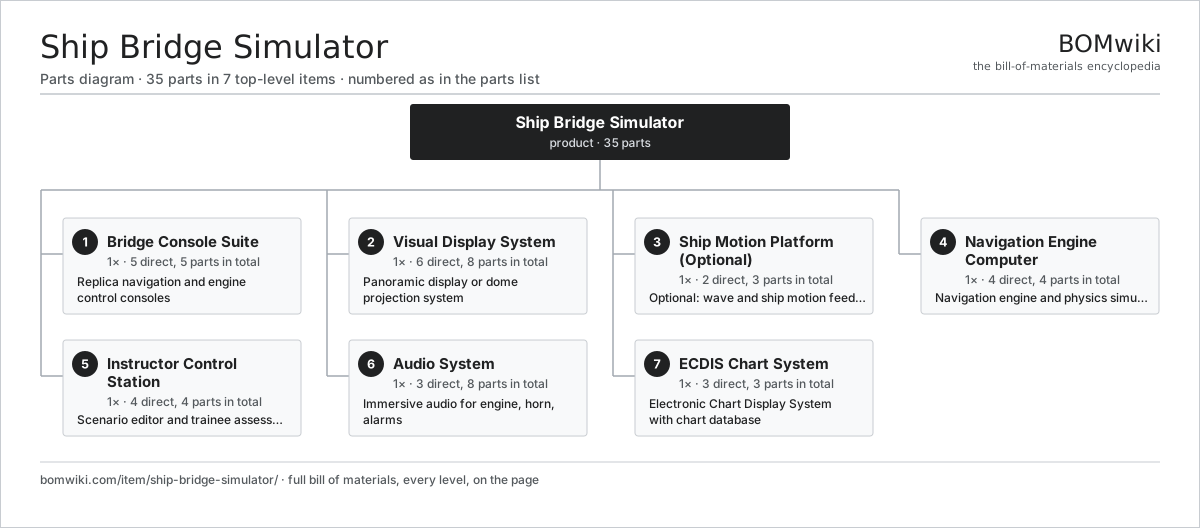
| # | Part | Qty | What it does |
|---|---|---|---|
| 1 | Bridge Console Suite 5 parts | 1× | Replica navigation and engine control consoles |
| 2 | Visual Display System 6 parts | 1× | Panoramic display or dome projection system |
| 3 | Ship Motion Platform (Optional) 2 parts | 1× | Optional: wave and ship motion feedback |
| 4 | Navigation Engine Computer 4 parts | 1× | Navigation engine and physics simulator |
| 5 | Instructor Control Station 4 parts | 1× | Scenario editor and trainee assessment station |
| 6 | Audio System 3 parts | 1× | Immersive audio for engine, horn, alarms |
| 7 | ECDIS Chart System 3 parts | 1× | Electronic Chart Display System with chart database |
3D model
No 3D model yet. Have a CAD file of this? Add a 3D model. STL renders right on this page; STEP, FreeCAD, and OpenSCAD sources are welcome too (openly licensed, like all 3D models on BOMwiki).
Build & assembly graph
expand / collapse · shared sub-assemblies converge · links to related products · est. labourTap an assembly to expand/collapse · tap a part to open it · use “Open page” for any node · drag to pan, scroll to zoom.
Bill of materials for Ship Bridge Simulator
7 top-level lines · 34 rows shown · 35 parts total · indented to 3 levels| # | Item / sub-assembly | Part no. | Qty/assy | Ext. qty | Parts | Type |
|---|---|---|---|---|---|---|
| 1 | Bridge Console Suite 5 parts | ship-bridge-simulator-console-array | 1× | 1 | 5 | assembly |
| 1.1 | Helm Wheel | ship-bridge-simulator-helm-wheel | 1× | 1 | · | part |
| 1.2 | Engine Order Telegraph | ship-bridge-simulator-engine-telegraph | 1× | 1 | · | part |
| 1.3 | Navigation Console Panel | ship-bridge-simulator-console-panel | 1× | 1 | · | part |
| 1.4 | Radar Console | ship-bridge-simulator-radar-console | 1× | 1 | · | part |
| 1.5 | VHF Radio Unit | ship-bridge-simulator-vhf-radio | 1× | 1 | · | part |
| 2 | Visual Display System 6 parts | ship-bridge-simulator-visual-system | 1× | 1 | 8 | assembly |
| 2.1 | Main Display Panels | ship-bridge-simulator-main-display | 3× | 3 | · | part |
| 2.2 | Port Display | ship-bridge-simulator-port-display | 1× | 1 | · | part |
| 2.3 | Starboard Display | ship-bridge-simulator-starboard-display | 1× | 1 | · | part |
| 2.4 | Overhead Display | ship-bridge-simulator-overhead-display | 1× | 1 | · | part |
| 2.5 | Dome Projection System | ship-bridge-simulator-projection-option | 1× | 1 | · | part |
| 2.6 | Multi-Display GPU | ship-bridge-simulator-display-controller | 1× | 1 | · | part |
| 3 | Ship Motion Platform (Optional) 2 parts | ship-bridge-simulator-motion-platform | 1× | 1 | 3 | assembly |
| 3.1 | Motion Actuator | ship-bridge-simulator-motion-actuator | 2× | 2 | · | part |
| 3.2 | Wave Motion Controller | ship-bridge-simulator-motion-controller | 1× | 1 | · | part |
| 4 | Navigation Engine Computer 4 parts | ship-bridge-simulator-control-computer | 1× | 1 | 4 | assembly |
| 4.1 | Simulation CPU/GPU | ship-bridge-simulator-cpu-gpu | 1× | 1 | · | part |
| 4.2 | Power Supply | power-supply | 1× | 1 | · | part |
| 4.3 | Memory and Chart Storage | ship-bridge-simulator-ram-storage | 1× | 1 | · | part |
| 4.4 | Console I/O Board | ship-bridge-simulator-console-interface | 1× | 1 | · | part |
| 5 | Instructor Control Station 4 parts | ship-bridge-simulator-instructor-console | 1× | 1 | 4 | assembly |
| 5.1 | Instructor Workstation | ship-bridge-simulator-instructor-pc | 1× | 1 | · | part |
| 5.2 | Scenario Control Monitor | ship-bridge-simulator-instructor-display-primary | 1× | 1 | · | part |
| 5.3 | Trainee View Monitor | ship-bridge-simulator-instructor-display-secondary | 1× | 1 | · | part |
| 5.4 | Input Peripherals | ship-bridge-simulator-keyboard-mouse | 1× | 1 | · | part |
| 6 | Audio System 3 parts | ship-bridge-simulator-sound-system | 1× | 1 | 8 | assembly |
| 6.1 | Audio Amplifier | ship-bridge-simulator-amplifier | 1× | 1 | · | part |
| 6.2 | Speaker Units | ship-bridge-simulator-speaker-array | 6× | 6 | · | part |
| 6.3 | Audio Interface | ship-bridge-simulator-audio-interface | 1× | 1 | · | part |
| 7 | ECDIS Chart System 3 parts | ship-bridge-simulator-ecdis-system | 1× | 1 | 3 | assembly |
| 7.1 | Vector Chart Database | ship-bridge-simulator-chart-database | 1× | 1 | · | part |
| 7.2 | ECDIS Software | ship-bridge-simulator-ecdis-software | 1× | 1 | · | part |
| 7.3 | ECDIS Touch Panel | ship-bridge-simulator-ecdis-touchpanel | 1× | 1 | · | part |
Something wrong in this list? Report a problem with this BOM.
Related products
same domain, ranked by shared parts Amateur Radio Transceiver
295 parts · shares 1 with this page
Amateur Radio Transceiver
295 parts · shares 1 with this page
 Bone Conduction Headphones
34 parts · shares 1 with this page
Bone Conduction Headphones
34 parts · shares 1 with this page
 Car FM Transmitter
240 parts · shares 1 with this page
Car FM Transmitter
240 parts · shares 1 with this page
 CB Radio
228 parts · shares 1 with this page
CB Radio
228 parts · shares 1 with this page
 Digital Audio Player
267 parts · shares 1 with this page
Digital Audio Player
267 parts · shares 1 with this page
Sourcing: possible vendors
Browse the supplier directory → Prices, MOQ, and lead times are algorithmic estimates, not quotes, and not claims about these companies. Company mappings are curated by keyword; est. price band $50–$2k. How estimates work| Vendor | HQ | Specialty | MOQ | Lead time |
|---|---|---|---|---|
|
🇨🇳Foxconn
foxconn.com ↗
|
Shenzhen, CN | Electronics contract mfg | 1,000 units | 8–14 wks |
|
🇺🇸Jabil
jabil.com ↗
|
St. Petersburg, US | Electronics manufacturing | 1,000 units | 8–14 wks |
|
🇺🇸Flex
flex.com ↗
|
Austin, US | Electronics manufacturing | 1,000 units | 8–14 wks |
| celestica.com ↗ | Toronto, CA | Electronics manufacturing | 1,000 units | 8–14 wks |
|
🇺🇸Sanmina
sanmina.com ↗
|
San Jose, US | Electronics manufacturing | 1,000 units | 8–14 wks |
1,213-word article