Digital Menu Board
ProductOverview
A digital menu board is a large networked display system used in restaurants, cafés, drive-throughs, and retail stores to show menu items, prices, photos, and availability. Unlike static printed menus, digital boards allow rapid updates, prices can be changed mid-shift, items can be marked out-of-stock in real time, and promotional images can be rotated during peak hours.
The system comprises multiple LCD panels (typically 4–9 panels in a grid), a media player running scheduling software, and integration with the restaurant's point-of-sale (POS) system. Changes made in the POS (e.g., a manager marking fried chicken "sold out") automatically propagate to the menu board within seconds.
How it works
The media player runs Linux with a CMS application. The CMS stores menu templates as HTML/CSS layouts, with placeholders for item name, price, image, and availability. When the POS system detects a change (e.g., item stock drops to zero), it sends a webhook to the media player's REST API.
The player updates its local database and re-renders the affected menu page, then transmits the video output via HDMI to all four LCD panels simultaneously (using a 1-to-4 splitter with buffering to maintain sync). The new menu is visible on-screen within 1 second.
Scheduling is handled by the CMS software. Menu rotations can be programmed:
- "Show Breakfast menu until 11 AM"
- "Show Happy Hour specials 4–6 PM weekdays"
- "Show promotional breakfast image every 3rd rotation"
These schedules are stored on the player's SSD and executed locally, so the display continues showing the correct menu even if network connectivity is lost.
POS integration
The integration module acts as a bridge between the POS system and the media player. It supports multiple protocols:
- REST API (JSON): Modern systems (Square, Toast, Lightspeed) send HTTP POST requests with menu updates.
- Serial (RS-232/RS-485): Legacy systems (NCR, Epson, Micros) use proprietary binary protocols over serial.
The integration module translates incoming commands into a canonical format (JSON) and queues them for the media player. Confirmation is sent back to the POS, so the operator knows the board has been updated.
Pricing is typically stored in the POS; the menu board caches it locally. If the POS is unavailable, the board shows the last-known prices. Once POS comes back online, prices re-sync automatically.
Display layout
A 2×2 grid of 55-inch displays (3840×2160 effective) is common in fast-casual restaurants. Fast-food drive-throughs often use a 1×3 portrait configuration (vertical stack) to fit above the ordering counter.
The thin-bezel frame kit reduces the black border between panels from 20 mm to 6 mm. This makes the grid appear nearly seamless from typical viewing distances (5+ meters).
Updating menus
Restaurant staff use a web dashboard (on laptop or tablet) to edit menus. They can:
- Change prices in bulk (e.g., "increase all proteins by 10%")
- Upload new item photos (PNG/JPEG)
- Add or remove items
- Reorder items
- Mark items "temporarily unavailable"
- Set time-based visibility (breakfast items disappear at 11 AM)
Changes are staged and previewed before publishing. Once published, they sync to all boards in the restaurant within 5 seconds.
Backup and resilience
The media player stores a complete menu database on its SSD, so it can continue displaying menus if the network goes down. A backup 4G LTE modem can sync with the cloud CMS every 10 minutes, capturing any changes that were made while offline.
The intelligent PDU (power strip) can be configured to reboot the player automatically if it stops responding. This ensures the board recovers from software hangs without human intervention.
Installation
Boards are wall-mounted above the counter or ordering line, at eye level for customers and staff. The rail system allows easy height adjustment and removal (no tools needed, brackets slide into T-slot channels).
Power cabling is routed through a conduit chase in the wall. Ethernet is run to the closest switch (usually in a back office or kitchen). HDMI from the player to the splitter, then to each display, can be run in a single conduit.
Installation takes 4–6 hours for a 2×2 grid: mounting the rail, installing panels, cabling, configuring the POS integration, and testing.
Long-term operation
LCD panels degrade at ~5% brightness per 20,000 hours. A board running 12 hours daily will see noticeable dimming after 5 years. Individual panels can be replaced without removing the entire array (brackets release with a lever).
Software updates are pushed automatically via Ethernet. The CMS receives new features, security patches, and font updates from the vendor's update server.
Digital Menu Board parts and their functions
5 top-level parts · 60 parts in total · full bill of materials below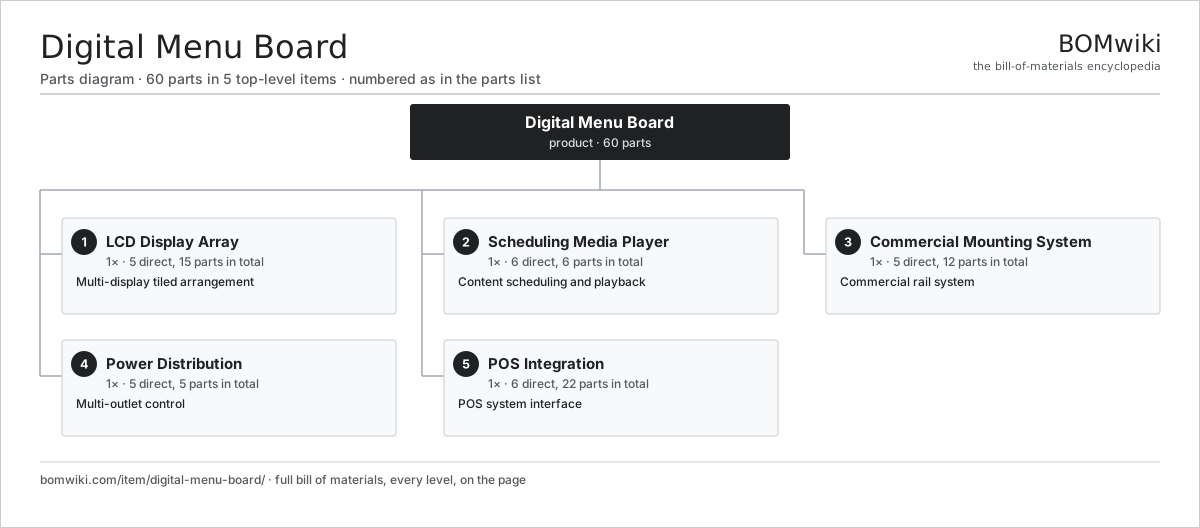
| # | Part | Qty | What it does |
|---|---|---|---|
| 1 | LCD Display Array 5 parts | 1× | Multi-display tiled arrangement |
| 2 | Scheduling Media Player 6 parts | 1× | Content scheduling and playback |
| 3 | Commercial Mounting System 5 parts | 1× | Commercial rail system |
| 4 | Power Distribution 5 parts | 1× | Multi-outlet control |
| 5 | POS Integration 6 parts | 1× | POS system interface |
3D model
No 3D model yet. Have a CAD file of this? Add a 3D model. STL renders right on this page; STEP, FreeCAD, and OpenSCAD sources are welcome too (openly licensed, like all 3D models on BOMwiki).
Build & assembly graph
expand / collapse · shared sub-assemblies converge · links to related products · est. labourTap an assembly to expand/collapse · tap a part to open it · use “Open page” for any node · drag to pan, scroll to zoom.
Bill of materials for Digital Menu Board
5 top-level lines · 32 rows shown · 60 parts total · indented to 3 levels| # | Item / sub-assembly | Part no. | Qty/assy | Ext. qty | Parts | Type |
|---|---|---|---|---|---|---|
| 1 | LCD Display Array 5 parts | digital-menu-board-lcd-array | 1× | 1 | 15 | assembly |
| 1.1 | Commercial LCD Panel | digital-menu-board-lcd-panel | 4× | 4 | · | part |
| 1.2 | Bezel Frame | digital-menu-board-bezel-frame | 1× | 1 | · | part |
| 1.3 | Video Splitter | digital-menu-board-video-splitter | 1× | 1 | · | part |
| 1.4 | Connector | connector | 8× | 8 | · | part |
| 1.5 | Fastener Set | fastener-set | 1× | 1 | · | part |
| 2 | Scheduling Media Player 6 parts | digital-menu-board-media-player | 1× | 1 | 6 | assembly |
| 2.1 | Compute SoC Module | soc-module | 1× | 1 | · | part |
| 2.2 | Media Storage SSD | digital-menu-board-cms-storage | 1× | 1 | · | part |
| 2.3 | Dual Ethernet | digital-menu-board-ethernet-dual | 1× | 1 | · | part |
| 2.4 | Power Supply | power-supply | 1× | 1 | · | part |
| 2.5 | Bare PCB | pcb-bare | 1× | 1 | · | part |
| 2.6 | Microcontroller | mcu | 1× | 1 | · | part |
| 3 | Commercial Mounting System 5 parts | digital-menu-board-mounting-rail | 1× | 1 | 12 | assembly |
| 3.1 | Rail Channel | digital-menu-board-rail-profile | 2× | 2 | · | part |
| 3.2 | Support Post | digital-menu-board-vertical-support | 2× | 2 | · | part |
| 3.3 | Display Bracket | digital-menu-board-display-bracket | 4× | 4 | · | part |
| 3.4 | Fastener Set | fastener-set | 3× | 3 | · | part |
| 3.5 | O-Ring Set | oring-set | 1× | 1 | · | part |
| 4 | Power Distribution 5 parts | digital-menu-board-power-distribution | 1× | 1 | 5 | assembly |
| 4.1 | Intelligent PDU | digital-menu-board-smart-pdu | 1× | 1 | · | part |
| 4.2 | Power Supply | power-supply | 1× | 1 | · | part |
| 4.3 | Connector | connector | 1× | 1 | · | part |
| 4.4 | Outlet Protection | digital-menu-board-circuit-protection | 1× | 1 | · | part |
| 4.5 | Fastener Set | fastener-set | 1× | 1 | · | part |
| 5 | POS Integration 6 parts | digital-menu-board-integration-module | 1× | 1 | 22 | assembly |
| 5.1 | Bare PCB | pcb-bare | 1× | 1 | · | part |
| 5.2 | Connector | connector | 2× | 2 | · | part |
| 5.3 | Integration Processor | digital-menu-board-api-processor | 1× | 1 | · | part |
| 5.4 | Integration Storage | digital-menu-board-integration-storage | 1× | 1 | · | part |
| 5.5 | Microcontroller | mcu | 1× | 1 | · | part |
| 5.6 | SMD Passive (R/C/L) | smd-passives | 16× | 16 | · | part |
Something wrong in this list? Report a problem with this BOM.
Related products
same domain, ranked by shared parts LED Curtain Display
356 parts · shares 3 with this page
LED Curtain Display
356 parts · shares 3 with this page
 Smart Speaker
379 parts · shares 3 with this page
Transit Passenger Display
46 parts · shares 3 with this page
Smart Speaker
379 parts · shares 3 with this page
Transit Passenger Display
46 parts · shares 3 with this page
 Digital Billboard
131 parts · shares 2 with this page
Digital Billboard
131 parts · shares 2 with this page
Sourcing: possible vendors
Browse the supplier directory → Prices, MOQ, and lead times are algorithmic estimates, not quotes, and not claims about these companies. Company mappings are curated by keyword; est. price band $50–$2k. How estimates work| Vendor | HQ | Specialty | MOQ | Lead time |
|---|---|---|---|---|
|
🇨🇳Foxconn
foxconn.com ↗
|
Shenzhen, CN | Electronics contract mfg | 1,000 units | 8–14 wks |
|
🇺🇸Jabil
jabil.com ↗
|
St. Petersburg, US | Electronics manufacturing | 1,000 units | 8–14 wks |
|
🇺🇸Flex
flex.com ↗
|
Austin, US | Electronics manufacturing | 1,000 units | 8–14 wks |
| celestica.com ↗ | Toronto, CA | Electronics manufacturing | 1,000 units | 8–14 wks |
|
🇺🇸Sanmina
sanmina.com ↗
|
San Jose, US | Electronics manufacturing | 1,000 units | 8–14 wks |
778-word article