Interactive Touch Table
ProductOverview
An interactive touch table is a large horizontal multi-touch display used in museums, educational institutions, corporate training facilities, and retail showrooms. Multiple users can simultaneously interact with the display, touching, swiping, and manipulating objects displayed on the screen. Some tables add object recognition, allowing physical tokens or cards placed on the surface to trigger digital content.
A 55-inch table seats 4–6 people around it comfortably, similar to a dining table. Users interact with maps, 3D models, educational simulations, and data visualizations.
Touch sensing
The display uses Projected Capacitance (PCAP) touch sensing, the same technology in smartphone and tablet screens. A grid of capacitive sensors beneath the glass detects finger position with <1 mm accuracy, even with multiple simultaneous touches.
The touch controller (a dedicated microcontroller) updates touch position data 120 times per second, sending X/Y coordinates and pressure information to the host PC via USB.
The system can distinguish between:
- Single touches: Traditional pointer interaction
- Multi-touch gestures: Two-finger pinch to zoom, three-finger rotate, etc.
- Long press: Holding a finger in place for >500 ms, typically triggering a context menu
Applications receive touch events through a standard Windows/Linux input API, so any application can be adapted for touch interaction.
Object recognition (optional)
Some tables add an infrared ring around the display: 120 IR LEDs and 60 photodiodes. When a reflective token or card is placed on the screen, the IR light bounces off it and is detected by the photodiodes. The touch controller triangulates the position (similar to the early "markers" in augmented reality systems).
A simple example: a game table uses physical chess pieces. When you place a physical piece on the display, the IR ring detects it and highlights legal moves. The game board updates in response to physical placement.
This combines the familiarity of physical objects with digital feedback, creating a hybrid interaction model.
Display characteristics
The 55-inch IPS LCD provides 400 nits brightness, suitable for indoor environments. The wide viewing angle (178°) ensures users sitting at different positions around the table see consistent colors and brightness.
The display is covered with a tempered glass sheet, scratch-resistant and providing a smooth feel for finger interaction (important for repeated swiping).
Embedded PC
A fanless Intel PC (Core i7, 32 GB RAM) is mounted beneath the display. The PC runs Windows 10/11 or Linux, with applications installed via standard packaging (MSI, snap, apt).
Fanless cooling is critical: fans would create airflow, potentially causing condensation inside the sealed display module. Instead, a large copper-aluminum heatsink is thermally coupled to the table's aluminum frame, which acts as a passive radiator. This limits the CPU to low-power operation, around 45–65W sustained, not suitable for 3D gaming, but adequate for interactive applications.
A discrete GPU (NVIDIA GTX 1660 Ti, optional) can be added for 3D graphics-heavy applications. The GPU is passively cooled as well.
Applications
Museums: Interactive maps, 3D artifact models, family trivia games. Touching a region on a map zooms in and displays historical photos.
Education: Collaborative problem-solving, math simulations (manipulating graphs, equations), science visualizations (molecular models, geological layers).
Retail: Product configurators ("build your own shoe" by choosing colors, materials, and size). Customers see their design rendered in 3D.
Corporate training: Collaborative exercises, decision trees, team challenges (who can arrange the supply chain most efficiently?).
Data analysis: Analysts touch data points to drill down, filter datasets, compare metrics. Multiple analysts can work simultaneously on the same dataset.
Customization and integration
The table runs standard Windows or Linux, so any C#, Python, or JavaScript application can be deployed. Custom applications are typically built using frameworks like:
- Chromium Embedded Framework (CEF): HTML5 applications
- Unity: 3D interactive experiences
- Qt: Custom C++ UI with multi-touch support
Integration with external systems:
- Database backends: Pull data from enterprise systems (SAP, Salesforce) and display on the table
- Wireless cameras: Overhead camera can stream live video to the table for collaborative analysis
- Network APIs: Applications can fetch real-time data (weather, traffic, stock prices)
Maintenance
The display is sealed, so no dust ingress. Annual cleaning of the glass surface with a soft cloth is sufficient.
The touch digitizer calibration can drift slightly over time. Recalibration is a 2-minute process (user touches known points on the grid; the system recomputes the mapping).
Individual components are field-replaceable:
- LCD panel: Swap entire display module (includes glass, touch sensor, backlight)
- Touch controller: Standalone board, USB-powered, can be replaced independently
- Embedded PC: Swappable compute module
- Power supply: Standard industrial unit
Thermal considerations
The sealed display creates a thermal cavity. In warm environments (above 40°C ambient), the internal temperature can exceed the safe operating range (0–40°C). Venues must provide air conditioning.
In cold environments (below 10°C), LCDS become sluggish. Heater elements in the backlight module can warm the display, but startup time increases.
Multi-user collaboration
A key advantage of touch tables is simultaneous multi-user interaction. Unlike a mouse (single cursor), four users can touch the table simultaneously and each control their own object.
This enables:
- Turn-based games (each player taps their hand)
- Collaborative drawing (multiple artists on a shared canvas)
- Group problem-solving (each member drags their proposed solution)
Applications must be designed with multi-touch in mind; sequential single-touch games don't leverage this capability.
Cost and ROI
A basic 55-inch touch table costs $20,000–30,000. A high-end table with GPU and object recognition can exceed $50,000.
Educational institutions recoup cost through increased attendance and engagement. Interactive tables increase student retention and learning outcomes (studies show 20–30% improvement in recall compared to static displays).
Retail showrooms use touch tables to drive impulse purchasing and increase dwell time. Customers spend 2–3x longer interacting with a product on a touch table versus looking at printed brochures.
Accessibility considerations
Touch interfaces are intuitive for many users but challenging for others:
- Elderly users may not be familiar with multi-touch gestures
- Users with mobility impairments may struggle to reach all parts of a large surface
- Visually impaired users cannot see the display (though audio feedback can help)
Inclusive design practices include:
- Onscreen help and tooltips
- Large touch targets (>2 cm buttons)
- Configurable gesture complexity
- Audio descriptions of content
- Adjustable tilt to accommodate standing or seated users
Interactive Touch Table parts and their functions
5 top-level parts · 130 parts in total · full bill of materials below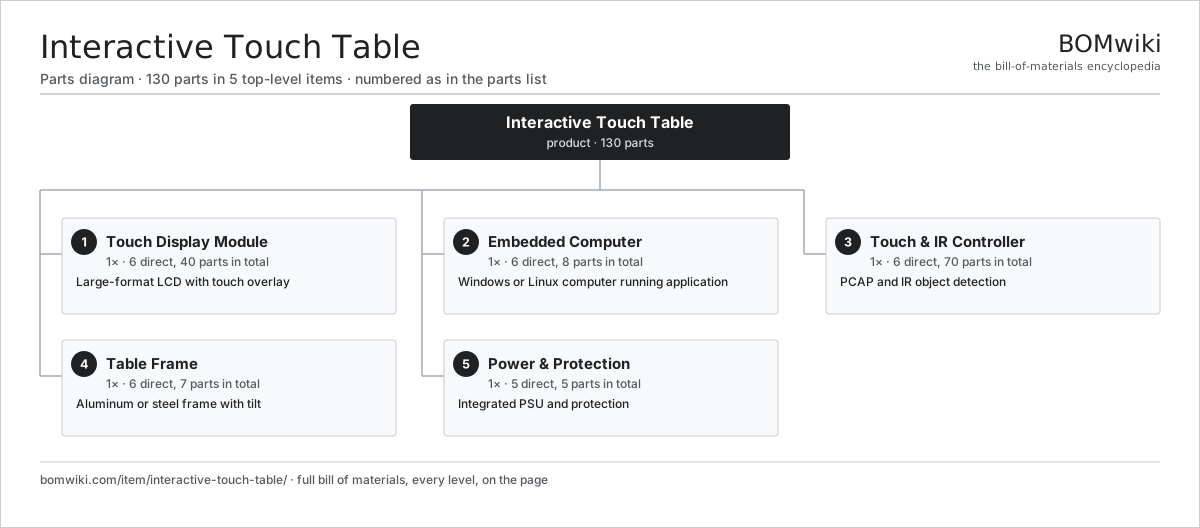
| # | Part | Qty | What it does |
|---|---|---|---|
| 1 | Touch Display Module 6 parts | 1× | Large-format LCD with touch overlay |
| 2 | Embedded Computer 6 parts | 1× | Windows or Linux computer running application |
| 3 | Touch & IR Controller 6 parts | 1× | PCAP and IR object detection |
| 4 | Table Frame 6 parts | 1× | Aluminum or steel frame with tilt |
| 5 | Power & Protection 5 parts | 1× | Integrated PSU and protection |
3D model
No 3D model yet. Have a CAD file of this? Add a 3D model. STL renders right on this page; STEP, FreeCAD, and OpenSCAD sources are welcome too (openly licensed, like all 3D models on BOMwiki).
Build & assembly graph
expand / collapse · shared sub-assemblies converge · links to related products · est. labourTap an assembly to expand/collapse · tap a part to open it · use “Open page” for any node · drag to pan, scroll to zoom.
Bill of materials for Interactive Touch Table
5 top-level lines · 34 rows shown · 130 parts total · indented to 3 levels| # | Item / sub-assembly | Part no. | Qty/assy | Ext. qty | Parts | Type |
|---|---|---|---|---|---|---|
| 1 | Touch Display Module 6 parts | interactive-touch-table-display | 1× | 1 | 40 | assembly |
| 1.1 | LCD Panel | lcd-panel | 1× | 1 | · | part |
| 1.2 | Touch Digitizer | touch-digitizer | 1× | 1 | · | part |
| 1.3 | IR Object Ring | interactive-touch-table-ir-frame | 1× | 1 | · | part |
| 1.4 | Display Power | interactive-touch-table-backlight-psu | 1× | 1 | · | part |
| 1.5 | Connector | connector | 4× | 4 | · | part |
| 1.6 | SMD Passive (R/C/L) | smd-passives | 32× | 32 | · | part |
| 2 | Embedded Computer 6 parts | interactive-touch-table-embedded-pc | 1× | 1 | 8 | assembly |
| 2.1 | Compute SoC Module | soc-module | 1× | 1 | · | part |
| 2.2 | System SSD | interactive-touch-table-ssd-storage | 1× | 1 | · | part |
| 2.3 | Graphics Card | interactive-touch-table-gpu-optional | 1× | 1 | · | part |
| 2.4 | Connector | connector | 3× | 3 | · | part |
| 2.5 | Power Supply | power-supply | 1× | 1 | · | part |
| 2.6 | Passive Heatsink | interactive-touch-table-heatsink | 1× | 1 | · | part |
| 3 | Touch & IR Controller 6 parts | interactive-touch-table-touch-controller | 1× | 1 | 70 | assembly |
| 3.1 | Microcontroller | mcu | 1× | 1 | · | part |
| 3.2 | PCAP Controller IC | interactive-touch-table-touch-ic | 1× | 1 | · | part |
| 3.3 | IR Signal ADC | interactive-touch-table-ir-adc | 1× | 1 | · | part |
| 3.4 | Bare PCB | pcb-bare | 1× | 1 | · | part |
| 3.5 | Connector | connector | 2× | 2 | · | part |
| 3.6 | SMD Passive (R/C/L) | smd-passives | 64× | 64 | · | part |
| 4 | Table Frame 6 parts | interactive-touch-table-table-chassis | 1× | 1 | 7 | assembly |
| 4.1 | Base Frame | interactive-touch-table-aluminum-base | 1× | 1 | · | part |
| 4.2 | Tilt Adjuster | interactive-touch-table-tilt-mechanism | 1× | 1 | · | part |
| 4.3 | Display Mount | interactive-touch-table-display-mount | 1× | 1 | · | part |
| 4.4 | Computer Mount | interactive-touch-table-pc-mount | 1× | 1 | · | part |
| 4.5 | Fastener Set | fastener-set | 2× | 2 | · | part |
| 4.6 | Sheet Metal Panel | sheet-panel | 1× | 1 | · | part |
| 5 | Power & Protection 5 parts | interactive-touch-table-power-distribution | 1× | 1 | 5 | assembly |
| 5.1 | Power Supply | power-supply | 1× | 1 | · | part |
| 5.2 | AC Power Inlet | interactive-touch-table-mains-inlet | 1× | 1 | · | part |
| 5.3 | USB Hub | interactive-touch-table-usb-hub | 1× | 1 | · | part |
| 5.4 | Network Interface | interactive-touch-table-network-interface | 1× | 1 | · | part |
| 5.5 | Fastener Set | fastener-set | 1× | 1 | · | part |
Something wrong in this list? Report a problem with this BOM.
Related products
same domain, ranked by shared parts LED Curtain Display
356 parts · shares 3 with this page
Stadium Ribbon Display
1,326 parts · shares 3 with this page
LED Curtain Display
356 parts · shares 3 with this page
Stadium Ribbon Display
1,326 parts · shares 3 with this page
 LED Television
737 parts · shares 3 with this page
LED Television
737 parts · shares 3 with this page
 Digital Billboard
131 parts · shares 2 with this page
Digital Billboard
131 parts · shares 2 with this page
 Highway Variable Message Sign
208 parts · shares 1 with this page
Highway Variable Message Sign
208 parts · shares 1 with this page
 Digital Photo Frame
31 parts · shares 4 with this page
Digital Photo Frame
31 parts · shares 4 with this page
Sourcing: possible vendors
Browse the supplier directory → Prices, MOQ, and lead times are algorithmic estimates, not quotes, and not claims about these companies. Company mappings are curated by keyword; est. price band $50–$2k. How estimates work| Vendor | HQ | Specialty | MOQ | Lead time |
|---|---|---|---|---|
|
🇨🇳Foxconn
foxconn.com ↗
|
Shenzhen, CN | Electronics contract mfg | 1,000 units | 8–14 wks |
|
🇺🇸Jabil
jabil.com ↗
|
St. Petersburg, US | Electronics manufacturing | 1,000 units | 8–14 wks |
|
🇺🇸Flex
flex.com ↗
|
Austin, US | Electronics manufacturing | 1,000 units | 8–14 wks |
| celestica.com ↗ | Toronto, CA | Electronics manufacturing | 1,000 units | 8–14 wks |
|
🇺🇸Sanmina
sanmina.com ↗
|
San Jose, US | Electronics manufacturing | 1,000 units | 8–14 wks |
1,053-word article