Waveform/Vector Monitor
ProductOverview
A waveform/vector monitor is the oscilloscope of video engineering. Instead of displaying pictures, it plots the numerical values of video signals, luminance on a vertical axis, time on the horizontal, allowing engineers to see exactly what the camera or transmission equipment is producing. The CRT or LCD display renders this data in real time, updating with every frame, so problems jump out instantly: a camera with an iris that drifts, an input with clipped blacks or blown highlights, or a chroma distortion that would ruin a green-screen composite.
Waveform display
The input stage accepts SDI, component, or composite video. The FPGA captures the active video region of every frame and converts each pixel's luminance (Y) value into a vertical dot. The dots are plotted at positions corresponding to their position in the video line. The result is a line-by-line graph of luminance across the frame.
Picture a well-exposed studio shot: the waveform should show a cluster of values bunched in the middle (60–80 IRE, or roughly 50–70% brightness). If a face falls into shadow and the waveform dips below 10 IRE (black level), the image is losing detail in the shadows. If any value exceeds 100 IRE (the legal white limit), the transmitter's clipper will crush the highlights. The video engineer watches the waveform during recording and adjusts the camera's iris, color correction, or input gain to keep the trace within safe bands.
Vectorscope
The FPGA also computes the chroma (Cb and Cr components, or saturation and hue in polar coordinates) and plots them on a polar graticule called the vectorscope. Each pixel's color is plotted as a dot at an angle (hue) and distance (saturation) from the center. A properly white-balanced camera shows a cluster of dots near the center (low saturation, neutral). A red object produces dots clustered 90° around the circle at high saturation. Vectorscope gives the engineer immediate feedback on color balance: if red is too hot, or if blue and red are offset from each other, the vectorscope reveals it before it reaches broadcast.
Display rendering
Modern waveform monitors use an LCD or CRT to render the analysis. CRT designs offer high persistence (traces remain visible for several frames), making it easy to spot intermittent glitches. LCD designs are more compact and cheaper but require careful refresh rates to avoid aliasing. The vertical amplifier scales the luminance values (0–255) to fill the screen height, and the horizontal timebase generates a ramp voltage to sweep the beam left-to-right at a rate matching the video sample clock.
Controls and modes
The operator selects display modes via buttons: waveform, vectorscope, histogram, or parade (individual R/G/B waveforms). A rotary dial adjusts the vertical scaling (gain) so fine adjustments become visible. The timebase selector switches between 1H (one horizontal line), 2H, 4H, or full-frame modes, allowing zoom on specific regions.
Some waveform monitors include a video multiplexer to monitor multiple inputs sequentially, or a digital audio interface to display audio levels or embedded audio metadata on the same display.
Integration
The waveform monitor typically sits in a broadcast station's master control rack, connected via BNC/SDI to the camera feed, vision mixer output, or transmission encoder. It runs continuously, providing real-time feedback to the vision engineer, video operator, or transmission technician. In live-to-air scenarios, the waveform is often recorded alongside the main transmission, allowing post-mortems if a picture quality issue occurred.
Engineering standards (ITU-R BT.601, SMPTE) define legal video ranges: luminance must stay 7.5 IRE (black) to 100 IRE (white), and chroma must plot within the SMPTE color box. A good waveform monitor enforces these ranges visually, making illegal signals obvious at a glance.
Waveform/Vector Monitor parts and their functions
11 top-level parts · 169 parts in total · full bill of materials below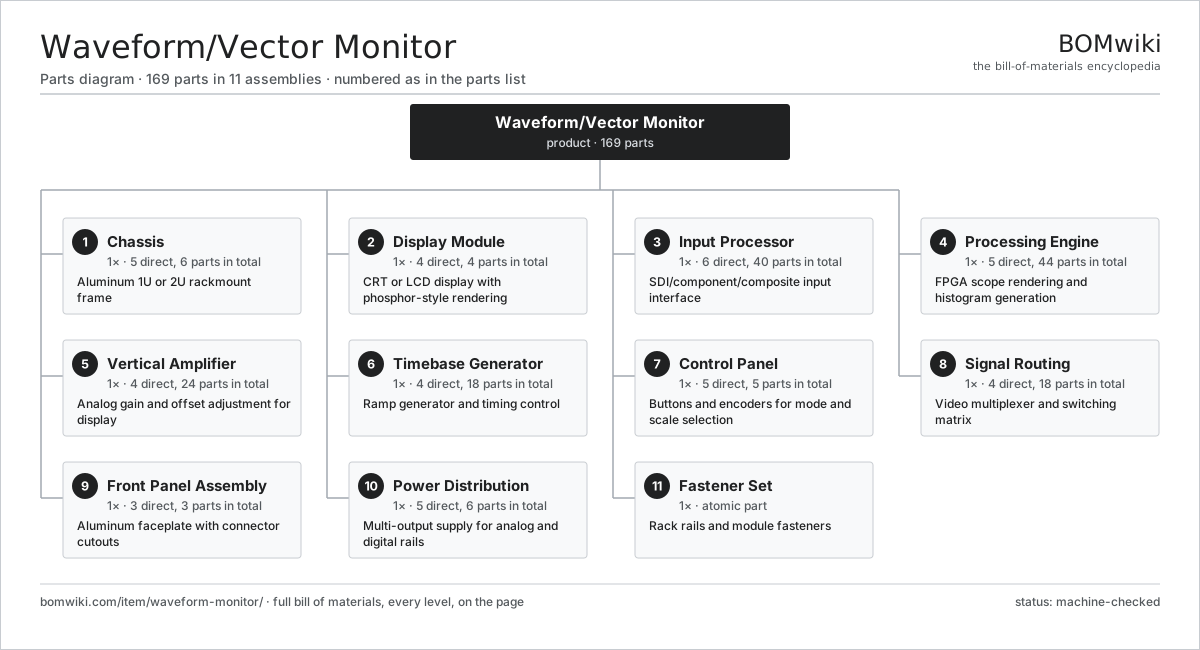
| # | Part | Qty | What it does |
|---|---|---|---|
| 1 | Chassis 5 parts | 1× | Aluminum 1U or 2U rackmount frame |
| 2 | Display Module 4 parts | 1× | CRT or LCD display with phosphor-style rendering |
| 3 | Input Processor 6 parts | 1× | SDI/component/composite input interface |
| 4 | Processing Engine 5 parts | 1× | FPGA scope rendering and histogram generation |
| 5 | Vertical Amplifier 4 parts | 1× | Analog gain and offset adjustment for display |
| 6 | Timebase Generator 4 parts | 1× | Ramp generator and timing control |
| 7 | Control Panel 5 parts | 1× | Buttons and encoders for mode and scale selection |
| 8 | Signal Routing 4 parts | 1× | Video multiplexer and switching matrix |
| 9 | Front Panel Assembly 3 parts | 1× | Aluminum faceplate with connector cutouts |
| 10 | Power Distribution 5 parts | 1× | Multi-output supply for analog and digital rails |
| 11 | Fastener Set | 1× | Rack rails and module fasteners |
3D model
No 3D model yet. Have a CAD file of this? Add a 3D model — STL renders right on this page; STEP, FreeCAD, and OpenSCAD sources are welcome too (openly licensed, like all 3D models on BOMwiki).
Build & assembly graph
expand / collapse · shared sub-assemblies converge · links to related products · est. labourTap an assembly to expand/collapse · tap a part to open it · use “Open page” for any node · drag to pan, scroll to zoom.
Bill of materials for Waveform/Vector Monitor
11 top-level lines · 56 rows shown · 169 parts total · indented to 3 levels| # | Item / sub-assembly | Part no. | Qty/assy | Ext. qty | Parts | Type |
|---|---|---|---|---|---|---|
| 1 | Chassis 5 parts | waveform-monitor-chassis | 1× | 1 | 6 | assembly |
| 1.1 | Frame Extrusion | waveform-monitor-frame-extrusion | 1× | 1 | · | part |
| 1.2 | Front Panel | waveform-monitor-chassis-front-panel | 1× | 1 | · | part |
| 1.3 | Rear Panel | waveform-monitor-chassis-rear-panel | 1× | 1 | · | part |
| 1.4 | Side Shield | waveform-monitor-side-shield | 2× | 2 | · | part |
| 1.5 | Fastener Set | fastener-set | 1× | 1 | · | part |
| 2 | Display Module 4 parts | waveform-monitor-display-module | 1× | 1 | 4 | assembly |
| 2.1 | Display Panel | waveform-monitor-display-panel | 1× | 1 | · | part |
| 2.2 | Display Driver | waveform-monitor-display-driver | 1× | 1 | · | part |
| 2.3 | Display Window | waveform-monitor-display-window | 1× | 1 | · | part |
| 2.4 | Connector | connector | 1× | 1 | · | part |
| 3 | Input Processor 6 parts | waveform-monitor-input-processor | 1× | 1 | 40 | assembly |
| 3.1 | SDI Receiver IC | waveform-monitor-sdi-receiver | 1× | 1 | · | part |
| 3.2 | Component Decoder | waveform-monitor-component-decoder | 1× | 1 | · | part |
| 3.3 | Composite Decoder | waveform-monitor-composite-decoder | 1× | 1 | · | part |
| 3.4 | Audio Receiver | waveform-monitor-audio-receiver | 1× | 1 | · | part |
| 3.5 | Bare PCB | pcb-bare | 1× | 1 | · | part |
| 3.6 | SMD Passive (R/C/L) | smd-passives | 35× | 35 | · | part |
| 4 | Processing Engine 5 parts | waveform-monitor-processing-engine | 1× | 1 | 44 | assembly |
| 4.1 | Waveform FPGA | waveform-monitor-fpga | 1× | 1 | · | part |
| 4.2 | Processing RAM | waveform-monitor-processing-ram | 1× | 1 | · | part |
| 4.3 | Clock Module | waveform-monitor-clocking-module | 1× | 1 | · | part |
| 4.4 | Bare PCB | pcb-bare | 1× | 1 | · | part |
| 4.5 | SMD Passive (R/C/L) | smd-passives | 40× | 40 | · | part |
| 5 | Vertical Amplifier 4 parts | waveform-monitor-vertical-amplifier | 1× | 1 | 24 | assembly |
| 5.1 | Operational Amplifier | waveform-monitor-op-amp | 2× | 2 | · | part |
| 5.2 | Offset DAC | waveform-monitor-dac-offset | 1× | 1 | · | part |
| 5.3 | Gain Control | waveform-monitor-gain-potentiometer | 1× | 1 | · | part |
| 5.4 | SMD Passive (R/C/L) | smd-passives | 20× | 20 | · | part |
| 6 | Timebase Generator 4 parts | waveform-monitor-timebase-generator | 1× | 1 | 18 | assembly |
| 6.1 | Ramp Generator IC | waveform-monitor-ramp-ic | 1× | 1 | · | part |
| 6.2 | Sync Separator | waveform-monitor-sync-separator | 1× | 1 | · | part |
| 6.3 | Timebase Adjustment | waveform-monitor-timebase-pot | 1× | 1 | · | part |
| 6.4 | SMD Passive (R/C/L) | smd-passives | 15× | 15 | · | part |
| 7 | Control Panel 5 parts | waveform-monitor-control-panel | 1× | 1 | 5 | assembly |
| 7.1 | Mode Buttons | waveform-monitor-mode-buttons | 1× | 1 | · | part |
| 7.2 | Select Encoder | waveform-monitor-select-encoder | 1× | 1 | · | part |
| 7.3 | Panel LCD | waveform-monitor-panel-lcd | 1× | 1 | · | part |
| 7.4 | Panel PCB | waveform-monitor-panel-pcb | 1× | 1 | · | part |
| 7.5 | Connector | connector | 1× | 1 | · | part |
| 8 | Signal Routing 4 parts | waveform-monitor-signal-routing | 1× | 1 | 18 | assembly |
| 8.1 | Video Multiplexer IC | waveform-monitor-mux-ic | 1× | 1 | · | part |
| 8.2 | Analog Switch | waveform-monitor-analog-switch | 1× | 1 | · | part |
| 8.3 | Routing PCB | waveform-monitor-routing-pcb | 1× | 1 | · | part |
| 8.4 | SMD Passive (R/C/L) | smd-passives | 15× | 15 | · | part |
| 9 | Front Panel Assembly 3 parts | waveform-monitor-front-panel | 1× | 1 | 3 | assembly |
| 9.1 | Panel Plate | waveform-monitor-panel-plate | 1× | 1 | · | part |
| 9.2 | Panel Frame | waveform-monitor-panel-frame | 1× | 1 | · | part |
| 9.3 | Fastener Set | fastener-set | 1× | 1 | · | part |
| 10 | Power Distribution 5 parts | waveform-monitor-power-distribution | 1× | 1 | 6 | assembly |
| 10.1 | Main Supply | waveform-monitor-main-supply | 1× | 1 | · | part |
| 10.2 | Isolated Supply | waveform-monitor-isolated-supply | 2× | 2 | · | part |
| 10.3 | Display Supply | waveform-monitor-display-supply | 1× | 1 | · | part |
| 10.4 | Power Distribution PCB | waveform-monitor-power-distribution-pcb | 1× | 1 | · | part |
| 10.5 | Connector | connector | 1× | 1 | · | part |
| 11 | Fastener Set | fastener-set | 1× | 1 | · | part |
Sourcing: possible vendors
Prices, MOQ, and lead times are algorithmic estimates, not quotes, and not claims about these companies. Company mappings are curated by keyword; est. price band $50–$3k. How estimates work| Vendor | HQ | Specialty | MOQ | Lead time |
|---|---|---|---|---|
|
🇯🇵Sony
sony.com ↗
|
Tokyo, JP | Consumer electronics | 1,000 units | 8–12 wks |
| samsung.com ↗ | Suwon, KR | Electronics & displays | 1,000 units | 8–12 wks |
|
🇺🇸Harman
harman.com ↗
|
Stamford, US | Audio (JBL, AKG) | 1,000 units | 8–12 wks |
|
🇺🇸Bose
bose.com ↗
|
Framingham, US | Audio | 1,000 units | 8–12 wks |
| yamaha.com ↗ | Hamamatsu, JP | Audio & instruments | 1,000 units | 8–12 wks |
707-word article