Smart Button
ProductOverview
A smart button is a wireless input device that performs application-defined actions when pressed. Unlike a traditional wired button, it communicates over Bluetooth, allowing placement anywhere within radio range. A homeowner might mount one on the wall to toggle lights; a retailer could place one at checkout to initiate a transaction. The device is self-contained: it has an internal battery, wireless radio, and firmware capable of detecting single taps, double taps, and long presses.
The button shell is molded plastic, featuring a large raised cap for easy pressing and a mechanical return spring that provides tactile feedback. Inside, a minimal circuit board houses the Bluetooth SoC, a CR2032 coin cell, and a debouncing switch circuit. The adhesive mount plate allows stick-anywhere deployment.
How it works
At power-on, the BLE SoC initializes its radio, loads saved pairing credentials from flash, and begins broadcasting advertisement packets every 1–2 seconds. Each packet includes the button's unique identifier and a payload indicating whether it is idle or recently pressed. A smartphone app or hub device continuously listens for these advertisements on the BLE channels (37, 38, 39 in the 2.4 GHz ISM band).
When the user presses the button cap, mechanical force depresses the dome switch, closing a contact to ground. The pull-up resistor normally holds the GPIO pin high; pressing the button drives it low. A debounce capacitor filters transient bounces (20–50 ms noise from the mechanical contact) to reliably detect the press.
The SoC firmware monitors this GPIO edge. When a falling edge is detected, it timestamps the event and checks whether the pin remains low. If the pin returns high within ~20 ms (debounce window), it's noise and ignored. If it stays low for >50 ms, it's a genuine press, and the MCU increments a press counter. If the pin returns high and no new press is detected for 500 ms, the MCU interprets the press pattern:
- Single tap: One press, released, no second press within 500 ms → Send single-tap action.
- Double tap: Two rapid presses (200–400 ms apart) → Send double-tap action.
- Long press: Pin held low for >1 second → Send long-press action.
After detecting a press pattern, the status LED briefly pulses to provide user feedback. The MCU then updates the advertisement payload with the detected action and increases the broadcast rate to 5–10 Hz for 2–5 seconds, ensuring that a nearby receiver device (phone/hub) sees the update promptly.
The receiver app or home automation hub processes the advertisement and triggers the mapped action: turning on a light, logging a database entry, sending a notification, etc. The communication is one-way (button → receiver); the button does not wait for a response, minimizing latency and power consumption.
The CR2032 coin cell is sized for 1–2 years of use at ~10 taps/day. This is possible because the SoC spends ~99% of its time in a low-power sleep mode, periodically waking to broadcast. The cell voltage is monitored by the MCU; when it drops below 2.5 V (indicating nearing end-of-life), the firmware sets a low-battery flag in the advertisement payload. The receiver app alerts the user to replace the battery.
The adhesive backing, typically 3M VHB tape, bonds the button to any clean, dry surface (walls, appliances, furniture). Once affixed, the button is secured and can withstand repeated presses over years without peeling.
The plastic shell provides IP54 rating, splash-resistant but not submersible. Rain or light spray will not damage it, but it is not suitable for shower or submerged use. The antenna is a planar inverted-F type (PIFA) or meander trace on the PCB, tuned to the 2.4 GHz band with a matching network of capacitors and resistors to ensure efficient radiation and reception.
Smart Button parts and their functions
8 top-level parts · 52 parts in total · full bill of materials below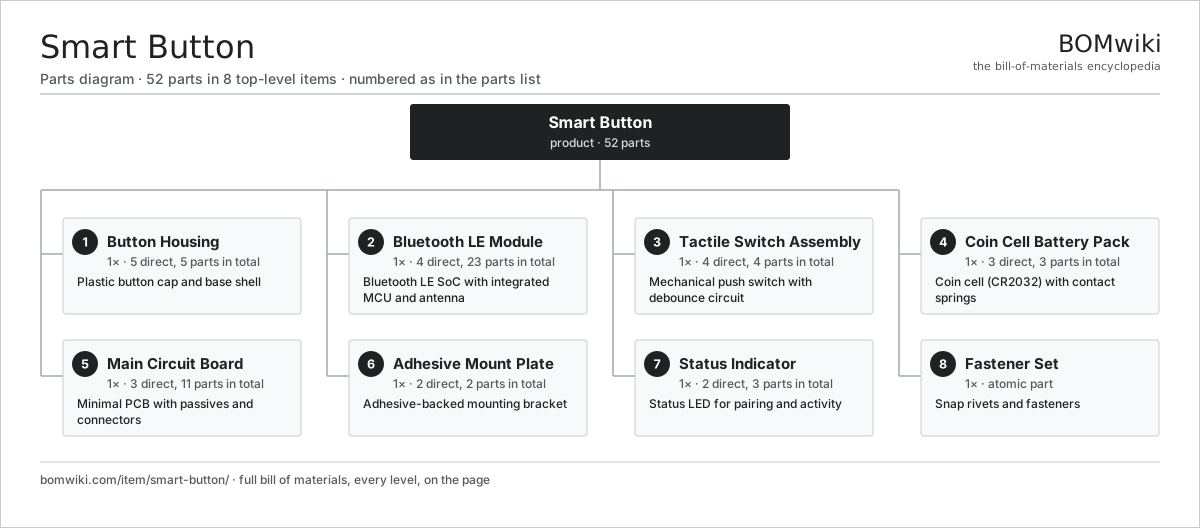
| # | Part | Qty | What it does |
|---|---|---|---|
| 1 | Button Housing 5 parts | 1× | Plastic button cap and base shell |
| 2 | Bluetooth LE Module 4 parts | 1× | Bluetooth LE SoC with integrated MCU and antenna |
| 3 | Tactile Switch Assembly 4 parts | 1× | Mechanical push switch with debounce circuit |
| 4 | Coin Cell Battery Pack 3 parts | 1× | Coin cell (CR2032) with contact springs |
| 5 | Main Circuit Board 3 parts | 1× | Minimal PCB with passives and connectors |
| 6 | Adhesive Mount Plate 2 parts | 1× | Adhesive-backed mounting bracket |
| 7 | Status Indicator 2 parts | 1× | Status LED for pairing and activity |
| 8 | Fastener Set | 1× | Snap rivets and fasteners |
3D model
No 3D model yet. Have a CAD file of this? Add a 3D model. STL renders right on this page; STEP, FreeCAD, and OpenSCAD sources are welcome too (openly licensed, like all 3D models on BOMwiki).
Build & assembly graph
expand / collapse · shared sub-assemblies converge · links to related products · est. labourTap an assembly to expand/collapse · tap a part to open it · use “Open page” for any node · drag to pan, scroll to zoom.
Bill of materials for Smart Button
8 top-level lines · 31 rows shown · 52 parts total · indented to 3 levels| # | Item / sub-assembly | Part no. | Qty/assy | Ext. qty | Parts | Type |
|---|---|---|---|---|---|---|
| 1 | Button Housing 5 parts | smart-button-housing | 1× | 1 | 5 | assembly |
| 1.1 | Button Cap | smart-button-cap | 1× | 1 | · | part |
| 1.2 | Base Shell | smart-button-base | 1× | 1 | · | part |
| 1.3 | Spring | smart-button-spring | 1× | 1 | · | part |
| 1.4 | Internal Shell Insert | smart-button-shell-insert | 1× | 1 | · | part |
| 1.5 | Fastener Set | fastener-set | 1× | 1 | · | part |
| 2 | Bluetooth LE Module 4 parts | smart-button-wireless-module | 1× | 1 | 23 | assembly |
| 2.1 | Compute SoC Module | soc-module | 1× | 1 | · | part |
| 2.2 | SoC Bypass Capacitors | smart-button-soc-caps | 1× | 1 | · | part |
| 2.3 | Antenna Matching Network | smart-button-antenna-match | 1× | 1 | · | part |
| 2.4 | SMD Passive (R/C/L) | smd-passives | 20× | 20 | · | part |
| 3 | Tactile Switch Assembly 4 parts | smart-button-tactile-switch | 1× | 1 | 4 | assembly |
| 3.1 | Dome Switch | smart-button-dome-switch | 1× | 1 | · | part |
| 3.2 | Debounce Capacitor | smart-button-debounce-cap | 1× | 1 | · | part |
| 3.3 | Pull-Up Resistor | smart-button-pull-up-resistor | 1× | 1 | · | part |
| 3.4 | Connector | connector | 1× | 1 | · | part |
| 4 | Coin Cell Battery Pack 3 parts | smart-button-battery | 1× | 1 | 3 | assembly |
| 4.1 | Coin Cell (CR2032) | smart-button-coin-cell | 1× | 1 | · | part |
| 4.2 | Positive Spring | smart-button-positive-spring | 1× | 1 | · | part |
| 4.3 | Negative Contact | smart-button-negative-contact | 1× | 1 | · | part |
| 5 | Main Circuit Board 3 parts | smart-button-circuit-board | 1× | 1 | 11 | assembly |
| 5.1 | Bare PCB | pcb-bare | 1× | 1 | · | part |
| 5.2 | SMD Passive (R/C/L) | smd-passives | 8× | 8 | · | part |
| 5.3 | Connector | connector | 2× | 2 | · | part |
| 6 | Adhesive Mount Plate 2 parts | smart-button-mount-plate | 1× | 1 | 2 | assembly |
| 6.1 | Mounting Bracket | smart-button-plastic-bracket | 1× | 1 | · | part |
| 6.2 | 3M VHB Adhesive Tape | smart-button-adhesive-tape | 1× | 1 | · | part |
| 7 | Status Indicator 2 parts | smart-button-led-indicator | 1× | 1 | 3 | assembly |
| 7.1 | LED Emitter | smart-button-led | 1× | 1 | · | part |
| 7.2 | SMD Passive (R/C/L) | smd-passives | 2× | 2 | · | part |
| 8 | Fastener Set | fastener-set | 1× | 1 | · | part |
Something wrong in this list? Report a problem with this BOM.
Related products
same domain, ranked by shared parts AR Glasses
242 parts · shares 1 with this page
AR Glasses
242 parts · shares 1 with this page
 Bluetooth Speaker
196 parts · shares 1 with this page
Bluetooth Speaker
196 parts · shares 1 with this page
 Bluetooth Tracker Tag
81 parts · shares 1 with this page
Bluetooth Tracker Tag
81 parts · shares 1 with this page
 Car FM Transmitter
240 parts · shares 1 with this page
Car FM Transmitter
240 parts · shares 1 with this page
 Digital Audio Player
267 parts · shares 1 with this page
Digital Audio Player
267 parts · shares 1 with this page
Sourcing: possible vendors
Browse the supplier directory → Prices, MOQ, and lead times are algorithmic estimates, not quotes, and not claims about these companies. Company mappings are curated by keyword; est. price band $50–$2k. How estimates work| Vendor | HQ | Specialty | MOQ | Lead time |
|---|---|---|---|---|
|
🇨🇳Foxconn
foxconn.com ↗
|
Shenzhen, CN | Electronics contract mfg | 1,000 units | 8–14 wks |
|
🇺🇸Jabil
jabil.com ↗
|
St. Petersburg, US | Electronics manufacturing | 1,000 units | 8–14 wks |
|
🇺🇸Flex
flex.com ↗
|
Austin, US | Electronics manufacturing | 1,000 units | 8–14 wks |
| celestica.com ↗ | Toronto, CA | Electronics manufacturing | 1,000 units | 8–14 wks |
|
🇺🇸Sanmina
sanmina.com ↗
|
San Jose, US | Electronics manufacturing | 1,000 units | 8–14 wks |
717-word article